
Microwaves have become essential in kitchens across the world. If you own a Samsung microwave, you might wonder how to set its power level for different foods. Using the right power setting can be the difference between a perfect meal and a disappointing one. Many beginners use the default settings, but that often leads to overcooked or undercooked dishes. This guide will show you, step by step, how to set power levels on Samsung microwaves, why it matters, and how to avoid common mistakes.
Understanding Microwave Power Levels
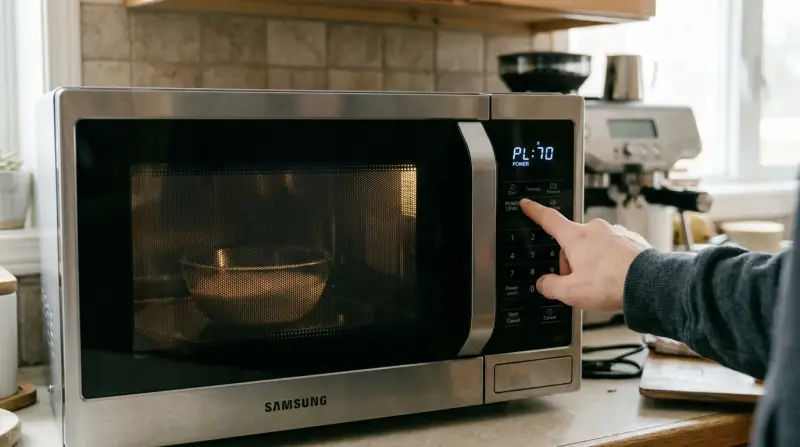
Every microwave, including Samsung models, uses power levels to control how much energy is sent to the food. The highest setting is usually 100% or “High.” Lower power levels, like 50% or 30%, pulse the microwave energy, allowing gentler cooking. This is especially important for defrosting, reheating, or cooking delicate foods.
Why Adjust Power Levels?
Many foods need different power levels. For example, soup might need high power, but chocolate melts best at low power. Adjusting power prevents burning, uneven heating, and keeps texture just right.
- Defrosting meat: Lower power avoids cooking the edges while the middle stays frozen.
- Softening butter: Medium power prevents splattering.
- Heating leftovers: Lower power keeps food from drying out.
Non-obvious insight: Most microwaves default to high power. If you always use the default, you risk ruining certain foods. Learning to change the power level is key for better results.
Types Of Samsung Microwaves
Samsung offers several microwave types. Knowing your model makes it easier to follow instructions.
Solo Microwaves
These are the basic models, meant for reheating, cooking, and defrosting. They usually have simple controls.
Grill Microwaves
These have extra features for grilling food. Power level setting for microwave mode works the same.
Convection Microwaves
These combine microwave and oven features. Power levels only apply to microwave mode, not convection.
Here’s a quick comparison of features among Samsung microwave types:
| Type | Key Features | Power Level Settings |
|---|---|---|
| Solo | Simple heating, basic functions | Yes |
| Grill | Microwave + Grill, more options | Yes (microwave mode) |
| Convection | Microwave + Oven + Grill | Yes (microwave mode only) |
How To Set Power Level On Samsung Microwave
Samsung microwaves are designed with user-friendly controls, but the process varies slightly by model. Let’s break it down step by step.
Step-by-step Instructions
- Place Food Inside
- Open the door.
- Put the food on the turntable.
- Close the Door
- Make sure it’s shut fully. Microwaves will not start if the door is open.
- Select Cooking Time
- Use the number pad or dial to set the desired time.
- Press Power Level Button
- Look for a button labeled Power Level, Microwave, or Cook Power.
- On touch models, it may be an icon or part of a menu.
- Choose Power Level
- Enter a number from 1 to 10 (or 1 to 100, depending on model).
- Example: Press 7 for 70% power.
- For models with percentage, press the appropriate number (e.g., 5 for 50%).
- Start Cooking
- Press Start to begin.
- The microwave will cook at the chosen power level.
Example: Setting 50% Power For Defrosting
Suppose you want to defrost chicken.
- Place chicken inside.
- Set time: 5 minutes.
- Press Power Level.
- Enter 5 (for 50%).
- Press Start.
The microwave will use 50% power, pulsing energy on and off to avoid cooking the edges.
Using The Dial
Some Samsung models have a rotary dial instead of buttons.
- Turn dial to set time.
- Press Power Level.
- Turn dial to adjust power (watch the display for percentage).
- Press Start.
Common Display Labels
Samsung microwaves use different display labels for power levels. Here’s what they usually mean:
| Display Label | Meaning | Typical Use |
|---|---|---|
| PL10 | 100% (High) | Cooking soup, heating water |
| PL5 | 50% (Medium) | Defrosting, reheating |
| PL3 | 30% (Low) | Melting chocolate, softening butter |
Recommended Power Levels For Common Foods
Choosing the right power level is important. Here’s a practical guide for different foods.
- Reheating Pizza: 70% power, 1-2 minutes (prevents sogginess)
- Defrosting Meat: 30-50% power, time depends on weight
- Softening Butter: 30% power, 10-20 seconds
- Cooking Vegetables: 100% power, 2-3 minutes
- Melting Chocolate: 30% power, 1-2 minutes, stir every 30 seconds
- Heating Soup: 100% power, 2-3 minutes
- Warming Milk: 50% power, 1-2 minutes
- Baking Potatoes: 100% power, 5-8 minutes
- Steaming Fish: 70% power, 4-6 minutes
Non-obvious insight: For foods like chocolate or cheese, microwave power pulses at low settings. This prevents burning and keeps texture smooth.

Credit: www.wikihow.com
Tips For Perfect Results
Microwave cooking is fast but needs care. Here are some tips to get the best from your Samsung microwave:
- Cover food: Use a microwave-safe lid or wrap to hold moisture.
- Stir or rotate: Pause halfway to stir or turn food for even heating.
- Let food rest: After cooking, let it sit for 1-2 minutes. Heat spreads, making food hotter and more even.
- Use microwave-safe containers: Avoid metal and some plastics. Look for the microwave symbol.
- Clean regularly: Food splatter can affect cooking and leave odors.
Power Levels Vs. Cooking Modes
Samsung microwaves often have different cooking modes. Power levels only affect microwave mode. Grill and convection modes use different settings.
When To Use Power Level Setting
- Microwave mode: Always set power for reheating, cooking, defrosting.
- Grill mode: Power level setting is not used.
- Convection mode: Power level doesn’t apply; set oven temperature instead.
If you switch modes, check the display. It will show either power percentage (microwave) or temperature (convection).

Credit: www.youtube.com
Troubleshooting Power Level Issues
Sometimes, microwaves don’t respond as expected. Here’s how to solve common problems.
Microwave Won’t Change Power Level
- Check if you’re in the right mode. Power level only changes in microwave mode.
- Some models require you to set time first, then power level.
Power Level Button Not Working
- Make sure the door is closed.
- Try resetting the microwave by unplugging for 1 minute.
Uneven Heating
- Stir food halfway.
- Use lower power for thick foods.
Using Sensor Cooking Features
Many Samsung microwaves have sensor cooking. This feature detects moisture and adjusts power automatically. You can still set power levels, but sensor mode often chooses the best setting.
- If using sensor mode, let the microwave work automatically.
- For manual control, set power level yourself.
Saving Power Level Settings For Favorites
Some advanced models let you save favorite settings.
- After setting power and time, press Save or Favorite (check your model).
- Next time, press that button and it will recall your settings.
This is useful for foods you cook often, like popcorn or oatmeal.
Safety Reminders
Microwaves are safe when used correctly. Here are important safety points:
- Never use metal or aluminum foil inside.
- Always use microwave-safe dishes.
- Don’t operate with an empty cavity (can damage the microwave).
- If you see sparks or hear popping, stop and check the food and container.

Credit: www.wikihow.com
Comparing Samsung Power Levels With Other Brands
Samsung microwaves are similar to other brands, but their controls are often clearer and displays more helpful. Here’s a quick comparison:
| Brand | Power Level Range | Setting Method |
|---|---|---|
| Samsung | 10–100% | Button or dial, display shows percentage |
| LG | 10–100% | Button, sometimes menu-based |
| Panasonic | 10–100% | Button, dial for advanced models |
Samsung’s display is often clearer for beginners. Some brands use odd labels like “Level 7” instead of “70%. ”
Common Mistakes Beginners Make
Many users don’t realize the importance of power levels. Here are mistakes to avoid:
- Always using 100% power: Leads to dry, uneven food.
- Not covering food: Causes splatter, uneven heating.
- Ignoring defrost setting: Using high power to defrost cooks the outside, leaves the inside frozen.
- Using wrong container: Non-microwave-safe dishes can crack or melt.
Non-obvious insight: If your microwave has no Power Level button, check for a menu or settings option. Some touch-screen models hide this feature under “More Options.”
Real-world Example: Cooking Frozen Lasagna
Let’s say you want to cook frozen lasagna.
- Place lasagna in microwave-safe dish.
- Set time: 6 minutes.
- Press Power Level, enter 7 (70%).
- Press Start.
- Pause halfway, stir or rotate.
- Let rest for 2 minutes after cooking.
The lower power prevents the edges from burning while the middle heats evenly.
Where To Find More Information
Samsung’s official website has user manuals and guides for specific models. These manuals show button locations and display meanings. For more details, visit Samsung Support.
Frequently Asked Questions
How Do I Reset Power Level On My Samsung Microwave?
To reset, open the door, clear any current settings, and start over. Set the time, then choose the desired power level. If the microwave is unresponsive, unplug for one minute and try again.
Can I Set Power Level During Cooking?
Most Samsung models require you to set power before starting. If you need to change power level mid-cooking, stop the microwave, reset time and power, then start again.
What Does “pl” Mean On My Microwave Display?
“PL” stands for Power Level. For example, “PL7” is 70% power. The higher the number, the more energy is used. Use lower PL numbers for gentle cooking.
Why Is My Food Still Cold After Microwaving?
This happens if the power level is too low, or cooking time is too short. Stir food halfway, and check container placement. For thick foods, use a higher power or longer time.
Are Samsung Power Levels The Same As Wattage?
No, power levels are percentages of maximum microwave output. If your microwave is 1000 watts, 50% power means it pulses at 500 watts. Wattage stays the same, but power level controls how often energy is sent.
Setting power levels on your Samsung microwave is simple once you know how. With the right knowledge, you can cook, defrost, and reheat food perfectly every time. Take a few minutes to try different settings, and you’ll notice the difference immediately.
Whether you’re warming soup or melting chocolate, mastering power levels gives you total control in the kitchen.