
Many Lexus RX 350 owners love their car’s comfort, performance, and technology. But Bluetooth pairing problems can frustrate even the most patient driver. If your phone won’t connect, music won’t play, or calls drop suddenly, you’re not alone. These issues are common across several RX 350 model years, and they can affect your daily routine or even your safety.
Understanding what causes Bluetooth pairing problems—and how to fix them—can make your Lexus experience smoother and more enjoyable.
Why Bluetooth Matters In The Lexus Rx 350
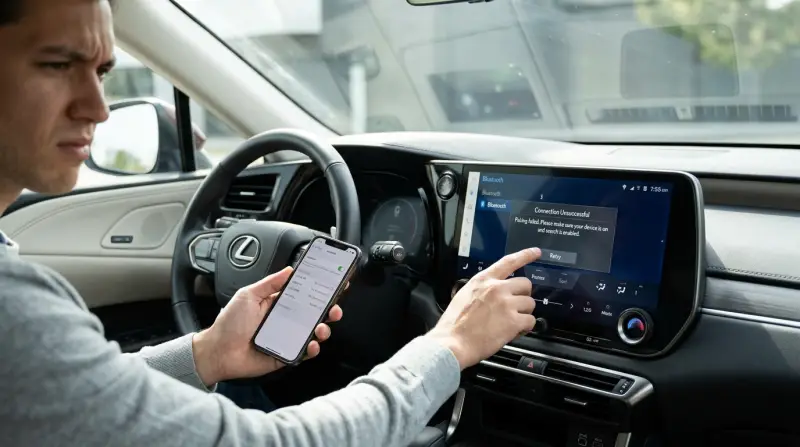
The Bluetooth feature in the RX 350 helps drivers and passengers connect smartphones for hands-free calling, streaming music, and accessing navigation. It’s a key part of modern car convenience. But when Bluetooth doesn’t work, you lose these features, and it can even distract you while driving.
Bluetooth also plays a bigger role than many people realize. For example, new RX 350 models allow you to use voice assistants like Siri or Google Assistant, send text messages, or access contact lists directly from the car’s screen. This keeps your eyes on the road and hands on the wheel.
Families also rely on Bluetooth for streaming kids’ playlists or audiobooks during long trips. Losing these options can make driving less enjoyable and more stressful, especially if you need to stay connected for work or emergencies.
In some countries, using a phone while driving is illegal unless you use a hands-free system. Reliable Bluetooth helps you follow these rules without losing touch. It’s not just about convenience—it’s part of safe and legal driving today.
Common Bluetooth Pairing Problems
Owners report many types of Bluetooth issues in the RX 350. The most frequent problems include:
- Connection failure: The car doesn’t recognize the phone or won’t pair at all.
- Audio lag or dropouts: Music skips or cuts out unexpectedly.
- Call problems: Calls don’t connect, or the other person can’t hear you.
- Device not found: Your phone doesn’t show up in the car’s Bluetooth menu.
- Pairing resets: The connection drops and needs to be re-paired often.
These issues can happen with both Android and iOS devices. Sometimes, the problems start after a software update to the car or phone.
Some users also notice that after a successful pairing, their contact lists or recent calls do not sync properly. This can make it hard to use the hands-free calling feature. Another frequent complaint is that text message notifications do not show up on the car’s display, even when pairing seems successful.
Advanced users sometimes connect more than one phone. For example, a driver and passenger may both want to pair their devices. This can confuse the car’s system and cause random disconnections or difficulty switching between devices.
Main Causes Of Bluetooth Problems
Understanding why Bluetooth problems happen helps you fix them. Here are the top causes in the RX 350:
- Outdated firmware: The car’s software may not match your phone’s Bluetooth version.
- Interference: Other devices or wireless signals can confuse the pairing process.
- Phone compatibility: Not all phones work perfectly with Lexus systems.
- Corrupted pairing data: Saved Bluetooth profiles may be damaged, needing a reset.
- Multiple paired devices: Too many devices paired can overload the system.
Sometimes, Bluetooth problems appear after a major phone update, like moving from Android 12 to Android 13 or updating to a new iOS version. The phone might use new Bluetooth protocols that the car’s system does not support yet. In other cases, environmental interference—like heavy Wi-Fi signals in parking garages or near airports—can make pairing unstable.
A less obvious cause can be a weak car battery or electrical problems. If your RX 350’s battery is old or not charging well, electronic systems like Bluetooth may behave unpredictably. Owners in cold climates sometimes report more problems in winter, when batteries work less efficiently.
How To Fix Bluetooth Pairing Issues
Most Bluetooth problems can be solved with simple steps. Here’s what works for many RX 350 owners:
- Restart both devices: Turn off your phone and the car’s infotainment system, then turn them back on.
- Remove old pairings: Delete all paired devices from the car and phone, then try pairing again.
- Update software: Check for updates for your phone and car. Visit your Lexus dealer if needed.
- Reset Bluetooth settings: On your phone, go to Bluetooth settings and reset. In the car, clear Bluetooth memory.
- Check compatibility: Visit the Lexus website for a list of compatible phones.
- Pair in the correct sequence: Sometimes pairing from the car’s system, not the phone, works better.
- Keep devices close: Make sure the phone is near the car’s console when pairing.
It helps to turn off Wi-Fi on your phone during pairing. Wi-Fi and Bluetooth use similar radio frequencies, and turning off Wi-Fi can reduce interference. Also, make sure your phone has enough battery, as some power-saving modes disable Bluetooth connections.
If you have paired your phone with other cars or many Bluetooth speakers, clear those connections too. Too many saved pairings can cause confusion, especially in older phones.
When updating software, don’t forget the navigation and infotainment system. Lexus sometimes releases updates specifically to address Bluetooth bugs, but these are not always automatic. Ask your dealer if any updates are available for your exact model and region.
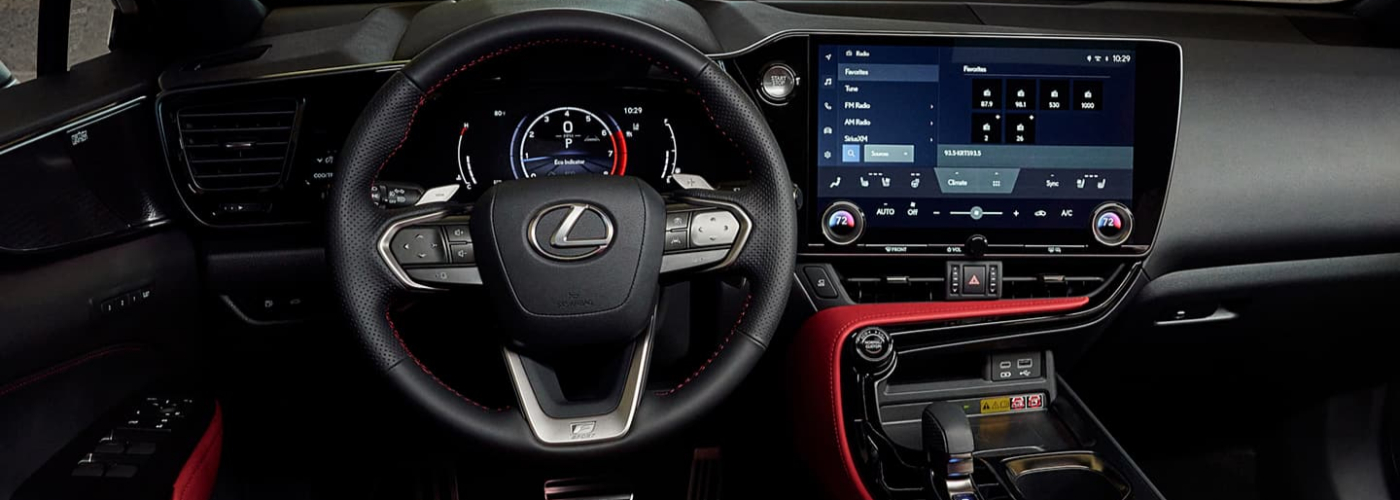
Credit: nplexusrgv.com
Rx 350 Model Years And Bluetooth Performance
Bluetooth issues can vary by model year. For example, 2013–2015 models often have more pairing problems, while newer models (2018+) include improved software. Here’s a quick comparison:
| Model Year | Bluetooth Stability | Common Problems |
|---|---|---|
| 2013-2015 | Low | Connection drops, device not found |
| 2016-2017 | Medium | Audio lag, call issues |
| 2018-2022 | High | Occasional pairing resets |
Owners of 2013–2015 RX 350s sometimes need to visit the dealer for a software update that isn’t available online. After 2018, Lexus added support for newer Bluetooth versions and improved phonebook syncing. Still, even the latest models can have minor problems after major phone updates.
If you’re buying a used RX 350, check the infotainment version and ask about recent updates. Some sellers forget to mention Bluetooth problems, but test-driving with your phone can reveal issues before you buy.
Real Owner Experiences
Many RX 350 owners share similar frustrations. For example, some report that after pairing their phone, the connection drops whenever they restart the car. Others notice music skipping, especially when using streaming apps. Drivers with iPhones often experience call problems, while Android users complain about the car not recognizing their device at all.
One owner found that removing all paired devices from the car and phone, then pairing fresh, solved the issue. Another discovered that updating the car’s firmware at a Lexus dealership made Bluetooth much more reliable.
Some owners found temporary fixes, like disabling contact sharing or message access on their phone, which sometimes stabilizes the connection. Others noticed that Bluetooth worked better with certain music apps (like Spotify) compared to built-in music players. Also, pairing problems are more common during cold starts, suggesting that waiting a minute after starting the car before pairing may help.
A few creative owners use a dedicated “car phone” just for Bluetooth, keeping their main phone free for personal use. This avoids compatibility issues when switching between multiple users.
Bluetooth Troubleshooting Tips
Here are practical tips that go beyond basic fixes:
- Try another phone: If your phone won’t pair, test with a friend’s device to see if the problem is with your phone or the car.
- Check for interference: Turn off other Bluetooth devices nearby, like smartwatches or tablets.
- Use airplane mode: Switch your phone to airplane mode, then back to normal before pairing. This resets wireless signals.
- Avoid pairing during engine start: Wait until the car is fully started before connecting Bluetooth.
- Contact Lexus support: Persistent problems may need professional help. Lexus dealers can update software or check hardware.
Some users also recommend deleting your phone’s Bluetooth cache (especially on Android) for a cleaner reset. If you use an iPhone, go to Settings > General > Reset > Reset Network Settings, but remember this will erase Wi-Fi passwords too.
Check your car’s manual for Bluetooth troubleshooting steps. Sometimes, a hidden menu or “factory reset” option in the infotainment system can clear deep software bugs that standard resets do not fix.
If you have aftermarket accessories (like dash cams or OBD readers), unplug them during Bluetooth testing. These devices sometimes interfere with wireless signals.
Bluetooth Vs. Wired Connections
Some owners switch to wired connections (USB or AUX) to avoid Bluetooth problems. Here’s a comparison:
| Connection Type | Reliability | Features Supported |
|---|---|---|
| Bluetooth | Medium | Hands-free calls, music streaming |
| USB | High | Music, charging, some apps |
| AUX | High | Music only |
USB connections often provide better sound quality and never drop, but they may not support hands-free calls. AUX is the most reliable for music but offers no phone or app integration. If you mainly listen to music, wired options can save time and reduce frustration.
Some RX 350 models support Apple CarPlay and Android Auto (via USB), offering even more features than Bluetooth. If your model supports these, using them instead of Bluetooth can improve stability and add navigation or messaging functions.

Credit: www.youtube.com
Non-obvious Insights For Rx 350 Bluetooth Users
- Firmware matters more than you think: Many owners skip software updates, but these often fix Bluetooth bugs. Even if your car seems up-to-date, ask your dealer to check for hidden updates.
- Phone settings can block pairing: Some phones have privacy or permission settings that block car connections. Check your phone’s Bluetooth permissions and allow connections for your car’s system.
Another detail: Some phones limit the number of Bluetooth connections or have “Do Not Disturb While Driving” modes that can block new pairings. Disabling these features during pairing can help.
Also, avoid connecting your phone to public or rental car Bluetooth systems, as these can sometimes carry over settings that confuse your RX 350’s system later.
Preventing Bluetooth Problems
To avoid pairing issues in the future:
- Update your car and phone software regularly.
- Pair devices one at a time, not while driving.
- Keep your phone’s Bluetooth visible when pairing.
- Limit paired devices in the car to 3–4.
Consider naming your phone something simple, like “John’s iPhone. ” Long or unusual device names can sometimes cause errors in the car’s system.
Backing up your contacts and music before pairing can also help if you ever need to reset your phone or infotainment system.
Data: How Common Are Bluetooth Issues?
A recent survey found that 1 in 4 Lexus RX 350 owners had Bluetooth pairing problems in the last year. Most were solved with software updates or resetting Bluetooth settings. However, about 10% needed dealer support.
Some regions report higher problem rates, possibly due to differences in local phone models or wireless rules. Also, drivers who switch phones often—such as business users—report more issues than those who keep one phone for years.
Regularly reading owner forums can help you spot if a new phone update is causing problems for others before you install it yourself.
When To Seek Professional Help
If you’ve tried all the steps above and Bluetooth still doesn’t work, it’s time to see a Lexus technician. Hardware faults, like a broken Bluetooth antenna, can’t be fixed at home. Dealers can diagnose these issues and replace parts if needed.
If your RX 350 is still under warranty, most Bluetooth-related repairs or software updates are covered. Even out of warranty, a quick diagnostic at the dealer can save hours of frustration.
Some owners found success by asking for a “full reset” of the infotainment system, which is different from the standard factory reset. Dealers have special tools for this deeper reset.

Bluetooth And Safety
Broken Bluetooth doesn’t just affect convenience—it can impact safety. Without hands-free calling, drivers may be tempted to use their phones directly, risking distraction. Reliable Bluetooth is important for safe driving.
Studies show that hands-free systems reduce accident risk compared to holding a phone. If your Bluetooth isn’t working, consider using a wired headset or pulling over to make calls instead of taking risks.
Frequently Asked Questions
How Do I Pair My Phone With The Lexus Rx 350?
Turn on the car’s infotainment system and your phone’s Bluetooth. Find the car’s Bluetooth name on your phone, select it, and enter the pairing code shown on the screen. Make sure your phone is visible and close to the console.
If you get stuck, restart both devices and try again. Remove any old pairings for the RX 350 on your phone first.
Why Does My Rx 350 Bluetooth Keep Disconnecting?
This can happen due to outdated firmware, interference from other devices, or too many paired phones. Try updating software, removing unused pairings, and keeping your phone near the car’s console.
Also, check your phone’s power-saving settings, as they can turn off Bluetooth to save battery.
Are All Phones Compatible With The Lexus Rx 350 Bluetooth?
No. Some older or very new phones may not pair perfectly. Check Lexus’s official compatibility list, or ask your dealer for advice.
Phones with custom Android versions or older iOS models may have more issues.
Can I Use Bluetooth For Music And Calls At The Same Time?
Yes, but some users report problems when switching between music and calls. If issues happen, try repairing your phone or updating the car’s software.
If you’re on a call, some apps may pause automatically, so check your app settings as well.
Where Can I Find More Information About Lexus Rx 350 Bluetooth Problems?
For detailed guides and compatibility lists, visit the official Lexus website or see this helpful resource: Lexus Bluetooth Support.
You can also visit owner forums for advice from other RX 350 drivers.
Final Thoughts
Bluetooth pairing problems in the Lexus RX 350 are common, but most can be fixed easily. Keeping your car and phone updated, removing old pairings, and following careful steps can solve most issues. If problems remain, don’t hesitate to seek help from a Lexus dealer.
With reliable Bluetooth, you’ll enjoy safer, more convenient driving every day. And by staying proactive with updates and good pairing habits, you can prevent many common issues before they start.
1 thought on “Lexus Rx 350 Bluetooth Pairing Problems: Quick Fixes and Tips”