
A Whirlpool stove can make cooking easier—until you see the F9 code flashing on the display. This error can stop your oven from working and leave you wondering what went wrong. If you see F9, don’t panic. This article explains what the F9 code means, what causes it, and how you can fix it yourself. You’ll also learn about nine key troubleshooting steps—each covered in detail—so you can get your stove back in action without calling a technician right away.
What Does The Whirlpool Stove F9 Code Mean?
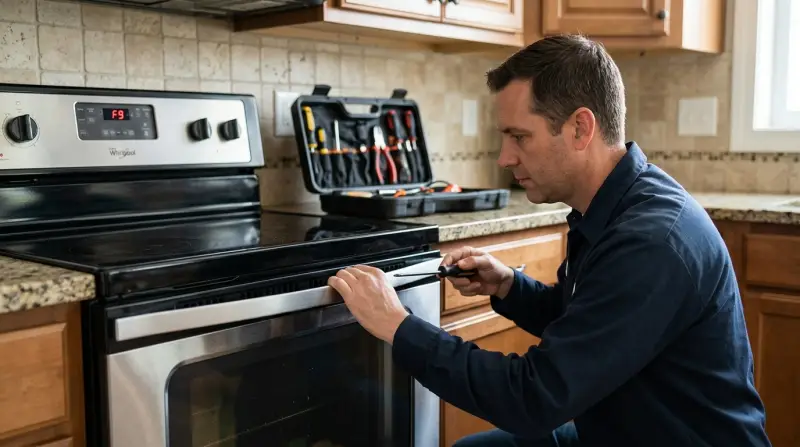
The F9 code on Whirlpool stoves signals a problem with the oven’s door lock or a long oven door unlock time. In simple words, the oven thinks the door isn’t locking or unlocking as it should, or the door lock system is faulty. This safety feature prevents the oven from starting if the door lock doesn’t work correctly.
The error is common in self-cleaning ovens, which use high temperatures to burn off food residue. During this process, the oven door must lock. If the oven can’t confirm the door is locked, or if the lock mechanism fails, you’ll see the F9 code.
Why Does The F9 Code Appear?
Several reasons can cause the F9 code on a Whirlpool stove:
- Faulty door lock motor
- Problems with door switch
- Wiring issues
- Control board malfunction
- Power supply problems
Often, a small issue—like something stuck in the door—can trigger the code. But sometimes, it points to a deeper electrical or mechanical failure.
Safety First: Before You Start
Before you try to fix the F9 code, take these safety steps:
- Unplug the stove or turn off the circuit breaker. This prevents electric shock.
- Wait for the oven to cool if you just used it. The self-clean cycle makes the oven extremely hot.
- Read your stove’s manual. Each model is a bit different, so the manual can give you model-specific advice.
9 Steps To Fix Whirlpool Stove F9 Code
Let’s go through the nine essential troubleshooting steps. Each can help you solve the problem, depending on what’s causing the F9 code.
1. Check For Stuck Objects In The Door
Sometimes, a simple thing—like a piece of food or a utensil—can prevent the oven door from closing or locking. Even a small crumb can block the lock mechanism.
- Open the door and inspect the area around the lock.
- Remove any debris, food, or objects.
- Close the door and see if the code clears.
Non-obvious tip: Even thick grease can cause the lock to stick. Use a damp cloth to clean the lock area.
2. Reset The Stove
A soft reset can clear minor glitches in the control board.
- Unplug the stove for at least 5 minutes.
- Plug it back in and check if the F9 code is gone.
If the code returns, further troubleshooting is needed.
3. Inspect The Door Lock Mechanism
The door lock motor and latch are common F9 culprits. If the motor can’t move the latch, or the latch is bent, the oven won’t lock.
- Gently test the latch for smooth movement.
- Listen for buzzing or grinding noises when the oven tries to lock.
- If the latch is loose or damaged, it may need replacement.
4. Test The Door Switch
The door switch tells the oven if the door is open or closed. If it fails, the oven might think the door is always open.
- Press the door switch by hand (usually a small button around the door frame).
- If it feels loose, sticks, or doesn’t click, it could be faulty.
- Door switches are inexpensive and easy to replace.
5. Examine Wiring And Connections
Loose or burned wires between the control board and door lock can also trigger the F9 code.
- Carefully check the wiring (if you’re comfortable opening the back panel).
- Look for loose connectors, broken wires, or burn marks.
- Reconnect or replace damaged wires as needed.
Non-obvious insight: Even if wires look fine, sometimes oxidation on the connectors can cause poor contact. Disconnecting and reconnecting them can help.
6. Inspect The Control Board
If all else seems fine, the control board could be the problem. This electronic part sends signals to the lock motor and reads its status.
- Look for signs of damage (burn marks, bulging parts).
- If you see damage, the board may need repair or replacement.
Control boards are more expensive, so only replace one if you’re sure it’s faulty.
7. Check For Power Supply Issues
Voltage problems can confuse the oven’s electronics and trigger error codes.
- Use a multimeter to check the outlet’s voltage (should be around 240 volts for most electric ovens in the US).
- Make sure the stove’s plug is fully inserted and not loose.
- If you find power issues, consult a licensed electrician.
8. Run A Diagnostic Test
Many Whirlpool stoves have a diagnostic mode that helps pinpoint errors.
- Refer to your user manual for instructions to enter diagnostic mode.
- The oven will display error codes for different failures.
- Write down any new codes that appear—they may lead you to the real problem.
9. Replace The Door Lock Assembly
If you’ve checked everything else and the F9 code remains, the door lock assembly may need replacement. This part includes the motor, switch, and latch.
- Order a compatible door lock assembly for your model.
- Disconnect power, remove the old assembly, and install the new one.
- Reconnect power and test the oven.
Practical tip: Take a photo of the wiring before removal so you can reconnect everything correctly.

Credit: smartapplianceservices.com
Comparison: Common Whirlpool Stove Error Codes
To help you understand where F9 fits among other Whirlpool stove errors, here’s a quick comparison:
| Error Code | Meaning | Typical Fix |
|---|---|---|
| F9 | Door lock issue / Long door unlock time | Check/replace door lock assembly |
| F1 | Control board problem | Replace control board |
| F2 | Oven temperature too high | Check oven sensor, control board |
| F3 | Oven temperature sensor fault | Replace oven sensor |
How To Know When To Call A Professional
Some F9 errors are easy to fix. Others require technical skills or special tools. Call a professional if:
- You’re not comfortable working with electricity.
- You need to replace the control board.
- You’ve tried all steps and the code stays.
Many repairs are covered in your oven’s warranty—check before paying out of pocket.
How Much Does It Cost To Fix F9 Errors?
Here’s a cost comparison for common F9 fixes:
| Part or Service | DIY Cost | Professional Cost |
|---|---|---|
| Door lock switch | $20 – $50 | $100 – $200 |
| Door lock motor/assembly | $40 – $120 | $150 – $300 |
| Control board | $100 – $400 | $300 – $600 |
| Diagnosis/Service call | N/A | $80 – $150 |
Prices vary by location and model. Doing it yourself saves money, but only if you’re confident in your skills.
Preventing F9 Errors In The Future
To avoid seeing the F9 code again:
- Keep the door lock area clean and free of debris.
- Don’t slam the oven door.
- Avoid using the self-clean cycle too often (it puts stress on lock parts).
- Schedule regular maintenance if your oven is older.
Where To Find Replacement Parts
Always use OEM (original equipment manufacturer) parts for the best fit and safety. You can find parts at appliance stores or online. For reliable information, visit the official Whirlpool parts website.
When Diy Fixes Don’t Work
Some F9 code problems need special tools or knowledge. If you’ve tried all the steps above and the code stays, it’s time to call a licensed appliance technician. A professional can test electronic parts, replace faulty components, and ensure your stove is safe to use.

Frequently Asked Questions
What Does The F9 Code Mean On My Whirlpool Stove?
The F9 code means the oven has a door lock problem or can’t unlock the door in the normal time. It usually happens during the self-clean cycle or if there’s a mechanical or electrical issue with the lock system.
Can I Fix The F9 Code Myself?
Yes, you can fix many F9 errors yourself. Start with simple steps—cleaning the door lock area, resetting the stove, and checking for stuck objects. For more complex issues (like replacing the door lock assembly or control board), you’ll need basic tools and some DIY skills.
How Do I Enter Diagnostic Mode On A Whirlpool Stove?
Entering diagnostic mode depends on your model. Usually, you press and hold two buttons at once (like “Cancel” and “Broil”) for several seconds. Check your user manual for exact instructions.
Is It Safe To Use The Stove With The F9 Code Showing?
No, it’s not safe. The F9 code means the oven’s safety lock isn’t working. Using the oven with this error can cause safety risks. Fix the problem before using the oven again.
What If My Stove Is Still Under Warranty?
If your Whirlpool stove is under warranty, contact Whirlpool support. Many F9 code repairs are covered. Avoid DIY repairs that could void the warranty.
Seeing the F9 code on your Whirlpool stove can be frustrating, but you don’t have to face it alone. By following these nine troubleshooting steps, you can solve most F9 errors yourself and avoid unnecessary repair bills. If the problem is serious, don’t hesitate to call a professional.
With proper care, your Whirlpool stove can serve you well for many years to come.