
A Samsung refrigerator can make life easier with its automatic ice maker. But sometimes, the ice maker stops working, or makes too little ice. Resetting it is often the quickest way to fix these problems. Many owners feel confused about how to reset the ice maker, especially if they are not familiar with appliances. This guide will walk you through every step, highlight common mistakes, and answer your most pressing questions. Whether your ice maker is jammed, slow, or simply not producing ice, you’ll find solutions here.
Understanding Samsung Refrigerator Ice Makers
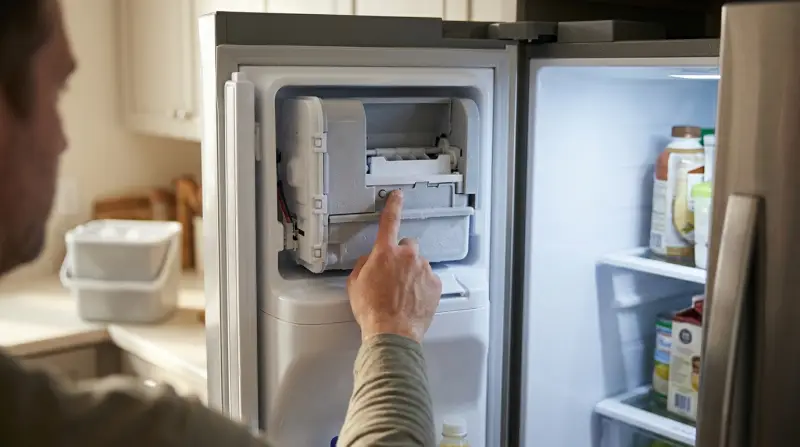
The ice maker is a small but important part of your Samsung refrigerator. It collects water from the supply line, freezes it, and releases ice cubes into the bin. There are two main types:
- Built-in ice makers: Found inside the freezer compartment.
- External ice makers: Located in the door, often with water and ice dispensers.
Knowing your ice maker type matters because the reset process can be slightly different. Most Samsung models released after 2010 have a reset button, but older models may require manual steps.
Why Resetting Is Needed
You might need to reset your ice maker if:
- It’s not making ice
- Ice production is slow
- The ice tray is stuck
- Ice cubes are small or misshaped
- After cleaning or replacing the filter
Resetting helps clear minor errors, recalibrate sensors, and restart the ice production cycle.
Preparing For The Reset
Before you reset, take a few simple steps to avoid damage or mistakes:
- Check the power: Make sure the refrigerator is plugged in and turned on.
- Look for warning lights: Some Samsung models display error codes related to the ice maker.
- Inspect the water supply: Confirm the water line is connected and water flows freely.
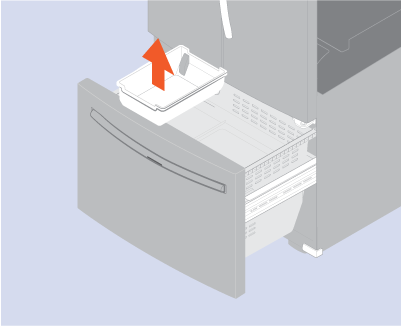
- Empty the ice bin: Remove old ice to prevent jams.
- Read your manual: If possible, check your refrigerator’s manual for model-specific instructions.
These steps ensure you don’t miss an obvious issue and make the reset effective.
Credit: www.samsung.com
How To Reset Samsung Refrigerator Ice Maker: Step-by-step
Resetting your Samsung ice maker can be simple, but it depends on the model. Here’s a practical approach for most models.
Finding The Reset Button
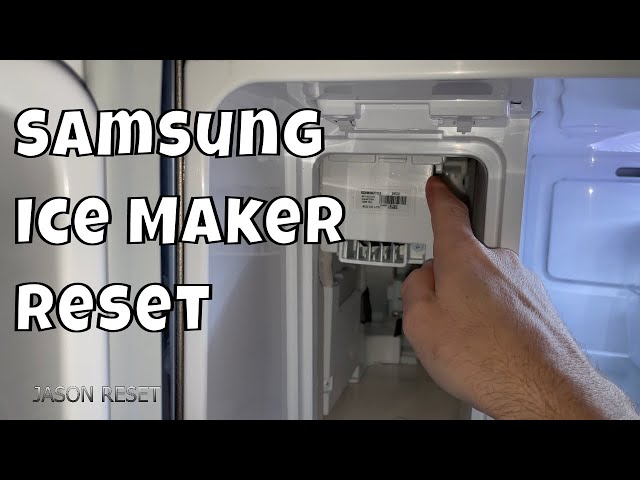
Most Samsung refrigerators have a reset button near or inside the ice maker unit. It’s usually labeled “RESET,” “TEST,” or with a small arrow.
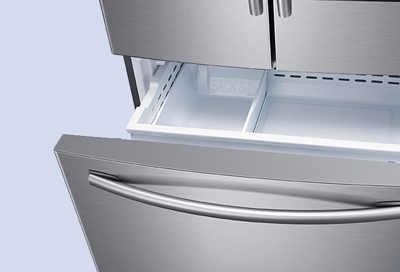
- For built-in models: Open the freezer and look for a small button under the ice tray.
- For external models: Open the ice maker compartment (usually in the door), and find the button on the side or front.
Some models may require you to remove the ice bin to access the button.
Resetting The Ice Maker
Follow these steps:
- Press and hold the reset button for about 10 seconds. You may hear a chime, click, or beep.
- Wait for the ice maker to start moving. The tray will usually rotate or move slightly, signaling the reset.
- Close the compartment and wait. Ice production should begin within minutes, but full ice bins may take up to 24 hours.
If you don’t hear a sound or see movement, repeat the process once. Don’t press the button too many times, as this can damage the motor.
Manual Reset For Older Models
If your Samsung refrigerator doesn’t have a reset button:
- Turn off the refrigerator using the control panel or unplug it.
- Wait 2–5 minutes to allow the system to reset.
- Plug it back in or turn it on.
- Check the ice maker to see if ice production resumes.
This manual reset helps in models with no dedicated reset button.
Common Issues After Reset
Sometimes, even after resetting, the ice maker won’t work as expected. Here’s what to check:
Water Supply Problems
- Low water pressure: Ice makers need at least 20 psi water pressure. If pressure is lower, cubes will be small or production will stop.
- Clogged filter: Replace filters every six months for best results.
Temperature Settings
- Freezer temperature: Should be set between 0°F and 5°F (-18°C to -15°C) for proper ice making.
Ice Maker Jams
- Stuck ice cubes: Remove jammed cubes by gently lifting the tray or using warm water.
Sensor Errors
- Error codes: Some Samsung refrigerators display codes like “E 14” or “E 40” for ice maker problems. Check your manual for meanings.
Comparing Samsung Ice Maker Models
Understanding your model helps you reset properly. Here’s a quick comparison of popular Samsung refrigerator types:
| Model Type | Reset Button Location | Common Features | Typical Issues |
|---|---|---|---|
| French Door | Inside ice maker compartment | Dual ice makers, water dispenser | Ice jams, slow ice production |
| Side-by-Side | Behind ice bin | External dispenser, large capacity | Clogged filter, sensor errors |
| Top Freezer | Under ice tray | Basic ice maker, manual fill | Manual reset needed, small cubes |
Knowing your model speeds up troubleshooting and helps avoid mistakes.
Practical Tips For Reliable Ice Maker Performance
Resetting your ice maker is only part of keeping it running smoothly. Here are practical tips many owners overlook:
- Clean the ice maker regularly: Remove mold, minerals, or dirt every few months.
- Change the water filter: A clogged filter slows production and lowers ice quality.
- Don’t overload the freezer: Too much food can block air vents, making ice production slow.
- Keep the freezer temperature stable: Avoid frequent door opening.
- Check for leaks: Water leaks can cause slow or no ice production.
These steps help prevent future problems and reduce the need for resets.
Non-obvious Insights
- Many owners forget to check the water valve behind the refrigerator. If it’s partially closed, ice production drops.
- Resetting the ice maker too often can wear out the motor or sensors. Only reset when necessary.
Troubleshooting: When Reset Doesn’t Work
If resetting does not solve the problem, try these advanced steps:
Inspect The Water Line
- Look for kinks or bends that block water flow.
- Replace old or damaged lines.
Test The Ice Maker Sensor
- Some Samsung models have optical sensors to detect ice bin levels.
- Clean the sensor with a dry cloth if it’s dirty.
Check For Software Updates
- Newer Samsung refrigerators may need firmware updates. Visit the Samsung website or contact support.
Call For Professional Help
If you’ve tried everything and the ice maker still fails, contact Samsung support or a certified technician. Attempting repairs yourself can void warranties.
Data: Samsung Ice Maker Reliability
A study by Consumer Reports showed that Samsung ice makers have an average reliability score of 82 out of 100. Most issues are minor and can be fixed with a reset, but about 15% of users report needing professional repairs within five years.
| Brand | Average Reliability Score | Common Issues |
|---|---|---|
| Samsung | 82 | Jams, sensor errors |
| LG | 79 | Slow production, leaks |
| Whirlpool | 84 | Filter clogs, jams |
This shows that Samsung is above average, but regular resets and maintenance are needed.
Credit: www.youtube.com
Safety And Warranty Considerations
Always follow these safety tips:
- Unplug the refrigerator before touching electrical parts.
- Don’t use sharp tools to remove jammed ice.
- If your refrigerator is under warranty, avoid opening panels or making repairs yourself.
Samsung warranties usually cover ice maker parts for one year. Professional help may be needed for complex issues.
When To Replace The Ice Maker
Sometimes, resetting isn’t enough. Consider replacing the ice maker if:
- It’s more than 5 years old
- The motor makes loud noises
- Ice production is very slow despite resets
- Water leaks appear in the compartment
Replacement can restore full performance. You can order parts from Samsung or use certified service centers.
Credit: www.samsung.com
Frequently Asked Questions
How Often Should I Reset My Samsung Ice Maker?
You should only reset the ice maker when there’s a problem, such as no ice, slow production, or after cleaning. Frequent resets can cause wear.
What If My Ice Maker Still Doesn’t Work After Reset?
Check the water supply, freezer temperature, and ice bin for jams. If all are normal and it still doesn’t work, contact Samsung support for help.
Can I Use Tap Water For The Ice Maker?
Yes, but filtered water is best. Tap water can cause mineral buildup and affect ice quality. Change the filter every six months for clean ice.
Is It Safe To Reset The Ice Maker Myself?
Yes, as long as you follow the steps and avoid using sharp tools. Unplug the refrigerator if you need to access electrical parts.
Where Can I Find Official Samsung Reset Instructions?
You can find detailed reset steps and troubleshooting guides on the Samsung official website: Samsung Support.
Resetting your Samsung refrigerator ice maker is usually fast and easy. With careful steps and regular maintenance, you can keep enjoying fresh ice every day. If problems persist, don’t hesitate to seek professional help. Following these guides will save time, prevent frustration, and ensure your refrigerator works smoothly for years.
1 thought on “How to Reset Samsung Refrigerator Ice Maker Quickly and Easily”