
When your microwave stops working but still has power, it can be frustrating and confusing. The lights might turn on, and the display may work, but the appliance won’t heat your food. This situation is common, yet most people don’t know what to check or how to fix it. In this article, you’ll learn why your microwave has power but isn’t working, how to identify the problem, and whether you can fix it yourself or need professional help. With easy explanations and clear examples, you’ll understand what steps to take next.
Understanding The Problem: Microwave Has Power, But Doesn’t Work
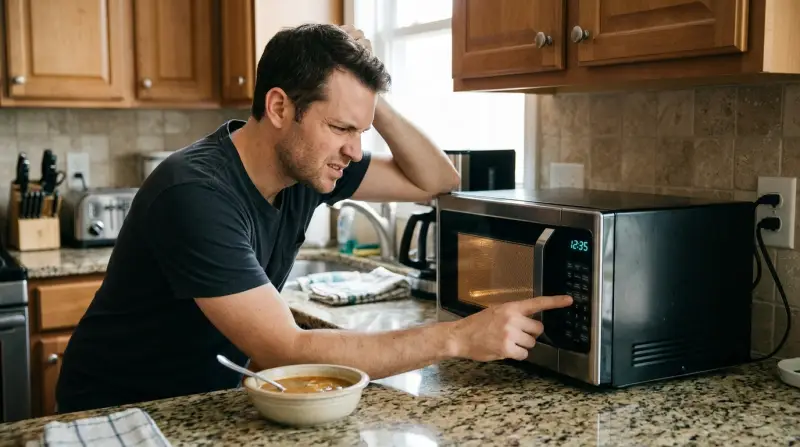
When a microwave shows signs of life—like lights, display, or clock—but doesn’t heat or spin, it means there’s power but a deeper issue. This is different from a microwave that’s completely dead (no lights or display). The problem usually involves internal parts, sensors, or switches.
Common symptoms include:
- Turntable not spinning
- No heating
- Buttons don’t respond
- Strange sounds (clicks, hums, but no operation)
Let’s break down the possible causes and solutions.
Most Common Causes And Solutions
1. Faulty Door Switch
Microwaves have door switches for safety. If the door isn’t fully closed, or the switch is broken, the microwave won’t start heating.
- Signs: The microwave starts, then stops; display works, but nothing happens when you press Start.
- Solution: Check if the door closes properly. Listen for the click when closing. If not, the switch may need replacement.
2. Blown Internal Fuse
Even with power, a blown fuse inside can prevent operation. Some fuses control heating, not the display.
- Signs: Display is on, but pressing Start does nothing.
- Solution: Unplug the microwave, open the casing (if safe), and check for fuses. Replacing a blown fuse can restore function. Always take safety precautions or call a technician.
3. Defective Magnetron
The magnetron is what heats your food. If it fails, the microwave won’t heat, though everything else works.
- Signs: Microwave runs, but food stays cold.
- Solution: Magnetron replacement is complex and costly. Usually, it’s better to buy a new microwave, especially for older models.
4. Broken Turntable Motor
Some microwaves will still heat with a broken turntable, but unevenly. Others stop heating altogether.
- Signs: The turntable doesn’t spin, display works, but heating is inconsistent.
- Solution: Replacing the turntable motor is a simple fix. Motors cost $10–$30. DIY repair is possible for those comfortable with small appliances.
5. Control Board Failure
The control board is the brain. If it’s faulty, some functions may work, others not.
- Signs: Buttons don’t respond, random errors, lights flicker.
- Solution: Professional repair required. Control boards cost $50–$150. Sometimes, replacement isn’t cost-effective.
6. Faulty Capacitor Or Diode
These parts help convert electrical energy for heating. If they fail, the microwave won’t heat.
- Signs: Loud humming, burning smell, no heating.
- Solution: Replacement needed. Avoid DIY unless you have experience, as capacitors can hold dangerous voltage.
7. Timer Or Setting Errors
Sometimes, the problem is simple—a wrong setting or timer.
- Signs: Microwave runs, but doesn’t heat; timer is set to zero; child lock is on.
- Solution: Double-check timer, settings, and child lock. Reset the microwave to factory settings if possible.
Quick Troubleshooting Steps
Before calling a technician, try these steps:
- Check the door: Open and close it firmly.
- Restart the microwave: Unplug for 10 minutes, then plug back in.
- Review settings: Ensure timer, power level, and child lock aren’t causing issues.
- Test with different foods: Try heating water for 1 minute.
- Listen and observe: Note any strange sounds or lack of movement.
If nothing changes, move to more advanced checks or call for help.
When To Repair Vs. Replace
Sometimes, fixing a microwave makes sense; other times, buying a new one is smarter. Let’s compare costs and risks.
| Issue | DIY Repair Cost | Professional Repair Cost | New Microwave Cost |
|---|---|---|---|
| Door Switch | $10–$20 | $50–$80 | $60–$300 |
| Fuse | $5–$15 | $50–$70 | $60–$300 |
| Magnetron | $50–$100 | $100–$200 | $60–$300 |
| Control Board | $60–$150 | $120–$200 | $60–$300 |
For older microwaves (5+ years), repairs costing more than half the price of a new unit usually aren’t worth it. For newer models, simple repairs like switch or fuse replacement are good options.
Safety Tips When Checking Your Microwave
Microwaves have high voltage parts, even when unplugged. Always follow safety:
- Unplug before opening
- Don’t touch capacitors
- Wear gloves and eye protection
- Never use a microwave with a damaged door or casing
If you’re unsure, call a professional.
Real-life Example: A Microwave That Runs But Doesn’t Heat
John’s microwave showed the display and lights, but food stayed cold. He heard a soft humming, but no heat. He checked the door, settings, and fuse—all good. The issue was the magnetron. The repair cost was $160, while a new microwave was $110. John decided to buy a new one.
This example highlights the importance of comparing repair costs to replacement.
Credit: www.youtube.com
Advanced Troubleshooting For Technically Skilled Users
If you have some electrical knowledge, you can check internal parts. Here’s a comparison of typical problems and the tools needed:
| Part | Symptom | Tool Needed | Skill Level |
|---|---|---|---|
| Door Switch | Microwave won’t start | Multimeter | Beginner |
| Fuse | Display works, no heating | Multimeter | Beginner |
| Magnetron | No heating, humming | Screwdriver, Multimeter | Advanced |
| Control Board | Random errors | Screwdriver | Advanced |
| Capacitor/Diode | Noise, burning smell | Multimeter | Advanced |
If you’re not comfortable with these tools, seek help. Microwaves can be dangerous to repair.
Two Insights Beginners Usually Miss
- Microwaves can run but not heat due to magnetron or capacitor failure, not just simple issues. Many people think power means everything works, but heating is a separate function.
- Door switches are common failure points. Even a small misalignment can stop the microwave from working, but the display will still light up.
Preventing Future Microwave Problems
To keep your microwave working longer:
- Clean the door seals regularly. Dirt can block the switches.
- Don’t slam the door. This damages switches and latches.
- Avoid overheating. Running the microwave empty can damage the magnetron.
- Use recommended containers only. Metal or foil causes electrical issues.
A well-maintained microwave lasts longer and avoids common failures.

Comparing Popular Microwave Brands For Reliability
Some brands are known for better reliability. Here’s a quick look:
| Brand | Average Lifespan (Years) | Common Issues | Repair Ease |
|---|---|---|---|
| Panasonic | 8–10 | Fuse, door switch | Easy |
| GE | 7–9 | Magnetron, turntable | Moderate |
| Samsung | 8–10 | Control board | Moderate |
| Sharp | 6–8 | Door switch | Easy |
Choose brands with easy access to spare parts and good warranties.
Credit: paradiseapplianceservice.com
Professional Help: When You Need It
If the issue is internal (magnetron, control board, capacitor), professional service is safer. Technicians have the tools and training to fix high-voltage parts. If your microwave is under warranty, contact the manufacturer.
For more technical info, see this Wikipedia guide.
Frequently Asked Questions
Why Does My Microwave Light Up But Not Heat?
This usually means the magnetron, capacitor, or diode is faulty. The display and lights use low voltage, while heating needs high voltage. If these parts fail, the microwave won’t heat but will still light up.
Can I Fix A Microwave Myself?
Simple issues like door switches or fuses can be fixed at home with basic tools. For internal parts (magnetron, capacitor), it’s best to call a professional. Microwaves are dangerous due to high voltage.
Is It Worth Repairing An Old Microwave?
If your microwave is over 5 years old and repair costs are more than half the price of a new one, it’s better to replace. Repairs for expensive parts like the magnetron are rarely worth it.
Why Does The Turntable Stop Spinning?
A broken turntable motor or dirty gears can cause the turntable to stop. This can lead to uneven heating. Replacing the motor is inexpensive and easy for most users.
What Causes Strange Smells Or Noises?
Strange smells or loud humming often come from a faulty capacitor or magnetron. Stop using the microwave and unplug it immediately. These issues can be dangerous and need professional inspection.
Microwaves are essential in most homes. When yours has power but stops working, knowing what to check saves time and money. Simple fixes like the door switch or fuse are easy for most people. For more complex problems, compare repair costs to replacement.
Always put safety first. By understanding your microwave, you can make smart decisions and keep your kitchen running smoothly.
1 thought on “Microwave Not Working But Has Power: Top Fixes You Need Now”