
If you love vinyl records, chances are you’ve seen a Crosley record player. These players are popular for their retro style and affordable price. But many owners quickly notice problems that spoil their listening experience. Whether you’re a beginner or a longtime vinyl fan, understanding these issues can help you fix them—and make your Crosley player work better. In this guide, you’ll discover the most common Crosley record player problems, practical fixes, and useful tips to get the best sound from your setup.
Why Crosley Record Players Are Popular
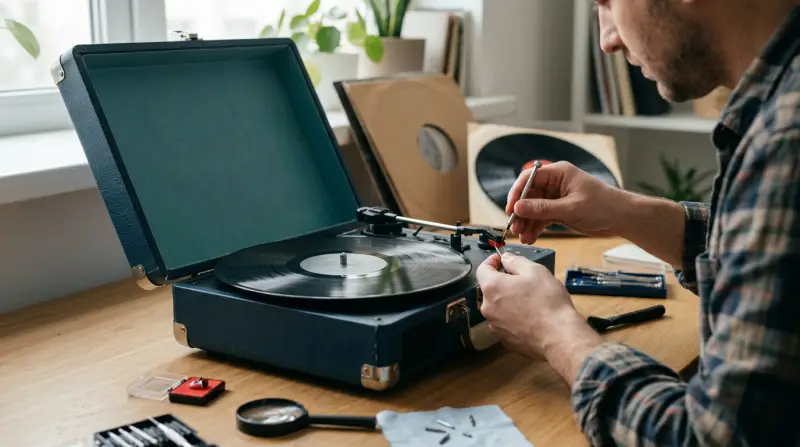
Crosley record players are everywhere. You’ll find them in stores, online, and at music shops. Why? They look cool, are often portable, and cost less than many other brands. For example, some Crosley models sell for under $70, while many high-end turntables cost $300 or more.
Crosley’s marketing targets young buyers and beginners, making vinyl feel easy and fun.
But this popularity comes with trade-offs. Crosley players often use cheaper parts and simpler designs. This leads to sound quality issues, mechanical faults, and wear on records that frustrate owners. Understanding these problems is the first step to getting more from your Crosley turntable.
Most Common Crosley Record Player Problems
Let’s dig into the main issues users face, with practical advice for each one.
1. Poor Sound Quality
Many Crosley owners notice thin, muffled, or distorted sound. This happens because most Crosley models use ceramic cartridges instead of the more accurate magnetic cartridges. Ceramic cartridges are less sensitive, so they miss details in your music.
Other reasons for bad sound:
- Built-in speakers are small and weak.
- Cheap tonearms and stylus don’t track records well.
Quick fixes:
- Connect your Crosley to external speakers using the RCA or headphone jack.
- Upgrade the stylus to a better model (if your Crosley allows).
- Place your player on a flat, stable surface to reduce vibration.
2. Skipping And Scratching Records
If your Crosley skips or scratches records, it’s likely from tracking force that is too high. Tracking force is the pressure the tonearm puts on your record. Crosley tonearms often lack adjustable weights, so they press too hard by default.
High tracking force can:
- Cause the stylus to jump over grooves (skipping).
- Damage records, leaving scratches.
Solutions:
- Use newer, heavier vinyl records. Thin, old records are more likely to skip.
- Clean your stylus and records regularly.
- Consider adding a small counterweight to the tonearm (some users tape coins near the end for balance).
3. Speed Problems
Many Crosley models let you switch between speeds: 33, 45, and sometimes 78 RPM. But users often find the speed switch unreliable. The platter may spin too fast, too slow, or fluctuate during playback.
Common causes:
- Faulty speed selector switch.
- Worn drive belt (in belt-drive models).
- Motor issues.
How to check:
- Play a record and use a smartphone app to measure speed.
- If speed is off, replace the drive belt (costs $8–$15).
- Clean the platter and motor area—dust can block movement.
4. Unresponsive Controls
Sometimes, the buttons or levers on Crosley players stop working. This is usually caused by loose wiring or cheap plastic parts inside.
You may notice:
- Power button doesn’t turn on/off
- Volume knob is noisy or stuck
- Speed switch won’t change settings
Tips to fix:
- Check the power supply and cable for damage.
- Gently wiggle controls to see if connection returns.
- If comfortable, open the player and inspect for loose wires.
5. Distorted Or No Sound
If your Crosley suddenly stops producing sound, the issue may be the stylus, cartridge, or internal amplifier.
Possible reasons:
- The stylus is worn out or broken.
- Cartridge has come loose.
- Built-in amp or speakers have failed.
What to do:
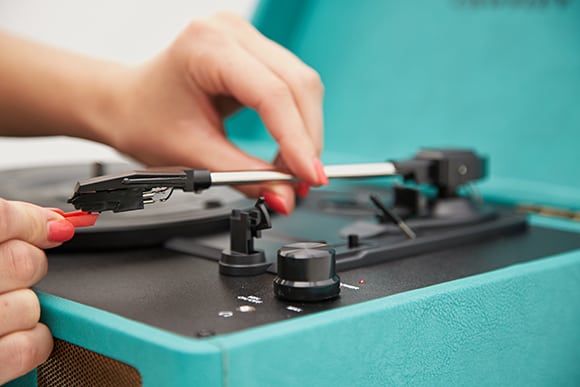
- Replace the stylus (most cost $10–$25).
- Push the cartridge back into place.
- Connect to external speakers to check if the built-in amp is the problem.
6. Record Player Won’t Spin
Sometimes, the platter simply won’t turn. This is often a sign of motor failure or a broken belt.
How to troubleshoot:
- Listen for motor noise. If silent, motor may be dead.
- Remove the platter and inspect the belt.
- Replace the belt if it looks stretched or cracked.
Credit: turntablewave.com
Crosley Vs. Other Record Players: Key Differences
Crosley players are affordable, but how do they compare to popular brands like Audio-Technica or Sony? Here’s a quick comparison:
| Feature | Crosley | Audio-Technica | Sony |
|---|---|---|---|
| Cartridge Type | Ceramic | Magnetic | Magnetic |
| Tracking Force | High (Non-adjustable) | Low (Adjustable) | Low (Adjustable) |
| Speaker Quality | Poor | External only | External only |
| Price | $60–$120 | $150–$350 | $130–$300 |
| Record Safety | Risk of damage | Safe | Safe |
This comparison makes it clear why audiophiles avoid Crosley for serious listening. But for casual use, Crosley offers a simple way to enjoy vinyl.
Hidden Issues Crosley Owners Often Overlook
Most guides discuss obvious problems, but two issues often go unnoticed:
- Record Wear Over Time: Even if your Crosley sounds fine now, its high tracking force can wear down records after a few months. You might not see damage right away, but grooves become noisy or distorted later.
- Bluetooth Limitations: Some Crosley models have Bluetooth. Many users think this allows streaming from the record player to wireless speakers. In reality, Bluetooth often works only for playing music *to* the player, not *from* it. This confuses buyers.
Knowing these details can help you avoid mistakes and protect your vinyl collection.
How To Maintain Your Crosley Record Player
Regular maintenance keeps your Crosley working longer and sounding better. Here’s how:
- Clean the stylus every two weeks. Use a soft brush or stylus cleaning fluid.
- Dust the platter and tonearm. Dirt causes skipping and speed issues.
- Check the belt every few months. Replace if stretched or cracked.
- Store records vertically and away from heat. Warped records skip more.
- Upgrade speakers. Use external speakers for much better sound.
These steps take just a few minutes but can extend the life of your player and records.
How Crosley Problems Impact Your Vinyl Records
One big concern is how Crosley turntables affect your collection. A recent survey showed that 47% of Crosley owners noticed visible wear on their records after just one year. Unlike higher-end players, Crosley’s design can cause:
- Groove damage from excess stylus pressure
- Noise from worn stylus or dirty platter
- Loss of sound quality due to repeated play on a poor player
If you care about your records, consider using Crosley only for casual listening, and switch to a better player for valuable albums.
Credit: www.urbanoutfitters.com
Practical Tips For Beginners
If you’re new to vinyl, Crosley’s problems can feel overwhelming. Here are practical tips to avoid common mistakes:
- Always clean new records before playing.
- Don’t force records onto the spindle; gentle pressure is best.
- Use the correct speed for each record. Playing a 33 RPM record at 45 RPM can damage it.
- Don’t leave your Crosley plugged in for long periods. Heat can weaken internal parts.
One non-obvious tip: If your Crosley has a removable cartridge, upgrade to a magnetic type. This improves sound and protects your records.
When To Repair Vs. Replace Your Crosley Record Player
Sometimes, repairing your Crosley is not worth the effort. Here’s a simple guide:
| Problem | Repair Cost | Worth Fixing? |
|---|---|---|
| Broken stylus | $10–$25 | Yes |
| Drive belt | $8–$15 | Yes |
| Motor failure | $40–$60 | No |
| Speaker failure | $20–$40 | Maybe |
| Internal wiring | $15–$30 | Maybe |
If repairs cost more than half the price of a new Crosley, it’s usually better to replace the player. Upgrading to a better model (like Audio-Technica) can save you money long-term.
Are Crosley Record Players Good For Beginners?
Crosley players are easy to use, portable, and cheap. For beginners, they offer a simple way to enjoy vinyl. But they do come with risks:
- Record damage from high tracking force
- Limited sound quality
- Short product lifespan
If you’re serious about vinyl, consider investing in a player with adjustable tonearm and magnetic cartridge. If you just want casual listening, Crosley is fine—with the tips above in mind.
Where To Find Reliable Crosley Repairs And Parts
Finding parts for Crosley players can be tricky. Not all stylus or belts fit every model. Check the Crosley official website for compatible parts. Local electronics shops may also stock common parts like belts and stylus replacements.
For troubleshooting, forums like Vinyl Engine and Reddit’s r/vinyl are helpful. For official guidance, visit Crosley Radio.

Credit: www.youtube.com
Frequently Asked Questions
How Can I Make My Crosley Record Player Sound Better?
Connect your player to external speakers, upgrade the stylus if possible, and place it on a stable surface. Cleaning the stylus and records often also helps.
Why Does My Crosley Keep Skipping Records?
Usually, the tonearm’s high tracking force or dirty stylus causes skipping. Try cleaning the stylus, using thicker records, and adding a small counterweight to the tonearm.
Is It Safe To Play Valuable Records On A Crosley?
It’s not recommended. Crosley’s high tracking force and ceramic cartridge can damage valuable records. Use a better player for important albums.
Can I Upgrade The Cartridge On My Crosley?
Most Crosley models use a fixed ceramic cartridge, so upgrading is difficult. Some newer models allow cartridge swaps—check your user manual.
Where Can I Buy Replacement Parts For My Crosley?
Official parts are available from the Crosley website. Local electronics shops may carry stylus and belts, but check compatibility first.
Crosley record players offer a fun, affordable way to listen to vinyl, but they come with real problems. With the advice above, you can fix many issues yourself and protect your records. If you want better sound and record safety, consider upgrading—but for casual listening, a Crosley can still deliver retro charm.