
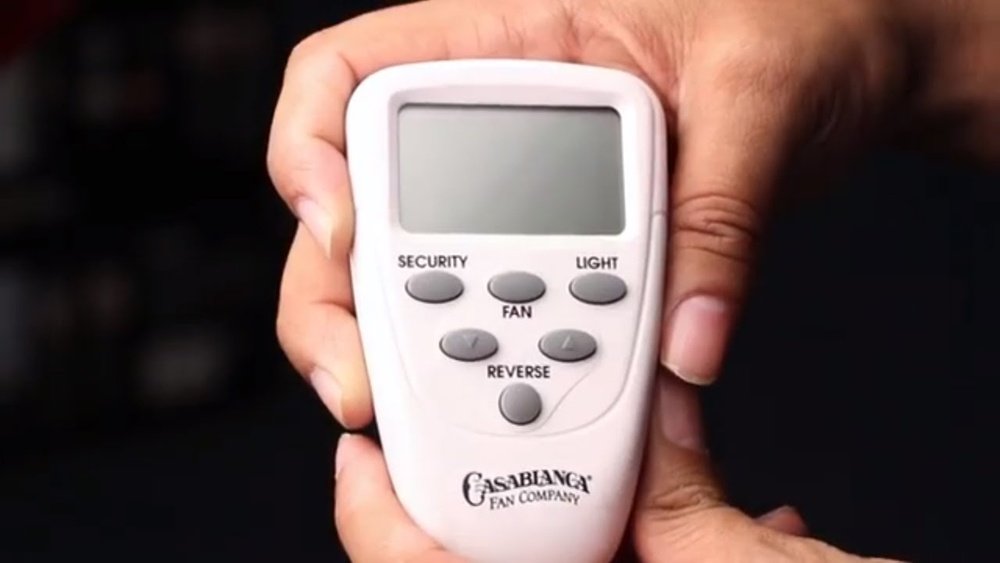
If your Casablanca ceiling fan remote suddenly stops working, it can be frustrating. Maybe the fan won’t respond to speed changes, the light stays on, or everything is stuck. Before you think about buying a new remote or calling an electrician, try resetting the remote control first. In many cases, a simple reset solves the problem and brings your fan back to life. This guide explains how to reset a Casablanca fan remote, what you need to know before starting, and tips to make the process smooth and safe.
Understanding Casablanca Fan Remotes
Casablanca ceiling fans are known for their elegant design and reliable performance. The remote controls that come with these fans allow you to manage speed, light, and sometimes even direction, all from your couch or bed. There are a few types of remotes used with Casablanca fans:
- Handheld Remotes – Small, battery-powered devices you keep nearby.
- Wall Controls – Mounted on the wall, look like a standard light switch but control multiple fan functions.
- Universal Remotes – Compatible with many Casablanca fans and sometimes other brands.
Each type sends a signal to the fan’s receiver, usually hidden in the fan canopy or motor housing. Sometimes, communication between the remote and receiver gets interrupted, causing the fan to stop responding. That’s when a reset is useful.
When Should You Reset Your Casablanca Fan Remote?
You don’t need to reset your remote for every problem. However, resetting is often the best first step if you notice:
- Fan or light not responding to remote commands
- Remote buttons unresponsive or only some features work
- Receiver and remote out of sync after a power outage or battery change
- Remote controlling the wrong fan (signal interference)
- Light flickers or stays on despite remote commands
Resetting can solve issues caused by electronic glitches, software bugs, or signal mismatches. If the problem continues after a reset, further troubleshooting may be needed.
Safety Precautions Before Resetting
Working with ceiling fans carries some risks. Always follow these safety steps:
- Turn off the fan’s wall switch and wait for the blades to stop completely.
- If you need to access the receiver, switch off power at the circuit breaker.
- Use a sturdy ladder if you must reach the fan canopy.
- Don’t touch wiring unless you’re sure the power is off.
If you feel unsure, ask a qualified electrician to help. Safety comes first.
Steps To Reset A Casablanca Fan Remote
Resetting a Casablanca fan remote depends on your model, but most follow similar steps. Here’s a practical, step-by-step guide.
1. Identify Your Remote Type
Check your remote’s model number. Look for labels in the battery compartment or on the back. Common Casablanca remotes include:
- Inteli-Touch
- Comfort-Touch
- Handheld Universal
- Wall-mounted controls
Knowing your remote type makes following instructions easier.
2. Basic Remote Battery Reset
Often, issues are due to weak batteries or a poor connection.
- Remove the remote’s batteries.
- Wait 30 seconds.
- Reinsert fresh batteries, making sure they’re installed correctly.
- Test the remote.
This simple action fixes many minor glitches. If it doesn’t help, proceed to a full reset.
3. Power Cycle The Fan
A power cycle can reset both the remote and the receiver.
- Turn off the fan using the wall switch or circuit breaker.
- Wait 60 seconds.
- Turn the power back on.
- Within 30 seconds, press and hold the “Fan” or “Light” button on your remote (depending on your model) for 5–10 seconds.
- Release the button and test if the fan responds.
This process re-establishes communication between the remote and receiver.
4. Resetting Dip Switches (for Older Models)
Some Casablanca fans use dip switches to set the communication channel. This prevents interference if you have multiple fans.
- Locate the dip switches in the remote (usually behind the battery cover).
- Find the matching dip switches on the receiver (inside the fan canopy).
- Make sure both sets are in the same pattern (up or down).
- Reinstall the remote batteries and test.
If you need help opening the fan canopy, check the user manual or look for videos online.
5. Factory Reset (for Smart/modern Remotes)
Some newer Casablanca remotes allow a factory reset that wipes all saved settings:
- Hold down both the “Fan” and “Light” buttons on the remote.
- After about 10 seconds, the fan’s light may blink, or the fan may beep. This confirms the reset.
- Release the buttons and test the remote.
Note: Factory reset steps vary by model. If unsure, check the official Casablanca manual or website.
Common Problems After Reset And How To Fix Them
Resetting usually solves basic remote issues, but sometimes new problems appear. Here’s how to handle them.
Remote Still Doesn’t Work
- Check the batteries again—sometimes they’re dead or installed backward.
- Make sure the fan’s power is on at the breaker and wall switch.
- Try the reset steps again, carefully following the timing.
- Confirm the remote and receiver are on the same channel (for dip switch models).
Remote Works, But Controls The Wrong Fan
Signal interference is more common in apartments or houses with multiple fans. Change the dip switch pattern to a unique setting on both the remote and receiver.
Fan Works, But Light Doesn’t (or Vice Versa)
- Check if the light bulb is burned out.
- If only the light or fan responds, the receiver may be partially faulty. Consider replacing it.
Nothing Works After Reset
It’s possible the receiver is damaged or a wire is loose. If all else fails, contact Casablanca customer support or a licensed electrician.
Comparison: Casablanca Fan Remote Types
To help you identify your remote, here’s a comparison of the main types:
| Remote Type | Common Features | Reset Method | Best For |
|---|---|---|---|
| Inteli-Touch | Speed, light, reverse, programming | Power cycle + button hold | Older Casablanca fans |
| Comfort-Touch | Speed, light, timer, LCD display | Factory reset | Premium models |
| Universal Handheld | Speed, light | Battery/power cycle reset | Most fans, replacements |
| Wall Control | Speed, light, sometimes reverse | Power cycle | Built-in wall installations |

Credit: www.youtube.com
Real-world Example: Resetting A Casablanca Inteli-touch Remote
Let’s say you have a classic Inteli-Touch Casablanca fan, and the remote stopped working after a power outage. Here’s how you might fix it:
- Turn off the wall switch for the fan.
- Wait at least 60 seconds.
- Turn the switch back on.
- Within 30 seconds, press and hold the “Fan” button until the fan beeps or starts moving.
- Test all remote functions (speed, light, reverse) to confirm the reset worked.
Insight: Sometimes, you need to repeat the process if the fan doesn’t respond the first time. Timing is key—don’t rush the steps.
Troubleshooting Table: What To Check If The Reset Fails
If your remote reset didn’t solve the problem, try this quick troubleshooting chart:
| Symptom | Possible Cause | What to Do |
|---|---|---|
| No response at all | Dead batteries, power off, failed receiver | Replace batteries, check breaker, inspect wiring |
| Only light or fan works | Partial receiver failure, bulb issue | Replace receiver or bulb |
| Controls wrong fan | Dip switch conflict, signal interference | Change dip switch pattern |
| Random operation | Signal interference, faulty remote | Try another remote or reset again |
Advanced Tips For A Smooth Reset
Beginners often overlook these small details:
- Distance matters: Stand within 10–15 feet of the fan during the reset process. Walls or furniture can block the signal.
- Interference: Other remote-controlled devices (like TVs or air conditioners) can cause interference. If possible, turn them off during the reset.
- Wait for confirmation: Some fans blink their lights or beep after a successful reset. Watch for these signals.
- Document your dip switch settings: Take a photo before changing them. This makes it easy to restore the original configuration if something goes wrong.
- Keep the manual: Many problems are unique to your model. Having the original manual or downloading it from Casablanca’s official website can save time.
When To Replace Your Casablanca Fan Remote
Sometimes, resetting isn’t enough. If your remote is physically damaged, lost, or keeps failing after multiple resets, replacement may be the best option. Here’s what to look for:
- Visible cracks or water damage
- Remote buttons stuck or not clicking
- Receiver emits burning smell or heat
- Remote works only at very close range (less than 2 feet)
Replacement remotes can be ordered from Casablanca’s official store or home improvement retailers. Always check for compatibility with your fan model.
Credit: support.hunterfan.com
How To Pair A New Casablanca Fan Remote
If you buy a new remote, you’ll need to pair it with your fan:
- Install fresh batteries in the new remote.
- Turn off the fan’s power at the wall switch or breaker.
- Turn the power back on.
- Within 30 seconds, press and hold the main button (often “Fan” or “Learn”) as described in the manual.
- The fan should respond (beep, blink, or move) to confirm pairing.
If your fan uses dip switches, set the new remote’s pattern to match the receiver.
Professional Support And Warranty Info
If the above steps don’t solve your problem, consider reaching out to Casablanca customer support. Most Casablanca fans come with a limited lifetime warranty on the motor and a one-year warranty on electrical components. Keep your proof of purchase handy when you call.
For more detailed model-specific instructions, you can visit the official Casablanca Fan Company Owners Manuals page.
Credit: support.hunterfan.com
Frequently Asked Questions
How Do I Know Which Casablanca Remote I Have?
Check the label in the battery compartment or on the back of the remote. You can also compare its shape and button layout to images in your fan’s user manual or on the Casablanca website.
Why Does My Casablanca Fan Remote Only Work Sometimes?
Weak batteries, signal interference, or a failing receiver can cause intermittent problems. Start by replacing the batteries and performing a reset. If issues continue, check for interference from other electronics.
Can I Use A Universal Remote With My Casablanca Fan?
Many Casablanca fans work with universal remotes, but not all. Check your fan’s compatibility before buying. Universal remotes may not support all advanced features like reverse or dimming.
What If I Lost My Casablanca Fan Remote?
You can buy a replacement remote from Casablanca or a compatible universal remote. Make sure it matches your fan’s receiver type (dip switch or smart pairing).
Is It Safe To Open The Fan Canopy To Check The Receiver?
Yes, if you turn off power at the breaker and use a safe ladder. However, if you’re uncomfortable or unsure, ask a professional electrician for help. Never work on live wiring.
Resetting a Casablanca fan remote is often a quick, effective fix for common issues. With the right steps and precautions, you can enjoy cool air and convenience again—without a costly service call.