
A Fellowes paper shredder is a trusted tool in many offices and homes. It helps keep sensitive documents safe. But what happens when your shredder stops working? Suddenly, your workflow slows down. You may worry about privacy risks. Many people face this problem.
But most issues are fixable. This guide helps you understand why your Fellowes paper shredder is not working, and how to repair or prevent those problems. With practical advice, troubleshooting steps, and real examples, you’ll learn to get your shredder running again, and keep it working for years.
Understanding Fellowes Paper Shredders
Fellowes is a leading brand for shredders. Their machines are known for quality and safety. Models range from small personal shredders to large office units. Most Fellowes shredders use a cross-cut or micro-cut mechanism, which slices paper into tiny pieces. Features like jam-proof technology, auto-start/stop, and thermal protection make them popular. But even reliable machines break down sometimes.
Common Fellowes models include:
- Powershred 99Ci (jam-proof, cross-cut)
- Powershred 79Ci (compact, safe sense)
- Powershred LX Series (modern, micro-cut)
Each model has unique features. But the troubleshooting steps are similar. Let’s look at the main reasons Fellowes shredders stop working.
Fellowes machines are also known for their safety features, such as SafeSense technology, which stops the shredder when hands touch the paper entry. This is especially useful in homes with children or pets. Some models also have energy-saving modes, automatically powering down when not in use.
These features make Fellowes shredders reliable and safe for daily use.
Another point to note is that Fellowes uses high-quality steel for their blades. This ensures long-lasting performance, but even the best blades can become dull over time if not properly maintained. If you buy a Fellowes shredder, make sure to check the manual for specific maintenance instructions.
Sometimes, users skip these details, which leads to avoidable breakdowns.
Main Reasons Your Fellowes Paper Shredder Is Not Working
There are several causes. Some are simple. Others need more attention. Here are the most common:
- Paper jams – Too much paper or wrong material blocks the blades.
- Overheating – Shredder runs too long and shuts down to cool off.
- Power issues – Cord, plug, or outlet problems prevent power flow.
- Sensor faults – Sensors fail to detect paper or bin placement.
- Full waste bin – The shredder stops until you empty the bin.
- Blunt blades – Dull blades struggle to cut paper.
- Wrong material – Staples, plastic, or credit cards damage the mechanism.
- Poor lubrication – Lack of oil causes friction and jams.
- Broken gears or motor – Internal parts wear out or break.
- Safety lock activated – Safety features prevent operation.
Most issues can be fixed without calling a technician. Below, you’ll find step-by-step solutions.
Some problems, like overheating, are not always obvious. For example, your shredder may shut down suddenly and refuse to start, even though everything seems fine. This is often due to the built-in thermal protection. If you keep trying to operate the shredder, you can make the situation worse.
Always allow proper cooling time.
In other cases, sensor faults can confuse even experienced users. If the bin is not placed exactly right, or if dust covers the sensor, the shredder will not start. Sometimes, users think the machine is broken, but it’s just a misplaced bin or dirty sensor.
Troubleshooting Steps: Fellowes Paper Shredder Not Working
Let’s go through a practical troubleshooting process. Each step solves a specific problem.
Step 1: Check Power Connection
Is your shredder plugged in? Sometimes, the cord is loose, or the outlet has no power. Try these actions:
- Plug the shredder into a known working outlet.
- Inspect the cord for damage.
- Test with another device to confirm outlet is working.
Non-obvious tip: Some Fellowes models have a hidden reset button near the power cord entry. Press it if the shredder does not respond.
If your shredder still doesn’t power on, check the fuse in the plug if you’re in regions where plugs have fuses. Sometimes, a simple fuse replacement solves the problem. Also, make sure the power switch is fully engaged. Some models require the switch to be firmly pressed, not just lightly touched.
Step 2: Inspect Paper Jams
Most shredders stop working due to paper jams. Signs include humming but no movement, or blades stuck. Here’s how to fix:
- Unplug the shredder.
- Remove the waste bin.
- Use tweezers or pliers to pull out jammed paper.
- Press the reverse button to loosen stuck paper.
- If jam persists, gently rock the blades with a screwdriver (without forcing).
Advanced insight: Older Fellowes models may need you to manually turn the gears. Never use excessive force. Damaging gears leads to expensive repairs.
If your shredder often jams, check if you are exceeding the sheet limit. For example, if your model says “up to 12 sheets,” try feeding only 8–10 sheets. Some paper types, like glossy or thick stock, jam more easily. To prevent jams, alternate the direction of paper insertion, and avoid folding paper before shredding.
Step 3: Empty The Waste Bin
A full bin triggers a sensor. The shredder stops until emptied. After removing and emptying the bin, ensure it is properly reinserted. Some models require the bin to click into place.
If your shredder still doesn’t work after emptying the bin, check for small pieces of paper stuck in the sensor area or around the bin slot. These tiny fragments can block the sensor. Use a can of compressed air or a soft brush to remove them.
Step 4: Cool Down The Shredder
Shredders have thermal protection. If you shred too much, the machine overheats and shuts off. Wait 20–30 minutes for it to cool. If it works after cooling, avoid long shredding sessions.
Data point: The average Fellowes shredder can run for 10–30 minutes before needing a break, depending on the model.
It’s important to note that ambient temperature affects cooling time. In warm environments, your shredder may need longer breaks. If you use the shredder in a hot office or near equipment that generates heat, allow extra cooling time.
Step 5: Check Sensors
Sensors detect paper and bin placement. If dirty or misaligned, the shredder will not start. Clean sensor areas using a dry cloth. Avoid liquids. If your model uses optical sensors, check for dust buildup.
Some Fellowes models have more than one sensor. For example, there may be a paper sensor and a bin sensor. If you clean one, but not the other, the problem may persist. Carefully check the manual to locate all sensors.
Step 6: Lubricate The Blades
Lack of lubrication causes jams and noisy operation. Use Fellowes shredder oil or vegetable oil. Apply a thin line across the blades, run the shredder in reverse for 10 seconds, then forward.
Non-obvious tip: Do not use WD-40 or motor oil. These can damage plastic parts and attract dust.
To lubricate effectively, put a sheet of paper on the feed slot, apply oil in a zigzag pattern, and shred the paper. This spreads the oil evenly. If your shredder is used heavily, consider oiling every two weeks.
Step 7: Remove Non-paper Items
If you shredded staples, paper clips, credit cards, or CDs, these may block the mechanism. Remove the waste bin, check for debris, and clear anything blocking the blades.
Some Fellowes models are rated for shredding staples and paper clips, but frequent shredding of these items will dull the blades faster. If you must shred these, do so sparingly and follow up with regular maintenance.
Step 8: Check For Safety Lock
Some Fellowes models have a safety lock or child lock. Make sure it is off. Refer to your user manual for its location.
The safety lock is often a small switch or button, sometimes colored red. If you can’t find it, check the side or back of the shredder. If the lock is engaged, the machine will not operate, even if everything else is working.
Step 9: Inspect Internal Parts
If none of the above works, internal parts may be broken. Check:
- Gears (look for cracks or missing teeth)
- Motor (listen for clicking or humming)
- Circuit board (look for burnt spots or loose wires)
If you see damage, contact Fellowes support or a technician.
Extra tip: If you hear loud grinding or knocking, stop using the shredder immediately. Continuing to operate a damaged shredder can cause further damage and even safety risks.
When To Repair, When To Replace
Repair is often cheaper. But sometimes, replacement is better.
Signs You Should Repair
- Shredder is less than 3 years old
- Problem is minor (jam, sensor, lubrication)
- Parts are available
- No electrical damage
Signs You Should Replace
- Shredder is over 5 years old
- Motor or circuit board is burnt
- Replacement parts cost over 50% of a new unit
- Frequent breakdowns
Statistic: According to Fellowes, the average shredder lifespan is 5–7 years with regular maintenance.
If your shredder is still under warranty, repair is almost always the best option. Fellowes often sends replacement parts or offers repair services. For older models, check the price of new units—sometimes, new shredders have improved features and better reliability.
Comparing Fellowes Shredder Models: Reliability & Common Issues
Here’s a comparison of three popular Fellowes models, showing reliability and typical problems.
| Model | Type | Run Time | Common Issues | Reliability Score (1-10) |
|---|---|---|---|---|
| Powershred 99Ci | Cross-cut | 30 min | Paper jams, sensor faults | 8 |
| Powershred 79Ci | Cross-cut | 20 min | Overheating, dull blades | 7 |
| Powershred LX20M | Micro-cut | 10 min | Bin sensor, lubrication | 8 |
Insight: Micro-cut models are safer but require more frequent lubrication.
Micro-cut shredders are popular for high-security needs. However, they cut paper into much smaller pieces, which puts more strain on the motor and blades. This means you need to oil them more often. If you rarely shred sensitive documents, a cross-cut model is usually enough.
Another factor is noise. Larger models like the 99Ci tend to be quieter, thanks to more advanced insulation. If you work in a quiet office, this matters. Compact models are louder but take up less space.
Preventing Future Problems
Good habits keep your Fellowes shredder working well. Here are smart prevention tips:
- Don’t overload – Feed only the recommended number of sheets at a time.
- Empty the bin regularly – Sensors work best when the bin is not full.
- Lubricate monthly – Use proper shredder oil.
- Avoid non-paper materials – Never shred CDs, credit cards, or thick cardboard unless your model supports it.
- Give cooling breaks – Let the machine rest after long use.
- Clean sensors – Dust and dirt cause sensor errors.
Data: Fellowes recommends lubricating after every 30 minutes of shredding, or at least once a month.
To prevent overheating, create a schedule for shredding. If you have a lot of documents, break them into small batches. For offices, assign regular maintenance duties to a staff member. This ensures the shredder is checked and oiled without fail.
If your shredder is used in a shared workspace, post a simple instruction sheet near the machine. Remind users not to overload, always empty the bin, and avoid forbidden materials. This small step reduces breakdowns caused by careless use.
Common User Mistakes With Fellowes Shredders
Many problems are caused by everyday mistakes. Here are the most frequent:
- Ignoring manual instructions – Every model is different. Always read the manual.
- Using wrong oil – Only use shredder oil.
- Forcing paper through jams – This damages gears and blades.
- Letting bin overflow – Causes sensor faults and jams.
- Shredding forbidden materials – Leads to blockages and blade damage.
Example: A user shredded a stack of envelopes with metal clasps. This broke the blades and required replacement.
Another common mistake is ignoring strange noises. If your shredder starts making loud grinding or clicking sounds, stop using it immediately. These sounds signal mechanical problems or foreign objects stuck in the blades.
Many users forget to clean sensors. Over time, dust and paper fragments build up, especially in busy offices. This prevents sensors from working correctly. Cleaning sensors is easy and takes only a few minutes, but is often overlooked.
Fellowes Warranty And Support
Fellowes offers warranties ranging from 1–5 years, depending on the model. They cover defects, but not damage from misuse. You can contact customer support for troubleshooting and parts. Always keep your proof of purchase.
External link for official support:Fellowes Support
If you bought your shredder from an authorized dealer, check if they offer additional support or extended warranties. Sometimes, dealers have their own repair services. If your warranty has expired, Fellowes still offers paid repair and parts replacement.
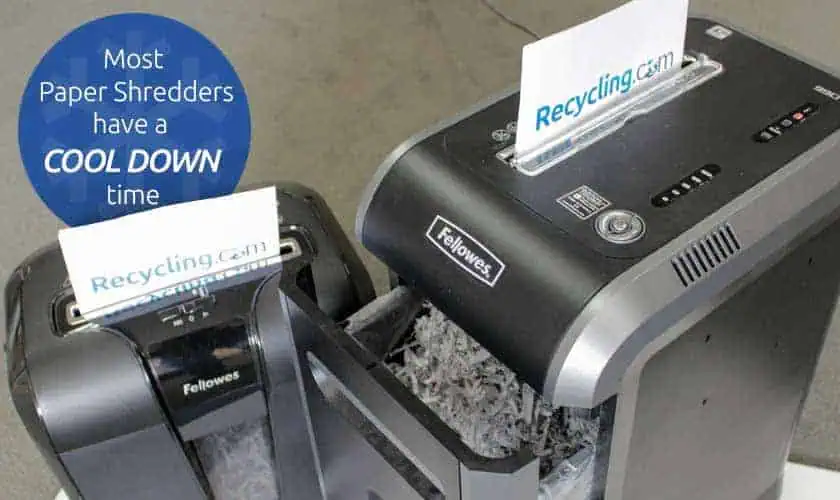
Table: Basic Troubleshooting Steps And Success Rate
Below is data from user reports on fixing Fellowes shredders.
| Step | Success Rate (%) | Recommended For |
|---|---|---|
| Remove paper jam | 72 | All models |
| Lubricate blades | 55 | Older models |
| Clean sensors | 42 | Sensor-equipped models |
| Reset power | 26 | Recent models |
| Replace internal parts | 8 | High-end models |
Most issues are solved with simple actions. Only a small percentage require professional repair.
If you try two or three steps and your shredder still doesn’t work, check the user manual for troubleshooting tips. Sometimes, models have special reset procedures not commonly known. For example, some models require you to hold the reverse button for 10 seconds to reset the system.
Real-world Example: Fixing A Fellowes Shredder
Let’s look at a real scenario. A small business owner had a Fellowes 99Ci. The shredder stopped in the middle of a busy day. Signs: humming sound, no movement, full bin.
Actions taken:
- Unplugged and emptied the bin
- Removed jammed paper using pliers
- Applied shredder oil
- Waited 30 minutes for cooling
Result: The shredder worked again. The owner avoided downtime and expensive repairs.
Non-obvious insight: The owner later set a monthly reminder to lubricate and empty the bin, preventing future problems.
Another example: In a school office, a Fellowes LX20M stopped working after a student tried to shred laminated paper. The blades jammed, and the machine overheated. Staff followed the troubleshooting steps, removed the jam, and let the shredder cool. They also reviewed the manual and posted a “No Laminated Paper” sign near the shredder. This prevented similar incidents.
Cost Comparison: Repair Vs. Replacement
Repairing a Fellowes shredder is often cheaper, but not always. Here’s a simple cost comparison.
| Action | Average Cost (USD) | Time Needed |
|---|---|---|
| Lubrication | 5 | 10 min |
| Paper jam removal | 0 | 15 min |
| Sensor cleaning | 0 | 10 min |
| Gear/motor replacement | 80 | 2 hours |
| Full replacement | 150–300 | 30 min |
If repairs cost more than half the price of a new shredder, consider buying a new one.
If you need professional repair, always ask for a quote before proceeding. Sometimes, a new shredder comes with better features, longer warranties, and lower operating costs. For example, micro-cut models use less energy and are safer for personal data.
How To Find Replacement Parts For Fellowes Shredders
If you need parts, check:
- Fellowes official website
- Authorized dealers
- Online marketplaces (Amazon, eBay)
Always use genuine Fellowes parts. Generic parts may not fit or work well. Look for model numbers before ordering.
When ordering parts, check if your model is still supported. Older models may be discontinued, so parts can be harder to find. If you can’t find parts, contact Fellowes support for advice. Sometimes, they offer compatible alternatives.

Safety Tips For Fellowes Paper Shredders
Shredders can be dangerous. Follow these safety rules:
- Keep fingers away from feed slot
- Unplug before maintenance
- Never let children operate
- Don’t shred wet paper
- Avoid loose clothing near the machine
- Use safety lock when not in use
Most accidents happen when safety rules are ignored. Always stay cautious.
Also, never insert tools or objects into the shredder while it’s plugged in. Even if the machine is off, sensors can trigger unexpectedly. Always unplug before any maintenance.
Upgrading Your Fellowes Shredder: What Matters
If you decide to buy a new shredder, consider:
- Sheet capacity – How many pages at once?
- Run time – Longer is better for busy offices.
- Cut type – Micro-cut is safer but slower.
- Noise level – Quieter models are better for shared spaces.
- Safety features – Look for auto-stop, safety lock, and sensor alerts.
- Warranty – Longer warranty means better value.
Practical tip: For home use, a 10-sheet cross-cut shredder is enough. For offices, choose 20+ sheets and micro-cut for higher security.
If you shred a lot of documents every day, choose a model with a larger bin and longer run time. For sensitive information, micro-cut is best. If you need to shred credit cards or CDs, make sure your model supports these materials.
Environmental Impact: Shredder Use And Disposal
Shredders create paper waste. Dispose responsibly:
- Recycle shredded paper
- Use waste for packing material
- Don’t throw old shredders in regular trash; recycle electronics
Data: Over 30% of office paper waste is shredded. Recycling helps reduce environmental impact.
If your workplace generates a lot of shredded paper, consider setting up a recycling station. Some cities offer special bins for shredded material. Also, check if your local e-waste center accepts old shredders for recycling.
Frequently Asked Questions
Why Does My Fellowes Shredder Only Work In Reverse?
This usually means a paper jam or blocked sensor. Try removing jammed paper and cleaning sensors. If the problem persists, lubricate the blades.
How Often Should I Oil My Fellowes Shredder?
Fellowes recommends oiling after every 30 minutes of use, or at least once a month. Use only shredder oil.
What Should I Do If The Shredder Overheats?
Turn off and unplug the shredder. Wait 20–30 minutes for it to cool down. Avoid running the shredder for long periods.
Can I Shred Credit Cards Or Cds In My Fellowes Shredder?
Only if your model supports it. Check your manual. Shredding unsupported materials can damage blades and gears.
Where Can I Find Fellowes Shredder Replacement Parts?
Use the official Fellowes website, authorized dealers, or trusted online stores. Always check the model number to ensure compatibility.
A Fellowes paper shredder not working can be stressful, but most issues are simple to fix. By following these steps and tips, you can keep your shredder in top shape. Proper maintenance and smart habits prevent breakdowns. If repairs are too costly, replacement is the best choice.
With this guide, you’re ready to troubleshoot, repair, and maintain your Fellowes shredder with confidence.