
If your Dyson vacuum suddenly loses suction, it can quickly turn cleaning from easy to frustrating. Many people trust Dyson for its powerful performance, but when the vacuum stops picking up dirt, the cause often isn’t obvious. Understanding why your Dyson vacuum has no suction can save you time, money, and stress. Let’s explore the main reasons behind this problem, how to troubleshoot it, and ways to keep your vacuum working at its best.
Why Dyson Vacuums Lose Suction
Even the best vacuums can lose power over time. Dyson models use cyclone technology to separate dust and debris from the air, but this system depends on clean filters and free airflow. Here are the most common reasons your Dyson might stop sucking up dirt:
- Clogged filters block airflow.
- Obstructions in the hose, wand, or brush bar.
- Full or improperly seated dust bin.
- Air leaks from broken seals or cracks.
- Worn or faulty parts like the motor or gaskets.
These issues can happen one at a time or together. Some can be fixed easily at home, while others might need professional help.
First Checks: Quick Troubleshooting Steps
Start with the basics before taking your vacuum apart. These simple checks often reveal the problem:
- Is the vacuum plugged in and powered on?
- Is the dust bin full? Empty it if it’s even half full.
- Are the filters in place? Check for missing or misaligned filters.
- Are all attachments connected tightly? Loose connections cause air leaks.
If these do not solve the issue, it’s time to dig deeper.
Common Blockage Points And How To Clear Them
Most Dyson vacuums lose suction due to blockages. Here’s where to look and how to clear them:
Hose And Wand
Disconnect the hose and wand. Shine a flashlight inside. If you see dirt or an object, use a broom handle or similar tool to gently push it out. A blocked hose is one of the most frequent causes of no suction.
Brush Bar
Flip the vacuum and remove any hair or string wrapped around the brush bar. Many Dysons allow you to remove the bar for easier cleaning. If the brush can’t spin, the vacuum can’t pick up dirt.
Air Pathways
Look for blockages at every connection point, including:
- Inlet behind the dust bin
- Openings where the hose attaches
- Inside the cyclone assembly
Small objects like socks, tissues, or pet toys can block these areas.
Filter Maintenance: The Key To Performance
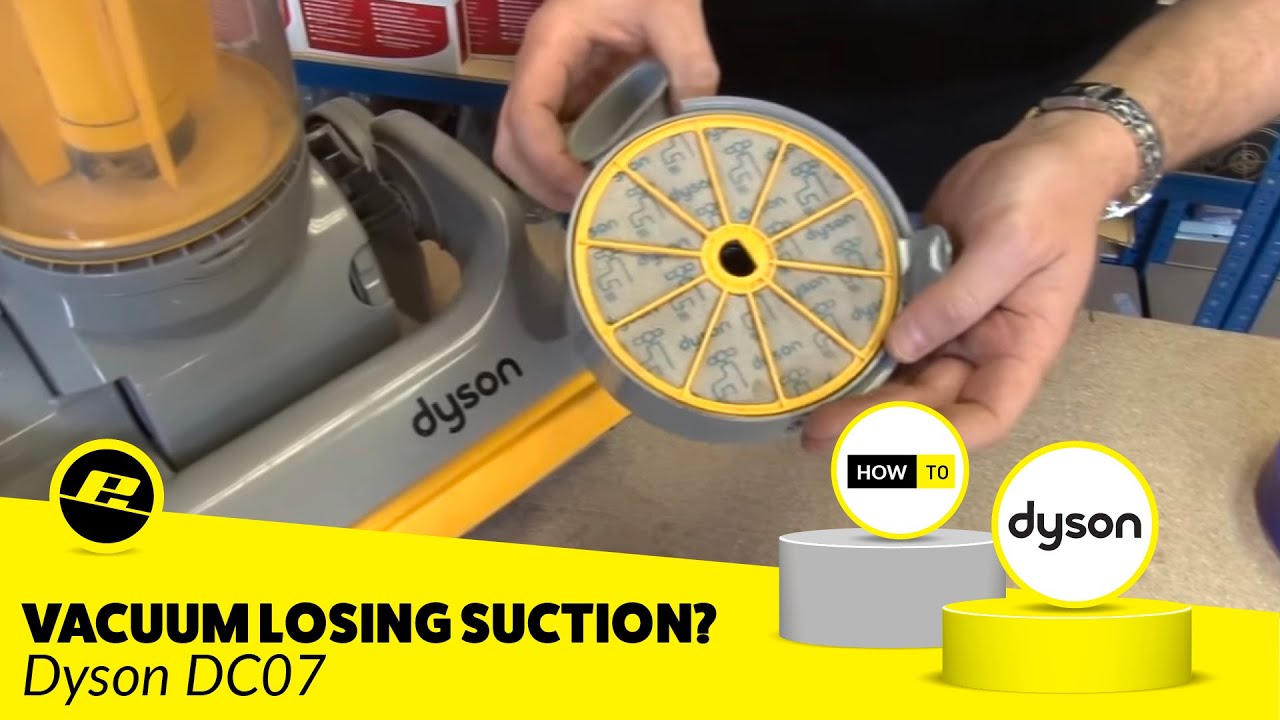
Dyson vacuums use one or two filters to trap fine dust. These should be cleaned regularly. A dirty filter can cut suction by more than 50%.
How To Clean Dyson Filters
- Remove the filter (usually marked with a purple ring).
- Rinse under cold water until water runs clear.
- Squeeze out excess water.
- Let the filter dry for 24 hours—never reinstall wet.
- Place back into the vacuum.
Most Dyson filters need washing every 1–3 months. Some models have more than one filter—check your manual.
Filter Types And Cleaning Frequency
Different Dyson models use different filter types. Here’s a quick comparison:
| Model | Number of Filters | Recommended Cleaning |
|---|---|---|
| Dyson V8 | 2 (pre- and post-motor) | Every 1-2 months |
| Dyson Ball Animal 2 | 1 | Every 1-3 months |
| Dyson V11 | 1 (lifetime filter) | Every 1-2 months |
Many people forget the post-motor filter if their vacuum has one. Always check for all filters your model uses.
Dust Bin Issues: More Than Just “full”
A full dust bin isn’t the only issue. Sometimes, even after emptying, the vacuum still has no suction. Look for:
- Dirt stuck in the shroud (the mesh cylinder inside the bin)
- Improperly seated bin it must click into place
- Wet debris Dyson vacuums are not made for wet cleaning
Clean the shroud with a small brush. Never wash the cyclone or shroud with water unless your manual says it’s safe.
Air Leaks And Seals
A less obvious reason for no suction is an air leak. Over time, seals and gaskets can crack or become misaligned.
How To Check For Leaks
- Listen for a hissing sound while the vacuum is running.
- Feel around the bin and hose connections for escaping air.
- Inspect rubber seals for cracks or tears.
If you find damage, you can often buy replacement seals online. In some cases, you may need to contact Dyson support.
Brush Bar And Belt Problems
If your vacuum has a motorized brush bar, problems here can also cause suction loss.
- Broken or stretched belt: The brush does not spin.
- Motorized head not working: Some cordless Dysons have a separate motor in the head.
Check the brush for movement and listen for unusual sounds. If the belt is broken, you may notice a burning smell.
Motor Problems: When To Seek Help
If you’ve checked everything and your Dyson still has no suction, the motor may be failing. Signs include:
- Loud or unusual noises
- Burning smell
- Vacuum shuts off during use
Motor repairs are not a DIY job for most people. Contact Dyson support or a qualified repair center.

Quick Reference: Most Common Dyson Suction Loss Causes
Here’s a comparison of the most common causes and how to fix them:
| Problem | Signs | Solution |
|---|---|---|
| Clogged filter | Low suction, dusty smell | Wash or replace filter |
| Hose blockage | No suction at hose, normal power | Clear blockage with stick or broom handle |
| Full dust bin | Bin over halfway full | Empty and clean shroud |
| Air leak | Hissing sound, loss of power | Check seals, replace if needed |
| Brush bar jam | Brush not spinning | Remove hair/debris, check belt |
Less Obvious Causes Most People Miss
Many users overlook these two problems:
- Mini blockages in the cyclone assembly: Fine dust can build up inside the cyclone cones, blocking air. Tap the assembly gently over a trash can and use a small brush to clean.
- Secondary filters hidden in the machine: Some Dysons have a secondary HEPA filter, often accessed only with a screwdriver. If your vacuum has one, clean or replace it according to the manual.
Preventing Future Suction Loss
Prevention is easier than repair. Follow these simple habits:
- Empty the bin after every use (or when half full).
- Clean filters regularly—set a reminder on your phone.
- Check for blockages if suction drops.
- Never vacuum up wet items—they cause clogs and damage filters.
- Inspect attachments for cracks or stuck objects.
These steps can extend your vacuum’s life and keep it working at full power.
When To Call Dyson Support
If you’ve tried all troubleshooting steps and your vacuum still does not work, it’s time for expert help. Dyson offers support by phone, online chat, and at service centers. Have your model number and purchase details ready.
- Warranty: Dyson vacuums usually come with a 2-5 year warranty. Repairs may be free if the problem is covered.
- Parts: You can often buy replacement filters, hoses, and brush bars directly from Dyson.
Visit the official Dyson Support page for more details.

How Dyson Suction Compares With Other Brands
You may wonder if suction problems are unique to Dyson. Here’s a quick look at how Dyson compares to other popular brands:
| Brand | Average Suction Power (AW) | Filter Maintenance | Blockage Tolerance |
|---|---|---|---|
| Dyson V11 | 185 | 1-2 months | Low |
| Shark Apex | 135 | Monthly | Medium |
| Miele Blizzard CX1 | 120 | 3 months | High |
AW stands for air watts—a measure of suction power. Dyson models typically have higher suction but are less tolerant of blockages.
Practical Tips For Dyson Owners
- Check all parts after vacuuming up large debris. Coins, small toys, and socks are common culprits.
- Store your vacuum in a dry place. Moisture can damage filters and cause clogs.
- Label your filter cleaning date with a sticky note.
- If you have pets, clean the brush bar weekly pet hair builds up fast.
- Don’t ignore strange sounds rattling, whistling, or grinding means something is wrong.
Frequently Asked Questions
Why Does My Dyson Vacuum Have No Suction After Cleaning The Filter?
If you still have no suction after cleaning the filter, check for blockages in the hose, wand, or cyclone. Also, make sure the filter is completely dry and installed correctly. A wet filter or a missing seal can prevent airflow.
Can A Dyson Vacuum Lose Suction If The Dust Bin Is Not Full?
Yes, even a partially full bin can block airflow, especially if fine dust is packed around the shroud. Always empty the bin when it reaches the halfway mark for best performance.
How Often Should I Clean Dyson Filters?
Most Dyson filters should be cleaned every 1–2 months. If you vacuum frequently or have pets, clean them more often. Always let filters dry for 24 hours before reinstalling.
What Should I Do If My Dyson Still Has No Suction After Checking For Blockages And Cleaning Filters?
If you’ve checked all obvious issues and the vacuum still doesn’t work, inspect for air leaks or broken seals. If the problem continues, contact Dyson support or a qualified repair technician.
Is It Safe To Wash All Dyson Vacuum Parts With Water?
No. Only the filters and some dust bins are washable. Never wash the cyclone assembly or motorized parts unless your manual says it’s safe. Water damage can void your warranty.
A Dyson vacuum with no suction can be frustrating, but most problems have simple fixes. Take your time to check each part, clean regularly, and watch for less obvious issues like hidden blockages or air leaks. With the right care, your Dyson can deliver strong, reliable cleaning for years.
If you run into a problem you can’t fix, don’t hesitate to reach out to Dyson support—they’re there to help keep your vacuum working its best.