
Browning trail cameras are popular with hunters, wildlife enthusiasts, and property owners. These devices help track animal movement, monitor security, and capture unique nature moments. However, like any technology, Browning trail cameras can face problems that frustrate users. Some issues are easy to fix, while others need deeper attention.
If you’re experiencing trouble with your camera, understanding common problems and solutions can save you time and money.
Common Browning Trail Camera Problems
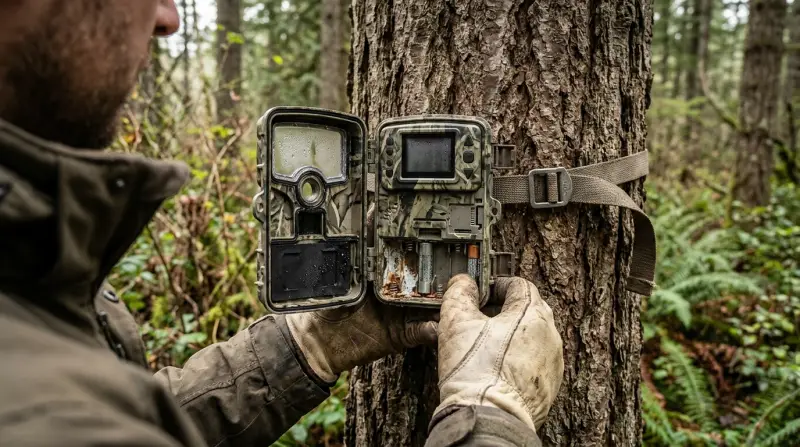
Trail cameras must survive outdoor conditions and perform reliably. Below are the most frequent Browning trail camera issues and how they affect users.
Battery Drain And Power Issues
One of the most widespread complaints is rapid battery drain. Many users notice their Browning camera’s batteries dying much faster than expected. This often happens because:
- Cold weather lowers battery performance.
- Using alkaline batteries instead of recommended lithium.
- Leaving the camera in high-activity zones, causing frequent photo triggers.
Another power-related problem is the camera not turning on. Sometimes, this results from loose battery connections or corroded battery terminals. If the device doesn’t power up, checking battery placement and cleaning terminals can help.
Sd Card Errors
Trail cameras depend on SD cards to save images and videos. Browning models sometimes show SD card errors, which might include:
- “Card error” on the display screen.
- Camera not saving photos.
- Images corrupted or missing.
These issues often occur due to using cards larger than the recommended size (usually 32GB), inserting cards with wrong formatting (not FAT32), or using low-quality brands.
Blurry Images And Video Quality Problems
Users expect clear photos and videos, but sometimes Browning cameras produce blurry or dark results. Reasons include:
- Dirty or fogged lens.
- Incorrect focus setting.
- Low light conditions, especially at dawn or dusk.
- Motion blur from fast-moving animals.
It’s helpful to clean the lens regularly and adjust the camera’s angle for better lighting.
Trigger Speed And Missed Shots
Browning cameras are known for fast trigger speeds, but some users report missed shots or delayed triggers. This could be due to:
- Faulty PIR (Passive Infrared) sensor.
- Improper camera placement.
- Too much vegetation or obstructions.
Testing the camera’s detection range and clearing the area in front can improve performance.
Date And Time Not Saving
Some Browning cameras fail to keep the correct date and time. This can cause confusion when reviewing images. Usually, this happens because:
- Battery is removed for too long.
- Internal clock malfunctions.
- Firmware glitches.
Resetting the settings or updating firmware can solve this.
Moisture And Weather Damage
Although Browning trail cameras are built for outdoor use, weather can still cause problems. Common issues include:
- Water or moisture inside the camera case.
- Fogged lens or screen.
- Corroded internal parts.
Placing the camera under cover and using silica gel packs can reduce moisture risk.
Software And Firmware Issues
Software bugs can cause Browning cameras to freeze, not record, or behave unpredictably. Firmware updates sometimes fix these bugs. However, applying updates incorrectly may lead to new issues. Always follow the manufacturer’s instructions for updates.
Troubleshooting Browning Trail Camera Problems
Solving camera issues requires a systematic approach. Below are practical steps to diagnose and fix common problems.
Checking Battery And Power Supply
Start by inspecting the batteries:
- Use lithium batteries for longer life and better cold-weather performance.
- Check battery terminals for corrosion and clean with a cotton swab.
- Make sure batteries are inserted correctly and fully seated.
If the camera still won’t turn on, try a fresh set of batteries from a reliable brand.
Sd Card Solutions
SD card errors are frequent but mostly easy to fix:
- Use SD cards of recommended size (up to 32GB).
- Format the card in the camera before use, not on a computer.
- Avoid cheap, generic SD cards. Choose reliable brands like SanDisk or Lexar.
If photos are missing, check if the card is full or locked.
Improving Image And Video Quality
For blurry or poor-quality images:
- Clean the lens gently with a microfiber cloth.
- Adjust the camera’s position for optimal lighting.
- Set the camera’s sensitivity according to the environment.
If motion blur is a problem, experiment with different trigger speeds and sensitivity settings.
Fixing Trigger Speed And Detection Problems
If the camera misses shots or reacts slowly:
- Remove branches, tall grass, or leaves blocking the sensor.
- Place the camera at the right height (about 3 feet off the ground).
- Test detection range with a walk test.
Some models let you adjust trigger sensitivity in the settings menu.
Resolving Date And Time Issues
To fix date and time problems:
- Reset the camera to factory settings.
- Set the date and time after changing batteries.
- Check for firmware updates on the official Browning website.
Keeping batteries installed, even when not in use, helps maintain the clock.
Preventing Moisture And Weather Damage
Protect your camera from rain and humidity by:
- Mounting it under trees or using a waterproof housing.
- Adding silica gel packs inside the case.
- Inspecting the camera after storms for signs of water intrusion.
Handling Software And Firmware Glitches
Update firmware only from official sources. Follow instructions carefully and avoid interrupting the update process. If the camera freezes or crashes, remove batteries and restart after a few minutes.

Comparison Of Browning Trail Camera Models And Reliability
Below is a comparison of three popular Browning trail camera models, focusing on reliability and common issues:
| Model | Battery Life | SD Card Compatibility | Image Quality | Weather Resistance |
|---|---|---|---|---|
| Strike Force HD | 6-8 months | Up to 32GB | High (20MP) | Good, occasional fogging |
| Dark Ops Pro | 8-10 months | Up to 32GB | Very High (24MP) | Excellent, strong seal |
| Spec Ops Elite | 5-7 months | Up to 32GB | Superb (30MP) | Moderate, needs extra cover |
This data shows that battery life varies by model, and weather resistance depends on build quality. Choosing a model that matches your climate and usage is important.
User Experiences And Common Mistakes
Many problems happen because users overlook small details. Here are two insights beginners often miss:
- Always format SD cards in the camera before first use. Formatting on a computer can cause compatibility issues.
- Check firmware version before troubleshooting. An outdated firmware may cause repeated errors.
Other common mistakes include:
- Using old batteries from different brands together.
- Mounting cameras too low or high, missing animal movement.
- Not updating settings after changing batteries.
Learning from these mistakes can extend your camera’s lifespan.

Credit: www.trailcampro.com
Preventative Maintenance Tips
Regular maintenance prevents most Browning trail camera problems:
- Clean the lens and sensors monthly.
- Check seals and gaskets for cracks or wear.
- Store cameras indoors when not in use.
- Use high-quality batteries and SD cards.
Quick visual checks after heavy rain or extreme cold are also helpful.
When To Contact Browning Support
If you’ve tried all troubleshooting steps and the camera still fails, it may need professional repair. Contact Browning customer support if:
- The camera is under warranty.
- Hardware is visibly damaged.
- Firmware update fails and the camera won’t restart.
Support can offer guidance or arrange a replacement if needed. For details, visit Browning Trail Cameras Official.

Credit: www.youtube.com
Data Table: Common Problems And Solutions
To help you quickly identify issues, here’s a handy reference:
| Problem | Possible Cause | Solution |
|---|---|---|
| Battery drains quickly | Cold weather, alkaline batteries | Use lithium batteries, protect from cold |
| SD card error | Wrong format, low-quality card | Format in camera, use quality brands |
| Blurry images | Dirty lens, low light | Clean lens, adjust position |
| Date/time resets | Battery removed, firmware bug | Reset settings, update firmware |
| Missed shots | Sensor blocked, placement | Clear area, adjust height |
Frequently Asked Questions
Why Does My Browning Trail Camera Drain Batteries So Fast?
Rapid battery drain can be caused by cold weather, using alkaline batteries, or frequent triggers. Try lithium batteries and place the camera in less active zones.
What Sd Card Should I Use With Browning Trail Cameras?
Use SD cards up to 32GB, formatted in the camera. Brands like SanDisk and Lexar are reliable. Avoid cheap or microSD cards with adapters.
How Do I Update Firmware On My Browning Trail Camera?
Visit the official Browning website, download the correct firmware, and follow their instructions exactly. Never interrupt the update process or use unofficial files.
Why Are My Photos Blurry Or Dark?
Blurry or dark photos are often due to dirty lenses, low light, or motion blur. Clean the lens, change camera angle, or adjust trigger settings for better results.
How Can I Prevent Moisture Damage In My Trail Camera?
Mount the camera under cover, use silica gel packs inside the case, and check seals regularly. After storms, inspect for water inside and dry if needed.
Browning trail cameras offer great features but can face practical problems in real-world use. Understanding battery, SD card, image, and weather issues helps you keep your camera reliable. Regular maintenance, careful settings, and proper troubleshooting will reduce frustration and help you capture the wildlife moments you’re after.
If persistent problems occur, Browning support is ready to help. With these tips, you’ll get more from your trail camera and waste less time fixing avoidable mistakes.