
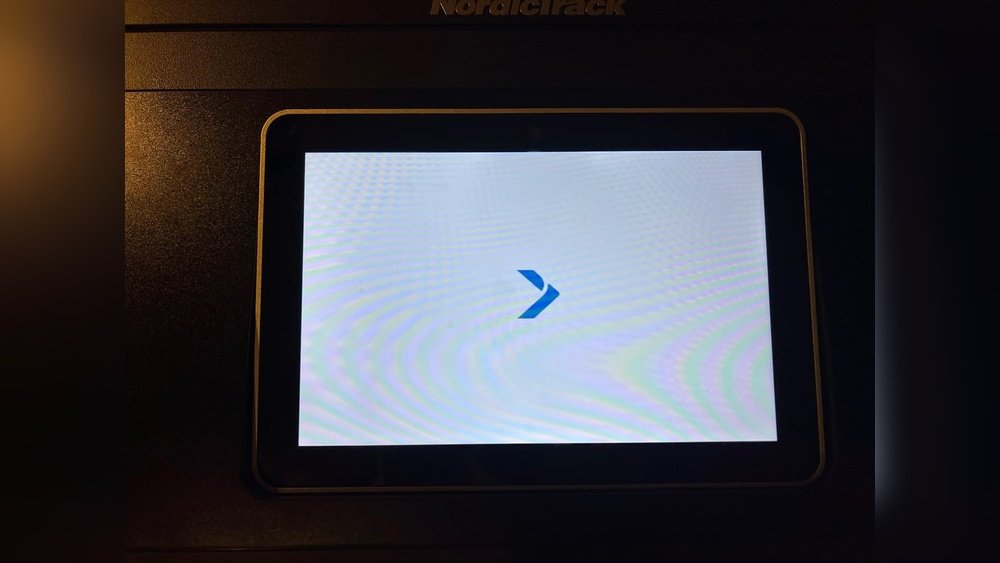
If you own a NordicTrack treadmill or other fitness equipment, you expect every workout to go smoothly. But sometimes, you might turn on the machine and see nothing but a white screen on the console. This problem can be frustrating, especially if you rely on the interactive features or iFit workouts. Many users face this issue, but not everyone knows what causes it—or how to fix it. Let’s break down why the NordicTrack white screen happens, what steps you can try at home, and when you need expert help.
What Does The Nordictrack White Screen Mean?
Seeing a white screen on your NordicTrack console means the display is not loading properly. This can happen during startup or while using the machine. Sometimes, the screen stays white, and you cannot access any features or workouts. In other cases, the screen flashes white and then goes dark.
This issue is not limited to one model. It can happen on treadmills, bikes, ellipticals, and other NordicTrack machines with a touchscreen. The white screen usually points to problems with:
- The software or firmware
- The internet connection
- Loose or damaged cables
- The display itself
Common Causes Of The White Screen
Understanding the causes can help you decide if you can fix the problem yourself or need to call a technician.
1. Software Glitches
Updates or errors in the firmware (the machine’s operating system) can cause the display to freeze or show a white screen.
2. Faulty Connections
Loose wires inside the console or damaged cables can stop the screen from working.
3. Power Issues
Surges, outages, or unstable power supply can disrupt the machine’s normal function.
4. Internet Or Ifit Problems
Many NordicTrack machines need a stable internet connection, especially when updating or using iFit. A poor connection can cause display errors.
5. Hardware Failure
Sometimes, the actual screen or the internal computer board fails. This is less common but more serious.
Quick Troubleshooting Steps
Before you panic, try some simple steps. Many white screen issues can be fixed at home.
- Restart Your Machine
- Turn off the power using the main switch near the base.
- Unplug the machine from the wall.
- Wait at least 60 seconds.
- Plug it back in and turn on the power.
- Check for Loose Cables
- If you feel confident, carefully open the console (following safety instructions in your manual).
- Make sure all connectors are secure.
- Try a Console Reset
- Some NordicTrack models have a small reset hole. Insert a paperclip and hold for 10 seconds.
- Others may need a sequence, such as holding the Stop and Speed+ buttons together while powering on.
- Test the Power Outlet
- Plug another device (like a lamp) into the same outlet to check for power issues.
- Check Your Internet
- If your machine uses Wi-Fi, make sure the signal is strong.
- Try restarting your router.
Here’s a quick comparison of basic troubleshooting steps and what they address:
| Step | Addresses | Difficulty |
|---|---|---|
| Restart Machine | Temporary software glitches | Easy |
| Check Cables | Loose connections | Medium |
| Console Reset | Deeper firmware errors | Medium |
| Test Outlet | Power supply issues | Easy |
| Check Internet | Network or iFit problems | Easy |
When To Try Advanced Fixes
If basic steps do not work, you may need to try advanced troubleshooting. But be careful—some actions can void your warranty or cause more problems.
Firmware Update Or Reinstall
If the machine starts but the display stays white, the firmware may be corrupted. Some models allow you to update or reinstall the firmware using a USB drive. You’ll need:
- A computer with internet access
- A blank USB drive (usually 1GB or larger)
- The correct firmware file from NordicTrack’s support site
Follow the instructions closely. If you make a mistake, the console might not work at all.
Factory Reset
A factory reset will erase all data and return the console to original settings. On most NordicTrack touchscreens:
- Tap the screen ten times quickly (if the screen is responsive).
- Look for a hidden factory reset menu.
- Follow prompts to reset.
If the screen is completely white and unresponsive, this method may not work.
Inspecting Internal Components
In rare cases, the console board or display may be damaged. If your machine is under warranty, contact NordicTrack support before opening the console. If not, you can:
- Unplug the unit
- Open the console back carefully
- Look for burnt areas, loose ribbon cables, or water damage
If you see clear damage, you likely need a replacement part.
Here’s a breakdown of when to try each advanced fix:
| Fix | When to Use | Risks |
|---|---|---|
| Firmware Update | White screen after update or crash | May brick console if done wrong |
| Factory Reset | Settings errors, unresponsive screen | All data lost |
| Internal Inspection | No fix after all else, out of warranty | May void warranty or cause more damage |
When To Call For Professional Help
Sometimes, home fixes are not enough. You should call NordicTrack customer service or a qualified technician if:
- The machine is still under warranty
- You see burning smell, smoke, or melted parts
- None of the above steps help
- You are not comfortable opening the console
Professional help can be costly if you are out of warranty, but it’s often safer for hardware repairs.
Preventing The White Screen Problem
You can reduce your chances of seeing the white screen with simple habits:
- Use a Surge Protector: Sudden power surges can damage electronics.
- Update Firmware Carefully: Only update through official sources and do not unplug the machine during updates.
- Keep Software Up to Date: Regular updates fix bugs and improve stability.
- Clean the Console: Dust or moisture inside can cause problems.
- Avoid Overloading Outlets: Sharing power with other high-wattage devices can cause drops.
A little prevention goes a long way. Most white screen problems are easier to prevent than to fix.

Credit: www.youtube.com
Real User Experiences
Many users report the white screen problem in online forums and reviews. Some have found success with simple resets; others needed new parts.
For example, a user on the official NordicTrack Community said:
“I tried everything, but the screen was still white. Support told me to check the ribbon cable inside the console. It was loose. I pressed it back in and the screen worked!”
But another treadmill owner wrote:
“My treadmill was out of warranty, and the white screen would not go away. I had to replace the console board, which cost over $250. ”
These stories show that sometimes the fix is easy, and other times, you need professional help.
Cost Comparison: Diy Vs. Professional Repair
Here’s a look at the average costs:
| Solution | Estimated Cost | Warranty Impact |
|---|---|---|
| Basic Reset/Update | $0 (DIY) | None |
| Replace Cables | $10–$40 | May void if self-replaced |
| Console Board Replacement | $150–$400 | Usually voids if self-replaced |
| Professional Repair | $100–$300 (labor only) | Preserves warranty |
As you can see, DIY fixes are cheaper, but you risk your warranty or causing more problems.
Key Insights Most People Miss
Many guides mention basic steps, but here are two insights that often get overlooked:
1. Check For Software Updates Before Problems Start:
Many white screen issues happen right after a failed update. Logging into your iFit account and checking for pending updates can prevent problems.
2. Document Error Messages Or Behaviors:
If you call support, having notes or even photos of what happens before the white screen appears can speed up diagnosis. Many users forget this step, but it can save hours.
When Is Replacement A Better Option?
If your machine is more than five years old or the repair cost is over half the price of a new machine, replacement might be smarter. Newer NordicTrack models have more stable software and better support for firmware updates.

Credit: www.youtube.com
Where To Find More Help
If you need more advice, the official NordicTrack support page is a good place to start. It offers manuals, troubleshooting guides, and contact info:
nordictrack Support
You can also find community advice on fitness forums and YouTube, but always check information against official guidance.
Frequently Asked Questions
What Causes The Nordictrack White Screen?
The most common causes are software glitches, loose cables, power issues, or problems with the display hardware. Sometimes, failed updates or poor Wi-Fi connections can also trigger the white screen.
Can I Fix The White Screen Myself?
Yes, in many cases. Try restarting, checking cables, and resetting the console. For more complex problems like firmware corruption or board failure, you may need professional help or to follow advanced steps.
Will Fixing The White Screen Void My Warranty?
Simple steps like restarting or updating do not affect your warranty. However, opening the console or replacing parts yourself might void the warranty. Always check your user manual or contact support before trying advanced fixes.
How Much Does It Cost To Repair The White Screen Issue?
Basic resets are free. Replacing cables might cost $10–$40. A new console board can cost $150–$400, plus labor if you hire a technician. Sometimes, it’s cheaper to buy a new machine.
Where Can I Get Official Help With My Nordictrack?
Visit the official NordicTrack Support page for troubleshooting, manuals, and warranty help. You can also call their customer service for personalized assistance.
A white screen on your NordicTrack is annoying, but not always a disaster. With careful troubleshooting and a little patience, you can often get back to your workouts quickly. If you ever feel unsure, reach out to the experts—your fitness journey shouldn’t be put on hold for long.

Credit: www.reddit.com