
A stud sensor is a small tool that helps you find wooden or metal studs behind walls. The Zircon stud sensor is one of the most popular brands for this purpose. Many homeowners and professionals trust it to make hanging shelves, TVs, or artwork safer and easier. But what happens when your Zircon stud sensor stops working? It can be frustrating, especially if you need to find a stud quickly. This guide explains why your Zircon stud sensor might not work, how to fix it, and what you can do to get reliable results every time.
How A Zircon Stud Sensor Works
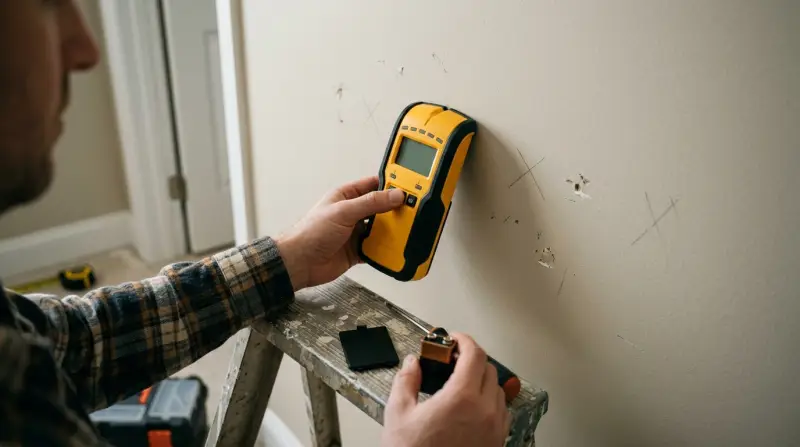
A Zircon stud sensor uses electronic signals to detect changes in wall density. When you move the sensor across a wall, it senses the edges of studs hidden under the surface. Most models have a button you hold while moving the device slowly.
A light or beep signals when you’ve found a stud edge.
These sensors use two main technologies:
- Edge detection: Finds the edges of a stud.
- Center finding: Some advanced models can also identify the stud’s center.
Knowing how your sensor works makes it easier to troubleshoot problems.
Common Reasons Your Zircon Stud Sensor Is Not Working
Let’s break down the most common causes behind a Zircon stud sensor not working properly:
1. Dead Or Weak Batteries
Low battery power is the top reason for stud sensor failure. The device needs enough power to send signals through the wall. If batteries are weak, the sensor may beep randomly, show no lights, or give false readings.
2. Incorrect Calibration
Zircon sensors must be calibrated before use. If you skip this step, the sensor can’t “learn” the wall’s normal thickness and may not detect studs at all.
3. Wall Surface Issues
Thick paint layers, wallpaper, tiles, or textured finishes can block the sensor’s signals. Metal mesh (used in old plaster walls) or foil-backed insulation will also confuse the device.
4. Faulty Sensor
Like any electronic tool, sensors can break. Dropping the sensor or exposing it to water can damage the internal parts, making it unreliable or dead.
5. User Error
Moving the sensor too quickly, pressing too hard, or not holding the button the entire time can all cause detection problems.
6. Electrical Interference
Nearby electrical wires or metal pipes can create false positives or prevent the sensor from working. High-voltage wires inside the wall may also cause problems.
Troubleshooting Steps For A Zircon Stud Sensor
If your sensor isn’t working, try these steps in order. Each step solves a common problem and can get your tool working again.
Step 1: Replace The Batteries
Always use fresh, high-quality batteries. Weak batteries are the most common cause of sensor problems. Check the battery compartment for rust or corrosion, and clean if necessary.
Step 2: Calibrate The Sensor Correctly
Calibration is key. Place the sensor flat against the wall, away from any likely stud location, and hold the calibration button until the light or display tells you it’s ready. If you move the sensor during calibration, start over.
Step 3: Choose The Right Wall Spot
Avoid thick paint, wallpaper seams, or tiles when possible. Try to calibrate and scan on a smooth, clean section of wall.
Step 4: Use Proper Technique
Move the sensor slowly—about 1 inch per second. Keep it flat and don’t tilt or lift the sensor. Always hold the button while scanning.
Step 5: Watch For Interference
If you suspect wires or pipes, use the sensor’s “deep scan” or “metal scan” feature if available. Stay clear of electrical outlets and switches during calibration.
Step 6: Test On A Known Stud
Every home has at least one wall where studs are easy to find (often near electrical outlets). Test your sensor there. If it works, the issue may be the wall, not the device.
Step 7: Reset Or Replace The Sensor
If none of these steps work, reset the sensor by removing the battery for a few minutes. If it still fails, the device may be broken and need replacement.
Quick Comparison: Common Zircon Models
Here’s a quick look at three popular Zircon stud sensor models and their key features:
| Model | Detection Modes | Battery Type | Special Feature |
|---|---|---|---|
| StudSensor e50 | Stud, Metal, AC Wire | 9V | WireWarning Indicator |
| StudSensor HD55 | Stud, DeepScan, AC Wire | 9V | Display Screen |
| MultiScanner 740 | Stud, Metal, AC Wire, DeepScan | 9V | Center Finding |
How To Tell If Your Sensor Or Wall Is The Problem
Sometimes, the issue is not the stud sensor but the wall itself. Here’s how to figure it out:
- Try the sensor on a different wall. If it works, the original wall likely has metal mesh, heavy paint, or foil insulation.
- Use a magnet to find nails or screws. If a magnet works but the sensor doesn’t, the sensor may be faulty.
- Check for signs of water damage or electrical wires. Wet walls can disrupt signals, and hidden wiring can cause false readings.
When To Replace Your Zircon Stud Sensor
Like most tools, stud sensors have a lifespan. Here are signs you need a new one:
- Cracked or damaged case
- Buttons that stick or don’t respond
- Display screen is blank or flickering
- Sensor works on some walls but not others, even after troubleshooting
If your sensor is over five years old, consider an upgrade—newer models are more accurate and handle tricky walls better.
Tips For Using A Zircon Stud Sensor Correctly
To get the best results, keep these tips in mind:
- Calibrate every time you scan a new wall or change surfaces.
- Move slowly for the most accurate readings.
- Mark both edges of the stud to find the center.
- Use painter’s tape to mark stud positions without damaging the wall.
- Test the sensor on a known stud before starting big projects.
- Store the sensor in a dry, safe place to avoid damage.
Many beginners forget to recalibrate after changing walls or surfaces. This simple step can fix many common issues.
Real Examples: Stud Sensor Problems And Fixes
Let’s look at a few real-world scenarios:
Case 1: You try to find a stud in a tiled bathroom, but your Zircon sensor gives false readings. In this situation, the tile’s thickness and the glue behind it confuse the sensor. Try scanning higher on the wall where there is just drywall, or use the “deep scan” feature if your model has it.
Case 2: Your sensor worked last week but now gives no lights or beeps. After changing the battery, it works again. This shows how important fresh batteries are for reliable results.
Case 3: You use the sensor near a light switch and get strange signals. This may be caused by electrical wires behind the wall. Move away from outlets and switches to avoid interference.
Quick Reference: Troubleshooting Guide
Here’s a simple chart for fast problem-solving:
| Problem | Likely Cause | Solution |
|---|---|---|
| No lights or sounds | Dead battery | Replace battery |
| False readings | Improper calibration | Recalibrate on clear wall |
| Sensor skips or jumps | Moving too fast | Scan slowly |
| Works on one wall, not another | Wall surface issue | Try different spot or use “deep scan” |
Upgrading To A New Stud Sensor: Is It Worth It?
Technology has improved in recent years. Newer Zircon models offer features like:
- DeepScan mode: For thick walls or surfaces.
- WireWarning: Alerts you to live electrical wires.
- LCD screens: Easier to read than old LED lights.
- Center finding: Helps you mount heavy items safely.
If you use your stud sensor often or have walls with tile, paneling, or thick paint, upgrading can save you time and frustration.
Safety Tips When Using A Stud Sensor
Never trust the sensor alone when drilling or nailing into a wall. Always:
- Double-check with a small nail or drill bit in a safe spot.
- Stay away from electrical outlets and switches.
- Use the AC wire detection feature if your sensor has one.
Accidentally hitting a wire or pipe can cause injury or damage. If you’re unsure, consult a professional.
How Zircon Stud Sensors Compare To Other Brands
Zircon is known for reliability, but other brands offer similar products. Here’s a quick comparison:
| Brand | Accuracy | Price Range | Special Features |
|---|---|---|---|
| Zircon | High | $20–$60 | WireWarning, DeepScan |
| Franklin Sensors | Very High | $30–$80 | Multi-sensor array |
| BLACK+DECKER | Medium | $15–$40 | Basic stud detection |
Zircon offers the best mix of accuracy and price for most users. For very thick walls or high accuracy, Franklin Sensors may be worth the extra cost.

Credit: www.youtube.com
Non-obvious Insights For Better Results
- Humidity can affect readings. If your wall is damp from weather or plumbing leaks, the sensor may not work well. Try drying the area or scanning a different wall.
- Metal corner beads (used to finish drywall corners) can give false stud signals. If you get a stud reading right at a corner, test further along the wall to confirm.
Most users don’t realize that wall repairs, old patches, or even wall art hangers left behind can create confusing signals. Always scan a wide area and look for a pattern—studs are usually spaced 16 or 24 inches apart.
Frequently Asked Questions
Why Does My Zircon Stud Sensor Beep Randomly?
Random beeping usually means the sensor needs new batteries, was not calibrated correctly, or is picking up electrical wires. Try replacing the battery and recalibrating on a clear section of wall.
Can A Zircon Stud Sensor Find Metal Studs?
Yes, most Zircon sensors have a “metal scan” mode. Check your model’s instructions. Metal studs are common in commercial buildings and some modern homes.
What Surfaces Can Confuse A Zircon Stud Sensor?
Thick tile, heavy wallpaper, foil-backed insulation, and textured finishes can block or confuse the sensor’s signals. Try scanning a different section or using “deep scan” mode if available.
How Often Should I Replace My Zircon Stud Sensor?
With proper care, a Zircon sensor can last several years. Replace if it’s physically damaged, gives false readings often, or if newer features would help your projects.
Is It Safe To Drill After Finding A Stud With A Sensor?
Always double-check before drilling. Use a small nail or drill bit to confirm the stud, and stay clear of electrical outlets. Use the AC wire warning feature if your sensor has one. If you’re unsure, ask a professional for help.
Final Thoughts
A Zircon stud sensor not working can cause real frustration, but most problems are easy to fix with a few simple steps. Always start with fresh batteries, calibrate carefully, and scan slowly. If you still have trouble, test on a known stud to decide if the wall or the sensor is at fault. Upgrading to a new model can also help if your walls are tricky or your sensor is old.
For official troubleshooting steps or warranty information, visit the Zircon website.