
When your UPS (Uninterruptible Power Supply) stops working while running on generator power, it can be stressful and confusing. Many people rely on UPS systems to keep computers, medical devices, or network equipment working during power outages. But sometimes, when you switch to generator power, the UPS refuses to operate as expected. If you’ve faced this problem, you’re not alone. Understanding why it happens and how to fix it can save you money, time, and headaches.
This guide explains why UPS units often fail to work with generators, what you can do to solve the issue, and how to prevent it from happening again. You’ll learn about common causes, practical troubleshooting steps, and real-world examples. Whether you’re a homeowner, IT manager, or small business owner, you’ll find clear advice to keep your equipment safe and powered.
Why Ups Fails On Generator Power
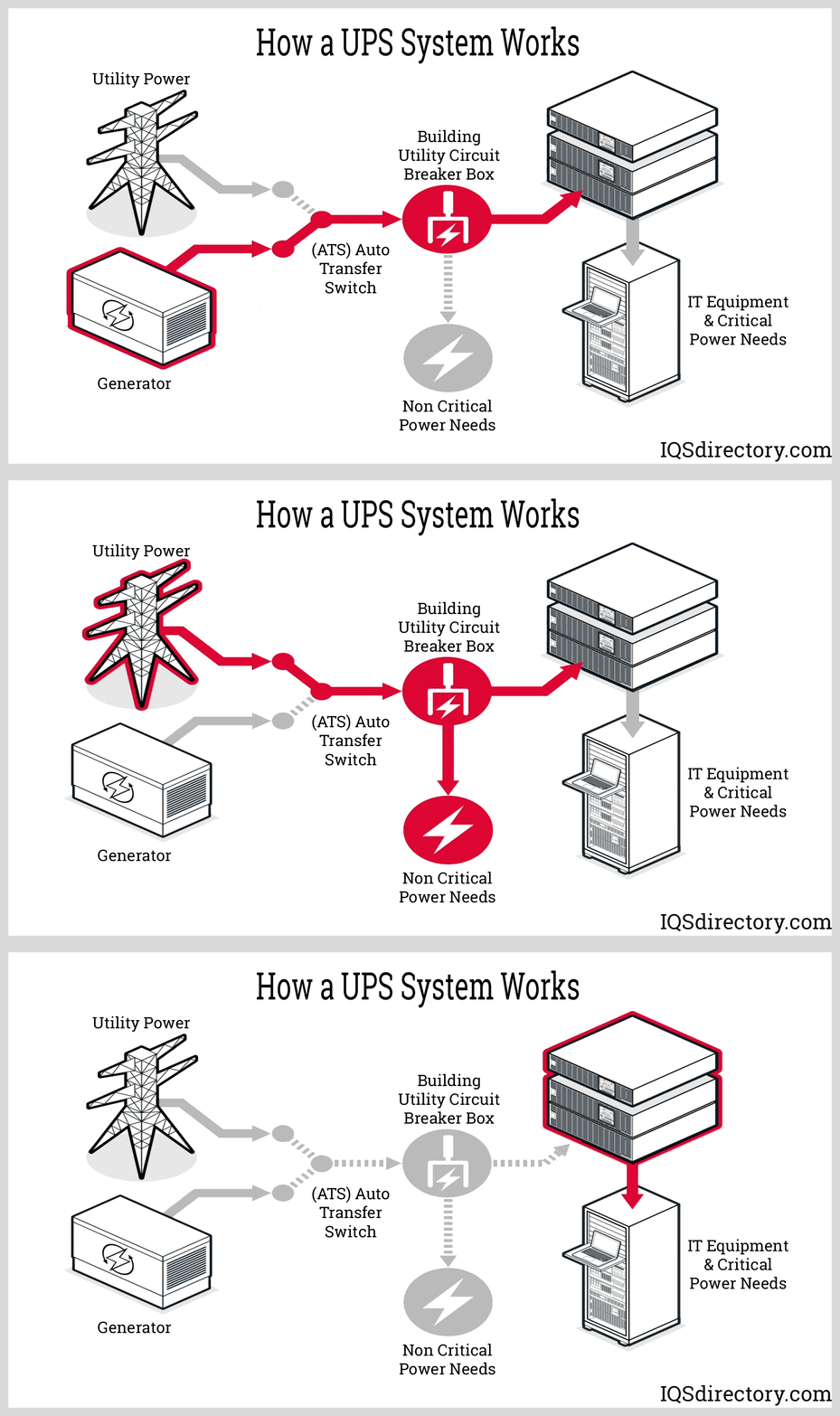
Many people think a generator can replace mains electricity without any problem. But generators and utility power are not the same. Several key differences can cause a UPS system to stop working or switch to battery mode while the generator is running.
Generator Output Quality
Generators often produce unstable voltage and frequency. Most UPS units are sensitive to these changes. They expect a stable voltage (usually around 120V or 230V, depending on your country) and a steady frequency (50Hz or 60Hz).
If the generator produces voltage that goes up and down or frequency that changes, the UPS may see this as unsafe. It will switch to battery mode or refuse to work. This is especially common with cheap generators or those without automatic voltage regulation (AVR).
Type Of Ups
There are three main types of UPS:
- Offline/Standby UPS: Only switches to battery when power fails. Sensitive to generator fluctuations.
- Line-Interactive UPS: Can handle minor voltage changes but still struggles with large generator swings.
- Online/Double Conversion UPS: Converts incoming power twice, making it more tolerant to generator output.
Here’s a quick comparison:
| UPS Type | Generator Compatibility | Common Issues |
|---|---|---|
| Offline/Standby | Poor | Frequent battery switch, shutdown |
| Line-Interactive | Moderate | Voltage errors, battery drain |
| Online/Double Conversion | Best | Usually works well, rare faults |
Generator Size And Load
If the generator is too small for the total load, it may not supply enough power. For example, a 2 kW generator powering a 2 kW load will struggle, especially when devices start up. This causes voltage drops, which the UPS sees as a problem.
Also, if the generator is overloaded, the UPS can shut down to protect itself.
Harmonics And Waveform
Cheaper generators often produce a modified sine wave instead of a pure sine wave. Many UPS units require a pure sine wave. If the waveform is poor, the UPS may not charge batteries or may refuse to accept generator power.
In a study by Schneider Electric, up to 40% of consumer UPS units failed to operate correctly on non-sine wave generator outputs.
Frequency Mismatch
Most countries use 50Hz or 60Hz. If the generator’s frequency is unstable or doesn’t match the UPS setting, the UPS will ignore generator power.
Grounding Issues
Incorrect grounding can cause the UPS to detect unsafe power and switch to battery. This is common with portable generators used outdoors.
Troubleshooting Steps
If your UPS is not working with generator power, follow these steps:
- Check Generator Output: Use a multimeter to measure voltage and frequency. If voltage is not stable or frequency fluctuates, adjust the generator or seek professional help.
- Review UPS Type: If possible, use an online/double conversion UPS for best results.
- Inspect Load Size: Make sure the generator’s capacity is at least 20% higher than the total load. This gives a safety margin for startup surges.
- Check Waveform: If your generator produces a modified sine wave, consider upgrading to a pure sine wave model.
- Grounding: Ensure the generator is properly grounded. Follow manufacturer instructions.
- Reduce Load: Unplug unnecessary devices. Try running only the UPS and critical equipment.
- Check for Overload: Make sure the UPS is not overloaded. If it is, reduce the load or upgrade your UPS.
- Test UPS Alone: Connect only the UPS to the generator. If it works, slowly add devices one by one to find the cause.
Here is a simple troubleshooting comparison:
| Problem | Likely Cause | Suggested Solution |
|---|---|---|
| UPS switches to battery | Generator voltage/frequency unstable | Adjust generator, use AVR |
| UPS shuts down | Overloaded generator or UPS | Reduce load, upgrade equipment |
| No UPS charging | Poor waveform | Upgrade generator |
| UPS does not recognize generator | Frequency mismatch | Set generator to correct frequency |
Real-world Examples
Let’s look at some examples to make the issue clearer:
- Office Case: An IT manager installed a 5 kW generator and several small UPS units. During outages, UPS units switched to battery and drained quickly. Testing showed the generator output had frequent voltage drops. Upgrading to a generator with AVR solved the issue.
- Home User: A homeowner with a line-interactive UPS faced repeated shutdowns during generator use. The generator produced a modified sine wave. Switching to a pure sine wave generator fixed the problem.
- Small Business: A retail shop had all devices plugged into one UPS and a portable generator. The generator was overloaded. Removing non-essential devices allowed the UPS to operate normally.
Preventing Ups Problems With Generators
To avoid UPS issues on generator power, plan ahead. Consider these tips:
- Choose the Right Generator: Select a generator with pure sine wave output and AVR. Check specs before buying.
- Match UPS and Generator Ratings: Make sure the generator output (watts) is above the UPS rating and all connected equipment.
- Stable Frequency: Use generators with digital frequency control for best results.
- Proper Grounding: Always ground your generator as per the manufacturer’s instructions.
- Routine Maintenance: Regularly check generator output using a multimeter or power quality meter.
- Consider UPS Upgrade: If you face frequent issues, consider upgrading to an online UPS.
- Keep Load Balanced: Don’t overload your generator or UPS. Spread devices across multiple UPS units if needed.
- Professional Installation: For large setups, get help from a certified electrician.
Common Mistakes And Non-obvious Insights
Many beginners overlook these important details:
- Ignoring Power Factor: Most devices have a power factor less than 1. For example, a computer may use 400W but have a power factor of 0.7, meaning it draws more apparent power. Always check the total VA (volt-ampere) load, not just watts.
- Assuming All UPS Are Equal: Some think any UPS will work with any generator. In reality, compatibility depends on UPS type, generator quality, and load.
- Skipping Load Testing: Before an emergency, test your setup. Run the generator, connect the UPS, and see if everything works. Many problems only appear under real conditions.
Choosing The Right Ups And Generator Pair
When buying a UPS and generator, consider:
- UPS Type: Online UPS is best for generator compatibility.
- Generator Output: Pure sine wave and stable voltage are critical.
- Capacity: Choose a generator at least 25% larger than your maximum load.
- Brand Reputation: Go for trusted brands that clearly state compatibility with UPS systems.
A comparison of generator features:
| Feature | Standard Generator | UPS-Friendly Generator |
|---|---|---|
| Sine Wave Output | Modified | Pure |
| AVR | No | Yes |
| Frequency Control | Manual | Digital/Automatic |
| Grounding | Basic | Enhanced |
Safety Considerations
Never ignore safety when running UPS systems on generator power:
- Overheating Risk: Overloaded generators and UPS units can overheat, leading to fire or equipment damage.
- Shock Hazard: Improper grounding can cause electric shock. Always follow safety instructions.
- Battery Life: Frequent switching between generator and battery reduces UPS battery life.
When To Seek Professional Help
If you try all troubleshooting steps and still face issues, contact a professional electrician or power systems expert. Complex problems like harmonic distortion, unstable frequency, or wiring faults require expert tools and knowledge.

Additional Resources
For more technical details and troubleshooting guides, the Schneider Electric website offers research papers and recommendations for UPS and generator compatibility. You can read more at Schneider Electric.
Frequently Asked Questions
Why Does My Ups Keep Switching To Battery On Generator Power?
This usually happens because the generator output is unstable or has a poor waveform. The UPS sees this as unsafe and switches to battery mode to protect your devices.
Can I Use A Cheap Generator With Any Ups?
No. Cheap generators often produce modified sine waves and unstable voltage. Most UPS units require pure sine wave and stable power. Always check compatibility before buying.
How Can I Make My Ups Work With My Generator?
Use a generator with pure sine wave output, AVR, and enough capacity. Test your setup, reduce unnecessary load, and ground the generator properly.
Is It Safe To Run Sensitive Equipment On Generator Power Through A Ups?
It can be safe if your generator and UPS are compatible and the load is within limits. But poor generator output can damage sensitive electronics. Always test and monitor your setup.
What Type Of Ups Is Best For Generator Power?
Online/double conversion UPS units offer the best compatibility with generators. They handle unstable voltage and frequency better than other types.
When your UPS does not work with generator power, it’s usually because of issues with voltage, frequency, waveform, or load. Understanding these factors helps you fix problems and prevent damage to your equipment. By choosing the right generator, matching it with the right UPS, and following safety practices, you can keep your devices running smoothly during power outages.
Regular testing and maintenance are key. If you face ongoing issues, don’t hesitate to seek expert help. With the right setup, you can enjoy reliable backup power whenever you need it.