
If you own a Whirlpool oven, you probably love its features, from precise temperature control to smart cooking modes. But what happens when your oven suddenly stops working and flashes the F3E2 error code? For many, seeing an error code can feel like a major setback—especially if you’re in the middle of preparing a meal. The good news is, the Whirlpool Oven F3E2 code usually points to a specific problem that you can often understand and even fix without calling a technician right away. In this guide, you’ll learn exactly what the F3E2 code means, why it appears, and what you should do next. With clear steps, real examples, and practical advice, you’ll feel confident facing this issue and getting your oven back in action.
What Does F3e2 Mean On A Whirlpool Oven?
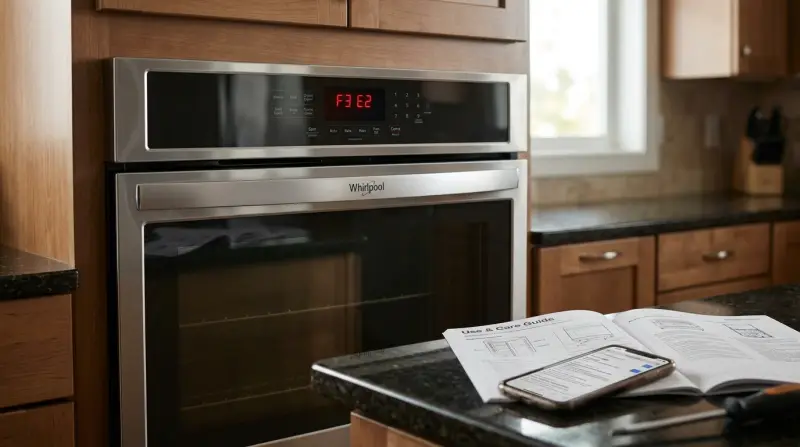
The F3E2 code on Whirlpool ovens signals a problem with the oven’s temperature sensor circuit. This error typically means the oven thinks the temperature sensor (also called the oven probe or thermistor) is shorted or not working correctly. The sensor’s job is to measure the oven’s heat and tell the control board if it’s too hot, too cold, or just right. When the control board receives a signal that doesn’t make sense—like a reading that’s out of range—it triggers the F3E2 alert.
If you see this code, your oven will likely stop heating until the problem is fixed. This is a safety feature, preventing overheating or undercooking that could damage the oven or your food.
Main Causes Of The F3e2 Error
Several factors can trigger the F3E2 code. Understanding these causes helps you troubleshoot more effectively.
- Faulty Temperature Sensor: The most common reason is a broken or shorted temperature sensor. Over time, sensors can wear out or fail due to repeated exposure to high temperatures.
- Wiring Issues: Loose, damaged, or corroded wires between the sensor and the control board can interrupt the signal. Even a small break in the wire can cause the error.
- Bad Control Board: Sometimes, the oven’s electronic control board (the “brain” of the oven) is at fault. If the board can’t read the sensor correctly, it may show the F3E2 code.
- Moisture or Grease: Spills inside the oven can seep into electrical connections, causing short circuits or faulty readings.
- Connector Problems: If the sensor is not plugged in securely, or if connectors are dirty or loose, the oven might misread the temperature.
Non-obvious insight: Sometimes, self-cleaning cycles can overheat the sensor, causing early failure. Also, using harsh oven cleaners near the sensor can damage its surface or connections.
How To Diagnose The F3e2 Error
Before calling for help, you can do a few checks yourself. Here’s a practical approach:
Power Cycle The Oven
Unplug the oven (or switch off its circuit breaker) for a minute. Plug it back in and see if the error reappears. Sometimes, a simple reset clears temporary glitches.
Visual Inspection
Look inside the oven for obvious issues:
- Check the sensor: It’s usually a thin metal rod sticking out from the oven wall.
- Are there any loose wires, burnt spots, or melted insulation?
- Examine the back of the oven (if accessible) for damaged wiring.
Test The Temperature Sensor
You’ll need a multimeter for this step:
- Disconnect the oven from power.
- Remove the sensor’s connector.
- Measure resistance across the sensor’s terminals. A working sensor should read about 1080 ohms at room temperature (70°F/21°C).
- If the reading is much lower (shorted) or much higher (open circuit), the sensor is bad.
Check Wiring And Connections
Inspect the sensor harness for loose or broken wires. Gently wiggle connectors to see if the error appears or disappears. If connections are dirty, clean them with electrical contact cleaner.
Examine The Control Board
If sensor and wiring are fine, the issue may be with the electronic control board. Look for burnt areas, loose plugs, or signs of moisture. Replacing a control board is more complex and often requires a technician.
Step-by-step Guide To Fixing F3e2
Many users can handle the most common fix—replacing the temperature sensor—without professional help. Here’s how:
Tools And Parts Needed
- Replacement temperature sensor (compatible with your Whirlpool model)
- Screwdriver (usually Phillips)
- Multimeter (for testing)
- Electrical tape (optional)
Step 1: Disconnect Power
Safety first! Unplug the oven or shut off the breaker.
Step 2: Locate And Remove The Sensor
- Open the oven door.
- Find the temperature sensor—it’s usually attached by two screws at the upper back wall.
- Unscrew and gently pull out the sensor. You may need to pull a few inches to reach the connector.
Step 3: Disconnect And Replace
- Unplug the sensor from its harness.
- Plug in the new sensor.
- Secure it with screws.
Step 4: Test The Oven
Restore power. Turn on the oven and check if the error code is gone. If the F3E2 code returns, double-check your connections or consider wiring/control board issues.
Step 5: Next Steps If Problem Persists
If replacing the sensor does not solve the problem, you might need to:
- Inspect or replace the wiring harness.
- Call a qualified technician to diagnose the control board.
Data Table: Common Whirlpool Oven Error Codes
To help you understand where F3E2 fits among other error codes, here is a quick comparison of frequent Whirlpool oven errors:
| Error Code | Meaning | Likely Solution |
|---|---|---|
| F3E2 | Temperature sensor shorted or faulty | Replace sensor, check wiring |
| F1E0 | Control board failure | Replace control board |
| F2E1 | Stuck key on touchpad | Clean or replace touchpad |
| F3E1 | Temperature sensor open circuit | Replace sensor |
| F9E0 | Oven not heating up | Check power, element |
Cost Comparison: Diy Vs. Professional Repair
Many people wonder whether to fix the F3E2 error themselves or call for service. Here’s a real-world cost comparison:
| Repair Option | Parts Cost (USD) | Labor Cost (USD) | Total Cost (USD) |
|---|---|---|---|
| DIY Sensor Replacement | $20–$40 | $0 | $20–$40 |
| Professional Sensor Replacement | $20–$40 | $80–$150 | $100–$190 |
| Control Board Replacement | $150–$350 | $100–$200 | $250–$550 |
Non-obvious insight: Sometimes, replacing the sensor yourself voids the oven’s warranty. Always check your warranty terms before opening the appliance.

How To Prevent F3e2 And Similar Errors
While you can’t stop all appliance issues, a few habits will make F3E2 and other errors less likely:
- Avoid Spills and Moisture: Clean up spills quickly, especially around the sensor area. Moisture can corrode wires or connectors.
- Don’t Overuse Self-Clean: High-heat cleaning cycles can wear out sensors and electronics faster.
- Use Gentle Cleaners: Avoid harsh chemicals near the sensor. Stick with mild soap and water.
- Check Connections Annually: If you’re comfortable, inspect wiring and connectors once a year for signs of wear.
- Keep Oven Well-Ventilated: Good airflow inside and around the oven keeps electronics cooler and prolongs their life.
When To Call A Professional
Some repairs are best left to experts, especially if you’re not comfortable with electrical work. Call a qualified technician if:
- The F3E2 error stays after replacing the sensor and checking wires
- You see sparks, smoke, or smell burning
- The oven’s display is blank or unresponsive
- Your oven is still under warranty
A professional can run deeper diagnostics, replace complex parts, and ensure your oven is safe to use.
Real-world Example: F3e2 In A Whirlpool Gold Series Oven
Maria, a home baker, noticed her Whirlpool Gold Series oven stopped heating and flashed F3E2. She unplugged the oven, removed the back panel, and checked the sensor. Using a multimeter, the sensor read only 200 ohms—far below the normal value. She ordered a replacement sensor for $32 and installed it herself in 20 minutes. The oven worked perfectly after the fix.
If you’re unsure about your oven model, find the serial and model number on the frame behind the oven door or in the owner’s manual.
Whirlpool Oven Models Most Likely To Show F3e2
Not all Whirlpool ovens display error codes the same way. Here’s a quick look at some models where F3E2 is most common:
| Model Series | Display Type | Error Code Support |
|---|---|---|
| Gold Series | Digital | Yes |
| AccuBake Series | Digital | Yes |
| Classic Wall Ovens | Digital | Yes |
| Older Analog Models | Dial/Knob | No |

Frequently Asked Questions
What Does F3e2 Mean On A Whirlpool Oven?
F3E2 means the oven’s temperature sensor circuit is shorted or faulty. The oven control can’t get a proper temperature reading, so it stops heating to protect you and the appliance.
Can I Use My Oven If The F3e2 Code Is Showing?
No, it’s not safe. The oven may not heat correctly, causing undercooked food or even overheating. Always fix the problem before using the oven again.
How Do I Know If My Temperature Sensor Is Bad?
A faulty sensor often reads outside the normal resistance range (about 1080 ohms at room temperature). If your oven shows F3E2, and the sensor’s resistance is much higher or lower, replace it.
Is Fixing F3e2 Expensive?
Replacing the sensor is usually affordable parts often cost $20–$40. Professional repair adds labor but is still less than replacing the control board.
Where Can I Find More Technical Details About Whirlpool Oven Errors?
For official technical documentation and support, visit the Whirlpool Service Manuals page.
If you’re facing the F3E2 code, don’t panic. With the right steps, many owners successfully diagnose and fix this issue themselves. If you’re ever unsure, a trusted technician can help you get your Whirlpool oven baking again safely.