
Your Samsung refrigerator’s ice maker is a helpful feature—until it stops working. Suddenly, you’re left with warm drinks and the frustration of finding out why your ice maker isn’t producing ice. Many people face this problem, but the reasons can be very different.
Understanding how to diagnose and fix your Samsung ice maker can save you time, money, and stress. In this article, you’ll learn common causes, step-by-step troubleshooting, repair solutions, expert tips, and answers to frequent questions. Whether you’re a beginner or have some experience, this guide will help you solve your Samsung ice maker problem quickly and confidently.
How Samsung Ice Makers Work
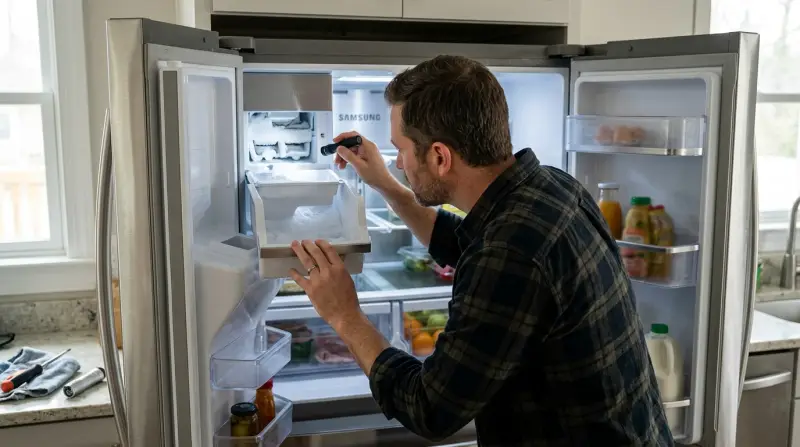
Samsung ice makers use a water inlet valve to bring water into the ice maker tray. The tray then freezes the water, and a motor or heater releases the ice cubes into a bin. Some models have extra features like ice dispensers, crushed ice options, and water filters. Modern Samsung refrigerators often include a control panel to manage ice making, and sensors to detect when the bin is full.
Knowing the basics helps you understand what might go wrong. For example, if the water valve fails, the tray won’t fill. If the tray doesn’t freeze, no cubes will form. If the dispenser motor breaks, the ice won’t move to the bin.
Some newer Samsung models also use a flex tray design, which bends to release ice. This helps prevent jams but can still fail if the motor or heater stops working. Smart models may include Wi-Fi controls or digital displays that show ice maker status and error codes. Understanding these features can make troubleshooting easier, since you’ll know where to check first when something goes wrong.
One non-obvious insight: The ice maker process depends on both electrical and plumbing systems working together. Even a minor issue in either part can cause the whole system to fail. Another detail: If your refrigerator has a water filter indicator, it may stop ice production when the filter needs replacing, even if the filter still passes some water.
Common Causes Of Samsung Ice Maker Not Working
Several issues can cause your Samsung ice maker to stop working. Here are the most frequent reasons:
1. Water Supply Problems
If the refrigerator isn’t getting water, the ice maker can’t produce ice. This may be due to a blocked water line, closed valve, or low water pressure. Sometimes, a newly installed fridge has air trapped in the water line, which prevents water flow until purged.
2. Freezer Temperature Issues
Ice makers need cold temperatures to freeze water. If the freezer is too warm (above 10°F / -12°C), the ice tray won’t freeze. Check if your freezer is set between 0°F to 5°F (-18°C to -15°C). A warm freezer can also be caused by frequent door openings or storing hot food.
3. Ice Maker Is Turned Off
Some Samsung models have an on/off switch or control panel. If it’s off, the unit won’t make ice. Accidentally pressing the “Ice Off” button can disable the ice maker, especially on touch panels.
4. Faulty Water Filter
A clogged or old filter can block water flow. Samsung recommends changing the filter every 6 months. In areas with hard water, filters may clog more quickly, so earlier replacement is needed.
5. Ice Maker Jammed
Sometimes ice cubes get stuck, causing a jam. The unit stops making more ice until the jam is cleared. Jams can also occur when the ice bin is not seated properly, so always check bin placement.
6. Frozen Or Blocked Water Line
If the water line inside the freezer freezes, water can’t reach the ice maker. This often happens if the freezer temperature drops below recommended levels or if airflow inside the freezer is poor.
7. Defective Parts
Broken components like the water inlet valve, ice maker motor, or sensors can stop the system from working. A failing sensor might incorrectly signal that the bin is full, preventing new ice from being made.
8. Door Seal Problems
If the door seal is damaged, warm air enters the freezer, making it hard for the ice maker to freeze water. Even small cracks or gaps can cause frost buildup and temperature changes.
9. Control Board Failure
A malfunction in the control board can prevent the ice maker from starting or completing cycles. Sometimes, lightning strikes or power surges can damage control boards, leading to sudden failures.
10. Incorrect Installation
If the refrigerator isn’t level, or the water line is not connected properly, the ice maker may not work. This is a common mistake after moving or installing a new fridge.
Troubleshooting Your Samsung Ice Maker
Solving an ice maker problem involves checking each possible issue step-by-step. Here’s how you can troubleshoot:
1. Check The Water Supply
- Make sure the water line is connected and the valve is open. You may find the valve behind the fridge or under the sink.
- Inspect for kinks or bends in the water line. Even a small kink can restrict flow.
- Test water pressure: Samsung recommends at least 20 psi. Low pressure can result from clogged pipes or municipal supply issues.
- Try dispensing water from the fridge. If it’s slow, you may have a supply issue. If the water dispenser works but the ice maker doesn’t, the problem is likely inside the ice maker.
2. Examine The Freezer Temperature
- Adjust the freezer to 0°F to 5°F (-18°C to -15°C). Small changes can make a big difference.
- Place a thermometer inside to verify the temperature. Don’t rely only on digital displays; actual temperature can vary.
- If the freezer is warm, check for blocked vents or overfilled shelves. Airflow is crucial for freezing water efficiently.
3. Inspect The Ice Maker Settings
- Find the Ice Maker On/Off switch or control panel. Some panels use icons instead of words.
- Confirm the ice maker is turned on. Look for indicator lights.
- Reset the ice maker (most models have a reset button). Press and hold the button for a few seconds, as short presses may not trigger a reset.
4. Replace The Water Filter
- Locate the filter inside the fridge. Usually in the upper right or lower left corner.
- Remove and replace it if it’s older than 6 months. A new filter can solve both water and ice issues.
- Use only Samsung-approved filters for best results. Some generic filters can cause leaks or error codes.
5. Clear Ice Jams
- Remove the ice bin. Some bins have release levers; check your manual.
- Look for stuck or clumped ice cubes. Clumps often form if the bin is not emptied regularly.
- Break up jams gently with a plastic utensil. Avoid anything metal to prevent damaging the bin.
6. Check For Frozen Water Line
- Inspect the line inside the freezer. Look for frost or ice buildup.
- If frozen, unplug the fridge and let the line thaw. This may take several hours.
- Use a hair dryer on low to speed up thawing (be careful not to melt plastic). Move the dryer slowly and avoid overheating.
7. Examine Door Seals
- Inspect the seal for cracks or gaps. Look for areas where the seal doesn’t touch the fridge.
- Clean with warm soapy water. Dirt and debris can prevent seals from working.
- Replace the seal if damaged. This is a simple fix that can prevent many problems.
8. Test The Ice Maker Parts
- Listen for the motor sound during ice making. If silent, the motor may be broken or disconnected.
- Check if the tray fills with water and freezes. If not, the valve or sensor may be faulty.
- Look for error codes on the control panel, if available.
9. Inspect Installation
- Make sure the refrigerator is level. Use a bubble level tool.
- Tighten any loose water connections. Loose connections can cause leaks or low water flow.
10. Reset The Control Board
- Unplug the fridge for 5 minutes. This can clear minor software glitches.
- Plug it back in and check if the ice maker works. If not, try a full reset using the control panel.
One overlooked troubleshooting tip: If you recently moved the fridge, air bubbles in the water line can block flow. Dispense several cups of water to clear air.
Data: Samsung Ice Maker Failure Rates
Understanding how often Samsung ice makers fail can help set expectations. Based on consumer reports and repair statistics:
| Model Series | Average Failure Rate (Yearly) | Common Issues |
|---|---|---|
| French Door (RF) | 11% | Frozen water line, jammed ice bin |
| Side-by-Side (RS) | 8% | Low water pressure, filter problems |
| Top Freezer (RT) | 6% | Motor failure, temperature issues |
| Family Hub | 13% | Control board errors, sensor faults |
These numbers show that failure rates are higher in certain models, especially French Door and Family Hub series. This is often due to complex features and more electronic parts.
Another insight: The more features your refrigerator has, the more points of failure. Simple models with fewer electronics often have longer-lasting ice makers.
Repair Solutions For Samsung Ice Maker
Once you find the cause, here are practical repair options:
Water Supply Repairs
- Replace cracked or broken water lines. Flexible plastic lines are easy to change.
- Install a new water inlet valve if the old one is faulty. Valves can clog or fail mechanically.
- Increase water pressure if needed (check home plumbing). Sometimes, a pressure booster may be needed for homes with low supply.
Filter Replacement
- Buy a certified Samsung filter. Check the model number for compatibility.
- Install according to the manual. Twist or push filters, depending on the model.
- Reset the filter indicator on the control panel. This step is important for models with smart displays.
Ice Maker Motor And Parts
- Order replacement parts from Samsung or a trusted supplier. Avoid used parts for reliability.
- Install a new motor if the old one is silent or slow. Motors can wear out after years of use.
- Replace sensors if the bin doesn’t detect full or empty correctly. Sensor issues can cause continuous or stopped ice production.
Defrosting The Water Line
- Unplug the fridge for several hours. Plan ahead, as food may thaw.
- Use a hair dryer carefully on frozen sections. Aim for gradual thawing.
- Prevent future freezing by keeping freezer temperature stable. Adjust shelves for better airflow.
Door Seal Replacement
- Purchase a Samsung seal. Seals are model-specific.
- Remove old seal and clean the area. Use rubbing alcohol for stubborn residue.
- Attach new seal firmly and check for leaks. Close the door and inspect for gaps.
Control Board Repair
- If the control board is faulty, professional repair is often needed. Boards are complex and require special tools.
- Contact Samsung support or a qualified technician. DIY attempts can void warranty or cause further damage.
Correcting Installation
- Level the refrigerator using adjustable feet. Uneven fridges can cause doors to seal poorly.
- Tighten all water line connections. Use a wrench but avoid over-tightening.
If you’re unsure about a repair, look for video tutorials. Many Samsung repairs are covered in detail online, which can make DIY easier.
Cost Comparison: Diy Vs Professional Repair
Let’s compare average costs for fixing Samsung ice maker issues:
| Repair Type | DIY Cost (USD) | Professional Cost (USD) | Difficulty |
|---|---|---|---|
| Water filter change | $35–$70 | $120–$180 | Easy |
| Water inlet valve | $45–$90 | $140–$250 | Medium |
| Ice maker motor | $80–$150 | $250–$400 | Hard |
| Control board | $120–$220 | $350–$550 | Very Hard |
| Door seal | $30–$60 | $110–$180 | Medium |
DIY repairs are usually cheaper, but some tasks—like fixing the control board—require technical skill. For safety and best results, consider professional help for complex repairs.
A hidden cost: If you damage a part during DIY repair, replacement costs can increase. Always check warranty terms before starting.
Preventing Samsung Ice Maker Problems
Preventive steps can reduce future issues and keep your ice maker running smoothly:
- Change the water filter every 6 months. This prevents blockages and keeps water tasting fresh.
- Clean the ice bin and tray monthly. Use mild soap and rinse well.
- Keep the freezer at the recommended temperature. Temperature swings cause frost and jams.
- Check door seals regularly. Clean and inspect after every deep cleaning.
- Avoid overfilling the freezer, which blocks air flow. Leave space around vents.
- Level the refrigerator after moving it. Recheck if you move or adjust the fridge.
- Use only Samsung-approved parts and filters. Generic parts can cause compatibility problems.
- If you notice slow ice production, address it immediately. Early action prevents bigger issues.
Many owners miss the importance of regular cleaning and filter changes. These simple steps can prevent most ice maker problems.
Another tip: If you live in a humid climate, wipe the freezer walls regularly to prevent frost buildup. Frost reduces efficiency and can cause jams.
Hidden Insights And Pro Tips
Some facts and tricks are less obvious but very useful:
- Resetting the ice maker can solve many minor issues. Most Samsung models have a small reset button on the side or bottom of the ice maker unit. Hold it for 10 seconds. You may hear a chime or see lights flash. Don’t press repeatedly; wait for the cycle to finish.
- Low water pressure is a common but overlooked cause. If your home uses well water or has old plumbing, check pressure before replacing expensive parts. A plumber can test and improve pressure if needed.
- Humidity and frost can affect ice production. If your kitchen is humid, frost can build up faster. Try to keep the area dry and ventilated. Place the fridge away from ovens and stoves to reduce heat and moisture.
- If the ice cubes are hollow or small, this often means a water supply issue—not a mechanical fault. Check filters and valves first.
- Many people forget to check the child lock feature. If activated, it can stop ice dispensing even if the ice maker is working. Check for lock icons on the panel.
- If you see white flakes in ice cubes, it’s probably due to minerals in water or an old filter. Use filtered water if possible. For extra clarity, empty the ice bin weekly.
Another insight: If your fridge has a vacation mode, it may turn off ice production to save energy. Always check modes after returning home.
Comparing Samsung Ice Makers To Other Brands
Samsung ice makers are popular, but how do they stack up against competitors? Here’s a quick comparison:
| Brand | Average Ice Production (lbs/day) | Failure Rate | Unique Features |
|---|---|---|---|
| Samsung | 6–9 | 10% | Family Hub, smart controls |
| LG | 7–10 | 8% | Dual ice makers, Craft Ice |
| Whirlpool | 6–8 | 9% | Filter indicator, easy maintenance |
| GE | 7–11 | 12% | Advanced water filtration |
Samsung models are strong in technology but have slightly higher failure rates compared to LG. Whirlpool is known for easy maintenance. GE offers good filtration but also higher failure rates.
Another point: LG’s “Craft Ice” feature creates round ice balls, which some users prefer for drinks. Samsung focuses more on smart connectivity and family features.
When To Call Samsung Support
If you’ve tried all troubleshooting steps and your ice maker still doesn’t work, it’s time to contact Samsung support. This is especially important if:
- The fridge is under warranty.
- You suspect control board or sensor failure.
- You notice leaks, electrical smells, or sparks.
- DIY fixes didn’t solve the problem.
Samsung can send a technician or guide you through advanced diagnostics. For official help, visit the Samsung Support Center.
An extra tip: Before calling support, write down your model number, error codes, and steps you’ve already tried. This speeds up troubleshooting.
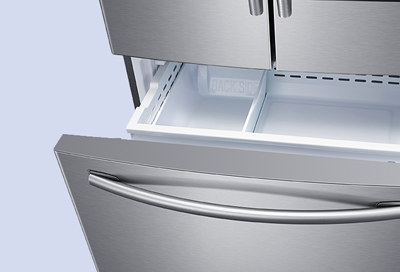
Credit: www.samsung.com
Real-life Example: Solving A Frozen Water Line
Let’s look at a real scenario. John owns a Samsung French Door refrigerator. One morning, he notices no ice is coming out. He checks the water dispenser—it works fine. The freezer is cold, and the ice maker is on. After searching, John finds the water line inside the freezer is frozen.
He unplugs the fridge and uses a hair dryer to thaw the line. After two hours, the ice maker starts working again. John prevents future freezing by setting the freezer to 0°F and avoiding overfilling. This simple fix saves him a $250 repair bill.
Another example: Maria’s ice maker stopped after she moved the fridge. The problem was a kinked water line behind the unit. Straightening the line restored water flow and fixed the issue, without any parts replaced.

Smart Features And Common Mistakes
Modern Samsung refrigerators offer smart features like Family Hub, Wi-Fi controls, and sensors. These are helpful but sometimes cause confusion:
- If the Smart Control Panel displays an error, check the manual for codes. Some codes are specific to ice maker issues.
- Don’t ignore regular maintenance just because your fridge is high-tech. Smart features don’t replace filter changes or cleaning.
- Avoid pressing the reset button too often—it can cause errors if used repeatedly. Wait for each reset cycle to finish.
- Always use approved filters and parts. Generic replacements can create leaks or sensor problems.
A common mistake: Some owners think smart fridges fix themselves. In reality, regular checks and cleaning are still needed.
Quick Troubleshooting Checklist
Here’s a fast summary for fixing your Samsung ice maker:
- Is the water line connected and valve open?
- Is the freezer cold enough (0°F–5°F)?
- Is the ice maker turned on?
- Is the water filter fresh?
- Are there any ice jams?
- Is the water line frozen?
- Are the door seals tight?
- Are all parts working (motor, sensors)?
- Is the fridge level?
- Did you try resetting the control board?
If you answer “no” to any, fix that step before moving to the next.
Frequently Asked Questions
Why Does My Samsung Ice Maker Make Small Or Hollow Ice Cubes?
Small or hollow cubes usually mean low water pressure or a clogged filter. Check water supply and change the filter. Also, ensure the freezer is cold enough.
How Often Should I Reset My Samsung Ice Maker?
Only reset your ice maker if it stops working or after changing parts. Frequent resets can cause errors in the system.
Can I Use Generic Water Filters With My Samsung Refrigerator?
It’s best to use Samsung-approved filters. Generic filters might not fit properly and can cause leaks or block water flow.
What Should I Do If The Ice Bin Is Jammed?
Remove the bin and break up any stuck cubes gently. Avoid using metal tools, which can damage plastic parts. Clean the bin monthly to prevent jams.
Is It Normal For My Samsung Ice Maker To Be Noisy?
A slight humming or clicking is normal during ice production. Loud noises may signal a jam, broken motor, or loose parts. If the noise is unusual, check for issues or call support.
Samsung ice makers are reliable, but problems can happen. With the right information, you can fix most issues yourself. Remember to check each possible cause, follow preventive steps, and use only Samsung-approved parts. If you still have trouble, Samsung support is ready to help.
By understanding your ice maker, you can enjoy cold drinks anytime—without worry.