
You can fix a Bedtech Adjustable Base Not Working by performing a full power cycle of the control box. Unplug the power cord from the wall outlet, wait for at least sixty seconds to allow the internal capacitors to discharge fully, and then plug it back in. This simple step clears temporary software glitches that often prevent the motors from responding to your remote. If the base remains unresponsive after this, check your power source and the remote battery levels first, as these account for the vast majority of movement failures.
Reasons your adjustable base stopped working
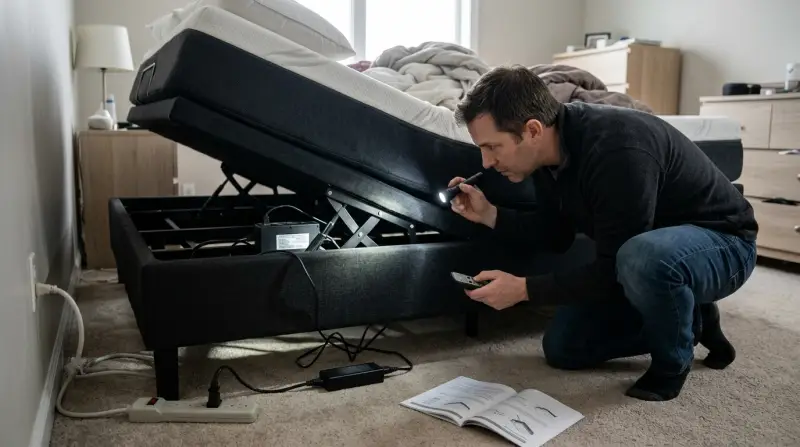
Most movement issues stem from a loss of communication between the remote and the base control box. This usually occurs because the wireless signal is blocked or because the system has encountered a minor electronic error during a power surge. If you have recently experienced a flickering light or a storm, the control box may have entered a protection mode that requires a manual reset to clear.
Another common cause involves the power supply itself. The power cord might be loose at the wall outlet or where it connects to the control box underneath the bed. Because these bases move frequently, the vibration can slowly wiggle a plug out of its socket over time. You should check that the connection is firm and that the outlet is actually providing power by testing it with a lamp or a phone charger.
Finally, the remote might simply have dead batteries or a stuck button. If the remote light doesn’t flash when you press a command, the signal isn’t being sent. In some cases, the remote needs to be re-paired to the base if the signal was lost. This varies by model — check the label on your control box to see if it lists a specific sync procedure. If you still hear a clicking sound from the control box but the bed doesn’t move, the motor or the control box itself may have a mechanical or internal electrical fault that requires professional replacement.
Safety: Inside a mains-powered machine, the parts behind the outer cover can hold a dangerous electrical charge even after it has been unplugged — that’s why they sit behind a cover. Opening the housing, or testing or replacing anything behind it, is a job for a qualified technician, never a home repair.
Perform a hard power reset
This fix is for users whose bed is completely unresponsive to the remote, regardless of the button pressed. First, locate the power cord connected to the wall outlet and pull it out completely. Leave it disconnected for a full minute. This duration is vital because it allows the control box to fully power down and reset. While the power is off, check the other end of the cord where it attaches to the motor housing under the bed. Ensure that the cord is pushed all the way into the port.
After the minute has passed, plug the cord directly into a wall outlet rather than a power strip or surge protector. Some adjustable bases don’t receive enough consistent voltage through extension cords or power strips to operate the heavy-duty motors. If the bed begins to move immediately after you plug it back in, you know the issue was a simple power glitch. If the bed still doesn’t respond, listen closely near the control box while pressing a button on the remote. If you hear a faint clicking sound, the control box is receiving the signal but the motor isn’t engaging. If you hear nothing at all, the issue is likely the remote or the signal link. If you have confirmed the power is steady but the unit remains dead, you should contact the manufacturer for specific warranty support regarding your model.
Re-pair the remote control
If the power is on but the bed ignores your commands, you may need to re-link your remote. This is the correct step if the remote light turns on but the base doesn’t react. Look for a small button on the side or bottom of the control box under the frame. This is the pairing or “sync” button. Press and hold this button until you see a light flicker on the box, which indicates it’s ready to search for a signal.
While the box is in pairing mode, press and hold the specific combination of buttons on your remote that your owner’s manual suggests for pairing. This usually involves holding the “head up” and “foot up” buttons at the same time for several seconds. If the pairing is successful, the control box will often make a brief beep or the light will stop flashing. This fix isn’t for users who have a physical obstruction under the bed or a broken motor. If you have replaced the remote batteries and the pairing process fails, the remote may be internally damaged. Don’t attempt to open the remote casing or the control box, as this can void your warranty and poses a risk of electrical shock. If you can’t get the remote to pair after three tries, you need to reach out to the retailer where you bought the base to order a replacement remote or control box.
Check for physical obstructions

This step is for when the bed moves partially but stops, or makes a loud grinding noise. It’s worth the time to inspect the area under the frame before calling for help. Clear away any stray items like shoes, power cords, or bedding that might be caught in the metal hinges or the motor arm. If the bed is trying to move but is blocked, it will often stop automatically to prevent the motor from burning out.
Check if the bed is perfectly level. If the frame has shifted on your floor, the metal components might be rubbing against the side rails or the headboard. If you see a bent metal support or a loose pin in the hinge, don’t try to bend it back yourself. This requires specialized tools and can be dangerous if the frame is under tension. If you see any mechanical damage, stop using the base immediately to prevent the frame from collapsing. A qualified furniture repair technician or the original seller should handle any structural repairs. Don’t ignore grinding noises, as these indicate that the gears are struggling under a load they can’t manage. If the bed is overloaded with more weight than its rated capacity, remove the excess weight and try the remote again. If it still fails, the motor gear may have stripped, which means the unit requires a professional part replacement.
What not to do
- Don’t use a screwdriver to probe the control box. You can easily short out the circuit board or touch a live wire, which poses a severe risk of electrical shock.
- Don’t force the bed to move by pushing or pulling on it. This will bend the metal frame and can snap the motor attachment points, turning a simple electrical fix into an expensive structural repair.
- Don’t spray lubricant into the motor housing. Most of these motors use sealed components, and adding oil can attract dust, gum up the gears, and ruin the internal electrical contacts.
- Don’t plug the base into a low-quality extension cord. These beds pull significant power during operation, and thin cords can overheat or cause a voltage drop that makes the base act erratically.
How to stop it happening again
Regular maintenance keeps the electronic components stable and prevents the sync issues that plague many users.
| If you’re doing this | Do this instead | Why |
|---|---|---|
| Using a cheap power strip | Plug directly into the wall | Power strips cause voltage drops |
| Leaving items under the bed | Keep the area completely clear | Prevents motor strain and jams |
| Moving the bed while loaded | Clear weight before adjusting | Reduces stress on the gear motor |
Most users mistake a minor stutter for a permanent mechanical failure. If your bed begins to drift, perform a hard reset by unplugging the power cord for exactly sixty seconds. This clears the control box’s temporary state.
If the bed continues to tilt after the reset, check your floor level. A slope of even three degrees shifts the center of gravity, forcing the motors to fight uneven resistance. If the floor is level but the bed still leans, the internal sync cable has likely slipped.
Frequently asked questions
Can I reset my Bedtech base without the remote?
You can reset the system by unplugging it from the power source for sixty seconds. This power cycle clears temporary errors in the control box. However, if the control box is faulty, a reset won’t restore motor functions.
Why is my bed making a clicking sound but not moving?
A clicking sound indicates the control box is receiving a signal, but the motor is failing to engage. This usually happens when the motor has a mechanical jam or stripped internal gears. If the path is clear, the motor likely needs professional replacement.
Is it safe to open the control box to check the wires?
No, it isn’t safe to open the control box or motor housing. These enclosures contain high-voltage components that can hold a charge even after being unplugged. Opening these boxes voids your manufacturer warranty and risks severe electrical shock.
How long should I wait after a power outage to use my bed?
Wait at least five minutes after power returns to ensure the electricity is stable before operating the bed. Power surges following an outage can damage the control board if the motor is used too soon. If the bed remains unresponsive, perform a sixty-second power cycle.
What happens if I lose the remote?
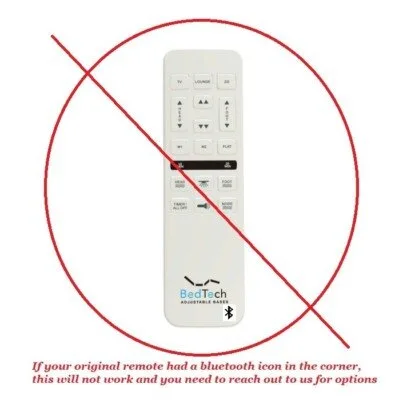
You must order a replacement remote directly from the manufacturer or retailer to ensure compatibility. Adjustable bases use unique radio frequencies or Bluetooth signals that generic remotes can’t replicate. Have your model number ready from the frame sticker when ordering.
Final Thoughts
If your bed still won’t move after checking these basics, there might be a deeper mechanical fault. Don’t hesitate to reach out to the manufacturer’s support team with your serial number handy. They’ll help you determine if a motor needs replacing so you can get back to sleeping comfortably again.
Related guides
- Tempur Pedic Ergo Adjustable Base Problems: Expert Solutions
- How to Reset Arlo Base Station Quickly and Easily
- How to Reset Ring Base Station: Quick and Easy Guide