
When your work depends on a desk PC, a sudden power outage is more than just annoying—it can cost you valuable data, time, and even damage your hardware. That’s why choosing the right UPS battery backup for your desk PC is not just a smart idea, but often a necessity. But with so many options, technical terms, and price points, picking the right UPS can feel overwhelming. This guide breaks down everything you need to know, using clear language and real-world examples, so you can confidently protect your PC and your work.
Why Your Desk Pc Needs A Ups Battery Backup
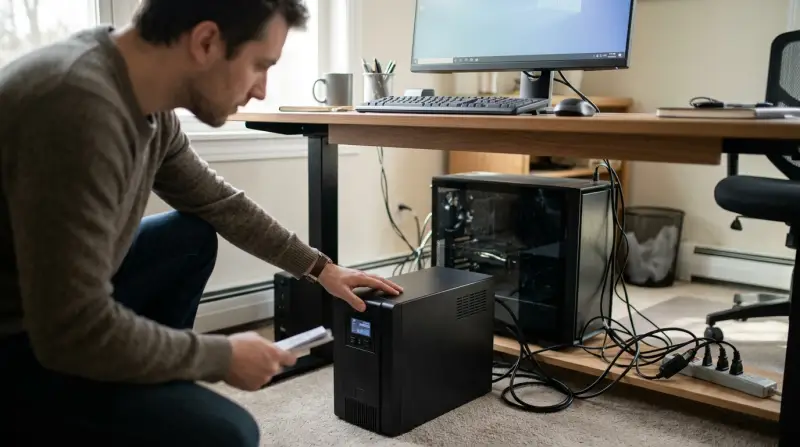
A UPS (Uninterruptible Power Supply) is more than just a big battery. It’s a device that provides emergency power when the main power fails. For a desk PC, a UPS gives you time to save your work, shut down safely, and avoid hardware damage caused by sudden blackouts or dangerous voltage spikes.
Even if you live in an area with “reliable” power, short outages, brownouts, or voltage drops can happen at any time. These can corrupt files, interrupt downloads, and even damage your hard drive or SSD. For anyone who works with important documents, creative projects, or business data, a UPS is a key part of a good setup.
Understand The Key Ups Types
There are three main types of UPS systems. Each is designed for different needs and budgets.
| UPS Type | How It Works | Best For | Price Range |
|---|---|---|---|
| Standby (Offline) UPS | Switches to battery only when power fails | Basic home/office PCs | Low |
| Line-Interactive UPS | Regulates voltage, switches to battery if needed | Most desk PCs | Medium |
| Online (Double Conversion) UPS | Always powers devices through battery/inverter | Critical systems, servers | High |
For most desk PC users, a line-interactive UPS offers the best balance between cost and protection. Standby models are cheaper but less reliable during voltage swings. Online UPS units are premium, often used for servers and medical equipment.
Calculate How Much Power You Need
Before buying, it’s important to know how much power your PC and connected devices use. UPS units are rated in VA (Volt-Amps) and sometimes in Watts. Here’s how to figure out what you need:
- List your devices. Include your PC, monitor, and any devices you’ll plug into the UPS (like a modem/router).
- Check their power usage. You can find this on the device label, in the manual, or online. For example, a typical desktop PC uses 250–600 watts, and a monitor uses 20–60 watts.
- Add up the total wattage. Then, add 20–25% extra, so you’re not running the UPS at full load.
For example, if your PC uses 400W, your monitor 40W, and your modem 10W, your total is 450W. Add 25% (about 110W) for safety, so look for a UPS with at least 560W output.
A good rule: The UPS’s watt rating should be higher than your total wattage. Don’t forget, VA is usually more than watts; check the conversion (many UPS are 0.6–0.7 power factor: 1000VA = 600–700W).
Battery Runtime: How Much Time Do You Need?
Runtime means how long the UPS can keep your PC running when the power goes out. Most UPS units give 5–20 minutes of backup at half load, which is enough to save your work and shut down. If you want longer backup (for example, to finish a video call), you’ll need a larger UPS.
Here’s a typical runtime chart for desk PC setups:
| UPS Capacity (VA) | Approx. Watts Supported | Estimated Runtime (PC + Monitor) |
|---|---|---|
| 600 VA | 360–400 W | 5–8 minutes |
| 1000 VA | 600–700 W | 10–15 minutes |
| 1500 VA | 900–1050 W | 15–25 minutes |
Remember, the more devices you connect, the shorter the runtime. For most people, 10–15 minutes is plenty.

Key Features To Look For
Not all UPS units are equal. Here are the most important features to consider:
- Number of outlets: Make sure there are enough battery-backed outlets for your PC, monitor, and any key accessories.
- Surge protection: Every UPS should protect against surges, but some offer better protection than others.
- LCD display: Shows battery status, load, and other info. Handy for troubleshooting.
- Replaceable batteries: Some UPS units let you swap the battery when it wears out, saving money in the long run.
- Automatic Voltage Regulation (AVR): Especially useful if your area has frequent voltage drops or spikes.
- Software support: Good UPS units come with software that lets you monitor power, and can auto-shutdown your PC safely during a long outage.
- Audible alarms: Alerts you when power is lost, battery is low, or there’s a fault.
What About Pure Sine Wave Vs Simulated Sine Wave?
UPS units produce either a pure sine wave or a simulated (stepped) sine wave when running on battery. Pure sine wave output is smoother and better for sensitive equipment, especially PCs with active PFC power supplies (common in modern desktops).
Simulated sine wave is cheaper, and works fine for most basic PCs and monitors. If you have a high-end gaming PC, workstation, or use audio equipment, investing in a pure sine wave UPS may prevent strange issues or noises.

Common Mistakes When Choosing A Ups
Many buyers make similar mistakes when picking a UPS. Here’s how to avoid them:
- Underestimating power needs. People often buy a UPS that’s too small, leading to very short runtimes or even overload shutdowns.
- Ignoring battery replacement. All UPS batteries wear out (usually in 2–4 years). If you can’t replace the battery, you’ll need a whole new UPS.
- Plugging in too many devices. Plugging printers, heaters, or other high-wattage devices into the UPS can cause overloads and damage.
- Not checking for auto-shutdown software. Without this, your PC can still crash during a long outage if you’re away.
- Placing the UPS in a hot or closed space. Heat shortens battery life. Keep your UPS in a cool, ventilated area.
Comparing Popular Ups Brands And Models
Some brands are well-known for reliable UPS units. Here’s a quick comparison of common UPS models for desk PCs:
| Brand / Model | Type | Capacity (VA/W) | Pure Sine Wave? | Estimated Price |
|---|---|---|---|---|
| APC Back-UPS Pro 1000VA | Line-Interactive | 1000/600 | No | $150–$180 |
| CyberPower CP1500PFCLCD | Line-Interactive | 1500/900 | Yes | $200–$230 |
| Eaton 5S 850VA | Line-Interactive | 850/510 | No | $120–$140 |
| APC Smart-UPS 1000VA | Online | 1000/800 | Yes | $450–$500 |
Non-obvious insight: Sometimes, a slightly higher capacity model costs just a bit more but gives you much longer runtime and more flexibility for future upgrades.

How To Size Your Ups For Future Needs
Your PC setup may change. Maybe you’ll add a second monitor, or upgrade your graphics card. It’s smart to choose a UPS with a little extra capacity. This way, you won’t need a new UPS every time your setup grows.
A good practice: Buy a UPS with 20–30% more wattage than you currently need. This helps with unexpected upgrades and keeps the UPS from running at full load, which extends battery life.
Setting Up And Maintaining Your Ups
Once you’ve bought your UPS, correct setup and regular maintenance will keep it working when you need it most.
- Connect only essential devices to the battery backup outlets: Your PC, main monitor, maybe your router. Plug printers, speakers, and lamps into the “surge only” outlets.
- Install the UPS software on your PC. Set it to auto-save your work and safely shut down the PC if the battery runs low.
- Test your UPS every few months. Unplug it from the wall (with your PC running) and make sure everything works as expected.
- Replace the battery when the UPS warns you, or every 2–4 years. If your battery is swelling or leaking, replace it immediately.
- Keep the UPS in a cool spot with good airflow. Heat is the main cause of early battery failure.
Non-obvious insight: Even when the UPS is not used often, the battery still ages. Don’t wait until a blackout to find out your battery is dead.
When Should You Upgrade Or Replace Your Ups?
A UPS is a long-lasting device, but not forever. Signs it’s time to upgrade or replace:
- The battery doesn’t hold charge as long as before (less than 5 minutes at normal load).
- The UPS fails self-tests, or the “replace battery” light stays on.
- You added more hardware (like a new PC, monitor) and now the UPS is overloaded.
- Your needs changed, and you want pure sine wave output or more features.
Don’t risk your data and hardware on an old or failing UPS. Replacing a battery is often enough, but sometimes a full upgrade is best.
Frequently Asked Questions
How Do I Know What Size Ups I Need For My Desk Pc?
Add up the wattage of your PC, monitor, and any important accessories. Choose a UPS with a watt rating at least 20–30% higher than that total. This gives you safe headroom for upgrades and longer battery life.
Can I Plug My Printer Or Speakers Into My Ups?
It’s best not to. Printers and speakers draw high power, especially when starting. This can overload the UPS and reduce backup time for your PC. Plug these into regular surge-only outlets, not the battery backup ones.
How Long Will A Typical Ups Keep My Pc Running?
Most desk PC UPS units give 5–20 minutes of backup at half load. Enough to save your work and shut down. Higher capacity models offer longer runtimes.
Do I Need A Pure Sine Wave Ups For My Pc?
If your PC has a modern, active PFC power supply or you use sensitive audio/video equipment, yes. For basic office PCs, a simulated sine wave is usually enough. Check your PC’s power supply specs for best results.
How Often Should I Replace The Battery In My Ups?
Most UPS batteries last 2–4 years. Replace the battery if your UPS warns you, if the runtime drops sharply, or every 3 years to be safe. Always use the correct battery type for your UPS model.
Choosing the right UPS battery backup doesn’t have to be complicated. By understanding your power needs, knowing what features matter, and planning for the future, you can keep your desk PC safe from power problems and stay productive—even when the lights go out. For more technical details and best practices, you can visit the official Wikipedia UPS guide. Protect your work, your PC, and your peace of mind with a UPS that fits your real needs.