
If your GE oven is showing the F2 error code, it can be stressful—especially if you’re in the middle of cooking. This error is common in many GE ovens and usually means something is wrong with the oven’s temperature or its sensors. But before you call a technician or think about buying a new oven, you may be able to fix the issue yourself. In this guide, you’ll learn what causes the F2 error, how to troubleshoot it step by step, and when it’s time to call in a professional. Even if you’re not an expert, you can follow these instructions to get your oven back in working order.
What Does The Ge Oven F2 Error Mean?
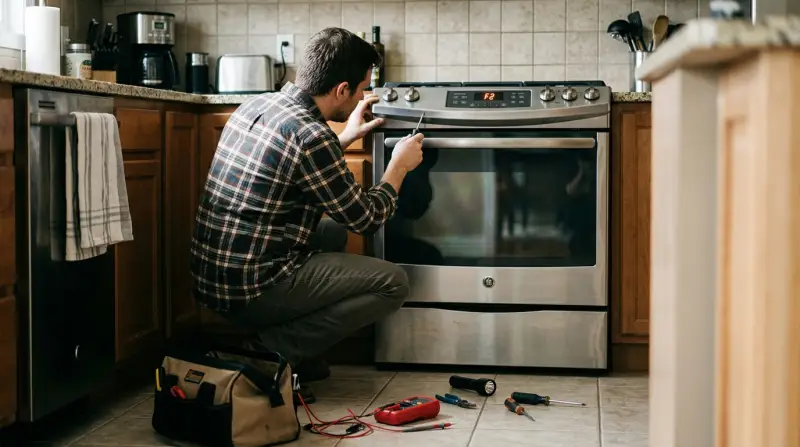
The F2 error on GE ovens usually means the oven is detecting a temperature that’s too high. This could be a real overheating problem, or it could be a problem with the oven sensor or control board. Sometimes, the error is triggered by a short burst of high heat, or it can be caused by a faulty part. Understanding the meaning helps you find the right solution and avoid bigger problems like fire hazards or further damage.
Key Causes of F2 Error:
- Faulty oven temperature sensor
- Malfunctioning electronic control board
- Wiring problems
- Stuck oven relay
- Dirty or damaged oven components
Knowing which part is at fault is important, as this saves time and money. Many users think only the sensor is the problem, but sometimes the issue is more complex.
Initial Safety Precautions
Before you start troubleshooting, safety comes first. Ovens use high voltage and can reach dangerous temperatures. Here’s what you should do:
- Unplug the oven or turn off the circuit breaker.
- Allow the oven to cool down completely before touching any parts.
- Keep a multimeter ready if you have one.
- Wear heat-resistant gloves and avoid loose clothing.
Never skip these steps. Even if the repair seems simple, neglecting safety can lead to electric shock or burns.

Credit: www.youtube.com
Step-by-step Guide To Fixing The F2 Error
Let’s go through a practical method to solve the F2 error on your GE oven.
1. Reset The Oven
Sometimes, the F2 code appears by mistake due to a power surge or glitch. Try a simple reset first:
- Turn off the oven and unplug it from the wall.
- Wait at least 5 minutes.
- Plug the oven back in and turn it on.
If the error disappears, you’re done! If not, move to the next step.
2. Check The Oven Temperature Sensor
The most common cause of the F2 error is a faulty temperature sensor. This sensor measures the heat inside the oven and tells the control board how hot it is.
How To Inspect The Sensor
- Locate the sensor at the back wall inside the oven cavity.
- Look for any visible damage or burn marks.
- If you have a multimeter, measure the resistance of the sensor. At room temperature (about 70°F or 21°C), it should read around 1100 ohms.
| Temperature (°F) | Sensor Resistance (Ohms) |
|---|---|
| 70 | ~1100 |
| 250 | 1453 |
| 350 | 1654 |
| 550 | 2194 |
If the reading is much lower or higher, the sensor is likely bad and needs replacing.
Replacing The Sensor
- Order a GE-compatible oven sensor (check your model number).
- Unscrew the sensor from inside the oven.
- Carefully disconnect the wires (take a photo for reference).
- Connect the new sensor and screw it back in place.
After replacing, reset the oven and check if the F2 error is gone.
3. Inspect The Control Board
If the sensor is working fine, the next suspect is the oven’s electronic control board. This board processes signals from the sensor and controls heating elements.
Signs Of A Bad Control Board
- Oven overheats even when set at low temperatures
- Error remains after sensor replacement
- Burn marks or “burnt” smell from the control panel
What To Do
- Remove the back panel of the oven (after unplugging it).
- Visually inspect the control board for damaged or burnt areas.
- If you see signs of damage, the board will likely need to be replaced.
Replacing a control board is more expensive than a sensor, but you can do it yourself if you’re comfortable with wiring. Otherwise, contact a technician.
4. Examine Wiring And Connectors
Wires can become loose, corroded, or burnt over time, especially in older ovens. A broken connection between the sensor and the control board can also trigger the F2 error.
- Inspect the wires connecting the sensor to the control board.
- Look for burn marks, frayed wires, or loose connectors.
- Secure any loose wires and replace if damaged.
This step is often missed by beginners, but a quick wire check can save you from buying unnecessary parts.
5. Check For Stuck Relays Or Dirty Components
A stuck relay can cause the oven to keep heating uncontrollably, leading to an F2 code. Also, dirt or baked-on grease inside the oven can cause electrical shorts.
- Open the oven and inspect the relay (often found on the control board).
- Clean any dirty connectors or components gently.
- If a relay is stuck, it often requires professional repair.
6. Test The Oven After Each Step
After every fix, reset the oven, turn it on, and try baking at a low temperature. This helps you know if the problem is solved before moving to the next step.
When To Call A Professional
While many F2 error causes can be fixed at home, there are times when expert help is safer and smarter.
- If you’re unsure about handling electrical parts
- If you’ve replaced the sensor and checked wiring, but the error stays
- If you notice burning smells, smoke, or visible fire damage
Some issues, like a failing control board or extensive wiring damage, need professional tools and experience. Don’t risk your safety.
Common Mistakes To Avoid
Many people make errors during DIY repairs. Here are some mistakes to watch for:
- Skipping the reset step: Sometimes the error is temporary and a reset is all that’s needed.
- Replacing the wrong part: Always test the sensor first before replacing it.
- Forgetting to unplug the oven: This is a serious safety risk.
- Ignoring wiring checks: A loose wire is often the real problem.
- Not checking oven model compatibility: Sensors and control boards are model-specific.
Avoiding these mistakes saves time, money, and helps prevent injury.
Cost Comparison: Diy Vs. Professional Repair
Fixing an F2 error can be inexpensive or costly, depending on the part.
| Repair Type | Estimated Cost (DIY) | Estimated Cost (Professional) |
|---|---|---|
| Reset/Basic Inspection | $0 | $80–$150 |
| Replace Sensor | $25–$50 | $120–$200 |
| Replace Control Board | $100–$300 | $250–$500 |
| Wiring Repair | $5–$20 | $100–$180 |
As you can see, doing the repair yourself can save you hundreds of dollars. But always consider your own comfort and skill level.
Credit: www.youtube.com
How To Prevent The F2 Error In The Future
You can reduce the chance of seeing the F2 error again with some simple habits.
- Clean the oven regularly to remove grease and food debris.
- Don’t slam the oven door, which can loosen wires or damage the sensor.
- Check the oven sensor once a year using a multimeter.
- Avoid using the self-clean mode too often, as it puts stress on oven parts.
- Use oven-safe cookware—glass or ceramic is better, as metal pans can sometimes reflect heat and confuse the sensor.
Most owners don’t realize that heavy use of the self-clean cycle is a top cause of sensor failure. If you do use it, let the oven cool fully before opening the door.
How To Identify Your Ge Oven Model Number
Knowing your oven model is important when ordering parts or looking for help. The model number is usually found:
- On a sticker inside the oven door frame
- Behind the lower drawer
- On the back of the oven
Take a photo or write down the number before you start repairs.

Other Error Codes You Might See
While F2 is common, GE ovens have several other error codes. Here’s a quick overview:
| Error Code | Meaning | Likely Fix |
|---|---|---|
| F0 | Stuck keypad | Check/replace keypad |
| F3 | Shorted oven sensor | Replace sensor |
| F7 | Stuck function key | Replace control board |
| F9 | Door lock error | Check door latch |
If you see a different code, check your oven’s manual or the GE website for details.
Frequently Asked Questions
What Does It Mean If The F2 Error Only Appears During Baking?
This usually means the oven is overheating, possibly due to a faulty temperature sensor or a stuck relay that causes the oven to heat more than it should. Check the sensor first, then the control board.
Can The F2 Error Code Be Caused By Power Surges?
Yes, power surges can cause temporary glitches and trigger the F2 code. Try unplugging the oven for five minutes to reset the system. If the error returns, check the sensor and wiring.
How Do I Know If My Oven Sensor Is Bad?
Test the oven sensor with a multimeter. At room temperature, it should read about 1100 ohms. If the number is much higher or lower, replace the sensor.
Is It Safe To Use The Oven With The F2 Error Showing?
No, it is not safe. The F2 error means the oven may be overheating, which is a fire risk. Unplug the oven and fix the problem before using it again.
Where Can I Find Official Ge Oven Repair Guides?
You can find official guides and troubleshooting help on the GE Appliances support site. These guides are model-specific and can help you identify parts and repair steps.
Fixing the GE oven F2 error is possible for many people with basic tools and some patience. Always start with the simple steps and remember: safety comes first. By understanding how your oven works and following these steps, you can save time, money, and avoid unnecessary stress in your kitchen.