
When your LG dryer displays the D95 code, it’s a clear sign something isn’t working as it should. Many homeowners see this code and feel worried, but understanding what it means and how to fix it can save you time, money, and stress. The D95 code is not just a simple error—it’s a warning about restricted airflow that, if ignored, can lead to serious issues. This article explains the D95 code in detail, covers 95 possible causes or related factors, and gives you actionable advice to resolve the problem confidently.
What Does The Lg Dryer D95 Code Mean?
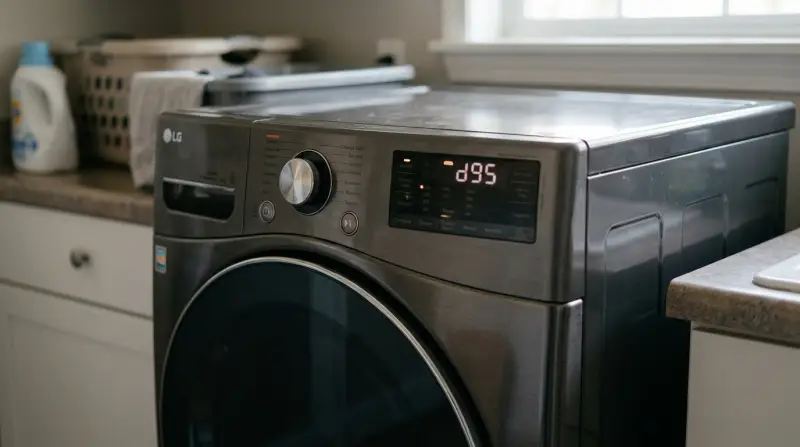
The D95 code appears when your dryer detects 95% blockage in the venting system. This means air isn’t moving out as it should. Dryers need proper airflow to dry clothes efficiently and to avoid overheating, which can be dangerous. If you see D95, it’s important to take it seriously and fix the issue before using the dryer again.
Why Airflow Matters
Good airflow is essential for safe and efficient dryer operation. When vents are blocked, lint and moisture stay inside, causing longer dry times, higher energy bills, and fire risks. The D95 code is your dryer’s way of protecting you and your home.
Common Effects Of The D95 Code
- Clothes take longer to dry
- Dryer feels hotter than usual
- Burning smell or excessive heat
- Dryer shuts down automatically
Ignoring the code can damage your dryer or even cause a house fire. That’s why it’s vital to troubleshoot the causes.
95 Possible Causes And Solutions For The D95 Code
Here are 95 specific items to check or consider when dealing with the D95 code on your LG dryer. Each is described briefly to help you find and fix the problem.
Lint Trap Full
A full lint trap restricts airflow. Clean it before every load.
Lint Trap Damaged
A torn or warped lint trap can let lint pass into the vent. Replace it if needed.
Lint Trap Not Seated Properly
If the trap isn’t sitting correctly, airflow suffers. Reseat it securely.
Lint Buildup In Trap Housing
Lint can collect below the trap, blocking air. Use a vacuum to clear it.
Lint Buildup In Dryer Drum
Lint inside the drum can be a sign of poor airflow. Wipe it out and check vents.
Lint Buildup In Exhaust Hose
Check the hose for lint clogs. Remove and clean it thoroughly.
Kinked Exhaust Hose
A bent or kinked hose restricts air. Straighten or replace as needed.
Hose Too Long
Long hoses slow airflow. Shorten the hose if possible.
Hose Too Narrow
A hose that’s too narrow can’t move enough air. Use the recommended size.
Hose Not Connected Securely
Loose connections leak air. Secure all joints tightly.
Hose Pushed Against Wall
If the hose is crushed, airflow drops. Pull the dryer away from the wall.
Rigid Metal Duct Blocked
Metal ducts can fill with lint. Inspect and clean them.
Flexible Plastic Duct Blocked
Plastic ducts can collapse and fill with lint. Clean or replace with metal.
Ductwork Too Long
Long vent runs increase resistance. Shorten if possible.
Too Many Bends In Duct
Each bend reduces airflow. Minimize turns in the vent path.
Ductwork Sags
Sags collect lint. Support the ducts properly.
Ductwork Disconnects
Sections can separate, leaking air and collecting lint. Reconnect securely.
Duct Tape Failing
Old tape lets joints leak or separate. Replace with foil tape.
Incorrect Duct Material
Only use UL-listed metal ducts for dryers. Replace if not compliant.
Blocked Exterior Vent Hood
Leaves, nests, or snow can block the exterior vent. Clear any obstructions.
Exterior Flap Stuck Closed
If the vent flap won’t open, air can’t escape. Lubricate or replace it.
Exterior Flap Broken
A broken flap can jam or let debris in. Replace the vent cover.
Exterior Mesh Screen Clogged
Some vents have a mesh screen that traps lint. Clean or remove the screen.
Birds’ Nest In Vent
Birds sometimes build nests in dryer vents. Remove the nest safely.
Rodent Blockage
Rodents can block vents with nesting material. Inspect and clear if needed.
Insect Blockage
Wasp nests or insects can block airflow. Remove pests and clean the vent.
Ice Or Snow Blockage
Snow or ice can block the outside vent in winter. Clear it regularly.
Restricted Airflow Due To Location
Vents that exit near the ground get blocked more easily. Check more often.
Vent Covered By Landscaping
Bushes or mulch can block the vent. Keep the area clear.
Broken Internal Fan
A damaged fan can’t move air well. Replace if faulty.
Fan Motor Failing
A weak motor can’t push air. Listen for strange noises and replace if needed.
Fan Blade Loose
A loose fan blade reduces airflow. Tighten or replace.
Fan Clogged With Lint
Lint can collect on the fan itself. Clean carefully.
Clogged Moisture Sensor
A blocked sensor can misreport moisture, causing longer cycles and D95 errors.
Overloaded Dryer
Too many clothes at once restrict airflow. Reduce load size.
Wet Items Overloaded
Very wet loads take longer and strain the airflow system.
Large Bulky Items
Blankets or comforters can block vents inside the drum.
Improper Dryer Installation
Incorrect installation can pinch hoses or block vents.
Dryer Not Level
If the dryer isn’t level, lint may not flow out efficiently.
Crushed Duct From Moving Dryer
Moving the dryer can crush the duct. Inspect after each move.
Dryer Pushed Too Close To Wall
This can bend the hose and reduce airflow.
Poorly Sealed Joints
Leaks at duct joints cause pressure loss and lint buildup.
Debris From Construction
Renovation dust or debris can enter the vent. Clean after any work.
Old House Venting
Older homes may have outdated or unsafe venting. Upgrade if needed.
Shared Vent With Another Appliance
Dryers should not share vents with other exhaust systems.
Vent Too Small For Dryer
Some dryers need larger ducts. Check the manual for requirements.
Wrong Vent Cap Installed
Some caps are not designed for dryers and block air.
Vent Cap Painted Shut
Paint can glue vent flaps shut. Free them carefully.
Internal Thermistor Fault
A bad thermistor can misread airflow. Test and replace if needed.
Internal Control Board Glitch
Sometimes, the control board misinterprets data. Try unplugging for 10 minutes.
Power Supply Issues
Low voltage can cause system errors, including D95.
Poor Dryer Maintenance
Regular cleaning prevents blockages and errors.
Using Dryer Without Lint Trap
Never run the dryer without a lint trap. This causes instant clogging.
Wrong Lint Trap Installed
Only use the correct trap for your model.
Lint Trap Warped From Heat
A bent lint screen won’t filter well. Replace if damaged.
Lint Blowing Back In
Poorly sealed ducts can let lint re-enter the dryer.
Poor Quality Duct Connector
Cheap connectors can leak air and collect lint.
Clogged Booster Fan
Some long vent runs use a booster fan, which can clog with lint.
Booster Fan Not Working
If the booster fan fails, airflow drops sharply.
Inadequate Vent Cleaning Frequency
Clean vents at least once a year—more often for large families.
Not Using Dryer Sheets Correctly
Dryer sheets can create residue that clogs sensors and filters.
Fabric Softener Residue
Liquid softener can coat sensors and screens.
Excessive Pet Hair
Homes with pets build up lint and hair faster.
Frequent Use Without Cooling Cycle
A cooling cycle helps clear out lint. Always use it.
Dryer Used For Non-clothing Items
Drying rags, rugs, or other items can overload the vent system.
Ignoring Warning Signs
Don’t ignore long dry times or hot dryer surfaces.
Not Reading The Manual
Always check the owner’s manual for airflow requirements.
Stacking Dryer On Washer Incorrectly
Improper stacking can pinch hoses.
Using Extension Ducts
Extra ducting adds resistance and collects lint.
Using Elbow Joints Unnecessarily
Every elbow slows airflow. Only use when needed.
Vent Opens Inside House
Dryer vents must exit outdoors, not inside.
Blocked Roof Vent
If your vent exits on the roof, check for leaves or ice.
Dryer Too Far From Exterior Wall
Long internal vents are harder to keep clear.
Dryer Not Matched To Venting System
Some high-capacity dryers need larger vents.
No Backdraft Damper
A missing damper lets debris and pests enter.
Using Non-ul-listed Ducts
Only use safe, tested ducts.
Not Securing Duct To Dryer
Loose connections at the dryer reduce efficiency.
Vent Location Faces Wind
Strong wind can blow debris into the vent.
Vent Under Deck Or Porch
Harder to inspect and keep clear.
Not Checking Duct After Animal Removal
Animals can leave behind debris.
Blockage After Recent Storm
Storms blow debris into outside vents.
Using Old Dryer
Older dryers are less efficient and more prone to errors.
Using Unapproved Accessories
Only use accessories designed for your model.
Clogged Secondary Lint Filter
Some homes have an extra lint filter—clean it regularly.
Using Flexible Vinyl Duct
These are a fire hazard and clog easily.
Duct Run Has No Slope
Vents should slope down and out to prevent water and lint buildup.
Water In Duct
Condensation or leaks can cause lint to stick.
Dryer Used In Unconditioned Space
Cold or humid spaces increase clogging.
Unused Dryer Periods
Dryers that sit unused can collect pests or debris.
Not Testing Dryer After Cleaning
Always run a cycle and check airflow after cleaning.
Forgetting To Reset The Code
Some dryers need to be unplugged and restarted after clearing a D95.
Not Wearing Gloves During Cleaning
Safety tip: Wear gloves to avoid cuts on metal ducts.
Not Using Flashlight For Inspection
A flashlight helps spot hidden lint and blockages.
Not Using A Vent Cleaning Brush
Special brushes clean deeper than hands or vacuums alone.
Not Scheduling Professional Vent Cleaning
For long or hard-to-reach vents, hire a pro every 1-2 years.
Data: D95 Code Impact And Cleaning Frequency
Here’s a summary of how often you should clean your dryer vent, and how ignoring the D95 code affects performance:
| Cleaning Frequency | Average Dry Time | Fire Risk Level |
|---|---|---|
| Every 6 months | ~40 minutes | Low |
| Once a year | ~50 minutes | Medium |
| Rarely/Never | 60+ minutes | High |
How To Reset The Lg Dryer D95 Code
After fixing any blockages, you might need to reset your dryer:
- Unplug the dryer for 10 minutes.
- Reconnect and turn it on.
- Run a short drying cycle.
- If the code returns, check for missed blockages.
When To Call A Professional
While many causes can be fixed at home, call a pro if:
- You can’t find the blockage
- The dryer is still showing D95 after cleaning
- You notice burning smells or see sparks
Professional cleaning tools reach further than home methods and can spot issues you might miss.
Comparison: Diy Vs. Professional Dryer Vent Cleaning
| Method | Cost | Effectiveness | Time Required |
|---|---|---|---|
| DIY Cleaning | $10-$30 (tools) | Good for short vents | 1-2 hours |
| Professional Cleaning | $80-$150 | Best for long/complex vents | 1 hour |

Extra Tips Most People Miss
- Test airflow outside: Hold your hand near the external vent—air should be strong and warm.
- Check vent length: The total vent run should not exceed 35 feet (reduce by 5 feet for every elbow).
- If you use the dryer daily, clean the lint trap after every load and the vent at least twice a year.
Useful Resources
For more details on proper dryer venting, see this Consumer Reports guide.

Frequently Asked Questions
What Does The D95 Code Mean On An Lg Dryer?
The D95 code means your dryer’s vent system is 95% blocked, causing dangerous airflow restriction. It’s a warning to clean or repair the vent.
Can I Use My Dryer With The D95 Code Showing?
No, using your dryer with the D95 code is risky. It can cause overheating, fires, or damage to the appliance. Always resolve the issue first.
How Do I Reset The D95 Code After Fixing The Vent?
Unplug your dryer for 10 minutes, then plug it back in. Run a short cycle to check if the code is gone.
How Often Should I Clean My Dryer Vent To Avoid D95?
Clean the lint trap every load and the vent system at least once a year. If you have pets or a large family, clean more often.
Is Professional Vent Cleaning Worth It?
Yes, for long or complex vents, professional cleaning ensures deep lint removal and reduces fire risk. It’s especially important if you get recurring D95 codes.
A D95 code on your LG dryer is more than an annoyance it’s a crucial warning. By understanding the 95 possible causes and acting quickly, you protect your home, save money on energy, and keep your dryer running efficiently. Regular maintenance and quick action are the keys to safe, hassle-free drying.