
When your microwave stops spinning, it can feel confusing and frustrating. The turntable is important for heating food evenly, so a non-spinning microwave means cold spots and poorly cooked meals. Whether you use your microwave daily or just for quick reheats, knowing how to fix this issue can save time and money.
This guide will help you understand why the turntable might not work, how to check for problems, and what steps you can take to solve them.
Why The Microwave Turntable Matters
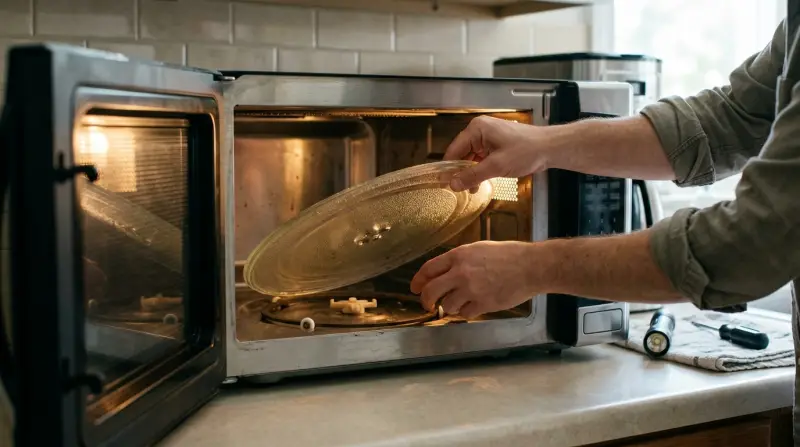
The turntable inside your microwave is more than just a rotating plate. It helps spread heat across your food, making sure everything gets warmed up the same way. Without it, food may stay cold in the middle or get overcooked on the edges. Many modern microwaves use a motor below the plate to spin it, and this system can break or get blocked.
Some models use rotating rings or rollers under the plate, while others depend on a central shaft. If any of these parts fail, the turntable stops spinning. Understanding this mechanism is the first step to fixing your microwave.
Common Reasons A Microwave Turntable Stops Spinning
Several things can cause your microwave’s turntable to stop. Here are the most frequent reasons:
- Dirty or blocked turntable track: Food or grease buildup can block the plate from moving.
- Broken turntable motor: The motor that spins the plate may fail or lose power.
- Damaged drive coupler: This small piece connects the plate to the motor. If it breaks, the plate won’t spin.
- Misaligned or missing rollers: Rollers help the plate glide. If they move out of place, the plate can’t turn smoothly.
- Electrical issues: Sometimes, wiring or electronic controls stop sending power to the motor.
Let’s look at these problems in detail and how to spot them.
Diagnosing The Problem
Before you try to fix anything, make sure your microwave is unplugged and safe to touch. Here’s how to check the main causes:
Inspect The Turntable And Track
Remove the glass plate and look underneath. Check for:
- Food debris: Crumbs or sauce can block the track.
- Roller wheels: Are they in place and moving freely?
- Drive coupler: Is it cracked or loose?
Clean any dirt and reassemble. Sometimes, a simple cleaning fixes the issue.
Listen For Motor Sounds
When you run the microwave, do you hear the motor trying to spin? If the motor is silent, it could be dead or not getting power.
Check The Plate Alignment
Make sure the plate is seated correctly on the coupler. If it wobbles or sits uneven, the coupler or rollers may need adjustment.
Compare Symptoms By Model
Different microwaves have different turntable setups. Here’s a quick comparison:
| Microwave Type | Turntable Mechanism | Common Failure Point |
|---|---|---|
| Standard Countertop | Motor + Glass Plate | Motor or Coupler |
| Built-in/Over-the-Range | Motor + Roller Ring | Roller Alignment |
| Commercial Microwave | No Turntable | Not Applicable |
Knowing your microwave’s setup helps you find the problem faster.
Step-by-step Solutions
Let’s tackle each issue one by one. These steps work for most home microwaves.
Clean The Track And Rollers
Food spills and grime can make the plate stick. Here’s how to clean:
- Remove the glass plate and roller ring.
- Wash both with warm soapy water.
- Wipe the interior of the microwave, focusing on the track area.
- Dry everything before reassembling.
This simple step solves many spinning problems.
Check And Replace The Drive Coupler
If the plate sits on a central plastic piece, that’s the coupler. It can crack or wear out.
- Inspect the coupler for damage.
- If broken, find a replacement (search by your microwave model number).
- To replace, pull out the old coupler and push the new one in place.
Most couplers cost less than $10 and are easy to install.
Fix Roller Ring Issues
The roller ring lets the plate glide smoothly. If it’s bent or missing wheels:
- Remove and inspect the ring.
- If a wheel is missing or stuck, try cleaning and realigning.
- Replace the ring if it’s damaged.
Roller rings are usually cheap and available online.
Test The Turntable Motor
If the above steps don’t work, the motor may be bad. Here’s a simple way to check:
- Unplug the microwave.
- Remove the bottom panel (usually with screws).
- Find the motor attached under the plate area.
- Use a multimeter to check if the motor gets power.
- If the motor is dead, replace it with a compatible part.
Motor replacement is more advanced. If you’re not comfortable, ask a professional.
Examine Electrical Connections
Loose or damaged wires can cut power to the motor.
- Carefully inspect wiring inside the microwave.
- Look for burnt or loose connectors.
- Reconnect or replace damaged wires.
Always unplug the microwave before touching any wires.
When To Call A Professional
Some repairs are simple, but others need expert help. You should call a technician if:
- You suspect electrical issues beyond the motor.
- The microwave is still under warranty.
- You are not confident working with electronics.
Professional repair can cost $50–$150 depending on the problem. Sometimes, replacing the microwave is smarter if the cost is high.
Preventing Turntable Issues
Taking care of your microwave helps avoid future problems. Here are some tips:
- Clean spills quickly: Food debris is the main cause of stuck plates.
- Check alignment: After cleaning, make sure the plate and rollers are positioned correctly.
- Avoid overloading: Heavy dishes can strain the motor.
- Inspect regularly: Look under the plate every few weeks for cracks or dirt.
These habits keep your microwave working longer.
How To Choose Replacement Parts
Not all parts fit all microwaves. Here’s what matters:
- Model number: Always use your microwave’s model number to find parts.
- Brand compatibility: Some brands use unique couplers or motors.
- Quality: Look for genuine or high-rated replacement parts.
Here’s a quick comparison of replacement part costs:
| Part | Average Price | Difficulty |
|---|---|---|
| Glass Plate | $15-$40 | Easy |
| Roller Ring | $10-$25 | Easy |
| Drive Coupler | $5-$15 | Easy |
| Turntable Motor | $20-$50 | Moderate |
Buying the right parts saves time and avoids further damage.
Extra Insights Most People Miss
Many beginners overlook a few details:
- Incorrect plate size: Using a plate that’s too big or too small can stop spinning.
- Hidden damage: Small cracks in the coupler or roller ring may not be obvious. Feel for rough spots or test movement.
- Power surges: After a power outage, the motor may not get proper voltage. Resetting the microwave or checking the outlet can help.
Also, some newer microwaves use a flatbed system with no turntable. If your microwave doesn’t have a spinning plate, it uses a different technology to heat food. Always check your manual if in doubt.

How Turntable Failure Affects Cooking
If your microwave’s turntable isn’t working, you may notice:
- Uneven heating: Some spots are hot, others are cold.
- Longer cooking time: You need to stir or rotate food by hand.
- Poor texture: Some foods may dry out or stay raw inside.
For example, reheating pizza without a spinning plate often leaves the crust cold but the cheese hot. This unevenness is caused by the microwave’s energy focusing on one area.
Safety Tips
Microwaves can be dangerous if opened incorrectly. Always follow these safety tips:
- Unplug first: Never work on a microwave while it’s plugged in.
- Avoid the capacitor: Microwaves store high voltage. Do not touch internal components unless you know what you’re doing.
- Use gloves: Protect hands from sharp edges.
- Read the manual: Some models have hidden panels or special screws.
If you’re unsure, call a technician. Safety should always come first.

What To Do While Waiting For Repairs
If your turntable is broken and you’re waiting for parts or help:
- Rotate food by hand halfway through cooking.
- Use lower power settings to reduce uneven heating.
- Heat smaller portions for better results.
These tricks can make your microwave usable until the plate spins again.
Comparing Microwaves With And Without Turntables
Some people wonder if all microwaves need a spinning plate. Here’s a comparison:
| Microwave Type | Even Heating | Maintenance |
|---|---|---|
| Turntable Microwave | Good | Needs cleaning & alignment |
| Flatbed Microwave | Excellent | Low maintenance |
Flatbed models use advanced technology to spread energy without a spinning plate. They cost more but need less maintenance.

Useful External Resource
For more detailed repair instructions, see Family Handyman. This guide covers safe DIY fixes and when to call an expert.
Frequently Asked Questions
Why Does My Microwave Make A Loud Noise But The Plate Doesn’t Spin?
A loud noise can mean the motor is trying to work but is blocked by dirt, a broken coupler, or misaligned rollers. Check for debris under the plate and inspect the coupler and roller ring.
Can I Use My Microwave If The Turntable Isn’t Spinning?
Yes, but food may heat unevenly. You should rotate food by hand halfway through cooking to avoid cold spots. For best results, fix the turntable as soon as possible.
How Do I Know If The Motor Is Broken?
If cleaning and realignment don’t work, and you hear no motor sound, the motor may be dead. To confirm, unplug the microwave and test with a multimeter, or ask a technician.
Are Flatbed Microwaves Better?
Flatbed microwaves use a different heating method and don’t require a spinning plate. They offer more even heating and are easier to clean, but usually cost more.
Is It Safe To Repair The Microwave Myself?
Simple fixes like cleaning or replacing the plate, rollers, or coupler are safe. For motor or electrical issues, it’s best to get professional help to avoid risk.
Microwaves are reliable kitchen tools, but even small problems like a non-spinning turntable can affect their performance. With these steps and tips, you can fix most turntable issues yourself and keep your appliance working well. Remember, regular cleaning and careful use prevent most problems before they start.