
If your Samsung dishwasher is showing flashing lights on the Normal, Heavy, or Smart Auto buttons, you’re not alone. Many users face this confusing situation and wonder what it means, if their dishes are safe, and how to fix it. These blinking lights aren’t just decoration—they’re your dishwasher’s way of signaling a problem. Understanding these signals can save you time, money, and frustration. Let’s break down what these lights mean, the real causes, and how you can confidently get your dishwasher working again.
Why Do Samsung Dishwasher Lights Flash?
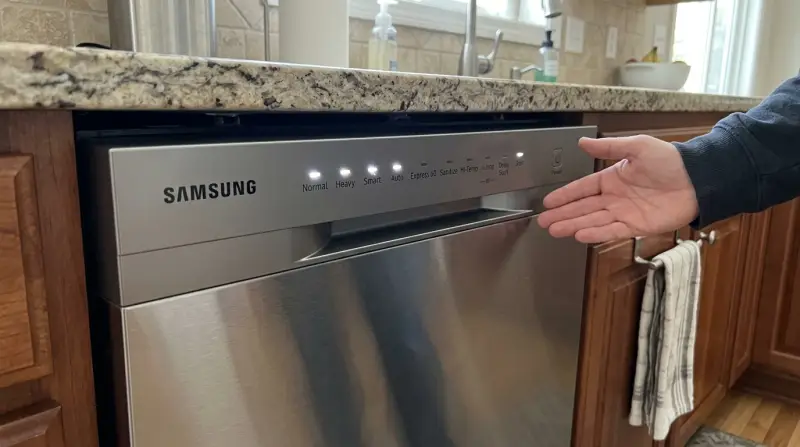
Flashing lights on your Samsung dishwasher usually mean the machine has detected a fault or error. Each combination of flashing lights points to a different problem. For example, if the Normal and Heavy lights blink together, that’s a different issue than just the Normal light flashing. Your dishwasher uses these light codes to communicate because there’s no digital screen for detailed error messages on many models.
Some of the most common reasons for flashing lights include:
- Water supply problems
- Drainage issues
- Door not closed properly
- Heater or temperature faults
- Overfilling or leakage
- Sensor malfunctions
Many of these problems have simple solutions, but some need expert attention. Recognizing which is which can help you avoid unnecessary repairs.
Understanding Samsung Dishwasher Light Codes
Not all Samsung dishwashers use the same light codes. However, the Normal, Heavy, and Smart Auto lights are the most important on many models. Here’s what each typically means when it’s flashing:
Normal Light Flashing
A blinking Normal light often points to a leakage or over-level water issue. The dishwasher’s leak sensor may have detected water where it shouldn’t be. Sometimes, it can also signal heater problems or a stuck button.
Heavy Light Flashing
If the Heavy light flashes, it usually means a heater relay failure or a high-temperature problem. The water may have reached a dangerous temperature, or the heater isn’t working correctly.
Smart Auto Light Flashing
A blinking Smart Auto light is commonly linked to drainage problems. The dishwasher tries to empty water, but something is blocking or slowing the process.
Multiple Lights Flashing
When two or three lights blink together, it usually signals a more complex error. For example, if both Normal and Heavy are flashing, it could mean a heating circuit error. If all three (Normal, Heavy, Smart Auto) are blinking, it’s often a communication error between different parts of the dishwasher.

Credit: www.wikihow.com
Quick Reference: What Each Light Code Means
Below is a handy table summarizing the most common light patterns and their meaning:
| Light(s) Flashing | Common Meaning | Possible Cause |
|---|---|---|
| Normal | Leak/Overflow | Leak sensor activated, too much water |
| Heavy | Heater Error | Heater malfunction, overheating |
| Smart Auto | Drain Error | Clogged or kinked drain hose |
| Normal + Heavy | Heater Circuit | Broken heating element or relay |
| All Three | Communication Error | Wiring or control board issue |
Not every situation fits perfectly into this table, but it covers most home user experiences.
Root Causes Behind Flashing Lights
Let’s dig deeper into what actually triggers these error codes. Many people focus on the lights, but understanding why they flash will help you fix the real problem.
Water Supply Problems
If the dishwasher isn’t getting enough water, or the water is slow to fill, the sensors may trigger an error. Common causes:
- Closed or partly closed water valve
- Kinked or blocked inlet hose
- Low household water pressure
- Clogged inlet filter
A simple check is to make sure the water valve under your sink is fully open.
Drainage Issues
If water can’t leave the dishwasher, the Smart Auto light often flashes. This is usually because of:
- Clogged drain hose (food, grease, or debris)
- Drain hose positioned too high (should not be higher than the base)
- Sink drain clogged (if the dishwasher shares a drain)
- Faulty drain pump
A dishwasher should drain completely after each cycle. If there’s standing water in the tub, drainage is likely the issue.
Door Not Closed Properly
Samsung dishwashers won’t run if the door latch isn’t secure. Even a small misalignment can cause an error. Check for:
- Obstructions (like a utensil or plate sticking out)
- Worn or broken latch
- Loose door seal
If the door feels loose or clicks oddly, inspect the latch closely.
Heater And Temperature Problems
Both the Normal and Heavy lights can flash when there’s a heater issue. This could be:
- Broken heating element
- Faulty thermostat
- Wiring problems
Running too hot or too cold can confuse the dishwasher sensors.
Leak Or Overflow
Modern Samsung dishwashers use a leak sensor at the base. If water collects there, the Normal light flashes. Causes include:
- Loose hoses inside the machine
- Cracked tub
- Too much detergent (leading to suds overflow)
- Overfilling from a faulty inlet valve
If you see water underneath, unplug the machine immediately.
Sensor Or Control Board Faults
Sometimes, the sensors or the main control board malfunction. This can cause random light flashing, especially if all three major lights blink. Unfortunately, this usually requires professional repair or replacement.
How To Troubleshoot Samsung Dishwasher Flashing Lights
Before you call a repair technician, try these practical steps. Many issues are minor and easily fixed at home.
1. Reset The Dishwasher
This is the first thing to try for any strange blinking lights. To reset:
- Turn off the dishwasher using the power button.
- Unplug it from the wall, or switch off the circuit breaker.
- Wait 2-5 minutes.
- Plug back in and turn on.
This simple reset can clear many error codes caused by electrical glitches.
2. Check Water Supply
- Make sure the water valve under your sink is fully open.
- Inspect the water inlet hose for bends or kinks.
- Remove the hose and check the filter at the inlet valve. Clean any debris.
3. Inspect The Drainage
- Look under the sink to see if the drain hose is bent or blocked.
- Detach the hose and flush it with water to clear clogs.
- Check the dishwasher filter (usually at the bottom inside) and clean it.
- Run the garbage disposal (if you have one), as clogs there can block drainage.
4. Examine The Door Latch
Open and close the door several times. Listen for a firm “click. ” If the latch feels loose or moves freely, it may need replacement. Look for any objects blocking the door from closing fully.
5. Look For Leaks
- Remove the bottom front panel (kickplate) and shine a flashlight underneath.
- If you see water, dry it out and check hoses and seals for leaks.
- Be sure to use only the recommended amount of detergent—too much can cause overflow.
6. Run A Diagnostic Cycle
Some Samsung models allow you to run a diagnostic mode. Check your user manual for the key combination. This can display additional error codes and narrow down the issue.
7. Listen For Unusual Noises
Grinding or humming sounds can mean the drain pump is stuck or blocked. Clicking noises can indicate a broken relay.
When To Call A Professional
Not all problems are DIY-friendly. Call a qualified repair technician if:
- The lights keep flashing after all troubleshooting steps.
- There’s water leaking from underneath.
- The dishwasher won’t start at all, even after resetting.
- You smell burning or see smoke (unplug immediately).
- The control board or wiring seems damaged.
Professional repairs are often needed for heater, sensor, or control board problems. These require special tools and safety knowledge.
Error Codes Vs. Flashing Lights
Some Samsung dishwashers have a digital display that shows error codes (like 4C, 5C, LC). Many others use only flashing lights. Both ways communicate similar problems, but the light-only models require you to count and identify which lights are blinking.
Here’s a comparison of error code types:
| Display Type | How Errors Show | Example |
|---|---|---|
| Digital Screen | Alpha-numeric codes | 4C (water supply), 5C (drain error) |
| Button Lights | Flashing patterns | Normal + Heavy, Smart Auto, etc. |
If you have a display, check your manual for specific error definitions.
Preventing Future Flashing Light Errors
Many dishwasher problems are preventable. Regular care and small habits can make a big difference.
Clean Filters Regularly
The filter at the bottom catches food and debris. Remove and rinse it under running water every 1-2 weeks. This keeps water flowing smoothly.
Check Hoses Annually
Look at both the water inlet and drain hoses. Make sure they’re free of kinks, sharp bends, or leaks. Replace hoses every 5 years for best results.
Use The Right Detergent
Too much soap can cause leaks or overflows, especially with newer, high-efficiency dishwashers. Always follow the detergent manufacturer’s guidelines.
Avoid Overloading
Cramming dishes in tightly blocks spray arms and can cause poor cleaning or drainage. Leave space between items and don’t block the door.
Run Hot Water First
Before starting the dishwasher, run your kitchen faucet until the water is hot. This helps the machine fill with hot water and clean better.
Regular Maintenance Tips
- Wipe the door seal and edges monthly to remove debris
- Clean spray arms (remove and rinse out holes)
- Check for any visible leaks under and behind the machine
These small actions can prevent most flashing light errors.
Common Mistakes When Dealing With Flashing Lights
Even experienced users make errors when troubleshooting. Here are two non-obvious insights:
- Resetting without Diagnosing: Many people reset the dishwasher as a first step (which is smart), but if the error returns, they keep resetting instead of investigating the root cause. Always check hoses, filters, and latches if the error comes back.
- Ignoring Water Under the Machine: Some users see a flashing Normal light, don’t see a leak inside the tub, and keep using the dishwasher. Water under the base can cause slow, invisible damage and even electrical short circuits. Always check below the dishwasher if you see a leak-related light.
Cost Of Repair Vs. Replacement
You might wonder if it’s worth fixing an older Samsung dishwasher or buying a new one. Here’s a quick comparison of average repair costs:
| Repair Type | Average Cost (USD) | Worth Repairing? |
|---|---|---|
| Drain Hose/Filter Cleaning | $0 – $100 | Yes |
| Door Latch Replacement | $80 – $200 | Yes |
| Heater Element Repair | $150 – $350 | Maybe |
| Control Board Replacement | $250 – $450 | Sometimes |
| New Dishwasher | $500 – $1200+ | Consider if over 8 years old |
If your machine is more than 8-10 years old and the repair is over $300, a new dishwasher may be the smarter long-term choice.
Real-world Examples
Let’s look at some common user experiences:
- Sarah noticed all three lights blinking after a heavy load. After checking underneath, she found a slow leak from a cracked hose. Replacing the hose stopped the lights from flashing.
- Jason’s Smart Auto light kept blinking. He discovered grease blocking the drain hose. Flushing it out with hot water solved the issue.
- Maria’s Normal and Heavy lights flashed together. A technician found a failed heating element. The part was replaced, and her dishwasher worked like new.
These cases show that most errors have practical solutions, especially with careful troubleshooting.
When Parts Need Replacement
Not every problem can be solved with a simple reset or cleaning. If you need to replace parts, here’s what you should know:
- Door Latch: Easily replaced with a screwdriver; parts cost $20-$60.
- Drain Pump: More complex; often requires removing the dishwasher from under the counter.
- Heating Element: Requires disconnecting power and sometimes water lines.
- Control Board: Should only be replaced by a professional due to electrical risks.
Always use genuine Samsung parts for best results. Aftermarket parts may be cheaper but can lead to recurring problems.

Credit: www.youtube.com
The Role Of Warranty And Support
Check if your dishwasher is still under manufacturer’s warranty or if you bought an extended protection plan. Samsung and major retailers often cover parts like the control board, heater, or pump for 1-5 years. Attempting repairs yourself can void the warranty, so read the fine print before opening up the machine.
Samsung’s official support website has model-specific troubleshooting guides and user manuals. If you’re unsure, use their live chat or phone support for personalized help. For more details, visit the Samsung Support Center.
Advanced Troubleshooting Tips
If you’re comfortable working with appliances, you can try these advanced steps:
- Check for error codes using diagnostic mode. Some models show additional codes via combinations of flashing lights. Find the sequence in your user manual.
- Test the continuity of the heating element using a multimeter. No continuity means it’s broken.
- Inspect the float switch (a small device at the base) for movement. If it’s stuck up, the machine thinks there’s a leak.
- Look for corrosion on control board connectors, especially if you’ve had leaks before.
If you’re not experienced, it’s better to call a qualified technician to avoid injury or further damage.

Credit: www.samsung.com
Frequently Asked Questions
Why Are The Normal, Heavy, And Smart Auto Lights Flashing Together On My Samsung Dishwasher?
When all three of these lights blink at the same time, it usually means a communication error between the main control board and other components. This could be due to a wiring problem, moisture on the control board, or a failing electronic part. Try resetting the dishwasher first. If the lights return, professional help is needed.
Can I Fix A Flashing Normal Light Myself?
Yes, in many cases. A flashing Normal light often means there’s a leak or overfill problem. Check under the dishwasher for water, inspect hoses for leaks, and make sure you’re not using too much detergent. Clean the filters and look for blockages. If you can’t find the cause or the light stays on, call a technician.
How Long Does A Samsung Dishwasher Last?
A well-maintained Samsung dishwasher typically lasts 8 to 12 years. Regular cleaning, using the right detergent, and not overloading the racks help extend its life. Major repairs after 8 years may not be cost-effective.
Is It Safe To Keep Using My Dishwasher When Lights Are Flashing?
No, it’s not recommended. Flashing lights mean the dishwasher has detected a problem. Using it can cause further damage or even electrical hazards, especially if there’s a leak. Always fix the error before running another cycle.
Where Can I Find The Error Code Meanings For My Specific Samsung Model?
The best source is your user manual or the official Samsung support website. Each model can have slightly different codes and light patterns. You can download manuals or use the live chat at the Samsung Support Center.
Keeping your Samsung dishwasher running smoothly is possible with a little knowledge and regular care. Most flashing light errors are not a disaster—they’re warnings you can act on quickly. By understanding what each light means and tackling the root causes, you’ll save time, avoid frustration, and enjoy sparkling dishes every day.