
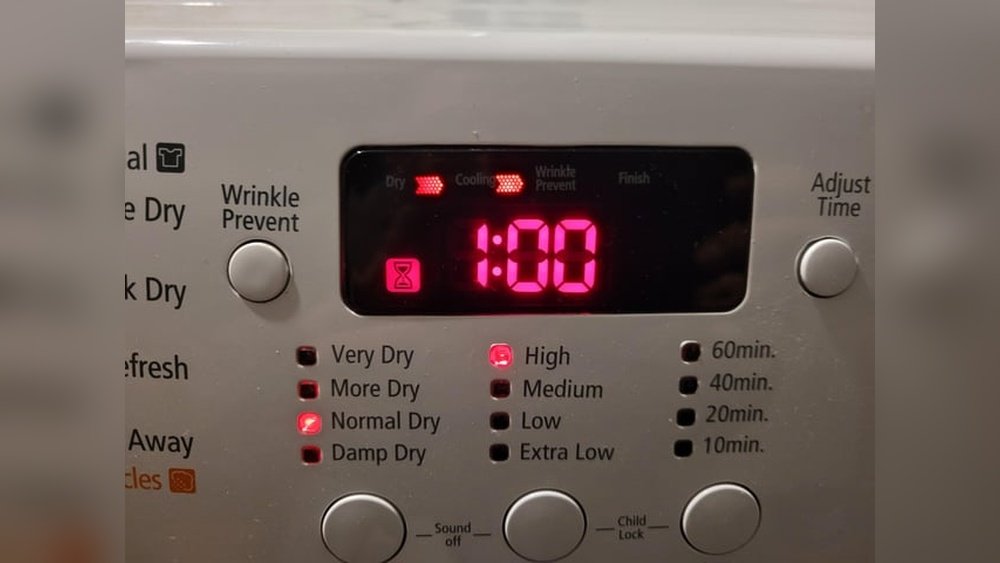
When your Samsung dryer is stuck on the cooling cycle, it can be frustrating and confusing. You may see the dryer running, but your clothes remain damp, or the machine never seems to finish. This is a common issue with Samsung dryers, but it does not always mean you need to call a technician right away. Understanding why this happens and how to fix it can save you both time and money.
This guide will help you find the reasons behind a Samsung dryer stuck on cooling, walk you through step-by-step troubleshooting, and share tips to prevent this problem in the future. Whether you have basic DIY skills or are just curious about how your dryer works, you will find clear advice here.
What Does “cooling” Mean On A Samsung Dryer?
The cooling cycle is a normal part of your dryer’s process. After the main drying phase, the dryer runs cool air through your clothes to help prevent wrinkles and make them easier to handle. This usually lasts for a few minutes at the end of the cycle.
However, if your dryer is stuck on cooling for much longer than expected or never finishes, it is not working as designed. Understanding this difference is important before you start troubleshooting.
Normal Cooling Vs. Stuck Cooling
Here’s a quick comparison to help you tell the difference:
| Normal Cooling | Stuck on Cooling |
|---|---|
| Lasts 3-10 minutes | Goes on for 20+ minutes or never ends |
| Clothes are dry at the end | Clothes stay damp or wet |
| Cycle ends automatically | Cycle won’t finish, dryer keeps running or stops with error |
Common Causes Of A Samsung Dryer Stuck On Cooling
Several factors can cause a Samsung dryer to stay on the cooling cycle. Here are the most frequent reasons:
1. Blocked Lint Filter Or Vent
If air can’t flow properly, the dryer may never reach the right temperature, forcing it to stay in the cooling mode.
2. Faulty Moisture Sensor
The sensor checks if clothes are dry. If it’s dirty or broken, the dryer may think clothes are still wet.
3. Control Board Glitch
Like any computer, the control board can freeze or misread signals, causing cycles to get stuck.
4. Broken Heating Element
If the dryer can’t heat, it can’t dry. The machine may stay on cooling, waiting for the heat that never comes.
5. Incorrect Cycle Selection
Accidentally choosing a “fluff” or “air dry” cycle can make the dryer run with only cool air.
6. Door Not Fully Closed
If the door switch is not triggered, the dryer will not heat and may only blow cool air.
Many people overlook the lint filter and vent. Even if the lint filter looks clean, a partially blocked vent can still cause problems. Regular checks are more important than most users realize.

Credit: www.youtube.com
Step-by-step Troubleshooting Guide
You don’t need advanced skills to fix most cooling-stuck issues. Follow these practical steps to narrow down and solve the problem.
1. Check And Clean The Lint Filter
- Open the dryer door and remove the lint filter.
- Clear away all visible lint.
- Wash the filter with warm water and a soft brush, especially if you use dryer sheets (these can leave residue).
- Let it dry completely before placing it back.
2. Inspect And Clean The Vent
- Unplug the dryer for safety.
- Pull the dryer away from the wall.
- Disconnect the vent hose from the back.
- Use a vent brush or vacuum to clear lint from the hose and wall vent.
- Check outside to make sure air can blow freely out of the vent flap.
A clogged vent is a common cause of extended cooling and is often missed by first-time troubleshooters.
3. Reset The Dryer
- Unplug the dryer from the wall outlet.
- Wait at least 1 minute (some recommend 5 minutes).
- Plug it back in and run a short cycle.
This helps clear minor software glitches that might be causing the stuck cooling mode.
4. Check For Error Codes
Samsung dryers often show error codes. Look for any code on the display. Common ones related to heating and cooling include:
- HC (heating problem)
- TO or tE (thermistor issue)
- DO (door open)
If you see a code, check your dryer’s manual or look it up on Samsung’s support page for more details.
5. Test The Moisture Sensor
- Run a timed dry cycle instead of sensor dry.
- If the dryer finishes properly, the moisture sensor may be dirty or faulty.
- Wipe the sensor bars inside the drum with a soft, damp cloth to remove buildup.
6. Confirm The Cycle Selection
- Make sure you are not using “Air Fluff” or “Cool Air” cycles, which do not use heat.
- Switch to a “Normal” or “Timed Dry” cycle and see if the problem continues.
7. Listen For Heating
- During the first 10 minutes of a drying cycle, open the door and feel for warm air.
- If the air is always cool, your heating element or thermostat may be faulty.
8. Check The Door Switch
- Gently press the door switch by hand and listen for a clicking sound.
- If you don’t hear a click, the switch may not be working, which can prevent heating.
9. Examine The Heating Element (advanced)
If you have basic DIY skills:
- Unplug the dryer.
- Remove the back panel.
- Locate the heating element (check your model’s diagram).
- Visually inspect for breaks or burnt spots.
- If you have a multimeter, test for continuity.
If you find a problem, you may need to replace the part, or call a qualified technician.
When To Call A Professional
Some dryer problems require expert repair. If you’ve tried the steps above and your Samsung dryer is still stuck on cooling, it’s time to call a technician. Warning signs that need professional help include:
- Burning smells or sparks
- Loud noises or vibration
- Error codes you can’t clear
- Physical damage to wiring or internal parts
A certified appliance repair specialist can safely test and replace more advanced parts, like the main control board or sensors.
Maintenance Tips To Prevent Future Issues
Keeping your Samsung dryer in good condition can stop cooling cycle problems before they start. Here are the best ways to prevent trouble:
- Clean the lint filter after every load – This is the simplest and most effective habit.
- Deep-clean the vent at least once a year – More often if you have pets or do heavy laundry.
- Use the right cycles for your fabrics – Avoid using air-only cycles unless you want no heat.
- Don’t overload the dryer – Too many clothes can block airflow and slow drying.
- Keep the drum and sensor bars clean – Wipe away any film or residue monthly.
- Listen for changes in dryer sounds – Rattling or squeaking can mean a problem is starting.
A little regular care goes a long way. Many users forget about the outside vent flap—if this gets stuck or blocked, your dryer may never heat properly.
Real-world Example
Imagine Jane, a busy parent. Her Samsung dryer began taking too long to dry clothes and stayed stuck on “cooling. ” She checked the lint filter, but it seemed fine. After reading a troubleshooting guide, she unplugged the dryer and cleaned the vent hose.
She found a large buildup of lint in the wall vent and outside flap. After cleaning, the dryer finished cycles normally again.
This story shows that even experienced users can miss hidden lint blockages, which are a top cause of the cooling issue.

Credit: www.youtube.com
Comparing Samsung Dryer Models And Cooling Issues
Different Samsung dryer models may have small differences in how they handle the cooling cycle. Here’s a basic comparison:
| Model Type | Common Cooling Issue? | Has Moisture Sensor? |
|---|---|---|
| Older Basic Models | Less common | No |
| Recent Sensor Dry Models | More common if sensor is dirty | Yes |
| High-End Smart Models | Software glitches can cause issues | Yes, with advanced controls |
No matter your dryer model, the basic troubleshooting steps remain similar. However, newer dryers with sensors and digital displays may show helpful error codes, making it easier to find the cause.
Common Mistakes When Fixing A Dryer Stuck On Cooling
Many users make simple mistakes when trying to solve this problem. Here’s what to avoid:
- Ignoring the vent system – Cleaning only the lint filter is not enough.
- Forgetting to unplug before repairs – This is a safety risk.
- Starting with advanced fixes – Always try simple resets and cleaning first.
- Misreading the cycle selector – Sometimes the wrong cycle is picked by mistake.
- Not checking for warranty – Some repairs may be covered if your dryer is new.
If you’re not sure, take a photo of your dryer’s model number and call Samsung support for advice. They may have model-specific tips.
Cost Of Repair: What To Expect
If you need to hire a professional, costs can vary. Here’s a quick comparison of common repair costs:
| Repair Type | Estimated Cost (USD) | DIY Possible? |
|---|---|---|
| Lint/Vent Cleaning | $50–$150 | Yes |
| Moisture Sensor Replacement | $100–$200 | Sometimes |
| Heating Element Replacement | $150–$300 | Advanced DIY |
| Main Control Board | $200–$400 | No |
DIY can save money, but only if you are comfortable working with appliances. If not, a skilled repair person is worth the cost.
When Replacement Is Better Than Repair
If your dryer is more than 10 years old or has repeated problems, it may be time to consider a new one. Modern dryers are more energy efficient, offer better moisture sensors, and have improved safety features. Compare the cost of repair to the price of a new dryer, especially if major parts like the control board have failed.
For more guidance on whether to repair or replace, you can check resources from the Consumer Reports.
Credit: www.omnewyork.com
Frequently Asked Questions
Why Does My Samsung Dryer Stay On “cooling” Even When The Clothes Are Dry?
The most common reason is a dirty or faulty moisture sensor. If the sensor can’t detect dryness, the cycle may not end properly. Clean the sensor bars with a soft cloth and try again.
Can A Dirty Lint Filter Cause My Dryer To Get Stuck On Cooling?
Yes. A blocked lint filter or vent restricts airflow, causing the dryer to stay in cooling or extend cycles. Always clean the filter after each load and check the vent at least once a year.
What Does The “cooling” Light Mean On My Samsung Dryer?
The cooling light signals that the dryer is blowing cool air, usually at the end of the cycle. If it stays on for too long or never turns off, there may be a heating or sensor issue.
How Do I Reset A Samsung Dryer That Is Stuck On Cooling?
Simply unplug the dryer from the wall, wait 1–5 minutes, and plug it back in. This can clear software glitches. If the problem returns, further cleaning or repair may be needed.
Is It Safe To Keep Using My Dryer If It Is Stuck On Cooling?
It is not recommended. Continuous running can waste energy and may hide a vent or heating problem. Fix the issue to avoid bigger repairs or safety risks.
When your Samsung dryer is stuck on cooling, it can feel like a big problem. But with the right steps, most issues can be fixed at home. Start with cleaning and simple checks, and don’t forget the vent system. If these do not help, professional service is the next step. Regular maintenance is the best way to avoid future trouble and keep your dryer working safely for years to come.