
A Samsung refrigerator is designed to keep your food fresh and safe. But what happens when your fridge starts freezing everything, from lettuce to milk? Many Samsung refrigerator owners face the problem of freezing up when the fridge or freezer gets too cold and begins to turn food into ice. This issue can be frustrating, wasteful, and sometimes expensive. If you find yourself dealing with frozen produce, solid milk, or icy water bottles, you’re not alone.
This article takes a deep dive into the causes, fixes, and preventive steps for Samsung refrigerator freezing issues. You’ll find clear explanations, practical tips, and expert advice to help you solve the problem. We’ll also share some insights that many beginners miss, such as how small mistakes in daily use can lead to major freezing problems.
Whether you’re a first-time owner or a seasoned user, you’ll find the guidance you need to keep your Samsung refrigerator running smoothly.
Why Do Samsung Refrigerators Freeze Up?
A refrigerator is supposed to keep food cold, but not frozen. If your Samsung fridge is freezing up, there are several likely reasons. Let’s look at the most common causes.
Incorrect Temperature Settings
The temperature control is the first thing to check. Most Samsung refrigerators recommend a fridge setting of 37°F (3°C) and a freezer setting of 0°F (-18°C). If the temperature is set lower than this, your food may freeze.
It’s easy to accidentally change the setting, especially with digital controls. Children, guests, or even a quick clean can press buttons that adjust the temperature.
Broken Or Faulty Thermostat
The thermostat is the part that senses the internal temperature and tells the compressor when to run. If it’s defective, it may keep the compressor running too long, causing the fridge to get colder than needed.
A faulty thermostat can be hard to detect. Sometimes, the fridge will cycle on and off at the wrong times, or not at all. If you suspect this part, you may need professional help.
Blocked Or Damaged Air Vents
Air vents in your Samsung refrigerator let cold air flow between the freezer and fridge compartments. If these vents are blocked by food or ice, or if the fan is broken, cold air can get trapped and make some sections freeze up.
Common mistakes include overfilling the fridge, which can block vents, or placing items directly in front of them.
Malfunctioning Temperature Sensor (thermistor)
The thermistor checks the temperature and sends data to the control board. If it’s not working, the control board may not get the right signals and will keep cooling even when it’s not needed.
A failing thermistor is a common cause of freezing in modern Samsung models with digital controls.
Problems With The Damper Control Assembly
Some Samsung fridges have a damper control—a small door that opens and closes to let cold air from the freezer into the fridge. If the damper is stuck open, too much cold air enters and causes freezing.
This problem often happens due to a mechanical fault or ice buildup.
Defective Control Board
The control board is like the brain of your refrigerator. If it’s damaged or glitchy, it might send the wrong signals to the compressor, fans, or damper, making the unit too cold.
Control board problems are less common but can be more expensive to fix.
Door Seal Issues
A damaged or loose door gasket (seal) lets warm air into the fridge. The fridge then works harder to cool the air, sometimes overcompensating and freezing the inside.
You can often see or feel gaps in the seal, or notice moisture and frost around the door.
Location And Room Temperature
If your fridge is in a very cold room (like a garage in winter), it may get confused and cool more than necessary. Likewise, direct sunlight or heat sources can affect how the sensors work.
Overstuffing Or Incorrect Food Placement
Packing your fridge too tightly or placing food near vents can cause cold spots and freezing. Air needs to circulate for even cooling.
Software Or Firmware Issues
Modern Samsung fridges may have smart controls that occasionally need updates. A glitch or bug in the system can cause incorrect temperature regulation.
Signs Your Samsung Refrigerator Is Freezing Up
Sometimes, the problem is obvious—frozen lettuce, icy eggs, or solid juice. But there are other, less clear signs that your fridge is too cold. Here’s what to look for:
- Icy or frosted food: Items in the fridge, not just the freezer, are covered in ice crystals.
- Cracking or splitting produce: Vegetables and fruits become brittle and break.
- Frozen liquids: Milk, juice, or water bottles turn solid.
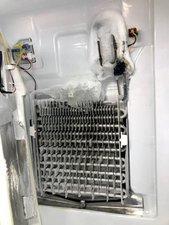
- Frost buildup on back wall: Ice forms inside the fridge, especially near vents.
- Unusual noises: Clicking, whirring, or buzzing sounds from the cooling system.
- Temperature readings: The display shows much lower temperatures than set.
If you notice any of these, your Samsung refrigerator likely has a freezing issue that needs attention.
Quick Fixes To Try First
Before calling for service or ordering parts, try these simple steps. Many freezing problems have easy solutions.
- Check and Adjust Temperature Settings: Make sure your fridge is set to 37°F (3°C) and your freezer to 0°F (-18°C). Wait 24 hours after adjusting for the change to take effect.
- Move Food Away from Vents: Look for vents inside the fridge and make sure nothing is blocking them.
- Don’t Overpack: Leave space between items for air to flow. Try not to fill more than 75% of the fridge.
- Check Door Seals: Close the door on a piece of paper. If you can pull the paper out easily, the seal may need cleaning or replacement.
- Defrost the Fridge: If you see a lot of ice or frost, unplug the fridge and let it defrost for a few hours. Wipe up water and restart.
- Reset the Fridge: Some models have a reset button, or you can unplug the fridge for a few minutes to reboot the system.
These steps solve many minor freezing problems. If your fridge is still freezing up, it’s time to dig deeper.
Common Samsung Refrigerator Models With Freezing Issues
While any fridge can freeze up, some Samsung models are more often reported for this problem. Here are a few examples and what makes them unique.
| Model | Type | Reported Issue | Special Notes |
|---|---|---|---|
| RF28HMEDBSR | French Door | Fridge section freezing, ice buildup | Common damper and sensor issues |
| RS25J500DSR | Side-by-Side | Freezer and fridge both freezing | Air vent blockages reported |
| RF23J9011SR | French Door | Produce freezing in crispers | Damper and firmware problems |
| RT18M6215SR | Top Freezer | Upper shelf items freezing | Temperature sensor placement issue |
| RB217ABPN | Bottom Freezer | Back wall ice buildup | Defrost cycle failures |
Many freezing issues are linked to sensors, dampers, or user habits. Checking your model’s manual can help you identify specific issues and solutions.
In-depth Troubleshooting Steps
If simple fixes don’t work, you may need to go through a more detailed troubleshooting process. Here’s a step-by-step guide.
Step 1: Confirm Settings And Environment
Double-check that the temperature is set correctly and that the fridge is in a room with normal temperatures (above 55°F/13°C). Extreme cold or heat can confuse the sensors.
Step 2: Inspect Air Vents And Circulation
Look for the air vents inside both the fridge and freezer. Make sure nothing is blocking them. Use a flashlight if needed. If you see frost or ice, a blocked vent may be the cause.
Step 3: Test The Door Seals
Run your hand along the door edge. If you feel cold air leaking, the gasket may be dirty, damaged, or loose. Clean it with warm soapy water and dry thoroughly. If it’s still not sealing, a replacement may be needed.
Step 4: Listen For Unusual Noises
A constant buzzing, clicking, or grinding could mean a faulty fan or damper. These sounds can help you locate the problem area.
Step 5: Check The Thermistor And Sensors
If you are comfortable with basic repairs, you can test the thermistor with a multimeter. A faulty reading means the part needs replacement. If not, a technician can do this for you.
Step 6: Inspect The Damper Control
If your fridge has a damper, listen for it opening and closing. If it’s stuck open or closed, it may need repair or replacement.
Step 7: Examine The Control Board
If all else fails, the main control board may be to blame. This is a more advanced repair, and you should contact a professional.
Step 8: Run A Diagnostic Mode
Many Samsung refrigerators have a diagnostic mode (sometimes called Test Mode or Self-Check). Check your manual for instructions. This mode can help you find sensor or control board errors.
How To Fix A Freezing Samsung Refrigerator
Once you’ve identified the likely cause, you can try fixing it yourself or call for help. Here’s what you can do for each problem:
Adjusting Temperature Settings
- Use the digital panel or dial to set the recommended temperatures.
- Wait 24-48 hours for changes to take effect.
- Avoid frequent adjustments, as this can confuse the system.
Cleaning Or Replacing Door Seals
- Clean with warm soapy water.
- For damaged seals, order a replacement gasket from Samsung or an authorized seller.
- Install the new gasket by following the instructions in your manual.
Unblocking Or Cleaning Air Vents
- Remove all food near the vents.
- Use a soft brush or cloth to clean dust or debris.
- Don’t use sharp tools to remove ice, as this can damage the vent.
Replacing A Faulty Thermistor
- Order the correct part for your model.
- Unplug the fridge.
- Remove the cover near the sensor, disconnect the old thermistor, and plug in the new one.
- Replace the cover and restart the fridge.
Fixing Or Replacing The Damper
- Check if the damper moves freely.
- If it’s stuck, it may need cleaning or replacement.
- Some dampers are easy to replace with a screwdriver, others may need professional help.
Updating Firmware
- If your fridge is smart-enabled, check for firmware updates via the Samsung app or website.
- Follow instructions to apply updates.
Resetting The Control Board
- Unplug the fridge for five minutes, then plug it back in.
- Some models have a reset button check your manual.
When To Call A Professional
If you’re unsure, or if the problem is with the control board, compressor, or internal wiring, it’s safest to call a Samsung-certified repair technician. DIY repairs on these parts can be risky and may void your warranty.
Real-world Example: Fixing A Freezing Samsung Fridge
Let’s say you have a Samsung RF28HMEDBSR. You notice your lettuce and milk are frozen solid, and there’s ice on the back wall of the fridge.
- First, you check the temperature setting: It’s at 34°F. You adjust it to 37°F.
- Next, you move food away from the air vent at the back.
- You clean the door gasket, which had crumbs and was not sealing well.
- After 24 hours, things are better, but you still see some ice.
- You enter the fridge’s diagnostic mode and find an error code for the thermistor.
- You order the part, replace it, and the problem is solved.
This step-by-step approach helps you avoid unnecessary repairs and saves money.
How To Prevent Your Samsung Refrigerator From Freezing Up
A little maintenance goes a long way. Here are some simple habits to stop freezing problems before they start:
- Set The Right Temperature: Keep your fridge at 37°F and your freezer at 0°F. Check these every few months.
- Don’t Overfill The Fridge: Leave space around items and especially near vents. This allows air to circulate and keeps temperatures even.
- Store Food Properly: Keep produce away from vents and store delicate items like lettuce or berries in crisper drawers.
- Clean Door Seals Regularly: Wipe the gasket every month with warm, soapy water. This keeps it flexible and ensures a tight seal.
- Defrost When Needed:
- If you see ice buildup, unplug and defrost the fridge. Do this at least once a year, or more often in humid climates.
- Update Firmware: If your model has smart features, check for updates every 6-12 months.
- Monitor The Room Temperature: Avoid placing your fridge in areas that get too cold or too hot, like garages or near ovens.
- Use The Power Cool Feature Carefully: Some Samsung fridges have a Power Cool or Power Freeze feature. Use these only when you need to cool things quickly, and turn them off after a few hours.
- Inspect Vents And Fans: Every few months, check that vents and fans are clear. A quick look can help you spot problems early.
- Schedule Regular Maintenance: If possible, have a professional check your fridge once a year, especially if it’s still under warranty.
Key Differences: Freezer Vs. Fridge Freezing Problems
It’s important to know where the freezing is happening. Here’s a quick comparison.
| Section | Common Cause | Typical Solution |
|---|---|---|
| Freezer | Too low setting, faulty defrost system | Adjust temp, check defrost heater/timer |
| Fridge | Blocked vent, bad thermistor, open damper | Move food, replace sensor, fix damper |
Knowing the location of the freezing problem helps you focus your troubleshooting and find a faster fix.
Common Mistakes That Make Freezing Worse
Even experienced users make small mistakes that can lead to freezing. Here are two that beginners often miss:
- Using the Power Cool/Freeze Feature for Too Long: These features blast cold air for rapid cooling. If left on, they can freeze everything inside.
- Ignoring Minor Ice Buildup: A little frost may not seem like a big deal, but it often points to a bigger air flow or sealing problem. Address it early.
Avoiding these mistakes will help your fridge last longer and work better.

How Does A Samsung Refrigerator Regulate Temperature?
Understanding how your fridge works can help you spot problems early. A Samsung refrigerator uses sensors, fans, and a control board to keep temperatures steady.
- Sensors measure the temperature in the fridge and freezer.
- The control board decides when to turn the compressor and fans on or off.
- Fans and dampers move air around so everything cools evenly.
If any part of this system fails, the fridge may get too cold, leading to freezing. Regular maintenance and careful use keep all parts working together.
Data: How Common Is Freezing In Samsung Refrigerators?
Freezing issues aren’t rare. According to a consumer survey from 2022, about 18% of Samsung refrigerator owners reported that their fridge section froze food at least once during the first three years. Most problems were fixed with simple adjustments, but about 6% required a part replacement.
Here’s a breakdown of reported causes:
| Cause | Percentage of Cases |
|---|---|
| Wrong temperature setting | 37% |
| Blocked vent/airflow | 22% |
| Door seal/gasket | 15% |
| Faulty sensor/damper | 14% |
| Control board | 7% |
| Other/Unknown | 5% |
Most freezing problems have a simple solution, but a small percentage need technical repairs.
When Is It Time To Replace Your Samsung Refrigerator?
If your fridge keeps freezing up after several repairs, or if it’s more than 10-12 years old, it might be time for a new one. Signs to look for include:
- Frequent part failures (thermistor, damper, control board)
- Rising energy bills
- Inconsistent cooling in both compartments
- Unusual noises that don’t go away after repairs
Newer models are more energy-efficient and have better sensors to prevent freezing. If you’re considering an upgrade, check the Energy Star label and look for models with smart sensors.
For more tips on appliance lifespan and efficiency, you can read the U.S. Department of Energy’s guide.
Frequently Asked Questions
Why Does My Samsung Refrigerator Keep Freezing My Vegetables?
The most common cause is blocked air vents or the temperature set too low. Vegetables placed near vents can freeze quickly. Move produce to the crisper drawers and keep vents clear for better results.
How Do I Reset My Samsung Refrigerator After It Freezes Up?
Unplug the fridge for five minutes to reset the control board. Some models have a reset button—check your manual for its location. After resetting, set the correct temperature and monitor for improvement.
Can A Samsung Refrigerator Freeze Up Due To A Power Outage?
Yes. After a power outage, the fridge may default to factory settings or run in Power Cool/Freeze mode. Check the temperature setting and adjust if needed. If you see ice buildup, defrost the fridge.
Is It Safe To Eat Food That Has Frozen In The Fridge Section?
Most foods are safe if they were kept cold, but the texture and quality may be affected. Lettuce, eggs, and some dairy can become watery or grainy. If food has an unusual smell or appearance after thawing, it’s best to throw it away.
How Often Should I Check My Samsung Refrigerator’s Temperature?
Check at least once a month. Use a fridge thermometer for accurate readings. Regular checks help you spot problems before they ruin your food.
A Samsung refrigerator that freezes up can be a hassle, but with the right knowledge and steps, you can solve most problems yourself. By paying attention to temperature, airflow, and seals, you’ll keep your food fresh and avoid unnecessary waste.
If you ever feel unsure, don’t hesitate to reach out to a professional. With good care, your Samsung fridge can serve you well for many years.