
If your Razor MX350 throttle stops working, it can quickly turn a fun day into a frustrating one. This electric dirt bike is popular with kids and beginners, but throttle problems are not rare. In many cases, the solution is simple. In others, you might need a bit more technical know-how. Let’s take a practical look at why the Razor MX350 throttle might not be working, how to diagnose the issue, and what you can do to fix it.
Understanding The Razor Mx350 Throttle System
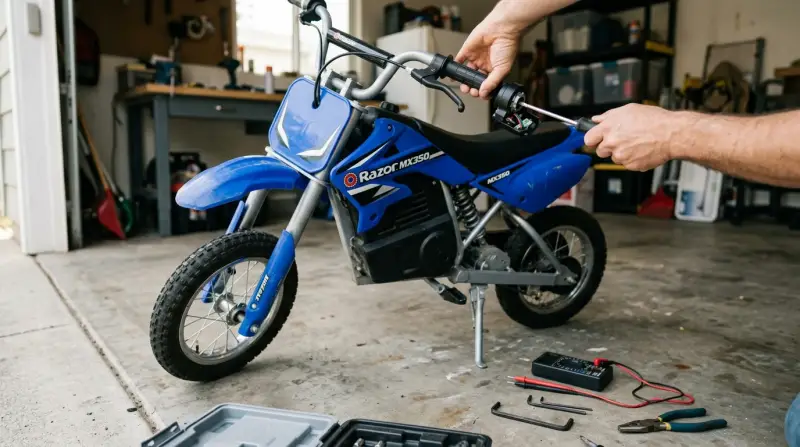
The throttle on the Razor MX350 is the part that lets you control the bike’s speed. It’s usually a twist grip on the handlebar. When you twist it, it sends a signal to the controller, which then tells the motor how much power to use. If the throttle stops working, the bike won’t move, or it may only work at certain speeds.
The main parts involved are:
- Throttle grip (on the handlebar)
- Wiring (connecting throttle to controller)
- Controller (the “brain” of the bike)
- Battery
- Motor
If any of these fail, the throttle may stop working.
Common Reasons The Razor Mx350 Throttle Stops Working
Let’s break down the most likely reasons for throttle failure:
- Dead or weak battery: The bike may not have enough power to respond.
- Loose or broken wires: Connections can come loose, especially after rough rides.
- Faulty throttle grip: The twist grip itself may break or wear out.
- Bad controller: If the controller fails, the throttle signal won’t reach the motor.
- Motor problems: Less common, but a bad motor can also cause throttle issues.
- Safety switches or fuses: Some models have a fuse or safety switch that may trip.
Most throttle problems are caused by simple electrical issues — not the motor itself.

How To Diagnose A Razor Mx350 Throttle Problem
Before you start replacing parts, it’s important to diagnose the problem. Here’s a step-by-step process:
- Check the battery
- Make sure it’s fully charged. If not, charge it for at least 12 hours.
- If the charger doesn’t work or the battery won’t hold a charge, that’s likely the issue.
- Inspect the wiring
- Look for any loose, disconnected, or frayed wires around the throttle, controller, and battery.
- Wiggle the wires gently while trying the throttle. If it works intermittently, you may have a loose connection.
- Test the throttle grip
- With the bike off, unplug the throttle from the controller (usually a plastic connector).
- Use a multimeter to check for continuity when twisting the throttle.
- No reading? The throttle grip may be faulty.
- Examine the controller
- If you have a spare controller or can borrow one, swap it in to see if the problem goes away.
- Controllers can fail internally, even if they look fine on the outside.
- Check for blown fuses or tripped breakers
- Some MX350 models have a fuse or circuit breaker. Replace the fuse if blown or reset the breaker.
- Listen for motor response
- When you twist the throttle, listen for any clicking or humming from the motor.
- If the motor is silent, the problem is before the motor (throttle, controller, or wiring).
Simple Fixes For Razor Mx350 Throttle Issues
Many issues can be fixed at home with basic tools and a little patience. Here are some practical steps:
Charging Or Replacing The Battery
A fully-charged battery is essential. If your battery is over a year old, it may not hold charge well. Consider replacing it with an official Razor battery for best results.
Securing Loose Wires
Loose wires are very common. Use zip ties to keep them in place and check connectors for corrosion or damage. Clean any dirty contacts with a bit of rubbing alcohol.
Replacing The Throttle Grip
If the grip itself is the problem, you can order a replacement online. It’s usually a plug-and-play part. Remove the old grip, disconnect the wiring, and plug in the new one.
Swapping Out The Controller
The controller is located under the seat or fairing. Replace it only after checking battery, wiring, and throttle. Be careful to match the voltage and connectors.
Resetting Or Replacing The Fuse
If your bike has a fuse, check it regularly. Always use the correct rating. Installing a fuse that’s too strong can create safety risks.
How To Prevent Throttle Problems
A few simple habits can help keep your Razor MX350 running smoothly:
- Charge the battery after every use.
- Store the bike indoors to avoid moisture and dust.
- Inspect wires regularly for signs of wear.
- Avoid overloading the bike (follow the weight limit).
- Teach young riders not to yank the throttle aggressively.
When To Call A Professional
Not every problem can be solved at home. If you smell burning, see melted wires, or the bike still doesn’t work after trying the steps above, it’s time to contact a professional. Look for a local Razor dealer or an electric bike repair shop.
Example: Diagnosing A Real-world Throttle Issue
Imagine you turn the key, the lights come on, but the MX350 won’t move when you twist the throttle. You check the battery and it’s fully charged. Next, you inspect the wiring and notice a connector under the seat is loose.
After pushing it back in, the throttle works perfectly. This simple fix is common, especially after rough rides or transporting the bike.
Data: Common Razor Mx350 Throttle Issues
Here’s a quick look at the most frequent causes of throttle failure:
| Problem | Frequency (%) | Typical Fix |
|---|---|---|
| Loose wire/connection | 38% | Secure or reconnect |
| Dead battery | 29% | Recharge/replace |
| Faulty throttle grip | 17% | Replace grip |
| Controller failure | 11% | Replace controller |
| Blown fuse | 5% | Replace fuse |

Comparing Diy Vs. Professional Repair
Should you fix it yourself or take it in? Here’s a comparison to help you decide:
| Repair Option | Cost | Skill Required | Time |
|---|---|---|---|
| DIY | $0-$60 | Basic to Moderate | 1-2 hours |
| Professional | $50-$150 | None | 1-7 days |
For most basic problems, DIY is cost-effective and quick. More complex issues (controller or motor replacement) may need professional help.
Two Insights Most Beginners Miss
- Charge maintenance matters: Many people let the battery run down to zero. This shortens the battery’s life and can cause throttle issues. Always recharge after each ride, even if the battery isn’t empty.
- Vibration is a hidden enemy: Off-road riding shakes the bike. This often loosens connectors, causing “random” throttle failures. Check all plugs and wires after bumpy rides.

Where To Find Help And Parts
Genuine parts are best for safety and performance. Order directly from Razor’s website or trusted retailers. Avoid no-name brands for critical parts like the controller and throttle grip. For wiring diagrams and step-by-step videos, the official Razor Support site is very helpful.
Frequently Asked Questions
What Should I Check First If My Razor Mx350 Throttle Isn’t Working?
Start with the battery. Make sure it’s fully charged and the charger works. Next, check all wiring and connectors, especially around the throttle and controller.
How Do I Know If The Throttle Grip Itself Is Broken?
If the battery and wiring are fine but the bike still won’t respond, unplug the throttle grip and test it with a multimeter. No signal when twisting means the grip is likely faulty.
Can I Replace The Throttle Myself?
Yes, replacing the throttle grip is a simple job for most people. Just unplug the old one and connect the new. Make sure to order the correct part for your MX350 model.
Is It Safe To Ride If The Throttle Works Sometimes But Not Always?
No, it’s not safe. Intermittent throttle response usually means a loose wire or failing component. This can lead to sudden stops or loss of control.
Where Can I Get Official Razor Mx350 Parts?
Buy from the Razor website or trusted online stores. Using genuine parts avoids compatibility issues and keeps your bike safer.
Fixing your Razor MX350 throttle can be straightforward if you follow a step-by-step approach. Start simple, check connections, and don’t skip battery care. With a little patience, you can get your bike back to full power and avoid future problems.