
If you own a Waterpik Sonic Fusion, you know how helpful it is for keeping your teeth and gums clean. It combines the power of a sonic toothbrush and a water flosser in one device. But what happens when your Sonic Fusion suddenly stops working as expected? Troubleshooting can be confusing, especially if you’re not a tech expert. This guide will help you solve common problems, understand why they happen, and get your Sonic Fusion working again without stress.
Common Waterpik Sonic Fusion Problems
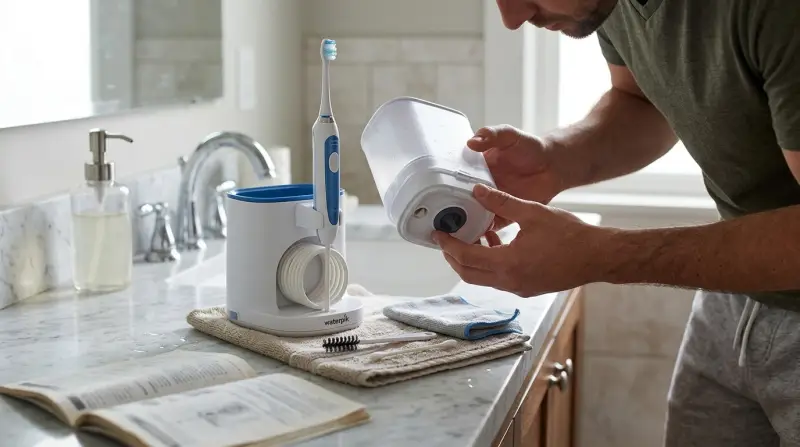
Many users experience similar issues with the Sonic Fusion. The most reported problems include:
- Device will not turn on
- No water flow or weak water stream
- Leaking water
- Brush head not vibrating
- Unit making strange noises
- Charging issues
Understanding these problems is the first step. Let’s look at each one in detail and learn how you can fix them at home.
Device Will Not Turn On
When your Waterpik Sonic Fusion doesn’t power up, it can be frustrating. There are a few simple checks you can do:
- Check the power connection. Make sure the power cord is plugged in and the outlet is working. Try plugging another device into the same outlet.
- Inspect the power button. Sometimes, residue or toothpaste can block the button. Wipe it clean with a damp cloth.
- Is the device charged? If you have the rechargeable model, leave it on the charger for at least 4 hours. The indicator light should show a steady glow when charging properly.
- Try a reset. Unplug the device, wait 30 seconds, and plug it back in.
If none of these steps work, the problem could be internal, like a faulty battery. In this case, contact Waterpik support.
No Water Flow Or Weak Water Stream
A strong water stream is essential for effective flossing. If the water flow is weak or not working, it usually means there’s a blockage or connection issue.
- Check the water reservoir. Ensure it is filled and seated correctly.
- Inspect the hose and handle. Kinks or bends can block water. Straighten the hose and remove any visible obstructions.
- Clean the tip. Mineral deposits can clog the flosser tip. Soak it in a mix of vinegar and water for 5–10 minutes, then rinse.
- Prime the pump. Sometimes air bubbles block the flow. Run the unit for 30 seconds with the tip detached to clear the line.
Common Causes Of Weak Water Flow
| Cause | How to Fix |
|---|---|
| Clogged tip or nozzle | Soak and clean as described above |
| Mineral buildup in the unit | Run white vinegar through the system, then rinse with water |
| Loose water reservoir | Reseat the reservoir firmly |
If you live in an area with hard water, regular cleaning is especially important.
Leaking Water
Leaks can happen at different places: the reservoir, handle, or base.
- Reservoir leaks: Remove and reseat the reservoir. Check for cracks or worn seals. Replace any damaged parts.
- Handle leaks: Inspect the O-ring (small rubber gasket) inside the handle. If it’s missing or loose, leaks can happen. You can buy replacement O-rings online or from Waterpik.
- Base leaks: Wipe the base dry. Run the unit and watch closely to see where the leak starts. If water comes from inside the unit and not from the reservoir or handle, stop using the device and contact support.
Leak Source And Fix Table
| Leak Source | Quick Fix |
|---|---|
| Reservoir seam | Replace reservoir or apply food-safe silicone sealant |
| Handle O-ring | Replace the O-ring |
| Internal base | Contact Waterpik support |
A non-obvious tip: If you overfill the reservoir, it may leak even if there’s no damage. Fill only to the marked line.
Brush Head Not Vibrating
The Sonic Fusion’s brush head uses sonic technology to vibrate and clean your teeth. If it stops vibrating:
- Check brush head attachment. Remove and reattach the brush head firmly.
- Clean the connection. Toothpaste or debris can block the metal post. Wipe it gently with a cotton swab.
- Replace the brush head. Worn brush heads sometimes lose their grip or connection.
- Try the other mode. Switch between brushing and flossing modes to see if the problem is only with one function.
Do not try to open the handle or force the brush head. Internal repairs should be left to professionals.
Unit Making Strange Noises
New noises usually mean something is wrong. The most common sounds are:
- Rattling: Usually loose parts or debris inside the handle.
- Buzzing: Normal for sonic vibration, but very loud buzzing can mean a broken part.
- Gurgling: Often caused by air in the water line.
What to do:
- Remove and clean the brush head and tip.
- Run the flosser without the tip to push out air bubbles.
- If you hear grinding or very loud noises from the base, stop using it. This could mean a failing motor.

Credit: www.waterpik.com
Charging Issues
If your Waterpik Sonic Fusion is not charging:
- Check the charger plug and cord. Make sure they are not damaged.
- Clean the charging contacts. Use a dry cloth to wipe away any moisture or residue.
- Inspect the indicator light. If the light blinks or stays off, the battery may need replacement.
- Avoid using the device while charging. This can sometimes confuse the charging circuit.
Rechargeable batteries lose capacity over time. If your device is more than two years old and won’t hold a charge, you may need to replace the battery or the entire handle.
Routine Maintenance To Prevent Problems
Regular maintenance can keep your Sonic Fusion working longer and better. Here’s a quick schedule:
- Daily: Rinse the reservoir and tip after use. Wipe the handle dry.
- Weekly: Soak the tip in vinegar and water to remove deposits. Clean the brush head connection.
- Monthly: Run a reservoir of white vinegar through the flosser, followed by two reservoirs of clean water.
Maintenance Checklist
| Task | Frequency |
|---|---|
| Rinse reservoir | Daily |
| Clean tip/nozzle | Weekly |
| Descale with vinegar | Monthly |
| Inspect O-rings | Every 3 months |
Many users forget about the O-rings. Replacing them every few months can prevent most leaks.
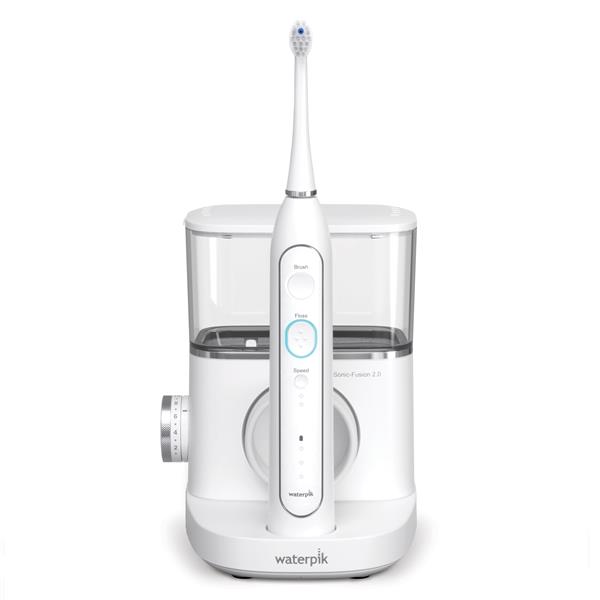
Credit: www.waterpik.ca
When To Contact Waterpik Support
Most basic problems can be fixed at home. But some issues need expert help:
- Internal leaks from the base
- Device won’t turn on after all troubleshooting
- Battery won’t hold any charge
- Broken or unresponsive buttons
- Strange burning smell from the unit
Waterpik offers a two-year limited warranty on most Sonic Fusion models. Keep your proof of purchase. Contact their support team via phone or website for warranty service or advanced repairs. For more information, visit the official Waterpik support page.

Two Insights Many Beginners Miss
- Water temperature matters. Using water that is too hot can damage the seals and plastic parts inside your Sonic Fusion. Always use lukewarm or cool water.
- Not all tips fit all models. If you buy replacement tips, make sure they match your Sonic Fusion model. Using incompatible tips can cause leaks and weak water flow.
Tips For Better Sonic Fusion Performance
- Always empty the reservoir after each use to avoid mold and bacteria.
- Store the device in a dry place, especially if you live in a humid climate.
- Replace the brush head every 3 months for best cleaning results.
- Never run the device without water—this can damage the pump.
Frequently Asked Questions
Why Is My Waterpik Sonic Fusion Not Turning On?
First, check the power connection and ensure the device is charged. If it still does not turn on, try a reset by unplugging and replugging the device. If the problem continues, the battery or internal circuitry may be faulty and will need professional service.
How Often Should I Clean My Sonic Fusion?
For best results, rinse the reservoir and tip daily. Soak the tip in vinegar weekly and descale the whole unit monthly. This prevents mineral deposits and bacteria buildup, keeping your device working well.
What Should I Do If The Water Flosser Sprays Everywhere?
Make sure the tip is fully inserted and the reservoir is seated properly. If it still sprays, the O-ring or tip could be worn out. Replace any parts that look damaged. Always point the tip toward your teeth before turning it on.
Can I Use Mouthwash In My Sonic Fusion?
Yes, but dilute it with water according to the manufacturer’s instructions. Full-strength mouthwash can harm the internal parts. After using mouthwash, run a reservoir of clean water through the device to rinse out any leftover liquid.
Where Can I Find Replacement Parts?
You can find official Waterpik replacement parts on their website or at large online retailers. Always check your model number before ordering, as not all parts are universal. For more details, see the Waterpik replacement parts page.
Getting your Waterpik Sonic Fusion back to full power often just needs a few simple steps and regular care. With the right troubleshooting and maintenance, your device can last for years and keep your smile healthy. If you ever feel unsure, don’t hesitate to reach out to Waterpik support or check their detailed user manuals. Good oral care starts with the right tools—and knowing how to keep them running strong.