
The primary reason for a Whirlpool Washer Spin Cycle Not Working is an unbalanced load, which triggers the machine’s safety sensor to stop the drum from spinning at high speeds. If your laundry is bunched up on one side, the washer can’t safely complete the cycle. You should redistribute the items evenly and try to restart the spin setting. If the machine remains full of water or makes loud grinding noises, stop using it immediately and check the Whirlpool product support page for specific error codes or troubleshooting steps relevant to your model.
Why Your Whirlpool Washer Spin Cycle Not Working
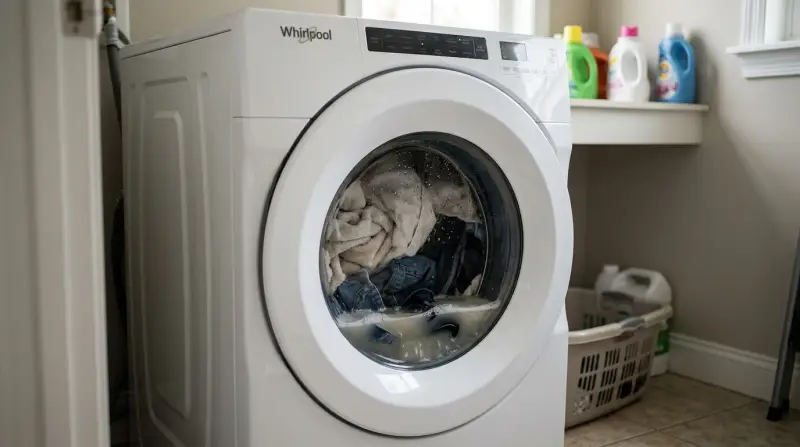
Most machines stop spinning because the internal control board detects a physical or electrical issue that could cause damage if the cycle continued. The most common cause is an uneven distribution of weight within the drum. If you wash a single heavy item, like a rug or a thick blanket, the drum becomes off-center. The machine senses this vibration and cancels the spin to prevent the unit from shaking itself apart or damaging the floor.
Another cause is a blocked drain pump. If the water can’t leave the tub, the washer won’t enter the spin phase. This often happens if a small item, such as a sock or a coin, gets stuck in the drain filter or the hose. When the water level remains high, the pressure switch tells the controller that it’s unsafe to spin.
Finally, some machines fail to spin due to a faulty lid switch or door lock. For your safety, the washer must confirm that the door is firmly closed before it engages the high-speed motor. If the latch is broken or the sensor is dirty, the machine will sit idle. This varies by model — check the label on your door frame for the specific sensor location and ensure the mechanism is free of debris. If the door lock mechanism is damaged, you’ll need a technician to replace the part to avoid electrical risks.
Redistribute the laundry load
This fix is for users who notice the washer stops mid-cycle or shakes violently during the spin phase. If the laundry is bunched in a ball, the machine detects an imbalance and pauses to protect the motor. Open the lid or door, pull the clothes apart, and arrange them in a loose circle around the agitator or drum wall. If you’re washing a heavy item, add two or three smaller towels to the load to balance the weight.
After rearranging the items, close the door firmly and select the “Drain and Spin” cycle. Don’t restart the full wash cycle, as this wastes water and time. If the washer completes the spin after you redistribute the load, the issue was simply an unbalanced weight. If the problem persists even with a small, balanced load, the issue is likely mechanical rather than user-error.
Who this isn’t for: If you hear a loud metallic banging noise or see smoke, don’t attempt to restart the machine. This indicates a failed bearing or motor issue. In such cases, stop all interaction and call a qualified repair professional. A common mistake is forcing the machine to run by holding the lid switch closed with an object; this is dangerous and can lead to severe injury if the drum spins while the lid is open.
Clear the drain system
If the drum is empty of heavy items but still full of water, the pump is likely blocked. This prevents the machine from sensing that it’s ready to spin. First, turn off the power at the wall outlet to ensure safety. Locate the drain filter, which is usually behind a small door at the bottom front of the unit. Place a shallow pan underneath to catch the excess water that will spill out once you unscrew the filter.
Remove the filter carefully and check for small objects like coins, buttons, or hair clips. These items can block the impeller blades, preventing the pump from turning. If you find debris, clear it out and rinse the filter under warm water before replacing it. Tighten the filter back into place firmly to prevent leaks.
If you don’t see any debris in the filter, check the drain hose for kinks. If the hose is bent or crushed against the wall, water can’t exit the machine. Straighten the hose to ensure a clear path to the standpipe. If the pump still makes a grinding noise after clearing the filter, the motor inside the pump may be failing. This is a trade-off; you can easily clear a clog yourself, but a dead pump motor requires a professional technician to replace the component.
Reset the control board
Sometimes the internal computer experiences a software glitch that prevents it from initiating the spin sequence. To reset the system, unplug the washer from the wall outlet for at least five minutes. This allows the control board to power down and reset, clearing any temporary software glitches. After the wait, plug the machine back in and try to run a “Drain and Spin” cycle.
If the machine begins to spin, the reset was successful. If the washer displays an error code on the digital screen after the reset, write down the code and check your owner’s manual. These codes are specific to your model and will tell you exactly which sensor is failing. If the code indicates a “Motor Control” or “Lid Lock” failure, this is a sign that a part has reached the end of its life.
This fix is only effective for minor software errors. If the machine continues to show the same error code repeatedly, it isn’t worth your time to keep resetting it. A persistent error code means a hardware component has failed. Don’t attempt to open the outer cabinet or touch the internal wiring, as capacitors can hold a lethal charge even when the unit is unplugged. Contact a factory-authorized service center to handle the repair.
What not to do
-
Don’t use a screwdriver to bypass the door switch. This is a major safety risk because the drum can continue spinning at high speeds while you reach inside, which can lead to severe injury. If the interlock fails, replace the entire latch assembly immediately rather than attempting a temporary mechanical override.
-
Don’t overload the drum with heavy bedding. The machine is designed for a specific weight limit; overloading it causes the suspension to fail, leading to costly damage to the outer tub. If the machine vibrates violently during the spin cycle, pause the load and remove at least one heavy item to prevent permanent structural fatigue to the springs.
-
Don’t try to fix internal electrical components yourself. If you suspect a faulty motor or control board, don’t open the housing, as you risk electric shock or voiding your warranty. Professional technicians use specialized diagnostic software to isolate board failures; manual testing often leads to accidental short-circuits.
-
Don’t ignore persistent “OE” or “E1” error codes. These codes usually mean the pump is failing; continuing to run the machine will cause the pump to overheat and eventually burn out. If you see these codes, clear the drain filter first; if the error persists, the pump motor is likely seized and requires professional replacement.
How to stop it happening again
To keep your machine running smoothly, follow a regular maintenance routine that prevents debris and weight issues from building up.
| If you’re doing this | Do this instead | Why |
|---|---|---|
| Washing heavy rugs | Use a local laundromat | Home washers aren’t built for high-density wet loads |
| Leaving coins in pockets | Empty all pockets before loading | Metal objects block the drain pump impeller |
| Using too much detergent | Use the recommended dose | Excess suds confuse the level sensors |
| Ignoring the filter | Check the filter as needed | Prevents buildup that causes pump strain |
Most users mistake a minor vibration for an uneven floor, but it’s usually a sign of an overloaded drum. If your machine walks during the spin cycle, stop the load immediately and redistribute the weight.
If you notice a musty odor, run a hot cycle with two cups of white vinegar once a month. This clears biofilm that standard detergents leave behind. If the smell persists, check the rubber door gasket for trapped moisture. Wipe it dry after every wash to prevent mold growth, which costs hundreds in premature seal replacements.
If you live in an area with hard water, add a softener to every cycle.
Frequently asked questions

Can I fix a washer that doesn’t spin myself?
You can perform basic tasks like clearing a blocked drain filter or fixing an unbalanced load. These checks resolve most common issues without needing specialized tools. If the problem involves the motor, internal wiring, or the electronic control board, you must hire a professional.
How long should a spin cycle take?
A standard spin cycle typically takes between 10 and 15 minutes, depending on speed settings and load size. If your machine runs significantly longer or stops abruptly, it’s likely detecting an imbalance or drainage issue. Note that high-speed settings may slightly increase the total duration.
Is it safe to run the washer if it shakes?
You should stop the machine immediately if it shakes or walks across the floor. Excessive vibration indicates the load is unbalanced, which puts immense stress on the suspension springs and shock absorbers. Always pause the cycle to redistribute the clothes and ensure the machine is level.
Why does my washer stop before it spins?
Your washer stops because sensors detect it isn’t safe to proceed at high speeds. This occurs if water remains, the load is off-center, or the lid is unlocked. Check the drain hose for kinks and ensure the drum isn’t overloaded to resolve these safety triggers.
What happens if I ignore a washer that won’t spin?
Continuing to run a washer with spin issues will likely damage the motor or drain pump. A pump unable to clear water will eventually burn out, leading to expensive repairs. Stop using the machine as soon as problems appear to avoid further damage to internal components.
Final Thoughts
If these simple adjustments don’t get things moving again, it’s time to reach out to a professional technician. Don’t let a broken appliance ruin your week; scheduling a quick inspection will help you avoid further damage. You’ll be back to washing your clothes in no time once the experts take a look.