
If your outdoor lighting is powered by a Hampton Bay transformer, you probably enjoy the convenience of automatic control and low-voltage safety. But what happens when things go wrong? Transformer issues can make your beautiful garden lights flicker, fail, or behave strangely. Fixing these problems isn’t always simple, especially if you’re new to landscape lighting. This guide will help you understand common Hampton Bay transformer problems, why they happen, and what you can do to solve them—without unnecessary confusion or wasted time.
Understanding The Hampton Bay Transformer
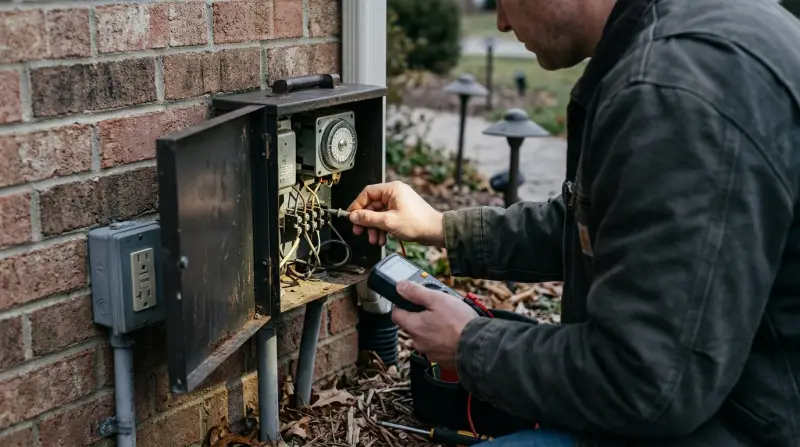
A transformer is the heart of any low-voltage outdoor lighting system. Hampton Bay, a popular brand sold at stores like Home Depot, offers transformers that convert your home’s 120V power to a much safer 12V or 14V for outdoor lights. Most models come with features like timers, photo sensors, and multiple output terminals.
Many users choose Hampton Bay because it’s budget-friendly and easy to install. Still, even reliable products can run into trouble. Knowing how your transformer works is the first step to troubleshooting.
Common Hampton Bay Transformer Problems
If your lights are not working as expected, the problem may be with the transformer. Here are the most frequent issues homeowners face:
1. Transformer Will Not Power On
Sometimes, the transformer does not turn on at all. This could be due to:
- No power at the outlet (circuit breaker tripped)
- Internal fuse blown
- Loose wiring connections
- Defective photo cell (if equipped)
A simple way to check: plug in another device to the same outlet to see if it works. If not, check your breaker box.
2. Lights Flicker Or Dim
Flickering or dim lights can be frustrating and often indicate:
- Overloaded transformer (too many lights or too high wattage)
- Loose wire connections at the transformer terminals
- Voltage drop due to long cable runs
- Faulty bulbs or sockets
It’s important to add up the total wattage of your lights and ensure it does not exceed the transformer’s rated capacity.
3. Timer Or Photocell Not Working
Many Hampton Bay transformers have built-in timers or photo sensors to turn lights on/off automatically. Problems include:
- Timer not keeping time
- Lights stay on all day or night
- Photo cell fails to detect light changes
In most cases, the timer or photocell may need to be reset or replaced.
4. Buzzing Or Humming Noise
A low-level hum is normal, but loud or new buzzing can mean:
- Loose mounting
- Internal electrical issue
- Overload condition
A persistent loud noise may indicate the transformer is failing.
5. Transformer Overheats
If the transformer is hot to the touch, possible causes are:
- Overloaded circuit
- Poor ventilation around the unit
- Internal short circuit
A hot transformer is a warning sign. Disconnect and investigate before reuse.

Diagnosing Transformer Issues
Before you replace your transformer, use a step-by-step approach to diagnose the problem.
Basic Checks
- Verify power source: Ensure the outlet has power.
- Inspect wiring: Check for loose wires, corrosion, or burnt smells.
- Check the fuse: Some transformers have a replaceable fuse inside.
- Test the timer/photocell: Try switching to manual mode.
Using A Multimeter
A multimeter is a handy tool for testing voltage. Here’s how to use it:
- Set the meter to AC voltage.
- Touch the probes to the transformer’s output terminals.
- For most Hampton Bay units, you should see 12–14V output.
If the voltage is much lower, the transformer may be faulty.
Quick Troubleshooting Table
Here’s a simple reference for common symptoms and likely causes:
| Problem | Possible Cause | Quick Fix |
|---|---|---|
| No power | Outlet, fuse, loose wires | Check breaker, replace fuse, tighten wires |
| Flickering lights | Overload, voltage drop, poor connection | Reduce load, check connections |
| Lights always on/off | Timer, photocell faulty | Reset/replace timer or cell |
| Buzzing sound | Overload, loose mount | Reduce load, secure transformer |
| Overheating | Overload, blocked vents | Reduce load, improve airflow |
How To Fix Hampton Bay Transformer Problems
Here’s a straightforward process to resolve most issues:
1. Power And Connections
- Unplug the transformer.
- Inspect all connections for corrosion or looseness.
- Clean or tighten as needed.
- Plug in and retest.
2. Reset Or Replace The Timer/photocell
- Set timer to manual/always on. If lights work, the timer is the problem.
- For photo sensors, cover/uncover the cell to test response. If no change, consider replacement.
3. Check For Overload
- Add up the wattage of all connected fixtures.
- Compare with the transformer’s max rating (usually printed on the unit).
- Remove some fixtures if you’re over the limit.
4. Replace Fuses
- Open the fuse compartment (usually a small panel).
- Replace with the same amperage fuse.
5. Replace The Transformer
If none of the above steps work, the transformer may be internally damaged. Replacement is often more cost-effective than repair.
How To Prevent Future Transformer Problems
Prevention saves time and money. Here’s what you can do:
- Do not overload the transformer. Always use 80% or less of the rated wattage for best life.
- Place the transformer in a dry, ventilated spot to avoid moisture and overheating.
- Use quality wire connectors to reduce corrosion and voltage drop.
- Inspect your system twice a year for loose connections, damaged wires, or water entry.
- Upgrade bulbs to LED—they use less power and create less heat.
Comparing Hampton Bay Transformer Models
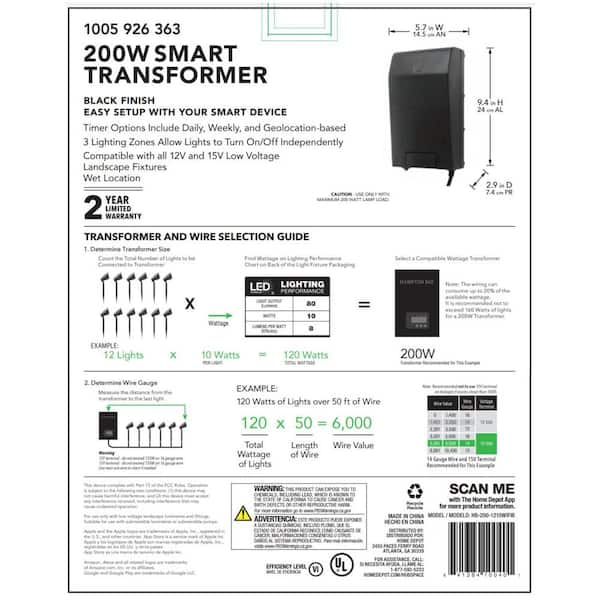
Not all Hampton Bay transformers are the same. Here’s a comparison of two popular models:
| Model | Wattage | Features | Best For |
|---|---|---|---|
| Hampton Bay 120W | 120 Watts | Timer, photo cell, single output | Small to medium yards |
| Hampton Bay 200W | 200 Watts | Multiple outputs, digital timer | Large yards, more lights |
Choosing the right model for your needs helps avoid many problems from the start.
Real-world Examples
Let’s look at a few real scenarios:
- Case 1: Maria installed 15 pathway lights (each 10W) on a 120W transformer. Her lights kept flickering. The total load (150W) was above the transformer’s rating. Solution: She removed three lights and the flickering stopped.
- Case 2: John’s timer stopped working after a storm. He found that the outlet’s GFCI had tripped. Resetting the outlet fixed the issue.
- Case 3: A Hampton Bay transformer in a wet basement rusted inside and failed. Keeping the unit dry would have prevented this.
Two Insights Beginners Often Miss
- Voltage drop is real: Many new users don’t realize that long wire runs (over 100 feet) can cause significant voltage loss, leading to dim lights at the far end—even if the transformer is working perfectly. Using thicker wire or shorter runs helps.
- Timer batteries die: Some digital timers have backup batteries inside. If the display is blank or timing is off, replacing this small battery often solves the problem, but it’s rarely mentioned in manuals.
When To Call A Professional
While many transformer issues are simple, there are times when it’s best to hire an expert:
- If there’s a burning smell or smoke
- If the transformer trips the breaker repeatedly
- If you’re unsure about working with electricity
A certified electrician can diagnose and fix dangerous problems safely.
Hampton Bay Transformer Vs. Other Brands
How Does Hampton Bay Compare With Other Common Brands?
| Feature | Hampton Bay | Malibu | Moonrays |
|---|---|---|---|
| Price Range | Low to mid | Mid | Low |
| Availability | Wide (Home Depot) | Moderate | Limited |
| Ease of Use | Easy | Moderate | Easy |
| Warranty | 1-2 years | 1 year | 1 year |
Most Hampton Bay units offer good value, but their basic models lack advanced features found in higher-end brands.

Best Practices For Hampton Bay Transformer Owners
- Label your wires during installation. This makes troubleshooting much easier later.
- Keep the manual in a safe place; you’ll need wiring diagrams and part numbers.
- Check for recalls before buying or when issues arise. Visit the manufacturer’s website or Consumer Product Safety Commission for the latest info.
- Document your layout (draw a map) so you remember which lights connect to which terminals.
Frequently Asked Questions
Why Do My Hampton Bay Transformer Lights Only Work Sometimes?
This usually means there’s a loose wire or an overloaded transformer. Check all connections and make sure the total wattage is within the transformer’s capacity.
Can I Use Led Bulbs With My Hampton Bay Transformer?
Yes, most models work with LED bulbs. LED lights use less power, so you can add more fixtures without overloading the transformer.
What Size Transformer Do I Need For My Yard?
Add up the wattage of all lights you want to install, then choose a transformer rated for at least 20% more than that total. For example, if you have 80 watts of lights, choose at least a 100W transformer.
Is It Safe To Install A Hampton Bay Transformer Outdoors?
Most models are weather-resistant but should be placed above ground and away from direct water. Never submerge a transformer or expose it to heavy rain.
Where Can I Find Replacement Parts For My Transformer?
Replacement fuses, timers, and photocells are available at hardware stores and online retailers. Bring your model number to ensure compatibility.
A well-maintained Hampton Bay transformer can power your outdoor lights reliably for years. By understanding the most common problems and solutions, you’ll save time, avoid frustration, and enjoy your landscape lighting with confidence.