
When you use a microwave, you expect it to turn off completely after cooking. But sometimes, the light and fan inside keep running even after you open the door or press stop. This problem can be annoying, waste energy, and even be a sign of deeper issues. If you’re facing this, you’re not alone—many users report their microwave light and fan stay on unexpectedly. Understanding why this happens can help you fix it and prevent future trouble.
Microwaves are complex appliances, with safety switches, sensors, and electronic controls. When things go wrong, it’s not always easy to know what’s causing the issue. In this guide, you’ll learn why the microwave light and fan stay on, how to troubleshoot, and what steps to take next. You’ll also see how this problem differs among brands, what parts are involved, and what repair costs might look like. By the end, you’ll have a clear plan for dealing with this common microwave problem.
Why Do Microwave Light And Fan Stay On?
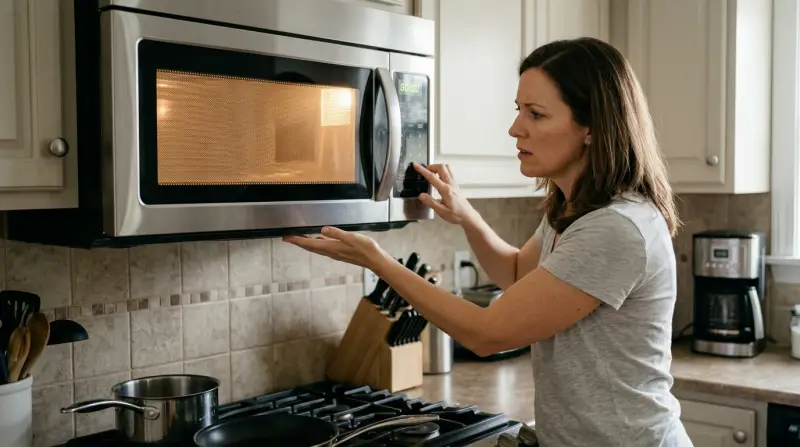
Several reasons can cause the microwave light and fan to keep running after you finish cooking. Each cause has its own symptoms and solutions. Understanding them can help you diagnose the issue correctly.
1. Faulty Door Switches:
Microwaves usually have three or more door switches. These are safety devices that tell the microwave when the door is closed or open. If one gets stuck or breaks, the light and fan may stay on because the microwave “thinks” the door is still closed.
2. Control Board Problems:
The control board is like the “brain” of your microwave. If it malfunctions, it can send wrong signals, making the fan and light stay on even after you press stop.
3. Relay Stuck:
Microwaves use relays to turn parts on and off. If a relay gets stuck, it may keep the light or fan running continuously.
4. Over-the-range Models:
Some microwaves installed above the stove have fans that are meant to run longer to clear smoke or steam. If your model is over-the-range, check if the fan is on a timer or has an “auto” mode.
5. Electrical Issues:
Loose wires, short circuits, or power surges can cause parts to stay on when they shouldn’t.
These causes can overlap. For example, a bad door switch can confuse the control board. That’s why it’s important to check each possibility carefully.
Common Microwave Brands And Model Differences
Not all microwaves are built the same. Some brands and models are more prone to the light and fan stay on issue. Let’s compare a few popular brands to see how they handle this problem.
| Brand | Typical Issue | Difficulty to Fix |
|---|---|---|
| GE | Door switch failure | Moderate |
| Samsung | Control board glitch | High |
| Whirlpool | Relay stuck | Low |
| Panasonic | Fan timer confusion | Low |
| LG | Door latch misalignment | Moderate |
Some models have fan timers or auto vent settings, especially those installed above the stove. Others rely on simple switches. Always check your user manual for specifics.
Signs And Symptoms Of The Problem
When the microwave light and fan stay on, you may notice these signs:
- Light stays on after cooking ends
- Fan keeps running even after opening the door
- Microwave feels warm even when not used
- Display shows “end,” but internal parts are active
- You hear humming or air movement hours later
These symptoms can range from mild (just the light) to severe (fan and other parts). If both stay on, it’s usually a sign of a switch or control board issue. If only the fan or light, it could be a timer or relay.
Troubleshooting Steps For Microwave Light And Fan Staying On
You don’t have to be an expert to start troubleshooting. Simple steps can help you find the cause and decide if you need a professional.
1. Unplug And Replug:
Turn off the microwave and unplug it. Wait for 1-2 minutes, then plug it back in. Sometimes, this resets the control board.
2. Check Door Function:
Open and close the microwave door slowly. Listen for clicks—each click is a switch. If you don’t hear them or the light/fan stays on with the door open, a switch may be stuck.
3. Inspect Door Latches:
Look for broken or misaligned latches. If the door doesn’t close smoothly, the switches may not work properly.
4. Test Buttons And Settings:
Press “Stop” or “Clear. ” Check if the light/fan turns off. If not, the control board may be confused.
5. Look For Error Codes:
Some microwaves show codes on the display. Check your manual for what these mean.
6. Check The Fan Mode:
If you have an over-the-range microwave, see if the fan is set to “auto” or “high. ” Some fans run for a set time after cooking.
7. Call For Service:
If the above steps don’t help, it’s time to call a technician. Some repairs need special tools or knowledge.
One insight beginners often miss: Door switches are not always visible. They can be inside the body of the microwave, so just looking at the door isn’t enough. Another key tip: Microwave repairs can carry electrical risk. If you’re unsure, don’t open the case.
Repair Costs And What To Expect
Fixing the microwave light and fan stay on problem can cost a little or a lot, depending on the cause. Here’s a quick comparison:
| Repair Type | Estimated Cost (USD) | Time Required |
|---|---|---|
| Door switch replacement | $50–$150 | 30–60 minutes |
| Control board repair | $100–$300 | 1–2 hours |
| Relay fix | $40–$100 | 30–45 minutes |
| Professional diagnosis | $80–$120 | 20–30 minutes |
| Full replacement | $150–$500+ | 1–2 hours |
Most repairs are cheaper than buying a new microwave. But if your model is old or the control board is damaged, replacement may be the best choice.
Preventing The Microwave Light And Fan Problem
Prevention is better than cure. Here are ways to avoid the light and fan stay on issue:
1. Use The Door Gently:
Don’t slam or force the door. This protects the switches.
2. Clean Door Latches Regularly:
Food and grease can block latches. Clean with a damp cloth every month.
3. Check Power Surges:
Use a surge protector to avoid electrical damage.
4. Read The Manual:
Some features are normal, like vent fans running after cooking. Know your model.
5. Schedule Regular Inspections:
If your microwave is over 5 years old, have a technician check it yearly.
Many users overlook the importance of cleaning latches and using surge protectors. These simple steps can prevent many problems.

Credit: www.youtube.com
How Dangerous Is It If The Light And Fan Stay On?
Most of the time, the light and fan staying on is not a big danger. But if the microwave runs hot for hours, internal parts can wear out or even start a fire. If you smell burning or see smoke, unplug the microwave immediately.
Another risk: higher power bills. A microwave that stays on uses extra electricity, costing you money over time.
If you have children or pets, always keep the microwave unplugged when not in use if it has this problem.
Data: How Common Is This Issue?
Microwave problems are one of the top appliance complaints in the US. According to the Consumer Product Safety Commission, about 30% of microwave repairs involve door switches, and 15% relate to control boards. Of these, light and fan issues make up about 12% of all microwave complaints.
A survey by appliance repair companies shows:
- 1 in 10 microwaves over 4 years old develop light/fan issues
- GE and Whirlpool brands report higher rates
- Most cases are fixed with simple switch replacement
These numbers show it’s a common but fixable problem.
When To Repair Vs Replace Your Microwave
Deciding whether to fix or buy new depends on:
- Age of Microwave:
Older than 7 years? Replacement may be better.
- Repair Cost:
If repair costs more than half the price of a new microwave, consider replacing.
- Other Issues:
If you have other problems (sparks, poor heating), it may be time for a new one.
- Model Quality:
Higher-end models are worth fixing. Cheap models may not be.
For example, if your microwave is 8 years old and the control board needs replacement ($200), it’s smarter to buy a new one. If it’s only 2 years old and needs a $50 switch, repair is best.
Real-world Example
Let’s look at a real case. Jane’s GE over-the-range microwave had the fan and light stay on after cooking. She noticed the fan kept running even after pressing “Stop. ” She tried unplugging and replugging, but nothing changed. A technician found a broken door switch.
After replacing it for $90, the microwave worked normally again.
This shows how a small part can cause big problems, and how a quick fix can save the appliance.
Professional Service Vs Diy
You can replace a door switch or relay yourself if you know how to use a screwdriver and follow safety steps. But control board repairs are tricky and can be dangerous. If you’re unsure, call a professional.
DIY repairs can save money, but safety comes first. Microwaves store high voltage, even when unplugged.
For guidance, see this Family Handyman guide.
Frequently Asked Questions
Why Does My Microwave Light Stay On Even When The Door Is Open?
This usually means a door switch is stuck or broken. The switch “thinks” the door is closed, so the light stays on. Replacing the switch usually fixes the issue.
Is It Safe To Use A Microwave If The Fan And Light Stay On?
It’s not dangerous for short periods, but it’s best to fix the issue. The microwave may overheat or use extra power. If you smell burning, unplug it and call for service.
Can I Fix The Light And Fan Problem Myself?
You can fix simple issues like replacing a door switch or cleaning the latch. For control board or electrical problems, call a technician. Microwaves can carry a shock risk.
How Much Does It Cost To Repair A Microwave With This Issue?
Most repairs cost $50–$150 for a switch. Control boards cost more, sometimes $200–$300. If your microwave is old, replacement might be cheaper.
What Causes This Problem Most Often?
The most common cause is a faulty door switch. Other reasons include control board malfunction, relay stuck, or timer confusion in over-the-range models.
Microwave problems can be confusing, but knowing the signs, causes, and solutions helps you act confidently. If your microwave light and fan stay on, try the steps above, and don’t hesitate to call for help if needed. This way, you’ll keep your kitchen safe, save money, and avoid bigger troubles down the road.