
A smoke detector that keeps beeping even after you install a new battery can be both confusing and annoying. Many homeowners face this problem and wonder what went wrong. You expect the beeping to stop after changing the battery, but sometimes, the noise continues.
This article explains why this happens, how you can fix it, and what you should do to keep your home safe. You will also learn some common mistakes and tips that many people miss.
Why Smoke Detectors Beep
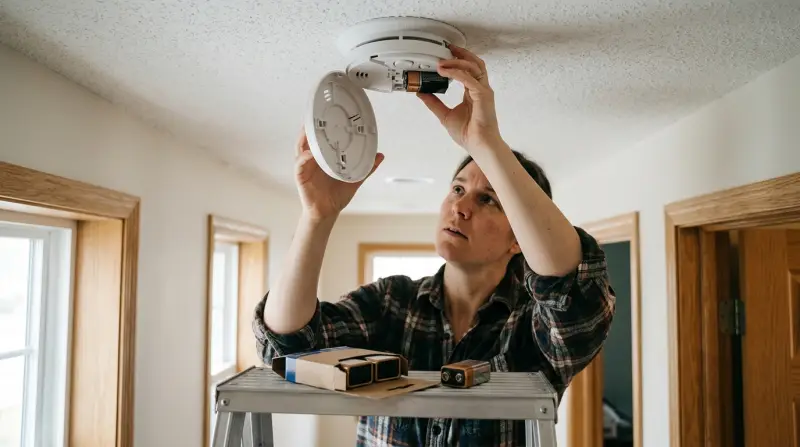
A smoke detector beeps for several reasons. The most common is a low battery warning. Some detectors beep once every minute to signal the battery needs changing. However, if you just put in a new battery and it still beeps, the cause is usually something else. Understanding the reasons helps you solve the problem faster.
Common Reasons For Beeping After Battery Change
Several things can cause your smoke detector beeping with new battery. Here are the main reasons:
1. Battery Pull Tab Not Removed
Some smoke detectors come with a plastic tab or strip under the battery. If this is not fully removed, the battery won’t connect properly.
2. Wrong Battery Type Or Orientation
Using the wrong kind of battery or inserting it the wrong way can lead to beeping. Most smoke detectors use 9V batteries, but some use AA or special lithium batteries.
3. Residual Charge Or Reset Needed
Detectors often store a small electrical charge, especially if they have a backup capacitor. This may cause beeping until you reset the device.
4. Dirty Sensor Or Dust
Smoke detectors can collect dust, cobwebs, or insects inside. This can block the sensor and trigger false alarms or beeping.
5. Wiring Issues (hardwired Units)
If your detector is wired into your house’s electrical system, loose wires or power surges can cause beeping.
6. End Of Life Warning
Most smoke detectors last about 8–10 years. After this, they begin to beep to tell you it’s time to replace the whole unit.
7. Humidity Or Temperature Fluctuations
Sudden changes in air moisture or temperature can sometimes trigger beeping.
8. Interconnected Alarm Problems
In homes with linked alarms, a problem with one unit may cause others to beep as well.
Real Example
Imagine you installed a new battery, but the smoke alarm keeps beeping. You check the battery, and it’s fine. You then notice dust inside the detector. After cleaning it gently with compressed air, the beeping stops. This shows how dirt can be the hidden cause.

Step-by-step: How To Fix A Beeping Smoke Detector
Follow these steps to find and fix the issue. Always put safety first.
- Check Battery Orientation
- Remove the battery.
- Re-insert it, making sure the positive and negative ends are correct.
- Use the battery type recommended by the manufacturer.
- Remove the Plastic Tab
- Look for any plastic or paper tab in the battery compartment.
- Pull it out completely.
- Reset the Smoke Detector
- Remove the battery.
- Press and hold the test button for 15–20 seconds.
- Reinsert the battery and reconnect the detector.
- Clean the Smoke Detector
- Use a vacuum or canned air to remove dust from the detector.
- Wipe the outside with a dry cloth.
- Never use water or chemicals inside the detector.
- Check for End-of-Life Signal
- Look for a sticker or label showing the manufacturing date.
- If the detector is more than 8–10 years old, replace it.
- Check Hardwired Connections
- Turn off the power at the circuit breaker before removing the unit.
- Check that all wires are firmly connected.
- Reinstall the detector and turn the power back on.
- Test and Observe
- Press the test button to make sure the alarm works.
- Listen for beeping over the next few hours.
Troubleshooting Table
Here’s a quick reference for common causes and solutions:
| Problem | Possible Cause | Solution |
|---|---|---|
| Beeping continues after battery change | Residual charge or needs reset | Press test button for 15–20 seconds |
| Beeping every minute | Battery inserted wrong or tab not removed | Check battery placement and tabs |
| Random beeping | Dust or dirt inside | Clean with vacuum or canned air |
| Multiple alarms beeping | Interconnected alarm system | Check all units and reset |
| Beeping after power outage | Wiring or power surge | Reset and check wiring |
Key Features Of Different Smoke Detectors
Smoke detectors come in different types. Choosing the right one and knowing their features can help you troubleshoot better. Here’s a comparison of the main types:
| Type | Power Source | Average Lifespan | Common Issues |
|---|---|---|---|
| Ionization | Battery or hardwired | 8–10 years | Dust sensitivity |
| Photoelectric | Battery or hardwired | 8–10 years | Humidity sensitivity |
| Dual-sensor | Battery or hardwired | 8–10 years | False alarms from steam |
| Smart detectors | Battery, hardwired, or both | Up to 10 years | App/software issues |
Mistakes To Avoid
Many people make the same errors when dealing with beeping alarms. Here are things to avoid:
- Ignoring the Beep: Never assume the alarm is faulty and ignore it. Your safety is at risk.
- Using Old Batteries: Always use new, high-quality batteries from a trusted brand. Old or cheap batteries can drain fast or cause false beeps.
- Skipping Regular Cleaning: Dust and dirt can build up over time. Clean detectors every few months.
- Not Checking Expiry Date: Most people forget smoke detectors expire. Replace them every 8–10 years.
- Not Testing After Reset: Always test the alarm after you reset or clean it.
When To Replace Your Smoke Detector
Even with a new battery, a smoke detector can wear out. Here’s how to know it’s time for a new unit:
- Manufacture Date Over 10 Years Ago: Most detectors have a sticker showing the date. If it’s over ten years, replace it.
- Frequent False Alarms: If beeping happens often without reason, it’s time for a new detector.
- Physical Damage: Cracks, broken buttons, or water damage mean you should replace the device.
- No Response to Tests: If the test button does nothing, the detector is not working.
Replacement Table
Here’s a quick guide to know when to replace your unit:
| Sign | What to Do |
|---|---|
| Over 10 years old | Replace immediately |
| Frequent unexplained beeping | Replace unit |
| Physical damage | Buy new detector |
| Non-working test button | Replace as soon as possible |
Pro Tips And Insights
Many homeowners don’t realize that humidity and bugs can also cause beeping. For example, if your smoke detector is close to a bathroom or kitchen, steam may trigger the alarm. Try moving the detector a few feet away from high-moisture areas.
Another tip: if you have interconnected alarms, a problem in one can cause all to beep. Always check every unit in the system, not just the one making noise.
Battery brands can matter more than you think. Some cheap batteries do not hold voltage well, causing beeping even when they are technically “new. ” Always use batteries recommended by the detector’s manufacturer.
Finally, if your smoke detector has a sealed 10-year battery, you must replace the whole unit when the battery dies. You cannot change only the battery in these models.
When To Call A Professional
Sometimes, the problem is not easy to fix. Call a licensed electrician or smoke detector technician if:
- You have checked everything and the beeping continues.
- The alarm is hardwired and you are not comfortable working with electrical wiring.
- You notice burning smells, sparks, or signs of a short circuit.
A professional can quickly diagnose and fix the problem, keeping your home safe.

Credit: www.angi.com
How To Prevent Future Beeping Issues
Prevention is always better than cure. Here’s what you should do:
- Change batteries once a year or as recommended.
- Clean detectors every 6 months with a vacuum or canned air.
- Test alarms monthly by pressing the test button.
- Replace detectors every 8–10 years.
- Install detectors away from bathrooms or kitchens to avoid false alarms from steam or smoke.
These steps reduce the risk of beeping and make sure your detector works when you need it most.
Reliable Resources
For more details, check advice from the National Fire Protection Association. They offer guidelines on installation, maintenance, and safety.

Credit: www.youtube.com
Frequently Asked Questions
Why Does My Smoke Detector Beep After I Put In A New Battery?
The most common reason is that the detector needs to be reset. Other causes include a battery inserted the wrong way, a battery pull tab not removed, or dust inside the unit.
How Do I Reset A Smoke Detector?
Remove the battery, hold the test button for about 15–20 seconds, then reinsert the battery. This clears any stored charge and often stops the beeping.
How Often Should I Replace My Smoke Detector?
Replace your smoke detector every 8–10 years, or sooner if it is damaged or keeps beeping for no clear reason.
Can Humidity Or Steam Cause A Smoke Detector To Beep?
Yes. High humidity or steam from kitchens and bathrooms can trigger the sensor and cause false alarms or beeping.
What Should I Do If All My Interconnected Smoke Alarms Are Beeping?
Check each detector in the system, clean them, and reset each one. If the problem continues, call a professional to check the wiring and units.
A beeping smoke detector is more than an annoyance—it’s a sign that something needs your attention. By understanding the causes, following step-by-step solutions, and maintaining your detectors, you can keep your home safe and quiet. Don’t ignore the beeping; use it as a reminder to check your system and protect your loved ones.