
If your SimpliSafe keypad suddenly stops working, it can be stressful. You might worry about your home security or wonder if your system is broken. The good news is most keypad issues are easy to fix, and you don’t need to be an expert. In this guide, you’ll learn why SimpliSafe keypads fail, how to troubleshoot, and when to get help. You’ll find practical steps, common mistakes to avoid, and tips that many beginners miss. Let’s make your keypad work again—and keep your home safe.
Understanding The Simplisafe Keypad
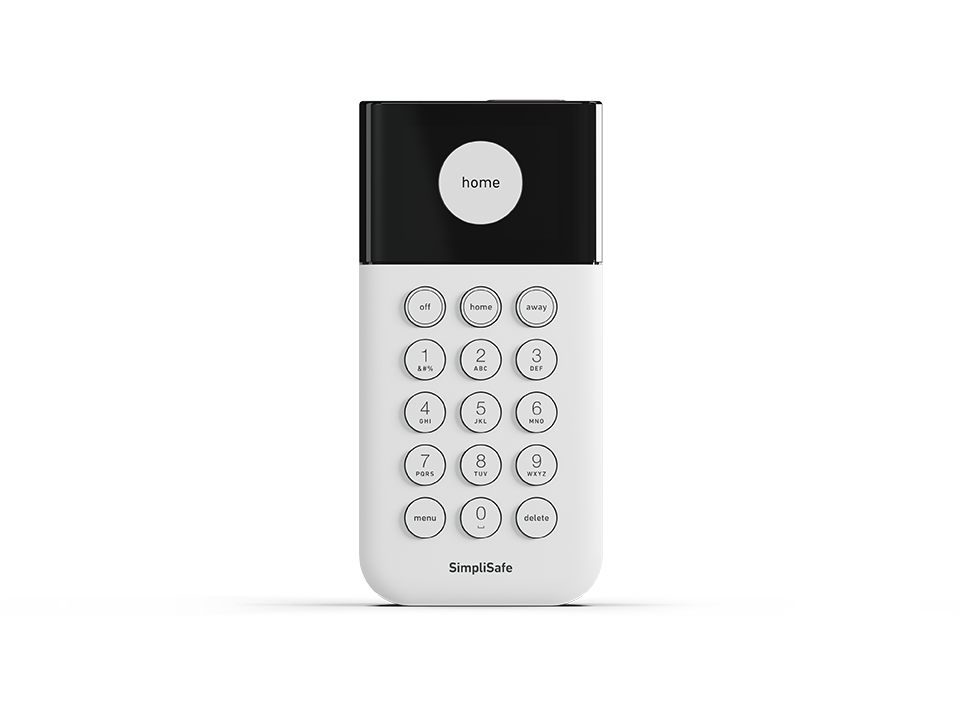
A SimpliSafe keypad is a wireless device that lets you control your alarm system. You use it to arm and disarm, set modes, and manage settings. The keypad connects to the base station, which is the brain of the system. If the keypad fails, you lose quick access to your security features.
Key Features
- Wireless connection: No wires needed; easy to move.
- Battery-powered: Uses AA batteries for portability.
- Simple interface: Large buttons and clear screen.
- Backlit display: Easy to see at night.
Common User Mistakes
Many users assume keypad problems mean the whole system is broken. But often, the issue is just with the keypad itself, not the base station. Always check the keypad first before worrying about your whole security system.
Main Reasons Why Simplisafe Keypad Stops Working
Several factors can cause your SimpliSafe keypad to stop working. Some are obvious, but others are easy to miss.
- Dead batteries: Most keypads use AA batteries. When they run out, the keypad stops responding.
- Wireless interference: Keypads communicate wirelessly. Devices like Wi-Fi routers, microwaves, or cordless phones can block signals.
- Distance from base station: If the keypad is too far from the base station, it can lose connection.
- Firmware issues: Software bugs can freeze the keypad or cause errors.
- Physical damage: Dropping or spilling liquids can damage internal parts.
- Loose battery contacts: Sometimes, battery terminals are not making proper contact.
- Faulty keypad: Rare, but sometimes the device itself is defective.
Uncommon Causes
- Electromagnetic interference: Rare, but strong sources (like industrial machines) can disrupt communication.
- Extreme temperatures: If your keypad is exposed to heat or cold, it might fail.
Troubleshooting Simplisafe Keypad Issues
Fixing a SimpliSafe keypad is often simple. Here’s a step-by-step method to diagnose and solve most problems.
Step 1: Check Battery Status
Remove the battery cover and inspect the batteries. Replace them with fresh AA batteries. Make sure they are placed correctly.
- If the keypad powers on, the issue was the batteries.
- If not, move to the next step.
Step 2: Inspect Battery Terminals
Look at the battery contacts inside the keypad. Are they clean and shiny? If not, gently rub them with a cotton swab and a small amount of rubbing alcohol.
Step 3: Restart The Keypad
Take out all batteries. Wait 60 seconds, then put them back. This resets the keypad.
Step 4: Check Wireless Connection
Place the keypad near the base station. Try to arm or disarm the system.
- If it works, your keypad was too far from the base station.
- If not, try moving other electronic devices away from the keypad and base station.
Step 5: Update Firmware
Check the SimpliSafe app or website for updates. If your system supports updates, follow the instructions to update the keypad.
Step 6: Inspect For Physical Damage
Look for cracks, water stains, or broken buttons. If you see damage, you may need a replacement keypad.
Step 7: Factory Reset
If all else fails, perform a factory reset. For most SimpliSafe keypads:
- Remove batteries.
- Hold down the 1 button while inserting batteries.
- Wait for the screen to display the reset prompt.
This clears most software bugs.
Step 8: Contact Support
If your keypad still doesn’t work, contact SimpliSafe support. They can help diagnose problems or offer a replacement.
Data: Simplisafe Keypad Failure Causes
Here’s a breakdown of how often each issue causes keypad failure, based on user reports:
| Cause | Percentage of Cases | Typical Solution |
|---|---|---|
| Dead Batteries | 48% | Replace batteries |
| Wireless Interference | 19% | Move keypad/base station |
| Firmware Issues | 12% | Update/reset keypad |
| Physical Damage | 8% | Replace keypad |
| Loose Battery Contacts | 7% | Clean terminals | Other | 6% | Contact support |
How To Prevent Simplisafe Keypad Problems
You can avoid most keypad issues with simple habits. Here are some practical tips:
- Replace batteries every 6–12 months: Don’t wait until they die.
- Keep keypad close to base station: Stay within 50 feet for best signal.
- Avoid placing keypad near Wi-Fi routers: Interference can cause connection drops.
- Clean battery contacts twice a year: Use a cotton swab and rubbing alcohol.
- Keep keypad dry: Avoid bathrooms, kitchens, or anywhere spills are likely.
- Update firmware regularly: Check for updates every 3–6 months.
Example: Battery Life Vs. Usage
| Usage Level | Average Battery Life | Recommended Replacement Interval |
|---|---|---|
| Heavy (10+ uses/day) | 6 months | Every 6 months |
| Moderate (3-9 uses/day) | 8 months | Every 8 months |
| Light (1-2 uses/day) | 12 months | Every 12 months |
Simplisafe Keypad Vs. Other Security Keypads
How does SimpliSafe’s keypad compare with other brands? Here’s a quick overview:
| Brand | Battery Type | Wireless Range | Ease of Reset | Display Quality |
|---|---|---|---|---|
| SimpliSafe | AA | 50 feet | Easy | Backlit, clear |
| ADT | CR123 | 40 feet | Moderate | Backlit, average |
| Ring | AA | 50 feet | Easy | Backlit, clear |
| Vivint | Built-in | 60 feet | Hard | Touchscreen |
SimpliSafe keypads are easy to reset and use, with good display quality and standard wireless range. Beginners often miss that some brands require special batteries or complex resets.
When To Replace Your Simplisafe Keypad
Sometimes, fixing isn’t enough. Here are signs you need a new keypad:
- Screen stays blank after new batteries and reset.
- Buttons stick or don’t respond even after cleaning.
- Frequent connection drops with no clear cause.
- Physical damage: Cracks, water stains, or broken parts.
If your keypad is still under warranty, SimpliSafe will often send a replacement. Otherwise, buy directly from their website or trusted retailers.
Warranty Facts
- SimpliSafe offers a 3-year warranty on most devices.
- Keep your purchase receipt.
- Contact support for replacement options.
Advanced Tips For Tech-savvy Users
If you want deeper troubleshooting, try these steps:
- Use a multimeter to check battery voltage. AA batteries should be above 1.2V.
- Check signal strength using the SimpliSafe app (if available).
- Open the keypad to inspect internal connections (only if out of warranty).
Many beginners overlook the battery voltage. Sometimes, batteries look new but are weak. Testing them can save time.

What To Do If Keypad Still Fails
If none of the above fixes work:
- Try a different set of batteries, preferably from a new package.
- Move the keypad and base station to a different room.
- Test the keypad on another SimpliSafe system (if possible).
- Contact SimpliSafe support. They have advanced diagnostics.
For more details on home security troubleshooting, visit the official SimpliSafe Help Center.
Frequently Asked Questions
Why Is My Simplisafe Keypad Screen Blank?
A blank screen usually means dead batteries or loose battery contacts. Replace batteries and check terminals. If the screen stays blank, try a reset or contact support.
How Do I Reset My Simplisafe Keypad?
Remove all batteries. Hold the 1 button while reinserting batteries. Wait for the screen to prompt a reset. This fixes most software issues.
Can Wireless Interference Cause My Keypad To Fail?
Yes, devices like Wi-Fi routers, microwaves, or cordless phones can interfere. Keep the keypad and base station away from these devices for best performance.
How Often Should I Replace Batteries In My Simplisafe Keypad?
Replace batteries every 6–12 months, depending on usage. Heavy use means shorter battery life. Don’t wait for the keypad to stop working.
What Should I Do If My Keypad Is Physically Damaged?
If you see cracks, water stains, or broken buttons, replace the keypad. Physical damage is often not repairable and can affect security.
Making your SimpliSafe keypad work again is usually a quick process. By understanding common causes, using simple troubleshooting steps, and keeping up with maintenance, you can keep your security system reliable. Remember to check batteries, keep the keypad close to the base station, and update firmware regularly. If you ever feel stuck, don’t hesitate to ask for help or use the official resources. Your home security depends on a working keypad—don’t let small issues turn into big problems.