
If you use Life360 to stay connected with your family, you know how important the invite code is. This code allows new members to join your Circle and share locations. Sometimes, the invite code doesn’t work. This can be frustrating, especially when you need to add someone quickly. Understanding why this happens and how to fix it can save you time and stress.
When you depend on Life360 to know where your loved ones are, every second counts. For example, parents often use the app to check if their kids arrived at school safely or to coordinate pick-ups. If the invite code fails, you might spend valuable minutes searching for solutions instead of getting peace of mind.
Some users even try to resend codes multiple times, but without the right fix, these efforts go nowhere. Knowing the main reasons and solutions not only prevents delays but also reduces confusion for everyone in your Circle.
What Is A Life360 Invite Code?
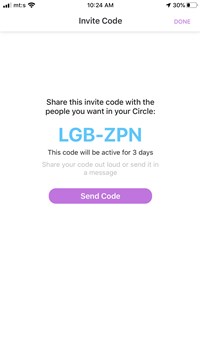
Life360 is a popular app for family location sharing. The invite code is a unique number or link generated by the app. It lets you invite someone to your group (called a Circle). The code is usually sent by text or email. When the person receives the code, they can join your Circle and start sharing their location.
Most users find the process easy. But sometimes, the code does not work. The error can show as “Code Not Valid,” “Expired,” or “Unable to Join Circle. ” If you see these messages, you’re not alone.
The invite code is more than just a password. It acts as a secure key, making sure only people you trust can join your group. In some cases, you might also see a QR code option, which lets users join by scanning with their phone camera.
This can be helpful for younger family members who find typing codes difficult. If your child has just received their first smartphone, showing them how to use the invite code or scan a QR code can make joining the Circle easy and fun.
Common Reasons Life360 Invite Code Fails
Several factors can cause problems with the invite code:
- Code Expired: Life360 codes are time-sensitive. If someone takes too long to use the code, it becomes invalid.
- Wrong Code: Typing errors can lead to “invalid code” messages. Double-check numbers and letters.
- Already Joined: If the person is already in another Circle, the app may block the code.
- App Version: Using an old version of Life360 can cause invite code errors.
- Account Type: Life360 works with family accounts. If someone uses a different email or account type, the code might not work.
- Server Issues: Sometimes, the app’s server has problems. This affects code generation and validation.
- Device Compatibility: Certain devices may not support the latest Life360 features.
- Internet Connection: Poor Wi-Fi or data can prevent the code from working.
- Code Used Too Many Times: Life360 codes can only be used a limited number of times.
- Region Restrictions: Life360 may not work in some countries or regions.
Sometimes, the issue is not obvious. For example, you might think your internet is fine, but a weak signal or switching between Wi-Fi and mobile data during the process can interrupt the code validation. Or, if you’re using a work email instead of your personal one, Life360 may see this as a security risk and block the code.
In rare cases, server maintenance (usually announced on Life360’s social media or website) can block new members from joining at all. Beginners often overlook checking these less obvious factors, which can save time if addressed early.
How To Fix A Life360 Invite Code That’s Not Working
If your invite code fails, here’s what you can do:
- Check Code Validity: Make sure the code is still active. Try generating a new code if needed.
- Update the App: Download the latest Life360 version from the app store.
- Restart Device: A simple restart can solve many app problems.
- Check Internet Connection: Switch to a stronger Wi-Fi or data signal.
- Check Account Type: Use the correct email and account type for joining.
- Contact Life360 Support: If all else fails, reach out to Life360’s customer service.
- Try a Different Device: Sometimes, switching devices can help.
- Clear Cache: Clear app cache and data to fix minor bugs.
- Check Region Settings: Make sure Life360 is supported in your area.
- Ensure No Previous Circle Membership: Remove the user from other Circles before joining.
For example, clearing the app cache is often missed but can solve stubborn errors. On Android, go to Settings > Apps > Life360 > Storage > Clear Cache. On iOS, you may need to delete and reinstall the app. Also, if you recently changed your phone number or email, update this info in Life360 before joining or inviting.
Using a friend’s device can sometimes reveal if the issue is with your phone or your account.
Step-by-step Guide To Troubleshooting
If you want to fix the code yourself, follow these steps:
- Open Life360 App
- Tap “Create Circle”
- Generate Invite Code
- Send Code to Recipient
- Recipient Opens Life360
- Enters Code
- If Error Shows: Restart app, check for updates, and try again.
- If Still Not Working: Contact Life360 support.
Each step matters. For instance, after sending the code, ask the recipient to confirm they received it. Sometimes, codes sent by email end up in the spam folder. If you use messaging apps, remind the recipient to copy and paste the code carefully—typing errors are common, especially with similar-looking numbers and letters.
If the recipient is a child or older adult, walk them through the process by phone or video call for faster troubleshooting.
Data Table: Common Error Messages And Solutions
Here’s a quick reference for error messages and what to do:
| Error Message | Possible Cause | Solution |
|---|---|---|
| Code Not Valid | Typing error | Check code and retry |
| Code Expired | Code timed out | Generate new code |
| Unable to Join Circle | Already in another Circle | Leave previous Circle |
| Server Error | App server down | Wait and retry |
| App Version Outdated | Old app version | Update app |
If you see a different error message, take a screenshot. This can help Life360 support diagnose the problem more quickly when you contact them.
Real-life Example
Let’s look at a practical example. Sarah wants to add her brother to Life360. She sends him the code, but he gets an “Invalid Code” message. They check:
- Code: Correct
- App: Both updated
- Internet: Strong
The problem? Her brother already belongs to another Circle. After leaving that group, the invite code works.
Another common situation: Grandparents often struggle with installing apps and using codes. If Sarah’s grandmother tries to join but her phone is too old to support the latest Life360 version, the invite code will always fail. In that case, using a more recent device or updating the phone’s operating system can solve the problem. In families with multiple generations, it helps to have one “tech-savvy” person guide everyone through the process. This avoids repeated frustration for older relatives.

Non-obvious Insights
Many beginners overlook two important points:
- Codes are case-sensitive. If you copy and paste, make sure the letters match exactly.
- Invite codes can be limited by device type. Sometimes, Android and iOS handle codes differently. If one device fails, try another.
A third insight: If you use parental controls or security apps on your child’s device, these can block Life360 features and prevent code entry. Check your security app settings if you face repeated issues. Also, sometimes the time zone setting on your device can affect code expiration. Make sure both sender and recipient have their phones set to the correct local time to avoid confusion.
Data Table: Device Compatibility
Different devices may behave differently with Life360 invite codes.
| Device | Common Issues | Recommended Fix |
|---|---|---|
| iPhone | Code expired quickly | Generate code again |
| Android | App not updated | Install latest version |
| Tablet | Compatibility issues | Use phone instead |
If you use a tablet, remember that GPS and background location services may work differently compared to phones. This can affect not only joining the Circle but also how location sharing works after joining.
Comparison: Life360 Vs. Other Family Locator Apps
Life360 is not the only app for family tracking. Let’s compare invite code features:
| App | Invite Code Feature | Reliability |
|---|---|---|
| Life360 | Unique code per Circle | High (with updates) |
| Find My Friends | No invite code (uses Apple ID) | Very high |
| Glympse | Temporary sharing link | Medium |
The invite code system in Life360 gives you more control over who joins your Circle compared to apps like Find My Friends. However, the extra security means you must manage codes carefully. With Glympse, links can be accidentally shared outside your family, while Life360’s codes are private by design.
When To Contact Life360 Support
Sometimes, you can’t fix the problem yourself. If you have:
- Repeated errors
- Code not working on any device
- App crashes when joining
Contact Life360 support. They respond within 24–48 hours. For official help, visit their help center or Life360’s official support page.
When you contact support, provide as much detail as possible. Include your device type, app version, error message, and what you’ve already tried. This speeds up the process. Also, check their FAQ page; your problem may already have a solution posted there.

Tips For Smooth Invite Code Use
- Always update the Life360 app before sending or using codes.
- Send codes quickly—do not let them expire.
- Double-check the code before sharing.
- Make sure recipients are not part of another Circle.
- Use strong internet connections.
It also helps to coordinate with your family or group before sending the code. Let everyone know when you are about to send it, so they can join right away. If you have a large family, keep a list of who has joined and who still needs to accept the invite.
This keeps things organized and avoids confusion later.
Frequently Asked Questions
Why Does My Life360 Invite Code Expire So Fast?
Life360 codes are designed for quick use. They often expire within minutes or hours to keep your Circle secure. If you wait too long, the code will not work. Always send and use the code as soon as possible.
Can I Use The Same Invite Code For Multiple People?
No, each invite code is usually for a single use or a limited number of times. If you want to add several members, generate a new code for each person. This prevents errors and keeps your Circle organized.
What Happens If Someone Is Already In A Life360 Circle?
If a person is already in another Circle, they may not be able to join yours. They need to leave their current Circle first, then use your invite code. This is a common reason for invite code problems.
Do Life360 Invite Codes Work In Every Country?
Life360 is available in many countries, but not all. Some regions block the app or limit its features. If you are traveling or living abroad, check if Life360 works in your area before sharing the code.
Is It Safe To Share A Life360 Invite Code?
Yes, as long as you trust the person you are inviting. The invite code lets someone join your Circle and share locations. Never share your code with strangers or on public websites to protect your privacy.
Life360’s invite code is a powerful tool for keeping families connected. When it doesn’t work, the solution is often simple. By following the steps above, you can fix most problems quickly. Remember to update your app, check codes carefully, and keep your Circle safe.
If all else fails, Life360 support is ready to help. With these tips, you’ll spend less time troubleshooting and more time staying connected with loved ones.