
When you’re settling in for a movie or your favorite show, the last thing you expect is for your LG TV screen to go black—especially when you can still hear everything. This problem is more common than you might think, and it’s frustrating. You hear the voices, the music, the action, but see nothing but a blank screen. Many LG TV owners run into this issue at some point, whether their television is new or has seen a few years of use.
Why does this happen? The causes can range from small settings glitches to hardware issues deep inside the TV. Some problems you can fix in minutes, while others might require expert help. If you’re not sure where to start, you’re not alone.
Understanding the reasons behind the “no picture but sound” issue—and knowing what to do next—can save you time, money, and a lot of stress.
This guide will walk you through everything you need to know, with clear steps, practical advice, and real-world examples. By the end, you’ll know what causes this problem, which solutions work best, and when it’s time to call in a professional.
Let’s get started.
Why Does My Lg Tv Have Sound But No Picture?
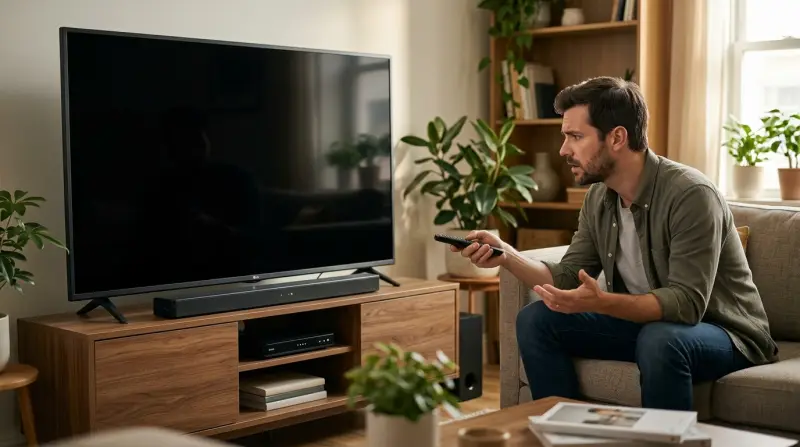
When your LG TV has no picture but plays sound, the issue usually falls into one of three main categories: settings or software glitches, hardware faults, or external device problems. Knowing which one applies to your TV is the first step toward getting your picture back.
Settings Or Software Glitches
Sometimes, the TV’s software gets confused or a setting changes accidentally. This can make the screen go black even when the TV is technically working. For example, a wrongly set input source or a sleep timer can cause the display to turn off.
Hardware Faults
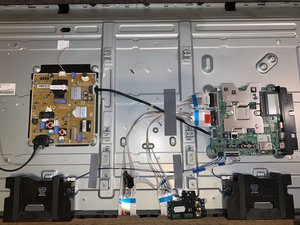
Hardware issues are more serious and usually involve the parts inside your TV, like the backlight, power supply board, or T-Con board. A failure in any of these can make your screen go dark while the sound still works.
External Device Problems
If you use a cable box, streaming stick, or gaming console, problems with these devices or their cables can also cause the TV to lose its picture. Sometimes the TV itself is fine, but the device providing the video signal is not.
Common Causes Of Lg Tv Screen Going Black
Understanding the most common reasons for this problem can help you find the right solution faster. Here are the main culprits:
- Faulty Backlight: In LED TVs, the backlight is what makes the picture visible. If it fails, you’ll only see a black screen.
- Loose or Damaged Cables: HDMI or power cables that are loose or damaged can interrupt the video signal.
- Wrong Input Source: If your TV is set to the wrong input, you won’t see a picture.
- Software Bugs or Updates: Sometimes, a software update can cause display issues.
- Defective T-Con Board: This board controls the timing of the display. If it fails, the screen may go black.
- Panel Damage: Physical damage to the screen can also cause this issue.
- Sleep Timer or Power Saving Mode: These settings can turn off the display while leaving the sound on.
- External Device Failure: If your streaming box or cable box stops sending a video signal, your screen may go black.
Quick Checks Before You Start Troubleshooting
Before you open up your TV or call a technician, do these quick checks. They can save you time and might even solve the problem immediately.
- Check Power and Standby Light: Is the power light on? If not, the TV might not be getting power.
- Try the Remote and Buttons: Press the Menu or Home button. If the on-screen menu appears, your TV panel works, but the input might be wrong.
- Shine a Flashlight on the Screen: In a dark room, shine a flashlight at an angle onto the screen while the TV is on. If you see faint images, the backlight is probably the issue.
- Listen for Unusual Sounds: Clicking, popping, or buzzing from the TV can point to hardware trouble.
- Test With Another Device: Connect a different device (like a DVD player or game console) to see if the picture returns.
Step-by-step Troubleshooting Guide
Let’s work through the most effective troubleshooting steps, starting with the easiest.
Step 1: Restart Your Lg Tv
A simple restart can fix many software glitches.
- Unplug your TV from the power outlet.
- Wait at least 60 seconds.
- Plug it back in and turn it on.
This clears temporary memory errors that may be causing the black screen.
Step 2: Check All Cable Connections
Loose or faulty cables are a common cause of picture problems.
- Make sure the HDMI, power, and other cables are firmly plugged in.
- Try different HDMI ports.
- Replace the cable with a known good one if you have a spare.
Step 3: Check The Input Source
Your LG TV needs to be set to the correct input (HDMI 1, HDMI 2, AV, etc. ) For the picture to appear.
- Press the Input or Source button on your remote.
- Cycle through the available options.
- Wait a few seconds on each input to see if the picture comes back.
Step 4: Disable Power Saving And Sleep Timer
These settings can turn off your screen while leaving sound active.
- Press Settings on your remote.
- Go to All Settings > General > Timers.
- Make sure Sleep Timer is off.
- Check Energy Saving mode and set it to “Off.”
Step 5: Test With Built-in Apps
Try opening a built-in app like Netflix or YouTube.
- If you see a picture, the issue is likely with your external device, not the TV.
- If the screen stays black, the problem is inside the TV.
Step 6: Update Lg Tv Firmware
Software bugs can cause display issues, and LG releases updates to fix them.
- Go to Settings > All Settings > Support > Software Update.
- If an update is available, install it.
Step 7: Perform A Factory Reset
A factory reset will erase all your settings, but it can fix persistent software problems.
- Go to Settings > All Settings > General > Reset to Initial Settings.
- Confirm the reset. The TV will restart.
Write down your Wi-Fi password and any custom settings, as these will be erased.
Identifying Hardware Problems
If basic troubleshooting doesn’t work, your LG TV may have a hardware fault. Here’s how to tell which part is likely at fault.
The Backlight Test
Most LG LED TVs use LED backlights. If these fail, you’ll hear sound but see nothing.
- Flashlight Test: Shine a flashlight at an angle on the screen while the TV is on. If you see faint images, the backlight is bad.
- No Image at All: If nothing appears, the problem may be deeper (T-Con board or main board).
Signs Of T-con Board Failure
The T-Con (Timing Control) board controls the display signal.
- Symptoms: Screen is black, but you hear sound; menu and volume display may also be missing.
- Sometimes, a T-Con failure will show brief flashes of image or colored lines before going black.
Main Board Or Power Supply Issues
- The main board processes inputs and sends signals to the screen.
- The power supply board powers the backlight and other components.
If you hear relay clicks, buzzing, or the TV turns off and on repeatedly, these boards may be failing.
Table: Common Hardware Failure Symptoms In Lg Tvs
Here’s a quick reference for matching symptoms with faulty parts:
| Symptom | Likely Faulty Part | Repair Difficulty |
|---|---|---|
| Sound, no picture, faint image with flashlight | Backlight | Moderate |
| Sound, no picture, menu does not appear | T-Con board | Hard |
| Sound, screen flashes then goes black | Main board | Hard |
| No power, no sound or picture | Power supply board | Hard |
Fixing Hardware Issues: What’s Possible At Home?
Some hardware fixes can be done by a careful do-it-yourselfer, but others need a professional.
When You Can Try A Diy Fix
- Replacing HDMI or Power Cables: Always safe and easy.
- Reseating Internal Cables: If you’re comfortable opening the TV (and it’s out of warranty), you can check for loose ribbon cables inside.
- Replacing the Backlight: Requires opening the TV and handling fragile parts. Not recommended unless you have experience.
When To Call A Professional
- T-Con Board, Main Board, Power Supply: These repairs require technical skill, special tools, and access to replacement parts.
- Panel Replacement: If the display panel is broken, it’s usually cheaper to buy a new TV.
Non-obvious insight: Opening the TV yourself can void your warranty. Always check your warranty status before trying internal repairs.
Table: Diy Vs Professional Repairs
Here’s a look at which repairs you can try and which need expert help:
| Repair Task | DIY Possible? | Professional Needed? | Risk Level |
|---|---|---|---|
| Replace HDMI/power cable | Yes | No | Low |
| Reseat internal ribbon cable | Yes (if out of warranty) | Optional | Medium |
| Replace backlight | Yes (experienced only) | Yes | High |
| Replace T-Con/Main Board | No | Yes | Very High |
| Replace display panel | No | Yes | Very High |
How To Prevent The “no Picture But Sound” Problem
Taking care of your LG TV can reduce the risk of this issue happening again. Here are some practical tips:
- Use a Surge Protector: Power surges can damage TV components.
- Keep Vents Clear: Overheating shortens the life of the backlight and main boards.
- Update Software Regularly: Install updates to fix bugs and compatibility issues.
- Handle Cables Carefully: Never force cables into ports.
- Clean Dust From Ports: Use a dry cloth or compressed air to remove dust.
Non-obvious insight: Turning the brightness up very high all the time can wear out the backlight faster. Use moderate brightness to extend TV life.
When To Replace Your Lg Tv
Sometimes, repair costs are so high that buying a new TV makes more sense. Here’s when you should consider replacement:
- Panel is cracked or dead: Panel replacement is usually not cost-effective.
- Main board or power supply replacement is over 50% of TV price: In these cases, a new TV is a better investment.
- TV is old and out of warranty: Older TVs are more likely to develop more issues soon.
Real-world Example: Diagnosing A 2018 Lg Led Tv
Let’s look at an example:
John owns a 2018 LG 55-inch LED TV. One night, he turns it on and hears sound, but the screen is black. He checks the power light (it’s on), tries the flashlight test (sees a faint image), and checks all the HDMI cables (all tight and working).
After updating the software and trying a factory reset, there’s still no picture.
Based on these checks, the problem is most likely the backlight. John contacts an authorized repair center, and they quote $180 for a backlight replacement. Since his TV is out of warranty but less than five years old, he decides the repair is worth it.
How Much Do Repairs Cost?
Repair costs can vary by location and TV size. Here are average costs for common repairs in the US:
- Backlight replacement: $100–$250
- T-Con board replacement: $120–$280
- Main board replacement: $150–$350
- Power supply board: $100–$300
- Panel replacement: $400–$800 (usually not worth it)
Always get a quote before agreeing to a repair.
Table: Estimated Lg Tv Repair Costs (us)
| Repair Type | Cost Range (USD) | Worth Repairing? |
|---|---|---|
| Backlight | $100–$250 | Usually Yes |
| T-Con Board | $120–$280 | Depends on TV age |
| Main Board | $150–$350 | Sometimes |
| Power Supply | $100–$300 | Usually Yes |
| Panel | $400–$800 | No (replace TV) |
Special Cases: Lg Oled Tvs
If you own an LG OLED TV, the causes for “no picture but sound” are similar, but OLED screens don’t have backlights. Instead, the problem is usually with the power supply or main board.
- Burn-In: OLEDs can suffer from image retention, but this usually shows as ghost images, not a blank screen.
- Panel Failure: If the OLED panel fails, replacement is expensive and rarely worth it outside warranty.
What About Lg Tv Warranties?
LG TVs usually come with a one-year warranty. Some stores offer extended warranties. If your TV is still covered:
- Do NOT open the TV yourself. This can void the warranty.
- Contact LG support or your retailer for repair or replacement options.
Many LG TVs have a sticker with the model and serial number on the back. This info is needed for warranty claims.
The Importance Of Model Numbers
When searching for solutions or ordering parts, knowing your exact LG TV model number is essential. You can find this number on a sticker at the back or in the TV’s menu under Settings > General > About This TV.
Different models can have different boards, backlights, and panels. Always double-check compatibility.
Summary Of What To Do (quick Reference)
If you want a quick checklist, follow these steps:
- Unplug TV, wait 60 seconds, plug back in.
- Check all cables and try different HDMI ports.
- Make sure the TV is on the right input/source.
- Test with another device.
- Try the flashlight test for backlight issues.
- Turn off power saving and sleep timer settings.
- Update software and perform a factory reset if needed.
- If still no picture, consider professional repair—especially if the backlight or boards are to blame.
- Check warranty status before opening the TV.
Extra Tips For Troubleshooting
- Try turning the TV on and off several times—sometimes, a stuck relay or capacitor may start working again.
- If your TV was recently moved, check for internal or cable connections that may have come loose.
- Use the LG TV Plus app (available on smartphones) to control the TV if the remote is not working.
- For more advanced information, the Wikipedia TV repair page offers further reading.
Frequently Asked Questions
What Does It Mean If My Lg Tv Has Sound But No Picture?
This means your TV is receiving power and audio signals, but something is preventing the screen from displaying an image. The most common causes are a failed backlight, a bad input source, or issues with the T-Con board.
Can I Fix The “no Picture But Sound” Problem Myself?
You can fix some issues, like changing cables, checking settings, or updating software. But if the backlight, T-Con board, or main board has failed, you should contact a professional. Opening the TV yourself can void the warranty and may cause further damage.
How Do I Know If The Backlight Is The Problem?
Do the flashlight test: shine a flashlight at an angle on the screen while the TV is on. If you see faint images, the backlight is likely faulty. If you see nothing, the problem may be elsewhere.
How Much Does It Cost To Fix An Lg Tv With No Picture?
It depends on the part that’s broken. Backlight repairs typically cost $100–$250. More expensive parts like the main board or panel can cost $150–$800. For older TVs or panel issues, replacement is often better than repair.
Should I Replace My Lg Tv If The Screen Is Black But Sound Works?
If your TV is old, out of warranty, or the repair cost is more than half the price of a new TV, replacing it is usually the smarter option. For newer TVs or simple issues like a bad backlight, repair is worth considering.
When your LG TV has no picture but has sound, it’s frustrating, but not hopeless. With the right steps, you can often find the cause and get your TV working again—sometimes without spending a dime. If you need professional help, knowing what to expect will save you time and money.