
The kitchen has changed a lot in the past decade. Smart technology now helps us solve problems that used to need a technician. One great example is the LG Refrigerator Smart Diagnosis system. This feature allows your fridge to “talk” to LG’s support team or app, making troubleshooting much faster and easier. If you’ve ever felt frustrated by a strange noise or error code, you’ll understand why Smart Diagnosis matters.
This article explains how LG Smart Diagnosis works, when you should use it, and what to expect during the process. Whether you’re thinking about buying an LG refrigerator or want to get more from the one you own, you’ll find clear answers here. We’ll also look at real-world examples, common mistakes, and how Smart Diagnosis compares to traditional support methods.
What Is Lg Refrigerator Smart Diagnosis?
Smart Diagnosis is a technology built into many LG refrigerators. It helps identify problems with your appliance without a technician visiting your home. The system uses built-in sensors to check the fridge’s operation. If something is wrong, Smart Diagnosis sends data—either by phone or through the LG ThinQ app—to LG’s support center.
There are two main ways to use Smart Diagnosis:
- By Phone: You call LG’s support number. When asked, you press a button on your refrigerator. The fridge emits a series of tones that the phone picks up. LG’s system decodes these sounds into technical data.
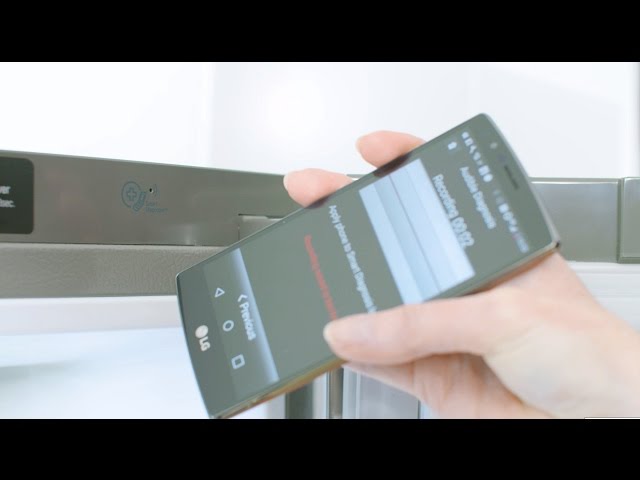
- Through the App: With the LG ThinQ app (available for Android and iOS), you can run Smart Diagnosis directly from your smartphone. The app collects the data and sends it to LG’s servers for analysis.
This feature is not only for when your fridge stops working completely. It can also help with smaller issues, like odd noises, cooling problems, or error messages.
How Does Smart Diagnosis Work?
Let’s break down what happens during a typical Smart Diagnosis session:
Sensors And Data Collection
Your LG refrigerator has sensors that monitor key parts like the compressor, evaporator, fan motors, and temperature sensors. If something is out of the normal range, the Smart Diagnosis system records the information.
Sending The Data
- Phone Method: You call LG support, who will guide you. You press and hold the “Smart Diagnosis” button on your fridge for a few seconds. The fridge emits beeping sounds (like a fax machine). These sounds contain data about your fridge’s health. The LG system reads the tones and translates them for the support agent.
- App Method: You connect your phone to the fridge via Bluetooth or Wi-Fi using the ThinQ app. The app collects the diagnosis data and sends it directly to LG’s servers.
Analysis And Feedback
LG’s system analyzes the data and gives you or the technician feedback—often in under a minute. For example, it might say “Check the door seal” or “Fan motor error detected. ” The support agent will then give you steps to fix the problem or let you know if a technician visit is needed.
Example Of A Smart Diagnosis Session
Suppose your fridge is making a humming noise and not cooling well. You open the ThinQ app, tap “Smart Diagnosis,” and follow the steps. The app sends data to LG. In seconds, you get a message: “Evaporator fan running slow—possible ice buildup. Try defrosting fridge for 24 hours.” This saves you a costly and time-consuming technician visit.

Benefits Of Lg Refrigerator Smart Diagnosis
Smart Diagnosis offers real advantages over traditional troubleshooting. Here’s why:
- Saves Time: Most sessions take less than 5 minutes.
- Reduces Service Calls: Many problems can be fixed without a technician.
- Clearer Communication: The system gives accurate data, reducing guesswork.
- Remote Support: You can get help even if you live far from a service center.
- User-Friendly: The process is simple, even for people who aren’t tech experts.
Non-obvious Insights
- Prevents Bigger Problems: Early diagnosis can catch small issues before they become expensive repairs. For example, a minor fan error found early can prevent a full compressor failure.
- Data Helps LG Improve Products: Each diagnosis session helps LG collect data on common issues, which they use to improve future models.
Common Issues Detected By Smart Diagnosis
While Smart Diagnosis can’t fix every problem, it identifies many common refrigerator issues, such as:
- Temperature Problems: Like cooling too much or not enough.
- Fan and Motor Errors: Slow or stuck fans, compressor issues.
- Sensor Failures: Faulty temperature or humidity sensors.
- Door Seal Alerts: If the door isn’t closing properly.
- Ice Maker Problems: Jammed or malfunctioning ice makers.
- Defrost Issues: Frost build-up warnings.
Here’s a comparison of issues commonly detected by Smart Diagnosis versus traditional troubleshooting:
| Issue | Smart Diagnosis | Manual Troubleshooting |
|---|---|---|
| Temperature too high/low | Sensor data, instant reading | Thermometer, manual checks |
| Fan error | Detects motor speed, status | Listen for noise, check airflow |
| Door seal issue | Sensor alert | Visual inspection |
| Ice maker jam | Reports malfunction code | Open ice maker, check manually |
Step-by-step Guide: How To Use Smart Diagnosis
If you’ve never used Smart Diagnosis, don’t worry. Here’s a simple step-by-step guide for both methods:
Using The Lg Thinq App
- Download the App: Install LG ThinQ from the Google Play Store or Apple App Store.
- Register Your Fridge: Open the app and add your LG refrigerator by scanning its QR code or entering the model number.
- Open Smart Diagnosis: Tap your fridge in the app, then find and select “Smart Diagnosis.”
- Run Diagnosis: Follow the on-screen instructions. The app will connect to your fridge via Bluetooth or Wi-Fi.
- Get Results: Wait for the results. The app shows a summary and suggests steps to fix the issue.
Using The Phone Method
- Call LG Support: Find the support number in your user manual or on the LG website.
- Press the Smart Diagnosis Button: On your fridge, press and hold the “Smart Diagnosis” button as instructed.
- Place Phone Near Speaker: Put your phone’s mouthpiece close to the Smart Diagnosis speaker on your fridge.
- Wait for the Tones: The fridge will emit a series of beeps for about 15 seconds.
- Listen to Feedback: The LG agent will explain the results and what to do next.
Practical Tips
- Make sure your fridge is plugged in and turned on.
- Keep your phone’s volume up and avoid background noise during the call.
- Always use the latest version of the ThinQ app for best results.
Smart Diagnosis Vs. Traditional Support
How does Smart Diagnosis compare to the old way of fixing fridge problems? Let’s look at key factors:
| Factor | Smart Diagnosis | Traditional Support |
|---|---|---|
| Speed | Under 5 minutes | 1-3 days for technician visit |
| Accuracy | Sensor-based, precise | Depends on technician’s inspection |
| Convenience | From home, anytime | Schedule appointment, wait for visit |
| Cost | Usually free | Possible service fee |
Key Insights
- Hidden Cost Savings: Many users don’t realize that avoiding just one technician visit can save $80–$150, depending on where you live.
- Better for Remote Areas: If you live far from a city, Smart Diagnosis can solve problems without waiting days for a repair.
Limitations And When To Call A Technician
Smart Diagnosis is powerful, but it’s not perfect. Here’s what it can and can’t do:
What Smart Diagnosis Can Do
- Detects most common electronic and mechanical problems.
- Gives clear instructions for simple fixes, like cleaning or adjusting.
- Helps decide if a technician visit is needed.
What It Cannot Do
- Fix physical damage (dents, broken shelves).
- Repair major leaks or coolant issues.
- Handle electrical problems outside the fridge (like power supply issues).
- Work if the fridge has no power.
If Smart Diagnosis recommends a technician, don’t ignore it. Some issues, like refrigerant leaks or compressor failure, need special tools and training to repair.
Real-world Example: Fixing A Common Error
Imagine your LG refrigerator shows the error code “Er rF” (evaporator fan error). Normally, you’d have to guess what’s wrong and wait for a repair person. With Smart Diagnosis, you use the app and get a message: “Evaporator fan not spinning. Unplug fridge for 5 minutes. If problem continues, call for service.” Sometimes, a simple reset solves the problem, saving you time and money.
Security And Privacy Concerns
With any smart device, users worry about privacy. LG states that Smart Diagnosis only sends technical data about your fridge. It does not send personal information or listen to your conversations. Still, it’s wise to:
- Use the official LG ThinQ app, not third-party apps.
- Read LG’s privacy policy if you have concerns.
- Update your app and fridge firmware regularly for security.
Tips To Get The Most Out Of Smart Diagnosis
- Register Your Product Early: This makes using Smart Diagnosis faster if you have a problem later.
- Keep Your Manual Handy: It explains where to find the Smart Diagnosis button and speaker.
- Update Regularly: Like your phone, your fridge and app may get updates that improve Smart Diagnosis.
- Try Before You Need It: Do a test run so you know what to expect in an emergency.
- Don’t Ignore Small Issues: Use Smart Diagnosis for minor concerns before they become major repairs.

Choosing A Refrigerator With Smart Diagnosis
If you’re buying a new fridge, consider these points:
- Model Availability: Not all LG fridges have Smart Diagnosis. Check the features list.
- App Compatibility: Make sure your smartphone can run the LG ThinQ app.
- Support in Your Country: Some features may only work in certain regions.
Here’s a quick comparison of LG refrigerator models with and without Smart Diagnosis:
| Model | Smart Diagnosis | App Support | Price Range |
|---|---|---|---|
| LG InstaView | Yes | ThinQ | High |
| LG Side-by-Side 260L | No | Not supported | Mid |
| LG French Door 675L | Yes | ThinQ | High |
| LG Top Freezer 300L | Optional | Depends on model | Low to Mid |
Frequently Asked Questions
How Do I Know If My Lg Refrigerator Has Smart Diagnosis?
Most LG fridges with Smart Diagnosis have a label or button saying “Smart Diagnosis” on the control panel. You can also check your user manual or the LG ThinQ app to see if your model is supported.
Is Smart Diagnosis Free To Use?
Yes, using Smart Diagnosis through the app or by phone is usually free. However, if the system tells you to call a technician, there may be a service fee for in-person repairs.
Will Smart Diagnosis Work If My Fridge Has No Power?
No. The refrigerator must be plugged in and turned on for Smart Diagnosis to work. If your fridge won’t power on, check your power supply or call for professional help.
Is Smart Diagnosis Available In All Countries?
Most LG refrigerators sold in North America, Europe, and parts of Asia support Smart Diagnosis. Some features, especially app support, may not be available everywhere. Check the official LG website for local availability.
Can Smart Diagnosis Fix My Fridge Automatically?
No, Smart Diagnosis only finds and reports problems. It can suggest simple steps to fix some issues, but complex repairs still need a technician.
The kitchen of today is smarter than ever, and LG’s Smart Diagnosis is a big reason why. With the right tools, you can solve many refrigerator problems in minutes—no waiting, no guesswork. As smart home features become more common, knowing how to use them saves time, money, and stress.
If you own or plan to buy an LG refrigerator, learning Smart Diagnosis puts you a step ahead in home appliance care.