
Resetting a thermostat may sound simple, but the process depends on the specific model and the reason for the reset. If you own a White Rodgers thermostat, you might need to reset it to fix errors, restore factory settings, or solve heating and cooling issues. Understanding how to reset your thermostat can save you time and money, and help your home stay comfortable. This guide gives you clear, step-by-step instructions, explains common mistakes, and offers practical tips. Whether you have a digital or mechanical White Rodgers thermostat, you’ll find easy solutions here.
Why Reset A White Rodgers Thermostat?
A thermostat reset is not just a button press. It’s a useful troubleshooting step for several situations:
- System not responding: Your heating or cooling is not turning on/off as expected.
- Display issues: The screen is blank or showing errors.
- Connectivity problems: Wi-Fi or programmable features fail to work.
- Incorrect settings: You want to clear schedules or preferences.
- After power outage: Device may not recover automatically.
Resetting can often fix these problems without needing a technician. It is also a first step before replacing batteries or calling support.
Types Of White Rodgers Thermostats
White Rodgers makes several thermostat models. The reset process can vary depending on your device:
- Mechanical thermostats: Older models with a dial or lever.
- Digital non-programmable thermostats: Basic models with push buttons.
- Programmable thermostats: Models with weekly schedules and digital screens.
- Smart thermostats: Wi-Fi enabled, connected to apps.
You’ll need to know your model to follow the correct reset steps. Check your thermostat’s faceplate or manual for the model number.
Here is a quick comparison of common White Rodgers thermostat types:
| Model Type | Main Features | Reset Difficulty |
|---|---|---|
| Mechanical | Dial, manual controls | Easy |
| Digital Non-programmable | Simple buttons, digital display | Easy |
| Programmable | Schedules, digital interface | Moderate |
| Smart/Wi-Fi | App connectivity, advanced features | Moderate |
Preparing To Reset Your Thermostat
Before you start, take these steps to avoid mistakes:
- Identify your model: Find the model number on the thermostat or in the manual.
- Note your settings: Write down your schedules and preferences. A reset will erase them.
- Check power source: Make sure the thermostat has working batteries or is connected to power.
- Turn off HVAC system: Switch off your heating/cooling system at the main control panel to prevent sudden starts.
Skipping these steps can lead to confusion or lost settings. Many users forget to record their schedules and regret it later.
How To Reset Mechanical White Rodgers Thermostats
For older, manual models, resetting is simple:
- Turn the dial: Move the temperature dial all the way up, then all the way down.
- Switch the lever: If there’s a system switch (Heat/Cool/Off), flip it to Off, then back to your desired setting.
- Wait: Give it a minute to respond.
Mechanical thermostats rarely need a full reset. These steps fix most calibration problems.
How To Reset Digital Non-programmable White Rodgers Thermostats
Most digital models have a reset button or simple process:
- Locate the reset button: Often found inside the battery compartment or on the main panel.
- Press and hold: Use a paperclip or small tool to press and hold the button for 5–10 seconds.
- Release and wait: The screen will go blank, then restart.
If there’s no reset button, try removing the batteries:
- Take out both batteries.
- Wait for 2 minutes.
- Reinsert batteries.
This “power cycle” can solve display or response issues.
How To Reset Programmable White Rodgers Thermostats
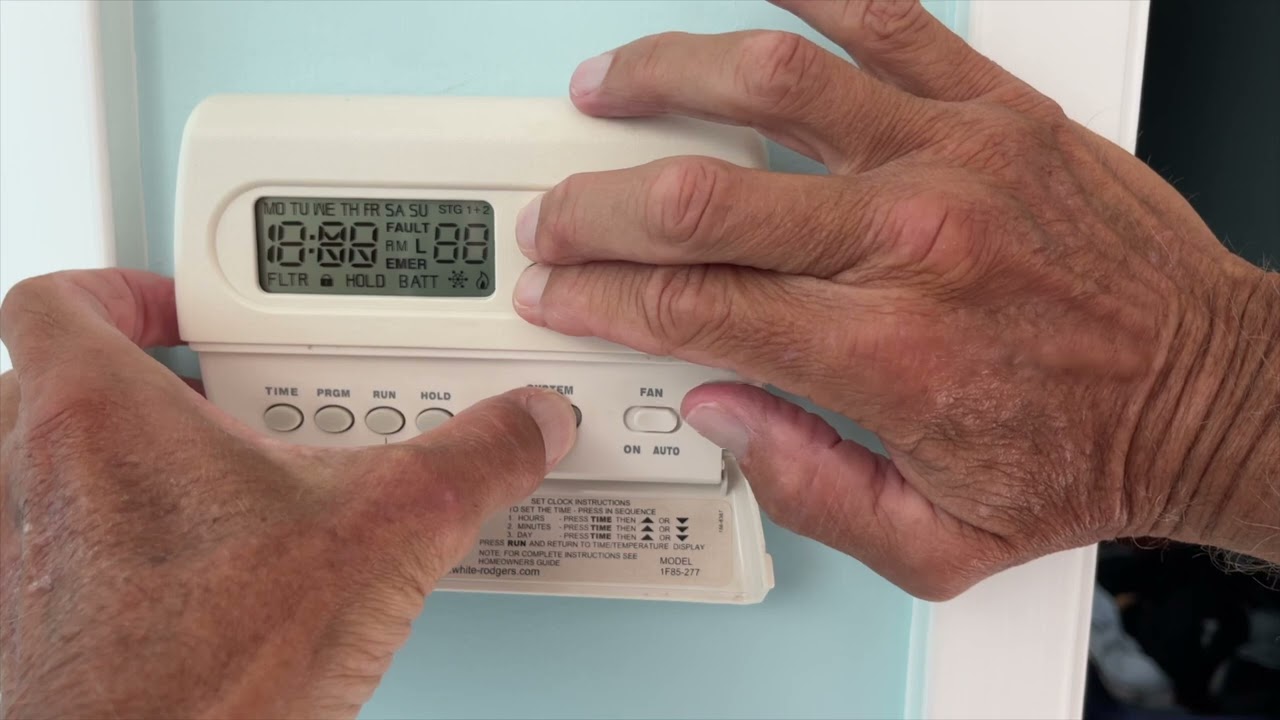
Programmable models require more steps:
- Press the “Reset” button: Sometimes labeled “Reset,” “RST,” or shown as a tiny hole.
- Hold for 10 seconds: Use a pointed object.
- Wait for reboot: The screen should flash or turn off, then restart.
- Restore settings: Re-enter your schedules and preferences.
On some models, you can reset through the menu:
- Press “Menu.”
- Scroll to “Reset” or “Factory Reset.”
- Confirm your choice.
Here’s a comparison of reset methods for digital and programmable thermostats:
| Thermostat Type | Reset Method | Time Required |
|---|---|---|
| Digital Non-programmable | Button or battery removal | 2–5 minutes |
| Programmable | Button or menu option | 3–7 minutes |
How To Reset Smart Or Wi-fi White Rodgers Thermostats
Smart thermostats use digital interfaces and apps. Resetting can fix connectivity or app issues.
Factory Reset Steps
- Open the menu: Tap “Menu” on the thermostat screen.
- Find “Settings”: Select “Settings,” then “Reset.”
- Choose “Factory Reset”: Confirm your choice. The screen may prompt you for a password.
- Wait for restart: Device will reboot and return to initial setup screen.
App-based Reset
- Open the White Rodgers app.
- Go to “Device Settings.”
- Select “Remove Device” or “Reset Device.”
- Follow prompts.
Factory reset will erase all Wi-Fi and schedule settings. Make sure to have your Wi-Fi password ready for re-setup.
Common Mistakes When Resetting
Resetting a thermostat seems easy, but these mistakes are frequent:
- Not recording schedules: Users lose custom schedules and forget how to re-enter them.
- Wrong reset method: Using the wrong procedure for the model leads to no change.
- Skipping battery check: Low batteries can cause display or reset failures.
- Forgetting HVAC shutdown: Not turning off the system can cause sudden starts or damage.
- Mixing up wires: For advanced resets (like disconnecting wires), always label them.
One insight many beginners miss: resetting does not fix wiring or sensor faults. If you see “Err” or “Sensor” messages after reset, check wiring or call a technician.

Troubleshooting After A Reset
A reset should solve most thermostat issues. If problems continue:
- Blank screen: Check batteries or power connections.
- No heating/cooling: Confirm HVAC system is on and thermostat is set to the correct mode.
- Error codes: Look up codes in the manual or online.
- Wi-Fi won’t connect: Re-enter your Wi-Fi details, check router status.
If your thermostat still doesn’t work, test with another device or contact White Rodgers support.
When To Call A Professional
Some issues need expert help:
- Wiring problems: If you see error messages after reset.
- Repeated failures: Thermostat keeps losing settings or shutting down.
- HVAC issues: Heating/cooling system won’t respond after a reset.
A technician can check wiring, sensors, and system compatibility. According to the US Department of Energy, nearly 40% of thermostat failures are caused by wiring or sensor issues, not software glitches.
Tips For Maintaining Your White Rodgers Thermostat
Resetting solves immediate problems, but regular maintenance prevents future issues.
- Change batteries every 6–12 months: Even if the display works, weak batteries cause errors.
- Clean the thermostat: Dust can block buttons or sensors.
- Update firmware: For smart thermostats, check for software updates.
- Review settings seasonally: Adjust schedules as weather changes.
- Check compatibility: Ensure your thermostat matches your HVAC system.
Here’s a quick maintenance schedule:
| Task | Frequency |
|---|---|
| Battery replacement | Every 6–12 months |
| Dust cleaning | Monthly |
| Firmware updates | When available |
| Schedule review | Seasonally |
Additional Resources
For specific instructions or troubleshooting, the official White Rodgers website offers guides and manuals for most models. You can visit Emerson White Rodgers Support for official resources.
Frequently Asked Questions
How Often Should I Reset My White Rodgers Thermostat?
You only need to reset your thermostat when there’s a problem—like errors, schedule glitches, or after a power outage. Regular resets are not required for maintenance.
Will Resetting My Thermostat Erase All My Settings?
Yes, a full reset will erase custom schedules, preferences, and Wi-Fi settings (for smart models). Always write down your settings before starting.
What Should I Do If The Thermostat Screen Stays Blank After A Reset?
First, check the batteries or power supply. If power is fine and the screen is still blank, try another reset or check wiring. If the problem continues, contact support.
Can I Reset My Thermostat From The App?
If you have a smart White Rodgers thermostat, you can reset it using the app. Go to device settings and choose the reset option, then follow the prompts.
What If My Heating Or Cooling Doesn’t Work After A Reset?
Confirm the HVAC system is powered on and set to the correct mode. Double-check your thermostat settings and wiring. If it still doesn’t work, you may need professional help.
Resetting your White Rodgers thermostat is a simple but important step to solve many home climate problems. With these clear instructions and tips, you can fix issues quickly and confidently, keeping your home comfortable year-round. Remember to record your settings, follow the steps for your model, and check power sources before you begin.
If problems continue, expert help is available. With regular care, your thermostat will work smoothly for years.