
You can fix an Lg Sound Bar Not Working Hdmi Arc by performing a full power cycle on both your television and the audio device to reset the digital handshake. This issue most often stems from a temporary communication error between the two devices, which prevents the HDMI-CEC protocol from sending audio signals through the cable. If a simple restart doesn’t restore sound, the problem usually lies in the TV’s audio output settings or a faulty cable connection.
Reasons your sound bar isn’t working
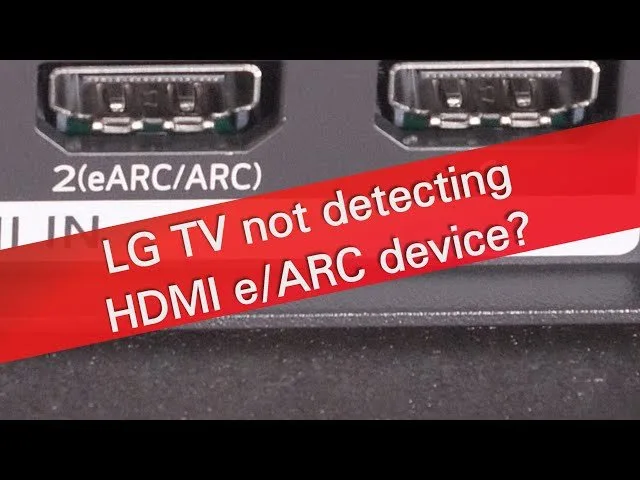
The primary reason sound fails to transmit through an HDMI ARC (Audio Return Channel) connection is a failure in the HDMI-CEC handshake. HDMI-CEC is the standard that allows your TV remote to control your sound bar’s volume and power. When this protocol experiences a software glitch, the TV stops recognizing the sound bar as an active audio output device. This varies by model — check the label on your TV’s HDMI port to ensure you’re connected to the specific port marked “ARC” or “eARC.”
Another common cause is an outdated firmware version. If your TV or sound bar software is behind, the communication protocols may no longer match, causing the audio signal to drop. Additionally, simple physical wear on the HDMI cable can prevent the high-bandwidth data required for ARC from passing through correctly. If you’re using a standard HDMI cable that came with an older device, it may lack the shielding or data capacity needed for modern audio formats.
Finally, the TV’s internal audio settings might have reverted to internal speakers after a system update. You must manually verify that the TV is set to output audio via “HDMI ARC” or “Optical/HDMI” rather than “TV Speaker.” If these settings are correct but you still have no sound, the issue might be a locked digital handshake. You can review the official LG support troubleshooting guide for specific steps on clearing your device’s audio cache.
Power cycle all devices
This fix is for anyone whose devices are powered on but silent. First, turn off your TV and your sound bar. Pull the power cords out of the wall outlets for both units. Wait at least sixty seconds to let the internal capacitors fully discharge, which clears any temporary software errors. While the power is off, disconnect the HDMI cable from both the TV and the sound bar. Inspect the ends of the cable for any bent pins or debris.
Plug the HDMI cable back in firmly, ensuring it clicks into the ARC-labeled port on the TV. Plug the power cord back into the sound bar first, then the TV. Turn the TV on, and wait for the sound bar to initialize. If the connection is successful, the sound bar will often display “ARC” or “TV” on its front panel. If you have a complex setup with a game console or cable box connected to the TV, keep those devices disconnected during this reset to avoid interference. If the sound bar doesn’t show a connection after this, you likely have a faulty cable that needs replacement. This isn’t for anyone who has already verified their cable with another device; if the cable works elsewhere, the issue is likely a hardware failure in the TV’s HDMI port, which requires a professional service technician.
Update your audio settings
This fix is for users who have a physical connection but no sound output. Navigate to your TV’s “Settings” menu using your remote. Look for the “Sound” or “Audio” tab. Within this menu, find “Sound Out” or “Audio Output.” You’ll likely see “Internal TV Speaker” selected by default. Change this setting to “HDMI ARC” or “External Speaker (HDMI).” Some newer LG TVs have a sub-menu labeled “HDMI ARC Mode” or “Digital Sound Out.” If you see an option for “Auto,” try changing it to “Pass-through” or “PCM.” This forces the TV to send a simpler audio signal that’s easier for the sound bar to process.
If you see an option for “SIMPLINK” (HDMI-CEC), ensure it’s turned “On.” SIMPLINK must be active for the ARC feature to function; if it’s toggled off, the TV will ignore the sound bar entirely. After changing these settings, restart the TV once more to lock in the configuration. If you notice the sound cuts out intermittently, check the “eARC” setting. If your sound bar doesn’t support eARC, keep that feature turned “Off” to prevent signal conflicts. This fix isn’t for users who can’t access their TV menu; if your TV screen is black or the menu is frozen, you have a display issue that requires a manufacturer repair.
Replace the HDMI cable
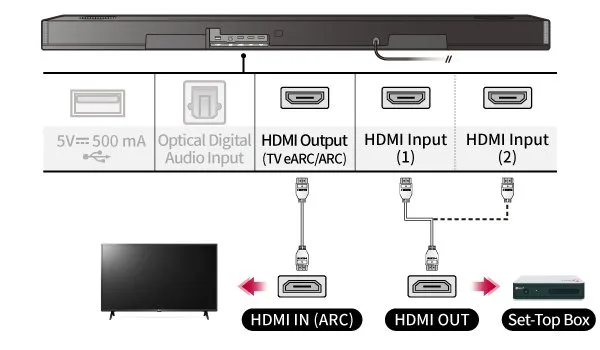
This fix is for cases where software restarts and setting changes have failed. HDMI cables designed for ARC require specific internal wiring to handle the return signal. A standard, older cable may not support the necessary data transfer. It’s worth the effort to try a certified “High Speed” or “Ultra High Speed” HDMI cable, as these are built to meet the bandwidth requirements of modern audio protocols.
If you have a spare HDMI cable, swap it in to see if the sound returns. If the sound works with the new cable, your old one was physically damaged or lacked the required ARC support. If you try a new cable and still have no audio, the HDMI port on your sound bar or TV may be damaged. If you don’t have the technical equipment to test the port’s electrical output, don’t attempt to open the device or probe the pins, as this can cause permanent short-circuit damage. At this point, the failure is likely internal. You should contact LG customer support or a certified home theater repair service to evaluate the HDMI board. Replacing a board is often expensive, so compare the cost of repair against the price of a new sound bar before committing to a service appointment.
What not to do
- Don’t perform a factory reset on your TV as a first step, as this deletes all your apps and saved settings without fixing most HDMI connection issues.
- Don’t use an HDMI-to-RCA adapter to connect your sound bar, as these converters don’t support the digital communication required for ARC and will result in no sound.
- Don’t plug the HDMI cable into a standard “HDMI IN” port that isn’t marked “ARC” or “eARC,” as these ports are designed for input only and can’t send audio back to the sound bar.
- Don’t force the HDMI cable into the port if it feels tight, as this can bend the delicate pins inside the TV or sound bar and permanently destroy the port.
How to stop it happening again
To prevent future connection drops, keep your firmware updated and ensure your HDMI cables are properly secured.
| If you’re doing this | Do this instead | Why |
|---|---|---|
| Leaving cables loose | Use cable ties to secure the cord | Prevents the cable from sagging and pulling the pins. |
| Ignoring update prompts | Enable “Auto-Update” in TV settings | Ensures the CEC protocol remains compatible. |
| Using old, thin cables | Use certified “High Speed” HDMI | Modern audio needs higher data bandwidth. |
| Powering off via power strip | Keep devices on standby | Sudden power cuts can corrupt the handshake. |
Most users mistake a faulty cable for a broken port. If your screen flickers when you move the television, the physical weight of the cable is likely bending the internal pins. A simple zip tie attached to the TV mount eliminates this strain.
If the issue persists despite these fixes, check your device’s “HDMI Deep Color” setting. If your source device is set to a higher bit depth than your cable can handle, the signal will drop intermittently. If you see a “No Signal” message, toggle this setting off. If the picture returns, your hardware is mismatched.
Frequently asked questions
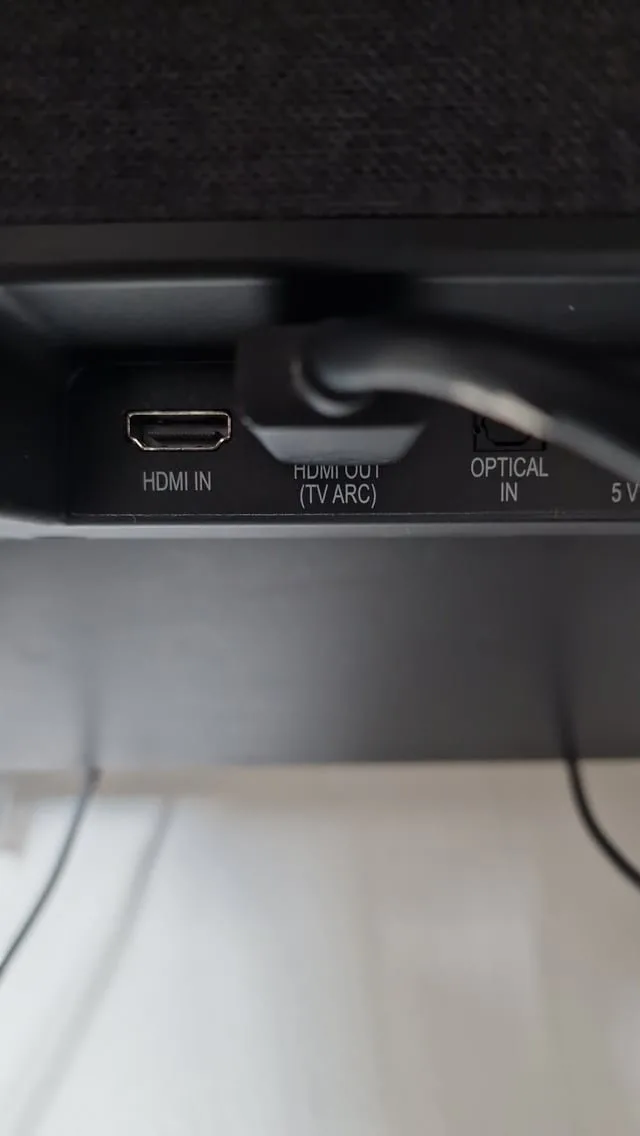
Can a bad HDMI cable cause no sound on a sound bar?
Yes, a faulty or incompatible HDMI cable is a leading cause of audio failure. ARC requires a specific data path within the cable to send sound back from the TV. If a new, high-speed cable doesn’t solve the problem, the issue is likely within the HDMI port hardware.
Why does my sound bar stop working after I turn the TV off?
This happens because the HDMI-CEC handshake is lost when devices power down. You can usually fix this by ensuring the “SIMPLINK” or “CEC” setting is enabled on both the TV and the sound bar. If the issue persists, perform a power cycle by unplugging both units to reset the link.
Is it safe to leave my sound bar on all the time?
Yes, it’s perfectly safe to leave your sound bar in standby mode. Modern sound bars are designed to remain in standby to detect TV signals instantly. You only need to unplug the device if you’re going to be away for a long time or during a severe thunderstorm.
What happens if I use an HDMI cable not labeled ARC?
Using a basic HDMI cable often results in no sound or intermittent audio drops. Standard cables frequently lack the necessary “Return Channel” wiring required for ARC to function. Always check the packaging to ensure your cable supports “ARC” or “High Speed” data transfer to guarantee a stable connection.
How long should I wait after unplugging my devices?
You should wait at least sixty seconds before plugging your devices back in. This time is necessary for the capacitors inside the power supply to fully discharge and clear any residual electricity. If you plug the devices back in too quickly, the system may retain the old error state and fail to reset properly. Patience during this step is the most effective way to ensure the software handshake resets completely.
Final Thoughts
If you’re still not hearing any audio after trying these fixes, don’t worry. It’s possible your firmware needs a quick update or the HDMI port itself is damaged. Reach out to LG’s support team or check your TV’s manual for hidden settings. They’ll help you get your home theater running smoothly again.
Related guides