
Every business relies on uninterrupted power to keep servers, computers, and essential devices running. When the lights go out, an Uninterruptible Power Supply (UPS) kicks in. But what happens if the UPS battery fails when you need it most? Checking your UPS battery health isn’t just a technical task—it’s a vital part of keeping your systems safe and your stress levels low. This guide shows you how to check UPS battery health, spot early warning signs, and make smart decisions to avoid downtime.
Why Ups Battery Health Matters
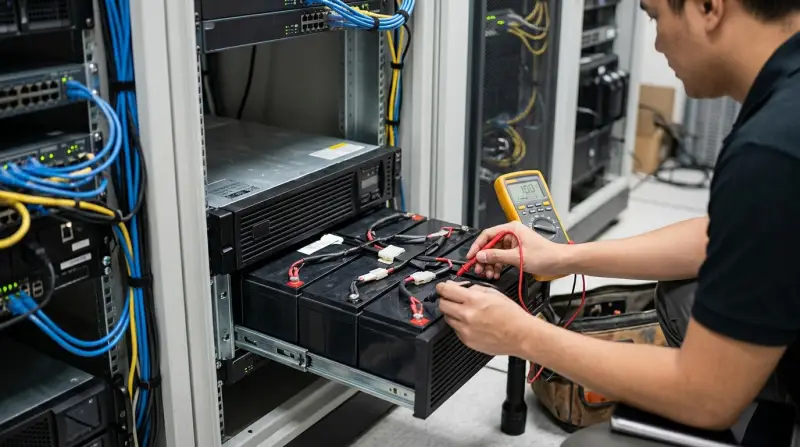
A UPS is only as good as its battery. If the battery is weak or dead, your equipment could shut off during a power outage, leading to:
- Data loss
- Hardware damage
- Work interruptions
UPS batteries degrade over time, even if you rarely use them. Most batteries last 3–5 years, but factors like temperature, usage, and maintenance can shorten their lifespan. Checking battery health helps you:
- Replace batteries before they fail
- Plan your budget for replacements
- Reduce the risk of unexpected downtime
Signs Your Ups Battery May Be Failing
You don’t need to wait for a total blackout to check your battery. Here are common warning signs:
- Short runtime: If your UPS used to last 30 minutes, but now it lasts only 5, the battery is likely weak.
- Frequent alarms: Many UPS devices beep or flash warning lights when the battery is near the end of its life.
- Physical swelling: Batteries that look bloated or misshapen are unsafe and should be replaced immediately.
- Heat: If the battery feels hot even when not in use, that’s a sign of internal problems.
- Age: If your battery is over three years old, check it more often.
Methods To Check Ups Battery Health
There are several ways to check your UPS battery. Some are simple and require no tools, while others need a bit more effort.
1. Use Ups Self-test Features
Most modern UPS devices include a self-test button. Running a self-test is usually the easiest way to get a quick idea of battery health.
How to run a self-test:
- Press the self-test button on your UPS. The location and label vary, so check your manual.
- Watch the indicator lights or display. Green usually means “good,” red means “replace soon.”
- Listen for beeps—some UPS units beep in a specific pattern to indicate battery issues.
Non-obvious insight: Some UPS models only run self-tests after a power event or when you manually start one. Don’t assume your UPS checks itself automatically.
2. Check Battery Status Via Ups Management Software
Many UPS units connect to computers via USB or network cables. Manufacturers offer free software (like APC PowerChute or Eaton Intelligent Power Manager) that shows:
- Battery charge level
- Battery age
- Estimated runtime
- Health status messages
How to use the software:
- Install the official UPS software on your PC.
- Connect the UPS using the right cable.
- Open the software and look for the battery health or diagnostics section.
Practical tip: Software often gives you more details than the UPS front panel, such as battery wear percentage.
3. Manual Runtime Test
A hands-on way to check battery health is to perform a controlled runtime test.
Steps:
- Fully charge your UPS battery (leave it plugged in for several hours).
- Plug in a device that uses about 50% of the UPS’s rated capacity (e.g., a desktop PC).
- Unplug the UPS from the wall to simulate a power outage.
- Time how long the UPS keeps your device running before shutting down.
Compare your result to the original runtime listed in the UPS manual. If the time is much shorter, the battery is likely worn out.
Common mistake: Testing with a device that draws too little power (like a small lamp) can give a false sense of security—the battery might handle small loads but fail with real equipment.
4. Visual Inspection
Open the UPS battery compartment (following safety instructions). Look for:
- Swelling or leaks
- Corrosion on terminals
- Loose wires
If you see any of these, replace the battery immediately.
Safety warning: Always unplug the UPS and let it rest for a few minutes before opening. Batteries can store dangerous energy even when unplugged.
5. Measure Battery Voltage
For users comfortable with basic electronics, measuring battery voltage with a multimeter gives useful data.
How to measure:
- Unplug the UPS and remove the battery.
- Set your multimeter to DC voltage.
- Touch the probes to the battery terminals.
- Compare the reading to the voltage printed on the battery (e.g., a 12V battery should read 12.5–13.5V when fully charged).
If the reading is below 12V (for a 12V battery) after charging, the battery may be near end of life.
Non-obvious insight: Voltage alone doesn’t tell the full story. A battery can show full voltage but still have low capacity. Combine voltage checks with a real runtime test for accuracy.
Table: Common Ups Battery Types And Lifespan
Understanding your battery type helps you plan replacements.
| Battery Type | Common Use | Average Lifespan |
|---|---|---|
| Sealed Lead-Acid (SLA) | Most home & small office UPS | 3–5 years |
| Lithium-Ion | High-end or rack-mount UPS | 5–10 years |
| Nickel-Cadmium (NiCd) | Industrial UPS (rare) | 7–15 years |
Table: Ups Self-test Indicators Comparison
Here’s how some common brands display battery health.
| Brand | Healthy | Replace Soon | Replace Now |
|---|---|---|---|
| APC | Green light steady | Amber light/blinking | Red light/flashing or constant beep |
| Eaton | Green LED | Yellow LED | Red LED or alarm |
| CyberPower | Normal operation | Battery icon flashes | Constant alarm/beep |
Table: When To Replace Your Ups Battery
Knowing when to act saves headaches later.
| Situation | Replace Battery? | Reason |
|---|---|---|
| Battery is over 3–5 years old | Yes | End of expected life |
| Frequent alarms or short runtime | Yes | Battery capacity is low |
| Swelling, leaks, or corrosion | Yes | Safety risk |
| Voltage below rated value after charge | Yes | Battery can’t hold charge |
| UPS passes all tests | No | Battery is healthy |
Practical Tips For Ups Battery Maintenance
Keeping your UPS in top shape isn’t hard if you follow some simple habits.
- Keep it cool: High temperatures (above 77°F or 25°C) shorten battery life. Place your UPS in a cool, well-ventilated spot.
- Test regularly: Run a self-test or runtime test every 3–6 months.
- Clean connections: Dust and corrosion can affect performance. Unplug and clean terminals carefully with a dry cloth.
- Don’t overload: Plugging in too many devices can stress the battery and reduce its lifespan.
- Record test dates: Keep a log of battery checks and test results for future reference.
Some businesses use a color-coded sticker system to track battery age at a glance.
What To Do If Your Ups Battery Fails A Health Check
If your UPS battery is failing, don’t panic. Here’s what to do next:
- Order a replacement battery from the UPS manufacturer or a trusted dealer. Generic batteries can be risky—always match the voltage and size exactly.
- Dispose of old batteries safely. Most stores that sell UPS batteries will recycle your old one for free.
- Install the new battery following the instructions in your UPS manual.
- Test the UPS with the new battery before relying on it.
Never try to repair a leaking or swollen battery. It’s safer and faster to replace it.

Credit: www.youtube.com
How Often Should You Check Ups Battery Health?
The answer depends on usage and environment:
- Home or small office: Every 6 months is enough for most users.
- Critical business systems: Check every 3 months or after every power outage.
- Hot or humid environments: Check more often, as heat speeds up battery aging.
Non-obvious insight: Batteries can fail early even if the UPS is rarely used, especially if it sits unused in a hot environment.
Battery Testing: Diy Vs. Professional
You can do basic checks yourself, but larger organizations or mission-critical systems should consider professional UPS maintenance. Certified technicians use advanced tools like battery impedance testers and can check things you can’t see.
Professional service is recommended if:
- You manage several UPS units
- Your UPS supports critical medical or financial equipment
- You notice repeated battery failures
For most home and small business users, following the steps above is enough to catch problems early.

Credit: onlitech.co.uk
Learning More About Ups And Battery Technology
If you want deeper knowledge, resources like the Wikipedia UPS article offer technical details and battery chemistry explanations.
Frequently Asked Questions
How Long Does A Ups Battery Usually Last?
Most UPS batteries last 3–5 years, but high-end lithium-ion batteries can last up to 10 years. Heat, heavy use, or poor maintenance can shorten this.
Is It Safe To Use A Ups With A Weak Battery?
It’s not recommended. A weak battery may fail to protect your devices during an outage, and in rare cases, a damaged battery could leak or overheat.
Can I Replace A Ups Battery Myself?
Yes, most UPS units are designed for user-replaceable batteries. Always follow the manufacturer’s instructions and use the correct battery type.
Why Does My Ups Beep Even When There’s No Outage?
Frequent beeping usually means the battery is weak or needs replacement. Check the UPS display or software for more details.
How Do I Dispose Of Old Ups Batteries?
Never throw old batteries in the trash. Take them to a recycling center or a store that sells UPS batteries. Many retailers offer free recycling.
Protecting your devices starts with a healthy UPS battery. With regular checks and smart maintenance, you’ll always be ready for the next power glitch—no surprises, just peace of mind.