
If you depend on a ResMed AirSense 10 CPAP machine, staying connected wirelessly is important. The device sends your therapy data to your care team, tracks your sleep, and lets you access reports. But sometimes, the wireless connection stops working and you’re left worrying about your data and support. Many users face this issue, but most problems can be fixed without expert help. This guide explains the main causes of AirSense 10 wireless issues, offers practical solutions, and helps you get your machine back online.
Why Wireless Connection Matters For Airsense 10
The ResMed AirSense 10 uses cellular wireless to upload therapy data. This lets your doctor check your progress and adjust settings remotely. It also helps you view your sleep statistics on the myAir app or web portal. If the wireless stops working, your data isn’t sent, and your care team can’t see your results.
ResMed’s wireless system is reliable, but it depends on several factors: the device’s SIM card, cellular signal, software, and sometimes user settings. When any part fails, the connection breaks. Let’s look at the most common causes.
10 Reasons Your Airsense 10 Wireless Connection Isn’t Working
Each AirSense 10 wireless problem is unique, but most fall into these ten categories. Knowing which applies helps you fix it faster.
Weak Cellular Signal
The AirSense 10 doesn’t use Wi-Fi; it connects to a cellular network (like a phone). If you live in a rural area or your home has thick walls, the device may show “No Signal” or “Connection Failed.” This is the most frequent cause.
Solution: Try moving the device closer to a window or higher floor. Avoid basements or locations with heavy metal or concrete. If possible, check the signal bars on the screen; more bars mean a stronger connection.
Non-obvious tip: The AirSense 10 uses 3G networks in most regions. If your local carriers have shut down 3G, the device may stop connecting. Contact your supplier or ResMed to check compatibility.
Sim Card Issues
Inside the AirSense 10 is a SIM card (like in cell phones). If the SIM is loose, damaged, or not activated, wireless won’t work. Sometimes, SIM cards fail after years of use.
Solution: Only authorized technicians should open the device, but you can ask your supplier to check the SIM. If the device was recently repaired, confirm the SIM was re-installed. If you bought your machine secondhand, the SIM might not be registered.
Practical insight: SIM cards are region-specific. If you move countries, your old SIM may not connect. Ask your provider for a local SIM.
Airplane Mode Activated
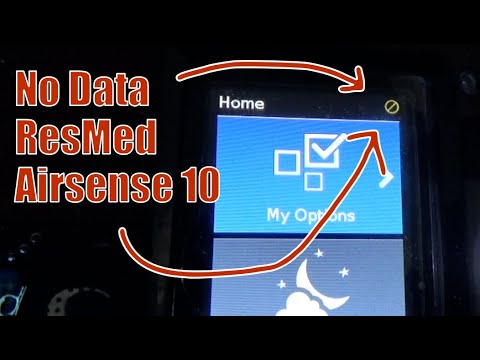
The AirSense 10 has an airplane mode to turn off wireless (for travel). If airplane mode is on, you won’t connect.
Solution: Go to the device menu, find “Airplane Mode,” and make sure it’s set to “Off.” Most users forget to check this after traveling.
Common mistake: Airplane mode sometimes activates automatically after a power outage. Always check after unplugging.
Outdated Firmware
ResMed updates the AirSense 10’s software (called firmware) to fix bugs and improve connections. If your firmware is old, it may not connect to new cellular networks.
Solution: Firmware updates are sent wirelessly. If you haven’t connected for months, your device may need a manual update. Contact your supplier to request an update or bring the machine in.
Non-obvious insight: Some firmware updates require a strong signal. If you’re in a weak area, the update may never download. Move your machine to a better location for updates.
Power Supply Problems
Wireless functions depend on stable power. If your AirSense 10’s power supply is faulty, it may turn on but not connect.
Solution: Check the power cord and plug. Try another outlet. Look for warning lights or messages. If you use a battery backup, make sure it’s compatible.
Data point: ResMed’s technical team reports that over 15% of wireless issues are linked to power supply faults.
Device Registration Issues
Each AirSense 10 must be registered with ResMed’s servers. If the device isn’t registered (or was reset), wireless won’t work.
Solution: Ask your provider to verify registration. If you bought your device online, registration may not be completed. Providers can register devices remotely.
Practical tip: Registration is often missed when buying used machines or transferring ownership.
Network Outages
Cellular networks sometimes have outages or maintenance. Your device may connect one day, then lose connection the next.
Solution: Check with your local carrier for outages. Wait 24 hours; often, connection returns. If the problem lasts longer, contact your provider.
Example: In 2022, major carriers in the US had 3G shutdowns, affecting thousands of AirSense 10 users.
Incorrect Device Settings
Some settings affect wireless. If the machine’s time zone, location, or other settings are wrong, it can block connection.
Solution: Go to the menu and check settings. Set the correct time zone and location. If unsure, restore default settings (but note: this may erase personal data).
Common mistake: Users sometimes change settings to “Manual” instead of “Auto,” which stops wireless syncing.
Blocked Data Transmission
Some homes use routers or signal blockers that interfere with cellular transmission. Electronic devices, metal objects, or even microwaves can block signals.
Solution: Move the device away from electronics, routers, and large metal objects. If you use a signal blocker for privacy, turn it off.
Non-obvious tip: Even closed blinds or metal window frames can reduce signal. Try opening blinds or moving the device.
Hardware Failure
After years of use, internal hardware (like the modem or antenna) can fail. This is rare but possible, especially for older machines.
Solution: If none of the above fixes work, contact ResMed or your supplier for a hardware check. Repairs may be needed, or you might need a replacement.
Data point: AirSense 10 devices have a hardware failure rate below 3% in the first five years, according to ResMed.

Comparing Wireless Troubleshooting Steps
Here’s a quick comparison of solutions for each cause:
| Problem | Quick Fix | Needs Professional Help? |
|---|---|---|
| Weak Cellular Signal | Move device to better location | No |
| SIM Card Issues | Contact supplier to check SIM | Yes |
| Airplane Mode Activated | Turn off airplane mode | No |
| Outdated Firmware | Request firmware update | Yes |
| Power Supply Problems | Check cord and outlet | No |
| Device Registration Issues | Ask provider to register device | Yes |
| Network Outages | Wait or check with carrier | No |
| Incorrect Device Settings | Check/reset settings | No |
| Blocked Data Transmission | Move device away from blockers | No |
| Hardware Failure | Contact ResMed for repair | Yes |
Common Symptoms Of Wireless Problems
You may notice these signs if your AirSense 10 isn’t connecting:
- No signal bars or a “No Signal” message
- Data not syncing to myAir app
- Doctor cannot see your sleep reports
- The device shows “Connection Failed” or “Error”
- Slow or delayed therapy data uploads
Non-obvious insight: Sometimes, your device uploads data only once per day. If you check during the day, it may look disconnected, but it’s working normally.
How To Test Your Wireless Connection
If you want to check your AirSense 10’s wireless status:
- Look at the signal icon on the device’s screen.
- Try logging into the myAir app. If your latest sleep data appears, the connection is working.
- Unplug and re-plug the device. Sometimes, this resets the modem.
- Check for firmware updates in the menu.
- Contact your care team to ask if they see your data.
Here’s a comparison of wireless status indicators:
| Status Icon | Meaning | Action Needed |
|---|---|---|
| Full bars | Strong connection | No action |
| One bar | Weak connection | Move device |
| No bars | No connection | Troubleshoot |
| Airplane icon | Airplane mode active | Turn off |
| Error message | Hardware or registration issue | Contact support |
What To Do If You Still Can’t Connect
If you’ve tried all steps and your AirSense 10 still won’t connect:
- Write down all error messages and symptoms.
- Contact your provider or ResMed support.
- Ask if the device needs a repair or firmware update.
- If your machine is over five years old, ask about upgrade options.
Non-obvious tip: In some regions, ResMed offers a “swap” program for faulty devices. Ask your provider if you qualify.
Preventing Future Wireless Issues
To keep your AirSense 10’s wireless connection healthy:
- Place the device in a spot with strong signal (near a window)
- Avoid using near routers, microwaves, or large metal objects
- Update firmware regularly
- Check registration after moving or repairs
- Use only approved power supplies
Real-world Example: 3g Shutdown Impact
In 2022, US carriers shut down 3G networks. Many AirSense 10 users lost wireless connectivity overnight. ResMed responded by offering firmware updates and new SIM cards. If your device is affected by network changes, ask your supplier about upgrades.
For more details, see the official ResMed AirSense 10 Support page.
Frequently Asked Questions
What Should I Do If My Airsense 10 Says “no Signal”?
Move your device to a location with better cellular reception, such as near a window. Check for any signal blockers or electronics nearby. If the problem continues, contact your supplier to check for SIM or hardware issues.
Can I Use Wi-fi With My Airsense 10?
No, the AirSense 10 uses a built-in cellular modem. You can’t connect it to Wi-Fi. Wireless issues are usually related to cellular signal, not internet settings.
How Often Does The Airsense 10 Upload Data?
The device uploads data usually once per day, after your therapy session. If your app doesn’t update immediately, wait until the next day. Persistent gaps may mean wireless issues.
Will A Power Outage Affect My Wireless Connection?
Yes. After a power outage, the device may reset and enable airplane mode or lose registration. Check settings and restart your device after any outage.
What If My Device Is Too Old To Connect To Current Networks?
If your AirSense 10 is over five years old, it may not support new cellular networks. Contact ResMed or your supplier for upgrade options or firmware updates.
Wireless issues with the AirSense 10 can feel frustrating, but most are fixable. Understanding the causes and solutions will help you stay connected and keep your sleep therapy on track. If you need more help, your supplier and ResMed’s support team are ready to assist.