
A common cause of a 2015 Chevy Trax Radio Touch Screen Not Working is a software glitch in the MyLink infotainment system, which you can often fix by performing a hard reset. This usually happens when the internal computer freezes while loading data or connecting to a device. If the screen remains blank or unresponsive after a reset, the issue might involve a blown fuse or a hardware failure in the display unit.
Causes of your Chevy Trax radio issues
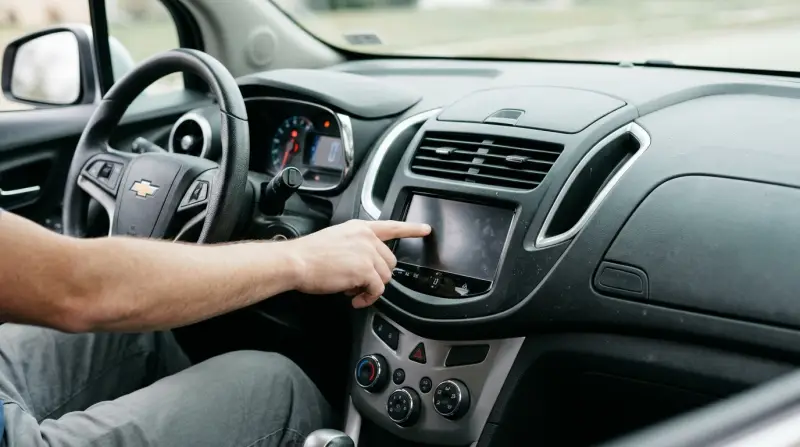
Infotainment systems in vehicles like the 2015 Chevy Trax rely on a complex operating system that functions much like a smartphone. When this system encounters a conflict, it stops responding to touch inputs. The most frequent trigger is a corrupted file or a “handshake” error when your phone connects via Bluetooth or USB. If the car’s computer fails to complete the communication cycle with your device, the screen may stay frozen on the logo or go completely dark.
Another common cause is an electrical supply issue. If the fuse dedicated to the radio or the display screen has burned out, the unit won’t receive the power it needs to function. This often happens due to a simple power surge or age. You can check your owner’s manual to identify the location of the radio fuse in your specific trim level, as the layout varies by model — check the label on the inside of your fuse box cover.
Finally, physical wear on the digitizer layer of the screen can cause it to stop detecting your touch. This happens if the screen has been exposed to extreme heat or moisture over many years. If the display is lit but ignore your fingers, the touch sensors behind the glass have likely failed.
Safety: Inside a mains-powered machine, the parts behind the outer cover can hold a dangerous electrical charge even after it has been unplugged — that’s why they sit behind a cover. Opening the housing, or testing or replacing anything behind it, is a job for a qualified technician, never a home repair.
Reset the Infotainment System
Performing a system reset is the first step for anyone experiencing an unresponsive screen. This process clears the temporary cache and forces the operating system to reboot, which resolves most software-related freezes. To do this, turn the vehicle off and remove the key from the ignition. Open the driver-side door and wait at least 10 minutes. This delay ensures the vehicle’s “Retained Accessory Power” circuit fully shuts down, allowing the radio computer to lose all power and reset its memory.
If the screen comes back to life, you have successfully cleared the error. However, if the screen remains black, this fix isn’t for you; you likely have a power issue or a dead unit. A common mistake is attempting to reset the system while the key is still in the “Accessory” position. This keeps the circuit active and prevents the memory from clearing, wasting your time.
If the system still fails to boot after you turn the car back on, don’t attempt to pry open the dashboard. The internal circuitry uses delicate ribbon cables that break easily. If you aren’t comfortable checking electrical components, take the vehicle to a certified technician.
Use this decision rule: if the screen is flickering but responsive, check your battery voltage first. If the screen is completely dead and unresponsive to the 10-minute reset, the issue is likely a blown fuse or a failed head unit. Always consult the Chevrolet Owner Center for the specific reboot procedures associated with your vehicle’s current firmware version.
Inspect the Fuse Box
If the radio screen shows no signs of life, you should inspect the fuse responsible for the infotainment system. Fuses are designed to blow as a safety mechanism to prevent electrical fires during a power surge. If you find a broken metal strip inside the clear plastic casing of the fuse, it has blown.
If you don’t have a spare fuse of the same amperage, don’t use one with a higher rating, as this can cause permanent damage to the wiring harness. This is a common mistake that leads to melted wires or a fire hazard. Always match the number stamped on the plastic housing exactly.
If the fuse appears intact but the screen is still dead, the problem is deeper within the hardware. If you see signs of melted plastic or a burnt smell near the fuse box, stop immediately and contact a professional mechanic. This is a clear sign of an electrical short that requires a professional diagnostic tool to track. If the new fuse blows again within minutes, you have a grounded wire that will continue to destroy every replacement you install.
Seek Professional Repair

When software resets and fuse checks fail to bring the screen back to life, you’re likely dealing with a hardware failure. This could be a disconnected internal cable, a failed backlight, or a broken motherboard. At this stage, it’s rarely worth the effort for a home user to attempt a repair.
You face a trade-off here: you can pay for a professional diagnostic or attempt to source a used replacement unit. If you choose to replace the unit yourself, be aware that many modern Chevy radios are “locked” to the vehicle’s VIN. This means a unit pulled from another car won’t work until it’s programmed by a dealer using a proprietary scan tool. If you lack the training or the specific software to perform this handshake, you’ll end up with a replacement that doesn’t turn on. In this case, the cost of the professional service is often cheaper than buying a mismatched part. If you value your time and want to ensure the safety of your vehicle’s electrical system, take the car to a licensed automotive electronics shop. They have the equipment to verify if the signal is reaching the display or if the head unit itself has reached its end of life.
What not to do
Don’t spray liquid cleaner directly onto the screen. Liquids often seep into the edges of the bezel and short out the touch-sensitive layers, turning a minor software glitch into a permanent hardware failure. If you must clean the glass, spray a microfiber cloth lightly until it’s barely damp, then wipe.
Don’t use a screwdriver to pry the radio housing. You’ll likely crack the plastic trim or snap the brittle dashboard clips. Most modern units require a specialized trim tool, but you rarely need to remove the unit to perform a software reset.
Don’t attempt to jump the radio power wires. Connecting power cables manually without the proper harness adapter can cause a short circuit that blows the car’s main computer. This mistake often costs a significant amount in diagnostic fees and module replacements.
Don’t ignore a burning smell. If you detect an acrid odor from the console, pull the fuse immediately and don’t turn the radio on again. This indicates a fire risk caused by internal wiring insulation melting, which can spread to the dashboard harness if ignored.
How to stop it happening again
Consistency is the best way to keep your infotainment system running smoothly. Small changes in how you connect your devices prevent the system from getting overwhelmed by data errors.
| If you’re doing this | Do this instead | Why |
|---|---|---|
| Leaving your phone plugged in at startup | Wait until the radio is fully booted | Prevents boot-time software conflicts |
| Using a damaged USB cable | Use a high-quality, certified cable | Prevents intermittent power surges |
| Leaving the car in extreme sun | Use a windshield sunshade | Protects the screen’s delicate digitizer |
| Ignoring software update prompts | Perform updates when available | Fixes known bugs in the system code |
If the screen becomes unresponsive, wait three minutes with the engine off to allow the capacitor to fully discharge.
The decision rule is simple: if the system lags for more than ten seconds during navigation, perform a hard reset. If the lag occurs only during media playback, replace your cable first. Always prioritize data-rated cables over simple charging cords to ensure stable handshake protocols.
Frequently asked questions

Can I fix a blank screen by disconnecting the car battery?
Disconnecting the negative battery terminal for 15 minutes forces a hard reset of your vehicle’s electronics. This process clears saved radio stations, clock settings, and other comfort preferences. Note that you may need an alarm bypass code if your vehicle is equipped with an anti-theft system.
Is it safe to buy a used radio from a salvage yard?
No, you can’t simply swap units because Chevy infotainment systems are digitally locked to the original vehicle’s VIN. The radio won’t function in your car without a dealer-level security re-learn process. You’ll likely find the unit stuck in a locked state without professional programming.
How long does it take for a radio to go into sleep mode?
It takes 10 minutes for the Retained Accessory Power to time out and fully cut power to the infotainment system. This duration allows the computer to clear its volatile memory, which a quick power cycle can’t do. Wait the full time to ensure the system is truly off.
Why does my screen work but ignore my touch inputs?
The screen is likely suffering from a failure of the digitizer, the layer that detects your touch. This occurs due to internal corrosion or physical degradation of the sensors over time. There’s no software fix for a broken digitizer, as the physical connection has been severed.
What happens if I use a fuse with the wrong rating?
Never use a fuse with an amperage rating higher than specified, as this can lead to melted wiring or a vehicle fire. The fuse is the weakest link in the circuit, and a stronger one allows wires to melt during a surge. Always check the fuse box label for the correct rating.
Final Thoughts
If these simple troubleshooting tips don’t restore your display, it’s best to visit a local mechanic or a dealership service center. They’ve got the specialized diagnostic tools to check the wiring and internal components. Don’t let a faulty screen distract you from enjoying your drive; getting it fixed will make everything easier.
Related guides
- Chevy Trax Dashboard Not Working: Quick Fixes and Solutions
- Chevy Equinox Radio Not Working: Quick Fixes and Solutions
1 thought on “2015 Chevy Trax Radio Touch Screen Not Working”