
If your Optimum remote suddenly stops working with your cable box, it can be frustrating. You want to relax and watch your favorite show, but instead you’re stuck pressing buttons with no response. This is a common issue that many Optimum customers face, and often, the solution is easier than you might think. In this guide, you’ll learn why your Optimum remote may not be working with your cable box, how to fix it step by step, and what to do if the usual solutions don’t work. Whether you’re a beginner or have some technical experience, you’ll find clear instructions and helpful insights below.
Common Reasons Your Optimum Remote Isn’t Working
Understanding why your remote isn’t working helps you fix the problem faster. Here are the most frequent causes:
- Dead Or Weak Batteries: Sometimes, the simplest answer is the right one. If the batteries are old or not placed correctly, your remote won’t send signals to the cable box.
- Remote Not Paired: If the remote loses its pairing with your box, it won’t control it. This can happen after changing batteries, a power outage, or a box reset.
- Obstructions Or Interference: Objects between your remote and the cable box, or electronic interference from other devices, can block the signal.
- Wrong Mode Selected: Optimum remotes can switch between TV, cable, or other device modes. If you’re in the wrong mode, the cable box won’t respond.
- Faulty Remote Or Cable Box: Physical damage or hardware failure can cause either device to stop working.
- Signal Range Issues: Every remote has a limited range. Too much distance or aiming at the wrong angle can cause problems.
- Software Glitches: Occasionally, a software update or bug in the cable box can stop the remote from working.
- Non-obvious insight: Many users do not realize that even small electronic devices like LED lamps or routers placed near the cable box can cause interference, blocking the remote’s signal.
Quick Troubleshooting Steps
Before you try more advanced fixes, go through these basic steps. Often, these will solve the problem quickly.
Check And Replace Batteries
- Remove the battery cover on your remote.
- Take out the batteries.
- Wait 10 seconds, then re-insert them, making sure the + and – ends are correct.
- If the remote still doesn’t work, try new batteries.
Remove Obstacles And Reduce Interference
- Make sure there’s a clear line of sight between the remote and cable box.
- Move any electronic devices, such as Wi-Fi routers or smart speakers, away from the cable box.
Confirm Remote Is In Cable Mode
- Press the CBL (cable) button on your remote.
- Try pressing the Power or Guide button to see if the cable box responds.
Test The Remote With Your Tv
- Switch the remote to TV mode.
- Try turning your TV on/off.
- If it works, the problem is likely with the cable box, not the remote.
Reset The Cable Box
- Unplug the cable box from power.
- Wait 30 seconds.
- Plug it back in and wait for it to restart.
- Try the remote again.
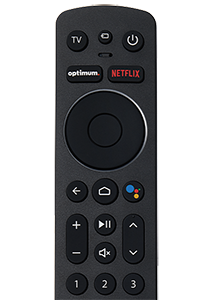
How To Re-pair Or Reprogram Your Optimum Remote
Sometimes, the remote loses its connection to the cable box and needs to be set up again. Here’s how to do it:
For Standard Optimum Remotes
- Turn on your TV and cable box.
- Press and hold the SEL and CBL buttons together for three seconds. The CBL button should light up.
- Enter the code 0999 using the remote’s number pad.
- Press the Power button. If the box turns off, pairing is successful.
For Optimum One, Altice, Or Bluetooth Remotes
- Hold down the 7 and 9 buttons together for three seconds to reset the remote.
- Wait for the LED to blink.
- Press and hold the Home button until the LED starts blinking.
- Follow the on-screen instructions to pair the remote with the cable box.
If you can’t find your remote’s model number, check the back or inside the battery compartment.
Table: Optimum Remote Types And Pairing Methods
| Remote Type | Pairing Method | Typical Use |
|---|---|---|
| Standard IR Remote | SEL + CBL, enter code | Older boxes |
| Altice/Optimum One | Home button pairing | Newer boxes |
| Bluetooth Remote | 7 + 9 reset, then on-screen | Latest models |
Non-obvious insight: Some remotes can appear to work for TV functions but not for the cable box because they use different technologies (IR for TV, RF/Bluetooth for cable box). Always pair for each device type as needed.
When The Remote Still Doesn’t Work
If you’ve tried all the basic and pairing steps, but your remote still won’t work with the cable box, consider these advanced checks.
Check The Remote’s Infrared Signal
- Use your smartphone’s camera to “see” if the remote’s IR light is working:
- Open the camera app on your phone.
- Point the remote at the camera and press any button.
- You should see a faint light in the camera’s preview.
- No light means the remote’s IR transmitter is likely broken.
Try A Different Remote
If you have another Optimum remote at home, try pairing it with your cable box. If it works, your original remote may be faulty.
Test The Cable Box With The Front Panel Buttons
Most Optimum cable boxes have power, channel, and menu buttons on the front. Try using these to see if the box responds. If these buttons do not work, your cable box may need service or replacement.
Table: Troubleshooting Steps And Success Rate
| Step | Estimated Success Rate | Time Needed |
|---|---|---|
| Replace batteries | 40% | 1 min |
| Remove interference | 15% | 1-2 min |
| Re-pair remote | 25% | 2-5 min |
| Reset cable box | 10% | 5 min |
| Replace remote | 10% | Varies |

Preventing Future Remote Problems
Once your Optimum remote is working again, you can take steps to avoid this problem in the future.
Use Fresh, High-quality Batteries
Cheap or old batteries cause most remote problems. Replace them every 6 months, even if the remote seems fine.
Keep The Remote Clean And Dry
Wipe the remote with a soft cloth and avoid spilling liquids on it. Dust and moisture can damage internal parts.
Place The Cable Box In A Good Spot
Keep the box in a place where the remote signal can reach easily. Avoid crowded shelves, stacks of equipment, or placing decorations in front of the box’s sensor.
Avoid Overusing The Remote
Don’t press buttons too hard or too quickly. This can wear out the buttons or the circuit board over time.
Table: Remote Care Tips
| Tip | Benefit |
|---|---|
| Replace batteries regularly | Prevents sudden failure |
| Clean remote monthly | Extends lifespan |
| Keep box visible | Reduces signal issues |
| Handle gently | Prevents internal damage |
When To Contact Optimum Support
If all else fails, it may be time to get professional help. Contact Optimum’s support team if:
- The remote or cable box is physically damaged.
- The box doesn’t respond to its own buttons.
- You see error messages on your TV.
- Your remote works with other devices, but not your cable box.
- You suspect a hardware failure.
You can reach Optimum support via their website, phone, or in-person at an Optimum store. They may send a new remote, schedule a technician, or swap out your cable box.
Experience-based tip: Always mention all the steps you’ve already tried when speaking to support. This saves time and helps them diagnose the issue faster.
For more technical details about remote control technology, you can visit the Wikipedia page on remote controls.

Frequently Asked Questions
Why Did My Optimum Remote Stop Working Suddenly?
A sudden stop is usually due to battery failure, lost pairing, or a software glitch in the cable box. Start by replacing the batteries and resetting the box.
How Do I Reset My Optimum Remote?
Hold the 7 and 9 buttons together on Altice/Bluetooth remotes for three seconds. For standard remotes, try removing batteries for 10 seconds, then re-inserting.
Can I Use A Universal Remote With My Optimum Cable Box?
Yes, most universal remotes can be programmed to work with Optimum cable boxes. You’ll need the correct Optimum remote code, usually found in the universal remote’s manual.
What Should I Do If Only Some Buttons On My Remote Work?
This usually means the remote is partially damaged or dirty inside. Try cleaning it. If that doesn’t help, you may need a replacement.
Is There A Mobile App To Control My Optimum Cable Box?
Some Optimum boxes support control via the Optimum TV app. Check the app store for your device and see if your box is compatible.
Fixing an Optimum remote not working with cable box problem is often simple, but sometimes it takes a few tries. With the steps above, you’ll be back to watching your favorite shows in no time. If you need more help, Optimum’s support team is always there to assist. Don’t let a small remote problem ruin your evening—most issues are solved in minutes with the right approach.