
If your JBL Endurance Peak 2 right earbud suddenly stops working, you’re not alone. Many users experience this issue, and it can be frustrating—especially if you rely on these earbuds for workouts, calls, or music. This article explores why the right earbud may not function, practical solutions, and how to avoid common mistakes. By understanding the causes and following expert advice, you can fix the problem or know when it’s time to seek professional help.
Common Causes For Right Earbud Failure
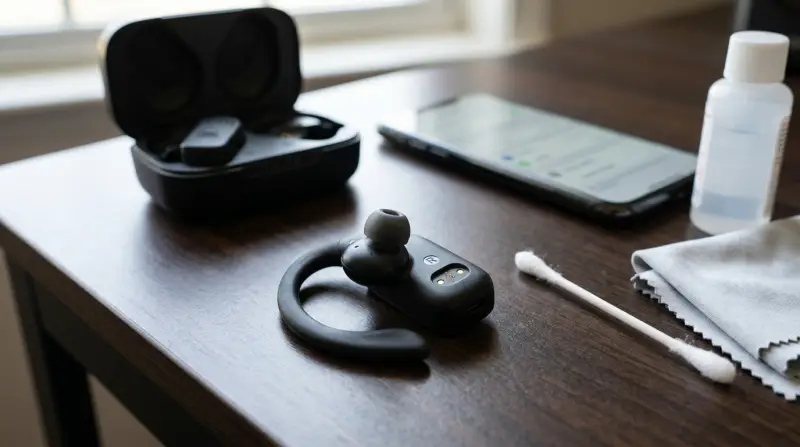
When the right earbud does not work, several issues could be responsible. Let’s look at the most frequent reasons:
- Battery Issues: Sometimes, the right earbud simply doesn’t charge. This can happen if the charging pins are dirty or misaligned.
- Bluetooth Connection Problems: If the earbuds are not paired correctly, only one side may connect.
- Firmware Glitches: Software bugs can affect one earbud, preventing it from syncing or playing audio.
- Physical Damage: Drops, water exposure, or sweat can damage sensitive parts inside the earbud.
- Earbud Misplacement in the Case: If the earbud isn’t placed correctly in the case, it won’t charge or reset.
These causes are not always obvious. For example, a tiny amount of sweat can cause the right earbud’s internal contacts to malfunction. Also, many users forget that Bluetooth devices sometimes connect to different earbuds, depending on the phone’s memory.
Diagnosing The Problem
Before you try to fix your JBL Endurance Peak 2, it’s important to diagnose the issue correctly. Here’s how you can do that:
Check The Charging Status
Place both earbuds in the charging case. Look for the indicator lights:
- If the left earbud’s light turns on but the right does not, the right earbud isn’t charging.
- If neither light turns on, the case may have a power issue.
Inspect For Physical Damage
Check if the right earbud looks normal. Signs of damage include:
- Cracks, chips, or loose parts
- Water marks or corrosion on the charging pins
Test Bluetooth Pairing
Try pairing the earbuds with another device:
- If the right earbud still doesn’t work, the problem is with the earbud itself.
- If both earbuds work on a different device, your phone or computer may be the issue.
Reset The Earbuds
A reset can fix many glitches. To reset:
- Remove both earbuds from the case.
- Press and hold the touch button on each earbud for at least 10 seconds.
- Place them back in the case and let them charge for a few minutes.
Often, beginners skip the reset step, thinking it’s only for major problems. However, a reset can solve minor software bugs that cause one earbud to stop working.
Credit: www.abt.com
Step-by-step Solutions
Once you know what’s wrong, use these steps to fix your right earbud:
Clean The Charging Contacts
Dirt and sweat build up on the charging pins. To clean them:
- Use a dry cotton swab to gently wipe the pins on both the earbud and the case.
- Avoid using water, as it can cause more damage.
- For stubborn dirt, use a drop of rubbing alcohol on the swab.
Cleaning is often overlooked, but it’s one of the most effective fixes for charging issues.
Ensure Proper Placement In The Case
Place the right earbud in the charging case and check if the light turns on. Wiggle it gently to make sure it’s seated correctly. If the light still doesn’t come on, try switching the earbuds’ positions (if possible) to see if the issue follows the earbud or the slot.
Update Firmware
Outdated firmware can cause syncing issues. Use the JBL Headphones app to check for updates:
- Connect the earbuds to your phone.
- Open the app and look for firmware updates.
- Follow on-screen instructions to update.
Firmware updates often include bug fixes that improve connectivity and battery life.
Re-pair Bluetooth Connection
To re-pair:
- Remove the earbuds from your device’s Bluetooth list.
- Turn off Bluetooth on your device.
- Put both earbuds back in the case.
- Take them out and turn Bluetooth back on.
- Pair the earbuds again.
If you notice the right earbud still doesn’t connect, try pairing with a different device to rule out phone-specific issues.
Try A Hard Reset
For stubborn problems, do a hard reset:
- Place both earbuds in the case.
- Press and hold the touch buttons on both earbuds for 20 seconds.
- Wait for the lights to flash or turn off, indicating a reset.
A hard reset wipes out old settings and may restore the right earbud’s functionality.
Comparing Jbl Endurance Peak 2 With Other Earbuds
It helps to know how the JBL Endurance Peak 2 compares to similar models, especially regarding reliability and troubleshooting.
| Earbud Model | Battery Life (hrs) | Reset Process | Water Resistance |
|---|---|---|---|
| JBL Endurance Peak 2 | 6 | Touch button (10-20 sec) | IPX7 |
| Jabra Elite Active 75t | 7.5 | Button on case | IP57 |
| Bose Sport Earbuds | 5 | App based | IPX4 |
The JBL Endurance Peak 2 stands out for its strong water resistance (IPX7), which is ideal for workouts. Its reset process is straightforward, but battery life is slightly less than some competitors.
Preventing Right Earbud Issues
You can avoid future problems by taking care of your earbuds. Here are proven tips:
- Keep the charging contacts clean. Wipe them weekly with a dry cloth.
- Store the earbuds in the case when not in use. This prevents dust and moisture buildup.
- Avoid exposing earbuds to extreme heat or cold. Temperature changes can damage internal components.
- Don’t overcharge. Remove from the case once fully charged.
- Update firmware regularly. Check for updates every few months.
Beginners often forget to update firmware, thinking it’s only about new features. But updates can fix hidden bugs that affect only one earbud.
When To Seek Professional Help
If none of the steps above work, your right earbud may have a hardware defect. Signs you need professional help include:
- The earbud does not turn on, no matter how long you charge it.
- The charging light never comes on.
- You see physical damage inside the earbud.
- The reset process does not restore function.
Contact JBL customer support or visit an authorized service center. If your earbuds are under warranty, you may get a free replacement.
Here’s a quick comparison of warranty policies among popular brands:
| Brand | Warranty Duration | Coverage | Support |
|---|---|---|---|
| JBL | 1 year | Manufacturing defects | Email & phone |
| Apple | 1 year | Manufacturing defects | In-store, chat |
| Samsung | 1 year | Manufacturing defects | Online, phone |
JBL’s warranty is similar to other leading brands. Always keep your proof of purchase and register your product.

Credit: www.youtube.com
Real-life Examples
Let’s look at two user stories:
- Case 1: After a gym session, a user found the right earbud wasn’t working. Cleaning the charging contacts fixed the problem.
- Case 2: Another user had repeated Bluetooth dropouts. A firmware update restored both earbuds.
These cases show that simple maintenance can solve most issues. However, if your earbud is silent after all fixes, hardware repair may be needed.
Non-obvious Insights
Many users don’t realize:
- Sweat can corrode charging contacts even if the earbuds are water-resistant. Regular cleaning is essential.
- Firmware bugs often affect only one earbud because each has its own chip. Updating can fix the issue, even if one side seems fine.
These tips go beyond basic troubleshooting and can save you from unnecessary repairs.
Credit: www.target.com
Frequently Asked Questions
Why Does My Right Jbl Endurance Peak 2 Earbud Lose Charge Faster?
The right earbud may drain faster if it’s used as the main microphone for calls, or if it’s not placed properly in the case. Cleaning the contacts and updating firmware can help balance battery use.
Can I Use Only The Left Earbud If The Right One Isn’t Working?
Yes, you can use the left earbud alone, but you’ll lose stereo sound. For workouts or calls, this is a temporary solution. Fixing the right earbud restores full performance.
How Do I Check If My Earbud Is Still Under Warranty?
Visit the official JBL website and enter your product’s serial number. You can also check your purchase receipt. For more details, see JBL Support.
Will A Factory Reset Erase All Settings?
A factory reset removes pairing information and settings, but it doesn’t affect firmware updates. You’ll need to re-pair the earbuds after a reset.
What Should I Do If Water Gets Inside My Earbud?
Dry the earbud immediately. Place it in a bowl of uncooked rice for 24 hours to absorb moisture. Do not use heat or blow dryers, as they can damage internal parts.
Fixing your JBL Endurance Peak 2 right earbud is often possible with simple steps. Regular cleaning, firmware updates, and proper storage can prevent most issues. If you still face problems, professional support is your best option. Taking care of your earbuds ensures long-lasting performance and less frustration in your daily routine.