
If you own a Keurig coffee maker, you’ve probably seen the message “Descale” flash on the display at some point. For many, this can be confusing or even frustrating—especially when you’ve tried to descale your machine, but the warning just won’t go away. If your Keurig is not working after descaling or you can’t clear that stubborn message, you’re not alone. This guide will help you understand why this happens, how to fix it, and how to keep your Keurig running smoothly for years.
Why Descaling Matters For Your Keurig
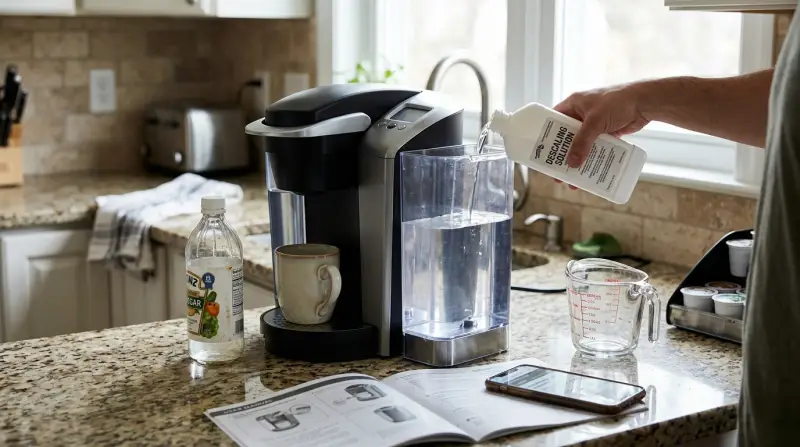
Descaling is more than just routine cleaning. Over time, minerals from water—like calcium and limescale—build up inside your coffee maker. This can block water flow, make your coffee taste strange, and even damage the machine. Most Keurig models will remind you to descale after a certain number of brews or when sensors detect buildup. Ignoring this can shorten the life of your Keurig and affect the quality of your coffee.
Common Reasons The Descale Light Stays On
If you’ve followed the instructions but the descale light won’t turn off, there are a few possible causes:
- Incomplete descaling process – If you skipped a step or didn’t rinse the machine well, the light may stay on.
- Sensor issues – Sometimes, the machine’s sensors become less sensitive or need a reset.
- Incorrect solution or water mix – Using the wrong ratio of water to descaling solution can confuse the sensors.
- Mechanical clogs – Blockages in the needles or water lines may stop the machine from sensing the process is done.
- Software glitches – Rarely, the Keurig’s internal program gets stuck and needs a manual reset.
Step-by-step Fixes For Keurig Not Working After Descaling
Before you call customer service or buy a new machine, try these practical steps. Most users can solve the problem at home with simple tools and a bit of patience.
1. Double-check The Descaling Instructions
Each Keurig model is a little different. Always use your machine’s manual for the exact steps. If you don’t have it, you can usually find a digital copy on the Keurig official website.
2. Run A Fresh Water Rinse Cycle
After descaling, you must flush the machine with plain water. This removes any leftover descaler and helps reset the sensors.
- Fill the reservoir with clean water.
- Run multiple brew cycles (without a pod) until the reservoir is empty.
- Repeat if the descaling message persists.
3. Reset Your Keurig
Many Keurig machines can be reset to clear minor glitches.
- Unplug the machine from the wall.
- Wait at least 5 minutes.
- Plug it back in and turn it on.
For some models, you may need to press and hold specific buttons (like the power and brew button together) for a few seconds.
4. Clean The Needles And Water Lines
Clogs can cause water flow problems and keep the descale light on.
- Remove the pod holder.
- Use a paper clip or the Keurig needle cleaning tool to clear out the entrance and exit needles.
- Rinse everything under hot water before replacing.
5. Use The Correct Descaling Solution
Some people use vinegar, but Keurig recommends their branded solution. If you use vinegar, mix it with equal parts water. Too strong a solution can confuse the sensors.
- Always follow the solution’s instructions for your model.
6. Repeat The Descaling Process
Sometimes, mineral buildup is so bad that one cycle isn’t enough. Run the whole process again if you still see the warning.
7. Check For Firmware Updates
Some new Keurig models (like K-Supreme Plus SMART) can update their software. Check the manual or the Keurig website to see if your machine supports this.
8. Contact Keurig Support
If you’ve tried everything and your Keurig is not working after descaling, the issue might be a deeper mechanical or software problem. Contact customer support for further advice or repair options.
Comparing Descaling Solutions
Choosing the right descaler can make a difference in effectiveness and machine health. Here’s a look at common options:
| Descaling Solution | Main Ingredient | Effectiveness | Odor |
|---|---|---|---|
| Keurig Solution | Citrus acid | High | Low |
| Vinegar | Acetic acid | Medium | Strong |
| Other Commercial Brands | Varies (often citric acid) | High | Low |
Non-obvious insight: Some off-brand solutions can void your warranty. Always check your manual before using a non-Keurig product.
Signs Your Keurig Needs Descaling
Besides the warning light, there are other clues that your machine needs attention:
- Slower brewing
- Odd noises during brewing
- Weaker coffee taste
- White flakes in the water reservoir or cup
If you notice these signs, don’t wait for the descale alert. Regular maintenance prevents bigger problems.
How Often Should You Descale?
The answer depends on your water and usage. Keurig recommends every 3-6 months, but you may need to descale more often if you have hard water (high in minerals). You can check your city’s water report, or look for white spots in your kettle or on glassware as a clue.
Using filtered water reduces buildup and means less frequent descaling.

Credit: www.youtube.com
Preventing Future Descale Problems
Most descale issues are avoidable with a few smart habits:
- Use filtered or bottled water – This reduces minerals and helps prevent clogs.
- Empty the reservoir nightly – Stagnant water encourages buildup and mold.
- Clean removable parts weekly – Wash the reservoir, lid, and pod holder with soap and water.
- Descale on schedule – Don’t wait for the warning light. Put it on your calendar.
- Check the needles monthly – Clogs here are common and easy to fix.
Troubleshooting: Keurig Won’t Brew After Descaling
Sometimes, after you finish descaling, the machine won’t brew at all. Here’s what you can do:
Check For Air Bubbles
After refilling the reservoir, air bubbles can get trapped, stopping water flow.
- Remove and shake the reservoir gently.
- Run a water-only brew to clear bubbles.
Inspect The Exit Needle
A blocked needle can stop brewing.
- Remove the pod holder.
- Use a straightened paper clip to gently clear the needle.
Confirm Reassembly
If you took the machine apart to clean, make sure everything clicks back into place. A loose part can stop the brewing cycle.
Quick Comparison: Vinegar Vs. Keurig Solution
A lot of users wonder if vinegar or branded descaler is better. Here’s a quick look:
| Feature | Vinegar | Keurig Solution |
|---|---|---|
| Cost | Low | Medium |
| Smell | Strong, may linger | Minimal |
| Warranty Safe | Sometimes no | Yes |
| Effectiveness | Good for mild buildup | Excellent for all buildup |
Non-obvious insight: Vinegar can leave a taste that requires extra rinsing. If you’re sensitive to smells, use the Keurig solution.
When To Call For Professional Help
If your machine still won’t work after all these steps, it may have an internal fault. Common signs include:
- Unusual error codes
- No power at all
- Leaking water
In these cases, contact Keurig customer service or check if your machine is still under warranty. Sometimes, repairs are covered if you’ve followed the recommended maintenance.

Is It Time To Replace Your Keurig?
Keurig machines are built to last 3–5 years with good care. But repeated descale issues, poor performance, or physical damage might mean it’s time for a new one. If you’re brewing more than 4 cups a day or have a large family, consider upgrading to a higher-capacity model.
Real-life Example: Dealing With A Stuck Descale Light
Sarah, a daily Keurig user, noticed her Keurig K-Slim showed the descale light even after running the descaling process twice. She tried unplugging and re-plugging the unit, but the light stayed on. After cleaning the needles and running three extra rinse cycles, the light finally turned off. The lesson: sometimes, the machine needs extra rinses, especially if you use hard water.
How Keurig’s Sensor System Works
Keurig machines use sensors to detect water flow and mineral buildup. These sensors aren’t perfect—they can be triggered by air bubbles, leftover solution, or sensor misalignment. Understanding this helps you troubleshoot more confidently.
Keurig Model Differences
Not all Keurigs handle descaling the same way. Here’s a quick overview of how popular models compare:
| Model | Descale Light | Manual Reset Needed? | Special Instructions |
|---|---|---|---|
| K-Classic | Yes | No | Standard process |
| K-Slim | Yes | Sometimes | Extra rinse cycles |
| K-Supreme Plus | Yes | Rarely | May need software update |
| K-Mini | No | No | Manual descale reminder |
Always check your model’s manual for the exact process.
Where To Find Help
If you need extra support, the official Keurig Support Center has troubleshooting guides, videos, and live chat.
Frequently Asked Questions
Why Won’t My Descale Light Turn Off After I’ve Descaled?
The most common reason is incomplete rinsing. Run several water-only cycles to flush out any leftover descaler or air bubbles. If the light still doesn’t turn off, try unplugging the machine for a few minutes before restarting.
Can I Use Vinegar Instead Of Keurig’s Descaling Solution?
Yes, you can use vinegar mixed with equal parts water. However, vinegar has a strong smell and may require more rinsing. Using Keurig’s solution is safer for your warranty and leaves less odor.
How Do I Clean The Needles On My Keurig?
Remove the pod holder, then use a straightened paper clip to gently clear both the entrance and exit needles. Rinse all parts with hot water before reassembling.
What If My Keurig Won’t Brew After Descaling?
Check for air bubbles in the reservoir, clear the needles, and make sure all parts are reassembled correctly. Run a plain water cycle to see if the problem is fixed.
How Often Should I Descale My Keurig?
Descale every 3–6 months, or more often if you have hard water. Regular descaling prevents buildup and keeps your coffee tasting great.
Final Thoughts
A Keurig not working after descaling can be frustrating, but most problems are easy to fix at home. Careful cleaning, using the right descaling solution, and regular maintenance can keep your machine brewing perfectly. Remember, patience and following each step closely are your best tools. If all else fails, professional help is just a call away.
2 thoughts on “Keurig Not Working Descale: Quick Fixes to Get Brewing Again”