
When you see a blinking light on your Samsung washer, it often feels like your laundry plans are on hold. The machine might stop mid-cycle, refuse to start, or flash unfamiliar codes. This situation is frustrating, especially if you don’t know what the blinking means or how to fix it. Many people worry that something serious is wrong, but in most cases, a blinking light is your washer’s way of asking for help. Understanding what each blinking signal means can save you time, money, and stress.
This guide will help you decode your Samsung washer’s blinking light, explain what might be causing it, and show you how to get your washer running again. You’ll also learn when it’s time to call a professional, and how to avoid these problems in the future.
Why Is My Samsung Washer Blinking?
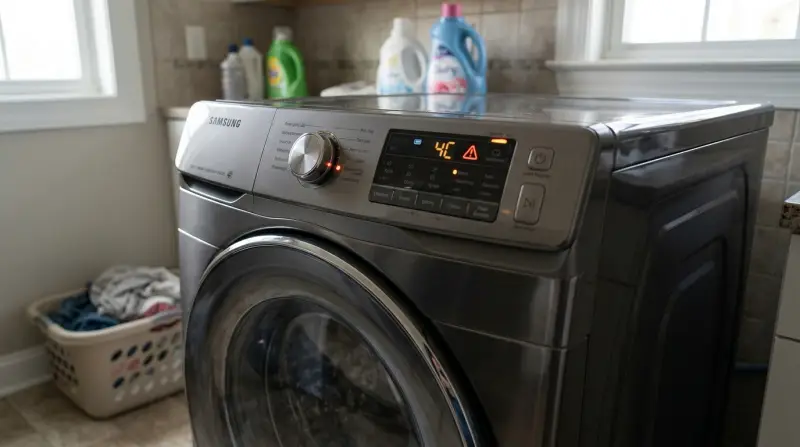
Samsung washers use blinking lights and error codes to communicate problems or alerts. These lights might blink during a cycle, when you try to start the machine, or after the washer stops. Sometimes the light is steady, but a blinking light almost always means the washer has detected something unusual.
Common reasons for a blinking light include:
- Door not closed properly
- Water supply issues
- Unbalanced loads
- Drainage problems
- Electrical or control board faults
Each model can have slightly different signals, but the main causes are similar across most Samsung washers.
Understanding Blinking Lights And Error Codes
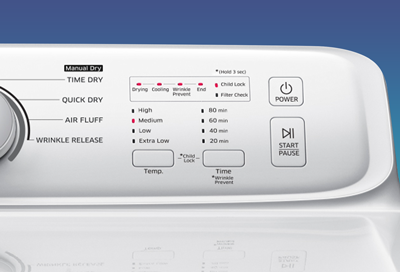
The meaning of a blinking light depends on where it’s located and whether any error code appears on the display. Some washers use simple light patterns, while others show combinations of lights and codes.
Below is a table showing common blinking lights and what they usually mean:
| Blinking Light/Code | Possible Meaning | Quick Action |
|---|---|---|
| Door Lock Blinking | Door not closed or not locking properly | Open and close the door firmly |
| Water Supply Light | Low or no water supply | Check faucets and hoses |
| Spin Light Blinking | Unbalanced load or washer not spinning | Redistribute clothes evenly |
| Drain Light Blinking | Water not draining | Clean the drain filter |
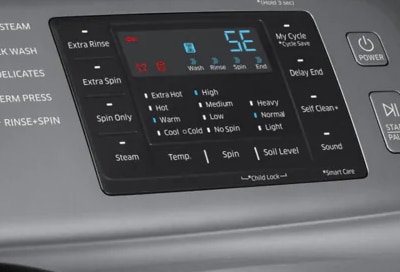
| Error Codes (e.g., 4C, 5C, dE) | Specific faults (see manual) | Refer to error code list |
If your washer shows an error code with a blinking light, check your user manual for its meaning. You can also find lists of common codes online.
Main Causes Of Samsung Washer Blinking Light
Understanding the real cause behind the blinking light will help you fix it quickly. Here are the most common reasons:
1. Door Problems
The washer will not start or continue if the door is not closed or locked. This is a safety feature. Sometimes, the door lock mechanism is dirty or faulty.
Quick fix: Open and close the door firmly. Check for laundry or objects stuck around the door seal. If the problem continues, the door lock switch may need cleaning or replacement.
2. Water Supply Issues
A blinking water supply light or error code (like 4C) usually means the machine can’t get enough water. Common reasons are closed water valves, kinked hoses, or clogged filters.
Quick fix: Make sure both hot and cold water faucets are fully open. Check hoses for bends or blockages. Clean the water inlet filters if needed.
3. Unbalanced Loads
If the spin light blinks and the washer doesn’t spin, the load may be unbalanced. This happens with heavy items like blankets or with a single large item.
Quick fix: Open the washer, rearrange the load, or add a few smaller items to balance it out. Restart the cycle.
Beginner insight: Many people try to wash one heavy item, like a bath mat or comforter, alone. The washer can’t balance a single bulky item, so always add a few towels or similar items to help balance.
4. Drainage Problems
A blinking drain light or code (like 5C) means water isn’t draining. The most common cause is a clogged drain filter or hose.
Quick fix: Locate the drain filter (usually at the bottom front of the washer), open it, and clean out any lint or debris. Check the drain hose for kinks or blockages.
Non-obvious tip: Place a shallow pan or towel under the filter before opening, as water will likely spill out.
5. Electrical Or Control Board Issues
A rapidly blinking light with no clear cause could point to a control board problem or electrical fault. Power surges can confuse the washer’s computer.
Quick fix: Unplug the washer for 1–2 minutes, then plug it back in. This resets the control board. If the blinking continues, there may be a deeper electrical problem.
How To Troubleshoot A Blinking Light
You don’t need to be an appliance expert to handle most blinking light issues. Here’s a step-by-step approach:
- Identify the blinking light or error code.
- Check the basics: Is the washer plugged in? Is the power outlet working?
- Inspect the door: Open and close it firmly; remove any obstructions.
- Check water supply: Ensure water faucets are open and hoses are not kinked.
- Balance the load: Redistribute clothes if needed.
- Clean the drain filter: Remove lint, coins, or other debris.
- Reset the washer: Unplug for 1–2 minutes, then power up.
If these steps don’t solve the problem, the issue may need professional help.
Credit: www.samsung.com
Preventing Blinking Light Issues
A little care goes a long way. Here’s how to reduce the chances of seeing that annoying blinking light again:
- Do not overload the washer. Follow the manual’s load size guidelines.
- Check pockets for coins, hairpins, or tissues before washing.
- Clean the drain filter every few months, or after washing heavily soiled items.
- Use the right detergent and amount to avoid excessive suds.
- Keep hoses and door seals clean to prevent leaks and blockages.
Real-world tip: Many people forget to clean the washer drum and door seal. Mold or detergent buildup here can cause odor and affect the washer sensors. Run a self-clean cycle monthly if your machine has this feature.
When To Call For Service
While most blinking light problems are easy to fix, some require expert help:
- Blinking continues after all basic checks
- Washer does not start or respond
- Error codes point to motor, sensor, or control board failures
- Water leaks or electrical smells
If you’re unsure, it’s safer to call a Samsung-authorized repair technician. Trying to repair wiring or the control board yourself can be dangerous.

Credit: eu.community.samsung.com
Comparing Common Samsung Washer Models And Their Error Signals
Different Samsung washer models may use different lights or codes. Here’s a comparison of how some popular models signal issues:
| Model | Blinking Light Location | Error Code Display | Common User Actions |
|---|---|---|---|
| WF42H5000AW | Control panel lights | Digital screen (e.g., 4C, 5C) | Check manual for code meaning |
| WA45T3200AW | Cycle progress lights | No digital codes | Use manual for light patterns |
| WF45R6300AV | LED indicators | Digital screen plus SmartThings app | Check app for detailed help |
Non-obvious insight: Some newer Samsung washers connect to the SmartThings app, which can give more detailed error explanations and even suggest fixes. If you have a Wi-Fi-enabled model, check your app for help.
What If The Blinking Light Won’t Stop?
Sometimes, the blinking continues even after you’ve tried all basic solutions. Here’s what to do:
- Record the exact pattern: How many times does the light blink? Is it steady, fast, or slow?
- Take a photo or video: This is useful when asking for help from Samsung support or a technician.
- Look for patterns: Some errors use a series of blinks, like three short and one long. Note this sequence.
- Check for updates: Visit the official Samsung support site for your washer model. Sometimes firmware updates or recalls can cause odd behavior.
Credit: www.samsung.com
The Role Of Maintenance In Avoiding Problems
Good washer care reduces breakdowns. Here’s a quick maintenance checklist:
- Monthly: Run a self-clean cycle; wipe the door seal and drum.
- Every 3–6 months: Clean the drain filter; check hoses for cracks or leaks.
- Yearly: Inspect and replace hoses if they look worn. Schedule a professional inspection if you use the washer heavily.
A well-maintained washer is less likely to flash a blinking light and will last longer.
Safety Notes
Never try to open the washer’s back panel or work with electrical parts unless you are qualified. Water and electricity are a dangerous mix. If you smell burning or see smoke, unplug the washer immediately and call for help.
Where To Find More Help
If you still have questions or your washer shows a code you don’t understand, visit the official Samsung support site or user forums. You’ll find manuals, troubleshooting guides, and even direct chat with support agents. For more detailed guidance, you can check Samsung Support.
Frequently Asked Questions
Why Does My Samsung Washer Door Lock Light Keep Blinking?
The door lock light blinks when the washer thinks the door is not properly closed or locked. This could be due to a dirty door latch, something stuck in the seal, or a faulty lock switch. Open and close the door firmly. If the problem continues, clean the area or call for service.
What Does The 4c Error With A Blinking Light Mean?
A 4C error and blinking light means the washer is not getting enough water. Check that your water faucets are fully open, hoses are not kinked, and the water inlet filters are clean. If you still see the error, there may be a problem with your home’s water pressure or the washer’s water valve.
Can I Reset My Samsung Washer If The Blinking Light Won’t Stop?
Yes, you can reset most Samsung washers by unplugging them for 1–2 minutes, then plugging them back in. This often clears temporary glitches. If the blinking light returns, check for error codes or call a technician.
How Do I Clean The Drain Filter On My Samsung Washer?
Locate the drain filter (usually at the front bottom behind a small panel). Place a towel or shallow pan underneath to catch water. Twist open the filter cap, remove debris, then replace the cap. Wipe up any spills before closing the panel.
Is It Safe To Use The Washer With A Blinking Light?
If the washer is still working, a blinking light usually means something needs attention, like an unbalanced load or a dirty filter. It’s best to stop and fix the issue before continuing. If you see sparks, smoke, or a burning smell, unplug the washer and call for help immediately.
When you know what your Samsung washer’s blinking light means, you can fix small problems yourself and keep your laundry routine running smoothly. With a bit of regular care and attention, you’ll spend less time troubleshooting and more time enjoying clean clothes.