
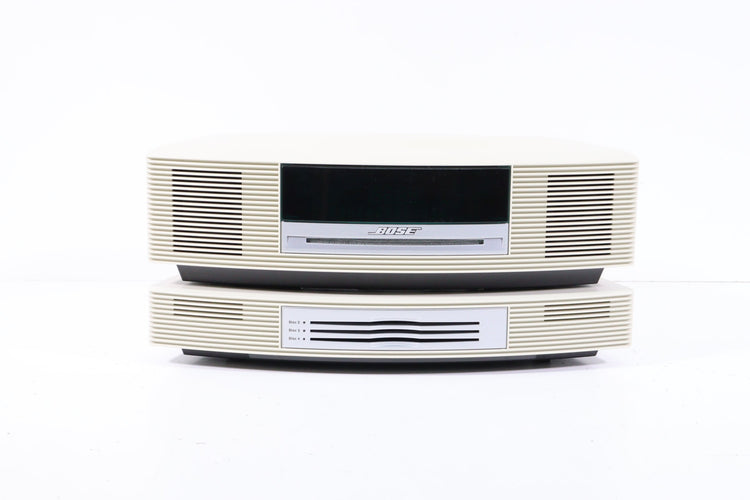
Many people trust Bose for their sound systems. Bose CD players are known for their clear sound and easy-to-use features. But, like any electronic device, Bose CD players can have problems. Sometimes, the CD won’t play. Other times, the sound is weak, or the controls don’t respond. If you have a Bose CD player and are facing issues, you’re not alone. Many users across the world report similar problems, and there are practical ways to fix most of them.
This guide explains common Bose CD player problems, why they happen, and how to solve them. You’ll also find advice on how to prevent issues in the future. Whether you own a Bose Wave CD player, a Bose Acoustic Wave Music System, or another Bose model, this article covers the most important issues and solutions. You’ll get clear explanations, real examples, and practical tips. With this information, you can keep your Bose CD player running smoothly and enjoy your music without frustration.
Common Bose Cd Player Problems
Bose CD players are built to last, but several problems can affect their performance. Here are the most common issues users report:
- CD Won’t Play or Load
- No Sound or Low Sound
- Skipping or Stopping During Playback
- Display Problems
- Remote Control Issues
- Tray Won’t Open or Close
- Error Messages
- Not Recognizing CDs
- Mechanical Noise
- Power Problems
Let’s look at each problem in detail.
Cd Won’t Play Or Load
One of the most reported problems is when the CD player refuses to play or load a disc. You might insert a CD, but nothing happens, or the player says “No Disc.” This issue can be caused by:
- Dirty or scratched CDs
- Laser lens needs cleaning
- Incorrect CD format
- Firmware issues
Often, cleaning the CD or the player’s lens fixes the problem. Some Bose models may not support certain CD formats (like MP3 or burned CDs), so always check compatibility. If the lens is dirty, the player cannot read the disc.
Special cleaning discs are available, or you can gently clean the lens with a cotton swab.
No Sound Or Low Sound
Sometimes, the CD plays, but you hear nothing or only weak sound. This can happen due to:
- Loose speaker connections
- Volume set too low
- Audio output settings
- Internal amplifier problems
Check all connections and try adjusting the volume. If you use external speakers, make sure they are working. In rare cases, the internal amplifier may fail. This requires expert repair.
Skipping Or Stopping During Playback
If your Bose CD player skips tracks or stops suddenly, this usually points to:
- Scratched or dirty CDs
- Laser lens problems
- Mechanical fault
Clean the CD and the lens first. If the problem persists, there may be a mechanical issue with the disc drive. Older players are more prone to this, especially after years of use.
Display Problems
Some Bose CD players show information on a small screen. If the display is blank, dim, or shows wrong data:
- Power supply issues
- Faulty display
- Software glitches
Try unplugging the unit for a few minutes. If the display doesn’t recover, it might need replacement.
Remote Control Issues
Remote controls make using your Bose CD player easier. Common remote problems include:
- Remote not working
- Buttons stuck
- Low battery
Change the batteries and clean the buttons. If the remote still doesn’t work, it may need replacement or reprogramming.
Tray Won’t Open Or Close
If the CD tray is stuck, you might hear motor noise but nothing moves. Possible causes:
- Mechanical jam
- Broken gears
- Electrical fault
Avoid forcing the tray open. Instead, unplug the unit and try again. If it remains stuck, professional repair is required.
Error Messages
Some Bose CD players display messages like “Error,” “No Disc,” or “Check CD.” These messages often indicate:
- Disc format issue
- Dirty lens
- Firmware problem
Check the CD format and clean the lens. If the error persists, check for software updates or reset the player.
Not Recognizing Cds
If your player doesn’t recognize any CD, possible reasons are:
- Unsupported CD format
- Laser alignment issue
- Damaged drive
Try different CDs and clean the lens. If none work, the drive may need repair.
Mechanical Noise
Sometimes, you hear clicking, whirring, or grinding sounds from the player. These noises may signal:
- Worn gears
- Disc not seated correctly
- Motor problems
If the noise is new or loud, stop using the player and seek service.
Power Problems
Your Bose CD player may not turn on, or it turns off suddenly. Causes include:
- Faulty power cord
- Internal power supply failure
- Electrical short
Check the power cord and outlet first. If the unit still won’t power up, it needs professional attention.
Models Most Affected By Problems
Not all Bose CD players have the same issues. Some models are more likely to show problems, especially older ones.
| Model | Common Problems | Year Released |
|---|---|---|
| Bose Wave Music System | Skipping, display errors, tray jams | 2004 |
| Bose Wave Radio/CD | No sound, remote issues, CD loading | 1999 |
| Bose Acoustic Wave Music System | Mechanical noise, tray issues | 1984 |
| Bose Wave Music System III | Firmware errors, CD not recognized | 2012 |
Older models, like the Bose Wave Radio/CD, tend to have more mechanical and display problems. Newer models, like the Wave Music System III, are more likely to have firmware or compatibility issues. Users with units over ten years old report more frequent CD loading and tray issues.
Why Bose Cd Players Have These Problems
Understanding why these problems happen can help you prevent them. Several factors contribute:
- Aging Components: Electronics age over time. Parts like motors, gears, and lenses wear out. After five to ten years, most CD players start showing signs of wear. Dust and humidity accelerate this process.
- Cd Format Changes: CD technology has changed since Bose released its first players. Some newer CDs or burned discs may not be compatible with older Bose models. This leads to “No Disc” errors or failed playback.
- User Habits: Many people use their Bose CD player daily. Frequent use increases wear, especially on the loading tray and lens. Using dirty or scratched CDs also causes more problems.
- Firmware And Software: Modern Bose CD players rely on software to control playback and display. Software bugs or outdated firmware can cause error messages or make the player unresponsive.
Troubleshooting Bose Cd Player Problems
Fixing Bose CD player issues starts with simple troubleshooting steps. Most problems can be solved without expert help.
Step-by-step Troubleshooting Guide
- Check The Cd: Inspect the CD for scratches, dust, or dirt. Clean the disc with a soft cloth. Try another CD to see if the problem persists.
- Clean The Laser Lens: The laser lens can get dusty over time. Use a CD lens cleaning disc or gently clean the lens with a cotton swab.
- Reset The Player: Unplug the player from power for at least 60 seconds. Plug it back in and try again.
- Check Connections: Make sure all cables and speaker wires are secure. Loose connections can cause no sound.
- Update Firmware: If your player supports firmware updates, check the Bose website for the latest version.
- Test The Remote Control: Replace batteries and clean the buttons. If it still doesn’t work, try using the player’s manual controls.
- Inspect The Tray Mechanism: If the tray is stuck, avoid forcing it. Unplug the player and wait a few minutes. Plug in and try again.
- Check Power Supply: Try a different outlet or power cord if the player won’t turn on.
Practical Example: Fixing A Skipping Cd
Suppose your Bose CD player skips tracks on every CD. First, clean the CD and lens. If skipping continues, try a cleaning disc. If the problem persists, it might be a mechanical issue. Contact Bose support or a local repair shop for help.
Common Mistakes In Troubleshooting
- Using harsh chemicals to clean the lens (can damage it)
- Forcing the tray open (may break gears)
- Ignoring error messages
- Using unsupported CD formats
Avoid these mistakes to prevent further damage.
Repair Vs. Replace: What Should You Do?
Sometimes, troubleshooting isn’t enough. You may need to repair or replace your Bose CD player. How do you decide?
Repairing Your Bose Cd Player
Repair is usually cheaper than buying a new player, especially for simple problems like lens cleaning or replacing a remote. Bose offers repair services for many models. Independent repair shops also handle common issues like:
- Lens replacement
- Tray mechanism repair
- Display fixes
Repair costs vary. Simple cleaning or lens replacement may cost $50–$100. Major repairs (like replacing the drive) can cost $150–$250.
Replacing Your Bose Cd Player
If your player is very old or the repair cost is high, replacement may be better. New Bose models offer more features and better compatibility. Before replacing, consider:
- Age of the player (over 10 years old = likely to fail soon)
- Cost of repair vs. new unit
- Availability of parts
Many users upgrade to the latest Bose Wave Music System, which plays CDs, radio, and connects to Bluetooth.
| Repair Type | Estimated Cost | When to Repair | When to Replace |
|---|---|---|---|
| Lens Cleaning | $50–$80 | Player under 8 years old | Player over 10 years old |
| Tray Repair | $80–$150 | Minor jam, no motor noise | Major jam, loud noise |
| Display Fix | $100–$250 | Display dim or blank | Display dead, player not working |
Preventing Bose Cd Player Problems
Prevention is better than cure. Simple steps can help you avoid most issues.
- Keep Your Player Clean: Dust is a major enemy. Clean the exterior regularly and keep the player away from humid places.
- Use Good Quality Cds: Avoid scratched or dirty CDs. Store discs in their cases and handle them carefully.
- Update Firmware: If your player supports software updates, install them. This can fix bugs and improve compatibility.
- Avoid Overuse: Don’t leave the player running for hours every day. Give it rest to avoid overheating.
- Store Properly: If you won’t use the player for a long time, store it in a cool, dry place. Unplug it to prevent electrical damage.

Bose Cd Player Compatibility Issues
Some Bose CD players don’t play certain CD types. Compatibility is a frequent problem, especially with burned CDs.
Supported Cd Formats
Bose CD players usually support:
- Standard audio CDs
- CD-R (recordable)
- CD-RW (rewritable)
Older models may not support MP3 CDs or CD-RWs. Always check your player’s manual.
Unsupported Cd Formats
Problems often arise with:
- MP3 CDs (not supported by some Bose models)
- CD-RW (older players may fail to read)
- Copy-protected discs
If your player doesn’t play a disc, check if it matches the supported formats.
Firmware Updates For Compatibility
Some newer Bose models allow firmware updates. These updates can add support for new CD formats or fix playback bugs. Visit the official Bose website for update instructions.
User Experiences: Real Stories
Reading real user stories can help you understand Bose CD player problems better.
Story 1: Display Failure
John from Texas had a Bose Wave Music System. After seven years, the display stopped working. He tried resetting and cleaning, but nothing helped. Bose repair center replaced the display for $120. The player worked again.
Story 2: Cd Skipping
Maria from California noticed her player skipped tracks on several CDs. She cleaned the discs, but the problem continued. A cleaning disc fixed the issue, proving the lens was dirty.
Story 3: Remote Control Problems
Ali from New York found his remote stopped working. He replaced the batteries, but it still failed. The problem was fixed after buying a new remote for $30.
Story 4: Tray Jam
Linda’s Bose CD player tray jammed after inserting a thick CD booklet by mistake. She unplugged the player, waited, and tried again. The tray opened, showing the importance of patience.
Non-obvious Insight: Seasonal Effects
Many users don’t realize that humidity and temperature changes can affect CD players. High humidity can cause condensation on the lens, making playback impossible. Keeping the player in a dry, stable environment prevents this issue.
Non-obvious Insight: Laser Alignment
After dropping or moving the player, the laser can become misaligned. This causes “No Disc” errors even with good CDs. Professional alignment is needed, but avoiding rough handling can prevent the problem.

Bose Customer Support And Warranty
Bose offers customer support and warranty for its products. Here’s what you need to know:
- Warranty Coverage: Most new Bose CD players come with a one-year limited warranty. This covers defects in materials and workmanship. If your player fails within the warranty period, Bose will repair or replace it for free.
- Out-of-warranty Support: If your player is out of warranty, Bose offers paid repair services. You can contact Bose support online or by phone. They provide estimates and arrange shipping.
- Contacting Bose Support: Visit the official Bose website for support options. You’ll need your model number and serial number. Bose also has authorized service centers in many countries. bose Support
Alternatives To Bose Cd Players
If you decide to replace your Bose CD player, there are several alternatives. Here are some popular options:
- Sony CD players: Reliable and affordable
- Yamaha CD players: Known for quality audio
- Denon CD players: Feature-rich, good for audiophiles
Each brand offers different features. Bose remains popular for its sound quality and compact design, but other brands may offer more compatibility or lower prices.
Frequently Asked Questions
Why Does My Bose Cd Player Say “no Disc” When I Insert A Cd?
This message usually means the player cannot read the disc. Reasons include dirty or scratched CDs, a dusty laser lens, unsupported CD format, or mechanical issues. Try cleaning the disc and lens. If the problem continues, check if the CD format is supported.
How Do I Clean My Bose Cd Player’s Laser Lens?
Use a CD lens cleaning disc, available at electronics stores. If you prefer manual cleaning, unplug the player, open the tray, and gently wipe the lens with a dry cotton swab. Avoid using liquids or pressing hard, as this may damage the lens.
Can I Use Burned Cds In My Bose Cd Player?
Most Bose CD players support CD-R discs, but not all models play CD-RW or MP3 CDs. Older models are more likely to have problems with burned CDs. Always check your player’s manual for supported formats.
Is It Worth Repairing An Old Bose Cd Player?
If your player is less than ten years old and the repair cost is low, repair is usually worthwhile. For older models or expensive repairs, replacing the player may be a better choice. Compare repair costs and new model prices before deciding.
What Should I Do If My Bose Cd Player Tray Is Stuck?
Unplug the player from the power source and wait a few minutes. Plug it back in and try opening the tray again. Do not force the tray open. If it remains stuck, contact Bose support or a professional repair shop.
Keeping Your Bose Cd Player Running Smoothly
Bose CD players are trusted by millions, but even the best devices can have problems. Most issues are caused by aging, dust, or compatibility changes. Regular cleaning, careful CD handling, and updating firmware are key to preventing trouble. If your player fails, start with simple troubleshooting steps.
Repair is often possible, but sometimes replacement is smarter.
Remember, Bose offers strong customer support and repair services. Compare repair costs with new units before making a decision. By following these tips, you can enjoy your Bose CD player for years and avoid common frustrations. If you want to learn more or get help, visit Bose’s official support site.
With care and attention, your music system can deliver great sound for a long time.