
A Samsung dryer is a powerful machine that makes laundry easier. But when you see strange codes on the display, your dryer can quickly feel confusing. These error codes are not just random numbers—they are signs that your dryer needs help. With the right knowledge, you can fix most issues yourself, saving time and money.
Many people panic when an error code appears. They worry about expensive repairs or think the dryer is broken forever. But most codes are simple warnings. If you understand what they mean, you can solve the problem and keep your dryer working for years.
This article will guide you through the most common Samsung dryer error codes. You will learn what each code means, how to fix it, and what to do if the problem returns. We will also cover helpful tips, real examples, and answer common questions.
If your dryer shows a code, you will know exactly what to do next.
Understanding Samsung Dryer Error Codes
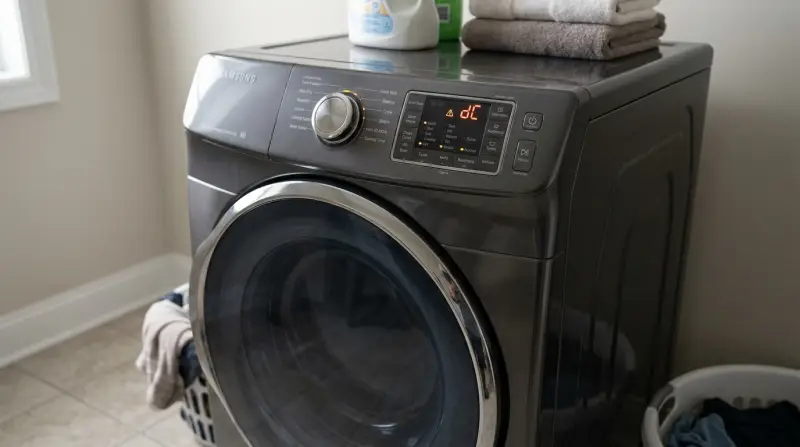
Samsung dryers use error codes to communicate problems. These codes appear on the digital screen. Each code has a specific meaning. Some codes warn about small issues, while others signal bigger problems.
The most common codes begin with letters like ‘dE’, ‘tE’, ‘HE’, and ‘E’. The codes are easy to read but sometimes hard to understand. Knowing what each code means will help you troubleshoot quickly.
Why Error Codes Matter
Error codes help you:
- Identify the problem fast
- Avoid unnecessary repairs
- Protect your dryer from damage
- Save money on service calls
Ignoring error codes can cause bigger issues. For example, a blocked vent may lead to overheating. A faulty sensor can make clothes stay wet. Solving the issue quickly keeps your dryer safe.
Also, error codes are useful for communication with technicians. When you call for help, telling them the exact code helps them diagnose faster. It can reduce repair time and costs. Many people don’t realize that even small issues, like a loose wire, can trigger a code.
Addressing codes early avoids future breakdowns.
How To Find Your Dryer’s Model And Code
Different Samsung dryers have slightly different codes. Check your dryer’s model number on the back or inside the door. When an error code appears, write it down. Search the code in your manual or use guides like this article.
Sometimes, the display may show a combination of letters and numbers. Make sure to note exactly what you see. If your display is faded or difficult to read, use a flashlight or take a photo. This can help you reference the code later or share with a technician.
Most Common Samsung Dryer Error Codes
Samsung dryers show many codes, but some are more frequent. Below you’ll find the meaning and solution for the most common codes.
1. De (door Error)
Meaning: The door is not closed properly, or the door switch is faulty.
How to fix:
- Make sure the door is shut tightly.
- Check for laundry stuck in the door.
- Inspect the door latch and hinges.
- If the problem continues, the door switch may need replacement.
Example: If you see dE after loading clothes, check for socks caught in the door.
Extra detail: Sometimes, the door gasket (rubber seal) gets dirty or damaged, stopping the door from closing well. Clean or replace the gasket if needed.
2. Te (temperature Sensor Error)
Meaning: The temperature sensor is faulty or dirty.
How to fix:
- Unplug the dryer and let it cool.
- Clean inside the dryer drum.
- If the code returns, the sensor may need replacement.
Non-obvious tip: Sometimes, humidity or lint buildup causes this error. Clean the sensor area regularly.
Extra example: If you dry heavy blankets often, lint can build up faster on the sensor. Use a soft cloth to wipe the area every few weeks.
3. He (heating Error)
Meaning: The heater is not working properly.
How to fix:
- Unplug the dryer.
- Check the heating element for visible damage.
- Remove lint from vents and filters.
- Call a technician if the code returns.
Added guidance: You can check the heating element using a multimeter if you have one. If there is no continuity, the element is likely broken.
4. Fe (fan Error)
Meaning: The dryer fan is not spinning correctly.
How to fix:
- Clean the vent and filter.
- Check for blockages in the air path.
- If the fan is noisy or stuck, it might need replacement.
Extra explanation: A fan error can also be caused by objects like coins or buttons falling into the drum and blocking the fan blades. Inspect the drum carefully.
5. E5/e6/e7 (communication Error)
Meaning: Internal parts are not communicating.
How to fix:
- Unplug and restart the dryer.
- If the code returns, contact Samsung support.
Non-obvious insight: Electrical surges or unstable power can cause this error. Using a surge protector can help prevent it.
6. 1e/2e/3e (sensor Error)
Meaning: Moisture or temperature sensor is faulty.
How to fix:
- Clean the sensors.
- Check for loose wiring.
- Replace the sensor if needed.
Example: If you notice your clothes are always damp after drying, a sensor error could be the cause.
7. Be (button Error)
Meaning: A button is stuck or not working.
How to fix:
- Press all buttons gently.
- Clean around the buttons.
- If stuck, try restarting the dryer.
Extra tip: Sometimes, spills or sticky residue cause buttons to stick. Use a damp cloth to clean the control panel.
8. 9e (voltage Error)
Meaning: Power supply issue.
How to fix:
- Check the plug and outlet.
- Make sure voltage matches the dryer’s requirements.
- If the code persists, contact an electrician.
Example: If you live in an area with frequent power cuts, voltage errors may happen more often.
9. Sue (software Update Error)
Meaning: Software update failed.
How to fix:
- Restart the dryer.
- Try updating again.
- Contact Samsung if the problem continues.
Added detail: If your dryer connects to Wi-Fi, check your internet connection before updating.
10. Oe (overflow Error)
Meaning: Dryer detected too much moisture.
How to fix:
- Check the moisture sensor.
- Clean the drum and filter.
- Remove wet items and restart.
Extra explanation: Overloading the drum with very wet clothes can cause this error. Run an extra spin cycle in your washer before drying.
11. Ce (current Error)
Meaning: Too much electrical current.
How to fix:
- Unplug the dryer.
- Wait 5 minutes.
- Plug back in and restart.
Extra insight: If you use other high-power appliances on the same circuit, it can cause current errors.
12. Ac (communication Error)
Meaning: Internal board communication problem.
How to fix:
- Restart the dryer.
- If the code returns, call a technician.
Extra tip: Sometimes, simply unplugging for longer (15 minutes) helps clear the board memory.
13. E4 (motor Error)
Meaning: Dryer motor is not working.
How to fix:
- Unplug and check for blockages.
- Listen for strange noises.
- If motor is damaged, replacement is needed.
Example: A loud humming noise often means the motor is struggling or stuck.
14. E8 (drum Error)
Meaning: Drum movement issue.
How to fix:
- Check for jammed clothes.
- Inspect drum for damage.
- If the code returns, call for service.
Extra detail: If the drum belt is loose or broken, the drum will not turn properly. This can trigger the error code.
15. E1/e2 (thermistor Error)
Meaning: Temperature control problem.
How to fix:
- Clean the sensor area.
- If code returns, replace thermistor.
Non-obvious tip: Using the dryer in a very hot room can affect the thermistor and cause errors.
16. Ec (electronic Control Error)
Meaning: Main board problem.
How to fix:
- Restart dryer.
- If not fixed, main board may need replacement.
Extra explanation: Power surges or moisture inside the dryer can damage the control board.
17. E9 (humidity Sensor Error)
Meaning: Humidity sensor is not working.
How to fix:
- Clean sensor.
- Replace if needed.
Extra tip: If your clothes are always overdried, this sensor may be faulty.
18. Le (low Voltage Error)
Meaning: Dryer detected low voltage.
How to fix:
- Check power supply.
- Use correct voltage outlet.
Example: If you use extension cords, low voltage errors can happen more often.
19. E0 (general Error)
Meaning: Unspecified error.
How to fix:
- Restart dryer.
- If code returns, check manual or call support.
Extra insight: Sometimes, E0 appears after a sudden power outage or storm.

Credit: www.samsung.com
Quick Comparison: Error Codes And Fixes
Here is a simple comparison of top error codes, their meaning, and the usual fix.
| Error Code | Meaning | Quick Fix |
|---|---|---|
| dE | Door not closed | Check door, latch |
| tE | Temperature sensor issue | Clean sensor area |
| HE | Heater not working | Check heating element |
| FE | Fan error | Clean vent, check fan |
| 9E | Voltage issue | Check power supply |
Troubleshooting Steps For Samsung Dryer Error Codes
Solving error codes is often simple. Follow these steps for most codes:
Step 1: Restart Your Dryer
Unplug the dryer for 5–10 minutes. Plug it back in and restart. Many codes clear after a reset.
Extra detail: After plugging in, wait for the display to fully light up. Sometimes the system needs a few seconds to reset.
Step 2: Check For Physical Issues
Look for obvious problems:
- Is the door closed?
- Are filters clean?
- Is the vent clear?
- Are clothes jammed in the drum?
Example: If your dryer stops mid-cycle, check if heavy clothes have blocked the drum.
Step 3: Clean Sensors And Filters
Dust and lint can cause many errors. Clean the moisture and temperature sensors. Remove lint from filters and vents.
Extra tip: Use a vacuum to clean deep inside the vent, not just the surface.
Step 4: Inspect Power Supply
Check the plug and outlet. Make sure the dryer is plugged in tightly. Use the correct voltage.
Example: If your dryer is in a garage or basement, outlets may be older and less stable.
Step 5: Try A Different Cycle
Sometimes, a certain cycle causes errors. Try running a different drying cycle.
Non-obvious insight: If the error does not appear in other cycles, the issue may be related to specific settings.
Step 6: Consult The Manual
Look up your error code in the manual. Samsung’s manuals list all codes and solutions.
Extra tip: If you lost your manual, download it from Samsung’s website. Manuals are free and easy to find.
Step 7: Call For Help
If the error continues, contact Samsung support or a technician. Some issues need professional repair.
Added guidance: Describe the exact error code and what you have already tried. This helps the technician plan the repair and bring needed parts.
:max_bytes(150000):strip_icc()/Troubleshooting-samsung-dryer-error-codes-2147296_color-2a4a811407904239b11b4adae5ce2b03.jpg)
Credit: www.thespruce.com
Preventing Error Codes: Practical Tips
You can avoid most Samsung dryer error codes with simple habits.
- Clean lint filters after every use.
- Check the vent monthly.
- Don’t overload the dryer.
- Keep sensors clean.
- Use correct voltage and outlet.
- Inspect door latch regularly.
- Update software when possible.
Extra explanation: Simple steps like emptying pockets before loading clothes can prevent coins or keys from causing drum or fan errors.
Common Mistakes That Cause Error Codes
Many people unknowingly cause error codes. Here are mistakes to avoid:
- Overloading the drum
- Ignoring dirty filters and vents
- Using the wrong voltage
- Not closing the door properly
- Forgetting regular maintenance
Non-obvious insight: Using fabric softeners can leave residue on sensors, causing false error codes. Clean sensors often.
Extra detail: Even small toys or hair clips can get stuck in the drum, causing movement errors.
How To Reset A Samsung Dryer
Resetting your dryer often clears error codes. Here’s how:
- Unplug the dryer from the wall outlet.
- Wait at least 5 minutes.
- Plug it back in.
- Turn on the dryer.
If the code returns, the problem is more serious.
Extra explanation: For some errors, holding the ‘Start/Pause’ button for 10 seconds after plugging in can help reset the internal board.
When Resetting Doesn’t Work
If resetting fails, check for physical damage or faulty parts. Some issues, like broken sensors or heating elements, need replacement. Don’t force the dryer to run if you suspect damage.
Extra guidance: For repeated errors, keep a list of what you have tried. This helps when contacting support.
What To Do If Your Samsung Dryer Keeps Showing Error Codes
Persistent error codes signal ongoing issues. Here’s what you should do:
- Keep a record of which codes appear and when.
- Check for patterns—does the code appear during certain cycles?
- Clean the dryer thoroughly.
- Inspect all wiring and sensors.
- Contact Samsung support if the problem does not go away.
Extra tip: Take photos of the error display. This can help technicians diagnose remotely.
Samsung Dryer Error Codes Vs Other Brands
How do Samsung’s error codes compare to other brands? Here’s a quick overview:
| Brand | Common Error Codes | Ease of Troubleshooting |
|---|---|---|
| Samsung | dE, tE, HE, FE | Easy with manual |
| LG | OE, FE, DE | Similar, sometimes less clear |
| Whirlpool | F01, F02, F22 | Manual needed for most codes |
| Maytag | AF, PF, L2 | Some codes are self-explanatory |
Insight: Samsung codes are usually easier to understand because they use letters related to the problem (like ‘d’ for door, ‘t’ for temperature).
Extra explanation: Some brands use only numbers, which can be confusing. Samsung’s approach helps users fix issues without guessing.
Real-life Examples: Fixing Samsung Dryer Error Codes
Example 1: A family noticed the tE code every time they used the ‘Heavy Duty’ cycle. Cleaning the moisture sensor fixed the issue.
Example 2: The dE code appeared after a sock got caught in the door. Removing the sock and closing the door tightly solved the problem.
Example 3: The HE code showed up during winter. The vent was blocked by snow outside. Clearing the vent fixed the heating error.
Example 4: After a power outage, the dryer showed 9E. Checking the outlet and resetting the dryer made the code disappear.
Non-obvious insight: Sometimes, error codes are triggered by short power interruptions or voltage changes. If your area has unstable electricity, use a surge protector.
Extra example: One user found the FE code was caused by a bird’s nest in the outdoor vent. Cleaning the vent cleared the error.
When To Call A Technician
Some dryer errors need professional help. Call a technician if:
- The error code returns after cleaning and resetting.
- You hear strange noises from the drum or motor.
- The dryer smells burnt or feels very hot.
- You see sparks or broken parts.
Waiting too long can cause more damage. If unsure, get expert help.
Extra guidance: If your dryer is under warranty, call Samsung first. Repairs may be free or discounted.
Samsung Dryer Error Codes: Quick Reference Table
Use this table for fast lookup:
| Code | Meaning | Action |
|---|---|---|
| dE | Door error | Check door |
| tE | Temp sensor error | Clean sensor |
| HE | Heater error | Check element |
| FE | Fan error | Clean vent |
| 9E | Voltage error | Check outlet |
| bE | Button error | Clean buttons |
| OE | Overflow error | Check moisture |
| E4 | Motor error | Check drum |
| E8 | Drum error | Remove jam |
| CE | Current error | Unplug, wait |
Samsung Dryer Maintenance: Keeping Errors Away
Proper maintenance keeps your dryer running smoothly.
- Clean lint filter after every load.
- Check and clean vent monthly.
- Inspect door latch and hinges.
- Wipe sensors with a damp cloth.
- Do not overload the drum.
- Use correct voltage and outlet.
- Update software if possible.
Extra tip: Consider using a dryer cleaning kit to reach deep inside the vent. Kits are available at hardware stores.
Extra Tips
- Use a surge protector to avoid voltage errors.
- Avoid using dryer sheets that leave residue.
- Schedule yearly professional cleaning.
Stat: Studies show that 70% of dryer failures are due to poor maintenance, not faulty parts.
Added guidance: If you live in a humid climate, check for mold or moisture buildup inside the dryer. This can cause sensor errors and strange smells.
Where To Find Official Error Code Information
For complete error code lists, visit Samsung’s official website or download your model’s manual. You can also check Samsung Support for the latest updates.
Extra tip: Samsung’s support site offers live chat and video tutorials for troubleshooting.
Frequently Asked Questions
What Should I Do If My Samsung Dryer Shows A Code Not Listed Here?
First, restart your dryer. If the code returns, check your model’s manual or Samsung’s website. Some codes are model-specific.
Extra guidance: Share the code with Samsung’s support team online. They may have updates or solutions not in the manual.
Can I Fix All Error Codes Myself?
Many codes are easy to fix with cleaning or resetting. Codes involving electrical or motor problems need professional help.
Non-obvious insight: Even if the dryer seems to work, fixing the cause prevents future breakdowns.
Why Does My Dryer Keep Showing The Same Error?
Repeated codes usually mean the problem was not fully fixed. Clean sensors and filters again. If the code returns, call for service.
Extra detail: Check for hidden blockages in the vent or drum. Sometimes, small items cause repeated errors.
How Often Should I Clean My Dryer To Avoid Error Codes?
Clean the lint filter after every load. Clean vents and sensors monthly. Schedule a yearly checkup.
Added tip: If you dry pet blankets or towels, clean the filter more often.
Is It Safe To Use The Dryer With An Error Code Showing?
No. Using the dryer with a code can cause more damage or unsafe conditions. Fix the issue before using it again.
A Samsung dryer is reliable when maintained well. Error codes are not something to fear—they are helpful signals. With this guide, you can solve most problems yourself. You will avoid costly repairs and keep your dryer working safely. Remember to clean, check, and maintain your dryer regularly.
If a code appears, you now have the tools and knowledge to fix it fast.