
Most Dual Xvm279Bt problems stem from loose ground wiring or smartphone software conflicts. If the screen freezes or audio cuts out, check your physical power connections first. These units require a steady 12-volt current to maintain memory and wireless pairing; voltage drops often cause the internal processor to hang or reset.
Causes of Dual problems

The primary cause for these issues is an unstable power supply. Car stereos are sensitive to voltage fluctuations that occur during engine startup or when using high-draw accessories like headlights and air conditioning. If your unit loses its constant 12-volt battery feed, the volatile memory clears, causing you to lose saved stations and Bluetooth pairings. This happens because the internal capacitors can’t hold enough charge to bridge the gap during a power dip.
Another frequent cause is a firmware mismatch between the head unit and your mobile device. Bluetooth standards change often, and the software inside the stereo doesn’t update automatically. If your phone runs a newer version of an operating system than the stereo expects, the connection will drop or refuse to pair entirely. This is a common point of failure for users who have recently upgraded their phones.
Finally, internal heat buildup often triggers a safety shutdown. These units require proper ventilation behind the dashboard to dissipate heat from the built-in amplifier. If the unit is packed too tightly into the dash kit, the internal thermal protection will kick in to prevent hardware damage. You can verify the specific electrical requirements and safety standards for mobile audio equipment through the Dual Electronics support documentation. If the unit feels excessively hot to the touch after only a few minutes of use, you must improve the airflow in your installation cavity.
Reset the head unit
If the screen is unresponsive or the interface is stuck, a hard reset is the most effective fix. This process clears the temporary memory and forces the system to reload its operating software. It’s a simple task that requires no special tools, but you’ll lose any custom EQ settings or saved radio stations once you perform it.
To reset the unit, locate the small pinhole button on the front faceplate, usually near the volume knob or the display. Use a paperclip or a similar thin, non-conductive tool to press and hold this button for five full seconds. You’ll see the screen flicker or go dark. Once you release the button, the unit will cycle through its startup sequence. If the system remains frozen after this, verify that your vehicle’s fuse for the radio isn’t blown.
This fix is ideal for software glitches, but it isn’t for hardware failures. If the unit doesn’t power on at all, or if the screen is cracked, you’re likely looking at a permanent hardware fault that requires professional repair or a complete replacement of the unit.
Re-verify the wiring harness
If the stereo loses its settings every time you turn the key, you have a crossed or loose wire in the harness. The Dual Xvm279Bt requires two separate power feeds: a yellow wire for constant 12-volt power and a red wire for the accessory-switched 12-volt power. If these are reversed or not making a solid connection, the unit can’t save your data.
Start by removing the trim panel around the stereo to access the wiring harness. Ensure the yellow wire is connected to a circuit that remains live when the key is removed. If you aren’t comfortable working with electrical systems, take the vehicle to a certified car audio technician.
If you find that the connections are tight, check the ground wire. This is usually a black wire that must be securely bolted to an unpainted metal part of the car’s chassis. A poor ground is a silent killer for head units, often causing intermittent audio cutting or screen flickering when you hit a bump in the road.
Update your mobile device settings
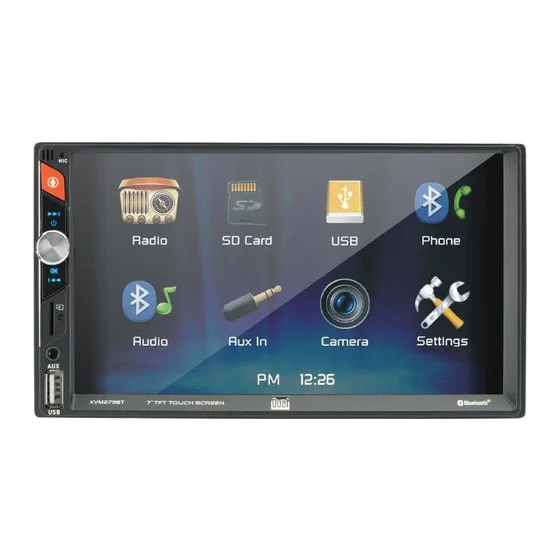
For Bluetooth connection failures, the problem often lies within your phone rather than the stereo itself. If the phone refuses to “see” the stereo, start by deleting the existing pairing profile on your smartphone. Navigate to your Bluetooth settings, find the device named “Dual” or “XVM,” and select “Forget this device.”
Once removed, turn off Bluetooth on your phone and cycle the power on your car stereo. Turn Bluetooth back on your phone and put the stereo into pairing mode. If the devices still refuse to handshake, clear the cache of your phone’s Bluetooth system. On most modern phones, this is found in the “Apps” or “System” menu under “Bluetooth.”
This approach is only for pairing issues. If your phone connects but the audio quality is poor or the connection drops repeatedly, the distance between the phone and the head unit might be too great, or there may be high levels of radio frequency interference in your vehicle. If you have tried these steps and the stereo still fails to maintain a link with multiple different phones, the internal Bluetooth module in the stereo is likely faulty. In this case, you should contact the manufacturer for warranty service or consider replacing the head unit, as internal module repair is rarely cost-effective.
What not to do
Don’t use wire nuts to connect the harness wires. Vibrations in the car will cause these connectors to loosen over time, creating intermittent power shorts that are difficult to diagnose. Instead, use heat-shrink butt connectors for a permanent, vibration-resistant seal.
Don’t bypass the vehicle’s fuse box to provide power. This removes the essential safety layer designed to prevent electrical fires during a short circuit. If you find your current fuse slot is occupied, use a dedicated fuse tap to maintain protection.
Don’t spray liquid contact cleaner directly into the faceplate ports. The moisture can seep behind the screen and permanently damage sensitive internal electronic components. If you must clean the contacts, apply a small amount of cleaner to a microfiber cloth first.
Don’t leave the stereo connected if you smell burning plastic. This indicates a severe wiring fault. If you detect this odor, disconnect the battery immediately to prevent a vehicle fire.
How to stop it happening again
Consistent maintenance of your connections and software will prevent most issues from returning.
| Forcing the unit into the dash | Use the correct mounting kit | Prevents overheating and vibration | | Ignoring the ground connection | Bolt ground to bare metal | Ensures a stable return path |
The most common mistake is assuming a loose connection will simply vibrate back into place. It will not. Instead, it will arc, creating heat that melts internal insulation and eventually fries your circuit board. If your unit cuts out when you hit a bump, stop driving immediately.
Check your ground wire first. If you see paint under the bolt, you have no ground. Scrape the metal to a shine before reattaching. If the issue persists, inspect the wiring harness for signs of discoloration. Brown or blackened plastic indicates a short that requires a full harness replacement. Never patch these wires with more tape; replace the entire segment to avoid a fire hazard.
Frequently asked questions

Can I update the firmware on my Dual Xvm279Bt?
No, this model doesn’t support user-installed firmware updates. It’s a static device that can’t be patched if software bugs occur. You must rely on external workarounds like wired connections, or replace the unit if the failure renders it unusable.
Why does my screen flicker when I turn the volume up?
The flickering occurs because your internal amplifier is drawing more current than the wiring can provide. Ensure your power and ground wires are at least 16-gauge thickness and that all terminal connections are tight. Note that this may not resolve the issue if the alternator is failing.
How long should this head unit last?
Most aftermarket head units last between five and seven years with proper installation. Lifespan depends heavily on the temperature inside your vehicle and the stability of your electrical system. Extreme heat can degrade internal capacitors, causing the unit to fail much faster.
Is it safe to use a different wiring harness?
No, you must use the specific harness designed for the Dual Xvm279Bt. Using a harness from a different model can result in incorrect pin assignments and short circuits. Always purchase a replacement specifically labeled for this model number from a reputable supplier.
What happens if I connect the wires incorrectly?
Connecting wires incorrectly will likely blow the fuse on the stereo or in your vehicle’s panel. This can permanently damage the internal audio output transistors. If the unit fails to turn on, stop immediately and re-check every wire against the wiring diagram.
Final Thoughts
If these basic adjustments don’t solve the glitch, it’s time to reach out to a professional installer. They’ll have the right tools to test your wiring harness for hidden faults. Don’t let a faulty connection ruin your drive; getting an expert’s opinion will help you get back to your music quickly.