
Many people enjoy watching movies, sports, or news on their Vizio TV every day. But what happens when the TV will not turn on? This problem can be frustrating and confusing, especially if you depend on your TV for entertainment or information. Whether you have an older model or a newer smart TV, the issue can appear suddenly. Sometimes, it is a simple fix. Other times, it may need more careful troubleshooting. This article will help you understand why your Vizio TV is not turning on and give you practical steps to solve the problem. You will also learn how to avoid common mistakes, discover hidden tips, and find answers to frequent questions.
Why Vizio Tv Won’t Turn On: Common Causes
Before you start fixing your TV, it helps to know what usually causes this issue. Most problems fall into a few categories:
- Power supply issues: The TV needs steady electricity. If the power cord or outlet is faulty, the TV will not work.
- Remote control problems: Sometimes, the remote is the reason your TV does not respond.
- Firmware glitches: Software errors can stop the TV from starting.
- Internal hardware faults: Parts inside the TV may break or wear out, especially after years of use.
- External devices: Connected devices, like streaming boxes or game consoles, can interfere.
Understanding these causes makes it easier to find the right solution. Let’s look at each one in more detail.
How To Troubleshoot Vizio Tv Not Turning On
Troubleshooting your TV is like following a map. Start with simple steps, then move to more complex ones if needed.
Step 1: Check Power Source And Cable
First, make sure your TV is getting power. This is the most common reason for TVs not turning on.
- Unplug your TV from the wall outlet.
- Wait for 60 seconds.
- Plug it back in firmly.
Try using a different wall outlet. Sometimes, outlets stop working without warning. If possible, use a known working outlet from another room.
Power Cable Comparison
Here’s a quick comparison of what to check:
| Power Cable Condition | Possible Issue | Action |
|---|---|---|
| Loose connection | No power reaches TV | Reinsert cable firmly |
| Damaged cable | Broken wires | Replace cable |
| Correct cable | TV receives power | Proceed to next step |
If your TV still does not turn on, move to the next step.
Step 2: Test The Remote Control
The remote control is a common culprit. Batteries can die or buttons can stick.
- Replace batteries with fresh ones.
- Clean the remote with a dry cloth.
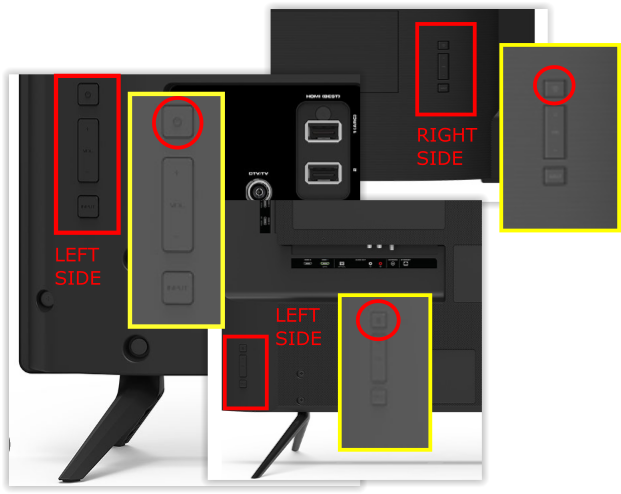
- Try turning on the TV using the power button on the TV itself.
If the TV turns on with the button but not the remote, you may need a new remote.
Step 3: Inspect The Power Indicator Light
Most Vizio TVs have a small LED light. This light can tell you a lot:
- If the light is on but the screen is black, the TV is getting power.
- If the light is off, the TV is not receiving power.
Some models blink to show errors. Check your manual to see what the blinking means.
Step 4: Disconnect External Devices
Sometimes, devices like streaming sticks or gaming consoles cause problems.
- Unplug all devices from the TV (HDMI, USB, etc. ).
- Try turning on the TV again.
This step helps rule out interference from other electronics.
Step 5: Perform A Power Cycle
A power cycle can fix many software glitches:
- Unplug the TV from the outlet.
- Hold the TV’s power button for 30 seconds.
- Plug the TV back in and try turning it on.
This simple step resets the internal software.
Step 6: Try A Different Power Cord
If you have another Vizio TV or a compatible cord, swap it. Some cords wear out over time.
Step 7: Factory Reset (if Possible)
If your TV turns on but acts strangely, a factory reset can help. You can usually do this from the menu, but if the screen is dark, look for a reset button (some models have it on the back).
Step 8: Check For Internal Hardware Problems
If none of the above works, the problem may be inside the TV. Common issues include:
- Faulty power board
- Broken capacitors
- Damaged main board
These require professional repair. If your TV is under warranty, contact Vizio support.
Signs Your Vizio Tv Has A Serious Problem
Not every issue is easy to fix. Some signs show your TV needs expert help:
- Burning smell or smoke
- Loud popping noises
- TV turns off by itself repeatedly
- Screen flickers but never turns on
If you notice any of these, unplug the TV and call a technician.
Vizio Tv Models: Key Differences In Troubleshooting
Vizio makes many types of TVs. Some solutions work better with certain models.
| Model Type | Common Issue | Unique Solution |
|---|---|---|
| Smart TVs (E, M, P Series) | Software glitches | Power cycle, firmware update |
| D Series | Remote issues | Replace batteries, use physical buttons |
| Older LCDs | Capacitor failure | Professional repair |
Always check your model number before searching for parts or instructions.
Credit: www.alphr.com
Hidden Tips Most Users Miss
Even experienced owners miss a few key tips:
- Check surge protectors: If you use a surge protector, it can fail silently. Plug your TV directly into the wall to test.
- Look for firmware updates: Vizio sometimes releases updates that fix power issues. Visit their official site and see if your TV supports USB updates.
- Avoid rapid power cycles: Turning your TV on and off quickly can cause software errors. Wait at least 30 seconds between attempts.
- Use a smartphone camera to test the remote: Point your remote at your phone’s camera and press a button. If you see a flashing light, the remote works.
When To Call Vizio Support
If you have tried all steps and your TV still does not turn on, it is time to call Vizio support. Have your model number and serial number ready. Describe the steps you have taken. This helps the support team diagnose your issue faster.
Vizio offers online guides and live chat for troubleshooting. You can also check their warranty policy. If your TV is less than one year old, repairs may be free.
For official troubleshooting tips, visit the Vizio Support Portal.

Credit: www.youtube.com
Vizio Tv Not Turning On: Statistics And Trends
Understanding how common this problem is helps you see you are not alone. According to consumer reports, about 12% of Vizio TV owners experience power-on issues in the first three years. Warranty claims for power problems are among the top three reasons for service calls.
Most problems happen during:
- Electrical storms: Power surges damage TVs.
- Moving the TV: Cables loosen or break.
- After software updates: Firmware errors can cause start-up issues.
Mistakes To Avoid When Fixing Vizio Tv
Trying to fix your TV can be risky if you don’t know what to avoid.
- Opening the TV case: This is dangerous and voids the warranty.
- Using wrong power cords: Not all cords fit every Vizio model.
- Ignoring burning smells: This can lead to fire hazards.
- Skipping basic steps: Always check power and remote before deeper fixes.
How To Prevent Vizio Tv Power Issues
Prevention is the best way to avoid future problems. Here are a few tips:
- Use surge protectors to protect from electrical spikes.
- Clean dust from vents regularly.
- Update firmware when notified.
- Avoid plugging and unplugging devices rapidly.
Following these steps extends your TV’s life and reduces downtime.
Cost Of Repair And Replacement
Sometimes, repair is not worth the cost. Here’s a comparison of typical costs:
| Problem | Average Repair Cost | Replacement Cost |
|---|---|---|
| Power board failure | $120–$200 | $400–$800 (new TV) |
| Remote control | $20–$40 | N/A |
| Firmware fix | Free (DIY) | N/A |
If your TV is older than five years, replacement may be smarter. Newer TVs have better energy efficiency and features.
Frequently Asked Questions
Why Does My Vizio Tv Not Turn On After A Power Outage?
After a power outage, surge protectors or internal fuses can trip. Unplug your TV for 60 seconds, then plug it back in. If it still does not turn on, try a different outlet or check for visible damage.
Can A Faulty Hdmi Device Stop My Vizio Tv From Turning On?
Yes, sometimes a faulty HDMI device can send a bad signal that prevents the TV from starting. Unplug all HDMI devices and try again. If your TV turns on, plug the devices back in one at a time to find the problem.
Should I Update My Vizio Tv’s Firmware To Fix Power Issues?
Updating firmware can fix some software problems. If your TV turns on but acts strangely, update the firmware through the settings menu. For TVs that do not turn on, firmware updates are not possible.
Is It Safe To Open My Vizio Tv To Check Inside?
No, opening your TV is not safe. It can expose you to electric shock and will void your warranty. Always contact a professional for hardware repairs.
What Is The Average Lifespan Of A Vizio Tv?
Most Vizio TVs last 5–8 years with regular use. Keeping your TV clean, using surge protection, and updating software can help it last longer.
Final Thoughts
Dealing with a Vizio TV not turning on can be stressful, but most problems are easy to fix with the right steps. Start with simple checks—power source, remote, and cables—before moving to more complex troubleshooting. Avoid risky actions like opening the TV or ignoring warning signs. If your TV is still under warranty, reach out to Vizio support for help. Remember, regular care prevents most issues, and understanding your model’s features helps you solve problems faster. By following these tips, you can get your TV working again and enjoy your favorite shows without worry.