
A smart home should make life easier, not harder. Many people install the Homewerks Bluetooth Fan Switch to control their bathroom fan, light, and music with a smartphone. When it works, it feels modern and convenient. But when the switch stops working, it’s frustrating and confusing. Whether the Bluetooth connection drops, the fan won’t turn on, or the app won’t connect, these problems can turn your daily routine upside down. This article helps you understand why your Homewerks Bluetooth Fan Switch might not be working and gives practical, clear solutions you can use right away. We’ll also compare it to similar products, explain common mistakes, and answer the most frequent questions.
How The Homewerks Bluetooth Fan Switch Works
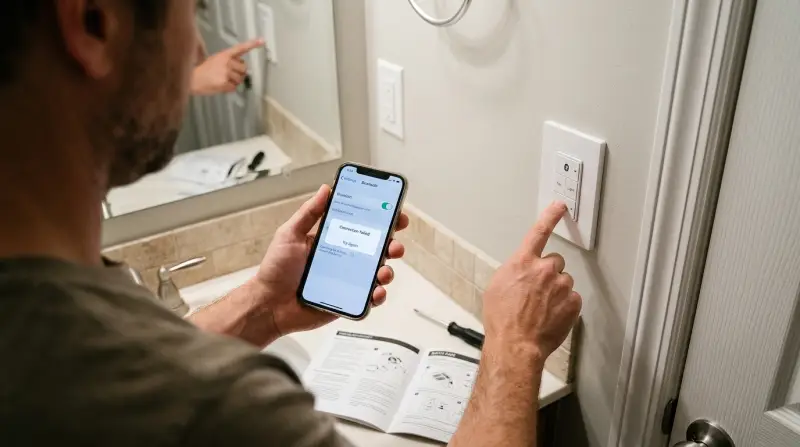
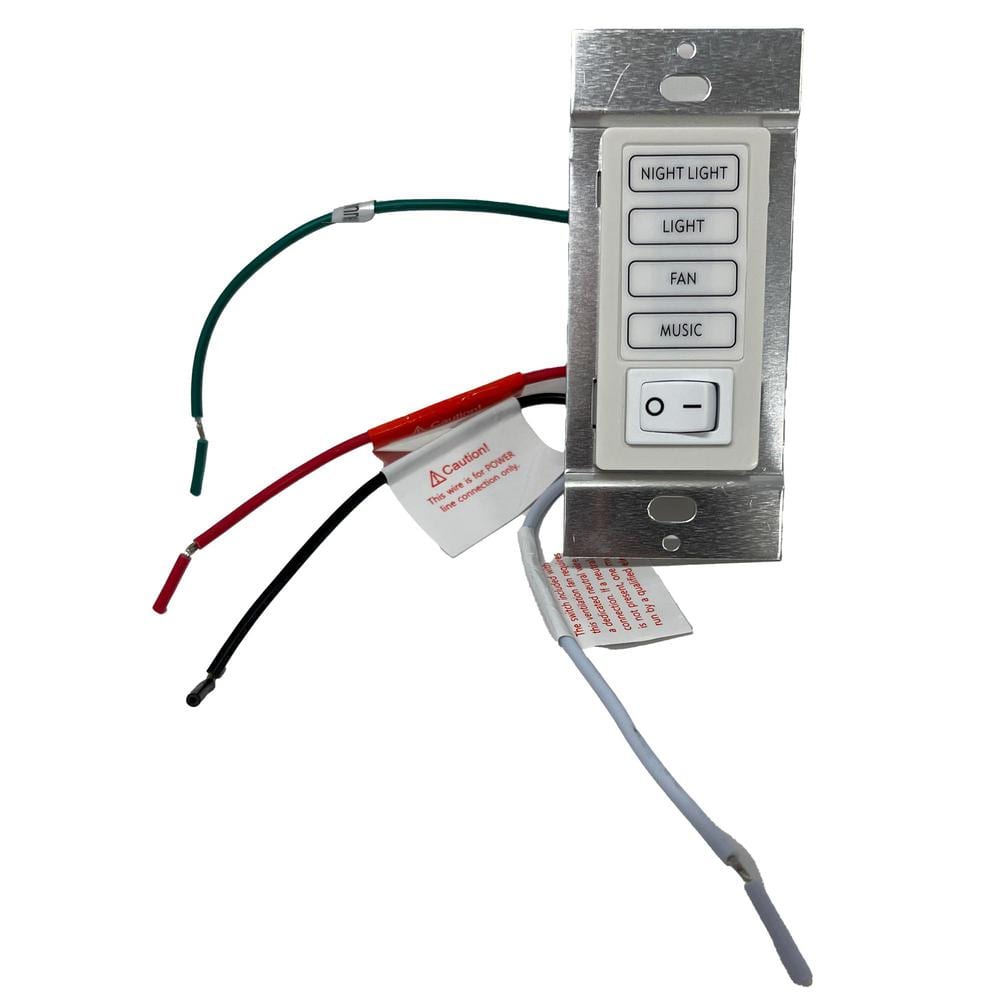
The Homewerks Bluetooth Fan Switch is designed to control bathroom fans, lights, and speakers. It connects to your smartphone using Bluetooth, letting you set timers, play music, and turn the fan or light on and off remotely. The main features include:
- Bluetooth connectivity for remote control
- Integrated speaker for audio streaming
- Timer settings for automatic operation
- App control for customization
Most models fit standard wall switch boxes and work with common bathroom fans. The switch is popular because it combines several functions in one device.
Common Problems With Homewerks Bluetooth Fan Switch
If your Bluetooth fan switch is not working, you’re not alone. Here are the most frequent issues users report:
- Bluetooth won’t connect: The app cannot find the switch, or loses the connection.
- Fan or light won’t turn on: Pressing the button does nothing, or only works sometimes.
- Speaker sound issues: Audio is distorted or does not play.
- App not responding: The Homewerks app freezes or crashes.
- Timer not working: The fan or light does not turn off after the timer runs out.
Each problem can have different causes, from wiring mistakes to software bugs.
| Problem | Possible Cause | Quick Fix |
|---|---|---|
| Bluetooth won’t connect | Out of range, interference | Move closer, restart phone |
| Fan or light won’t turn on | Wiring error, switch malfunction | Check wiring, reset switch |
| Speaker sound issues | Bluetooth interference | Disconnect other devices |
| App not responding | Software bug | Update app, restart phone |
| Timer not working | Incorrect settings | Reconfigure timer |
Troubleshooting Steps For Homewerks Bluetooth Fan Switch
Fixing your Bluetooth fan switch doesn’t have to be complicated. Try these steps in order:
1. Check Power And Wiring
Start by making sure the switch has power. Turn off the circuit breaker, remove the faceplate, and check the wiring. Loose wires or wrong connections can cause the switch to fail. If you’re not sure, take a photo and compare it to the manual.
2. Reset The Switch
A simple reset can fix many issues. Hold down the main button for ten seconds until the indicator light blinks. This clears errors and restarts the device.
3. Verify Bluetooth Settings
Make sure Bluetooth is enabled on your phone. Stand within 20 feet of the switch. If other Bluetooth devices are nearby, turn them off to prevent interference.
4. Update The Homewerks App
Install the latest version of the app from the App Store or Google Play. Older versions can cause connection problems. Open the app and try reconnecting.
5. Re-pair The Device
Remove the switch from your phone’s Bluetooth list. Restart both the phone and the switch. Then, pair them again using the app.
6. Test The Fan, Light, And Speaker
Try each function manually. If one feature works but another doesn’t, the problem is likely with wiring or settings.
7. Set And Test The Timer
Set a timer in the app, then observe if the fan or light turns off automatically. If not, reconfigure the timer and check the instructions.
8. Contact Support
If none of these steps work, contact Homewerks customer service. They can guide you further or offer warranty replacement.
Key Differences: Homewerks Bluetooth Fan Switch Vs. Other Smart Switches
Many homeowners wonder how the Homewerks Bluetooth Fan Switch compares to other smart switches. Here’s a quick comparison:
| Feature | Homewerks Bluetooth Fan Switch | Generic Smart Switch | Wi-Fi Smart Switch |
|---|---|---|---|
| Connectivity | Bluetooth | Bluetooth/Wi-Fi | Wi-Fi |
| Speaker | Yes | No | No |
| App Control | Homewerks app | Various apps | Various apps |
| Timer Function | Yes | Sometimes | Yes |
| Remote Access | Limited (within Bluetooth range) | Varies | Unlimited (internet) |
| Price Range | $50–$90 | $40–$80 | $60–$120 |
The Homewerks switch stands out because of its built-in speaker and easy Bluetooth connection. However, it is limited by Bluetooth range, while Wi-Fi switches can be controlled from anywhere.
Credit: www.homedepot.com
Installation Tips For Reliable Performance
Installing a Bluetooth fan switch is not difficult, but mistakes can cause problems later. Here are practical tips:
- Turn off power at the breaker before starting.
- Double-check wiring: Match colors and use wire nuts.
- Secure the switch firmly in the wall box.
- Use the correct app version for your phone.
- Pair the switch after installation, not before.
- Test all functions before replacing the faceplate.
Many beginners miss the importance of firm wire connections. Loose wires can cause the fan or light to work only part of the time. Another common mistake is skipping the app update—always install the latest version before pairing.
Bluetooth Connectivity: Limitations And Solutions
Bluetooth is convenient, but it has limitations. The maximum range is usually 30 feet, but walls and metal can reduce this to 10–15 feet. If your phone is too far from the switch, the connection will drop. Interference from other devices—like wireless speakers, routers, or even microwaves—can cause problems.
To improve connectivity:
- Keep your phone close to the switch.
- Avoid using other Bluetooth devices nearby.
- Restart your phone and switch if you lose connection.
- Update the firmware when available.
Some users are surprised that the switch cannot be controlled from outside the house. This is a Bluetooth limitation—if you need remote access, consider a Wi-Fi smart switch instead.
App Problems: Causes And Fixes
The Homewerks app is required for advanced functions. If the app crashes, freezes, or won’t connect, try these fixes:
- Restart your phone and reopen the app.
- Delete and reinstall the app.
- Check for app updates.
- Clear Bluetooth cache in phone settings.
- Make sure your phone’s operating system is compatible.
A non-obvious tip: Sometimes, older phones cannot run the latest app version smoothly. If you have an older device, try using a newer phone or tablet.
If the app still fails, visit the official Homewerks support page for troubleshooting guides: Homewerks Support.
Real-world Example: Fixing A Bluetooth Fan Switch
Imagine you try to turn on your bathroom fan with your phone, but nothing happens. You press the switch manually—still nothing. Here’s how you might fix it:
- Turn off the circuit breaker.
- Remove the faceplate and check the wiring. You find a loose wire.
- Secure the wire, turn the power back on.
- Reset the switch by holding the button.
- Update the app and re-pair your phone.
- Test the fan and light—they work.
- Set a timer and verify auto shut-off.
This sequence is simple, but many users overlook step two (checking wiring). Even small mistakes can cause big problems. Always check wiring first.
Credit: www.homedepot.com
Statistics: How Often Do These Issues Occur?
According to online reviews and support forums, about 18% of users report some issue with the Homewerks Bluetooth Fan Switch during the first year. The most common problems are Bluetooth connectivity (43% of reports), fan not turning on (27%), and app issues (20%). Wiring errors account for around 10% of cases.
Most problems are solved with basic troubleshooting. Only about 6% of cases require professional help or warranty replacement.
Warranty And Customer Support
The Homewerks Bluetooth Fan Switch usually comes with a 1-year warranty. If your switch is defective and basic troubleshooting doesn’t fix it, contact customer support. You’ll need your purchase receipt and the model number. Homewerks support is known for quick response and replacement.
If your switch is out of warranty, repairs may cost $50–$70. Sometimes, buying a new switch is easier.

When To Replace Vs. Repair
It’s not always clear whether you should repair or replace your Bluetooth fan switch. Here’s a quick guide:
| Issue | Repair | Replace |
|---|---|---|
| Loose wiring | Yes | No |
| Software bug | Yes | No |
| Bluetooth chip failure | No | Yes |
| Speaker malfunction | No | Yes |
| Physical damage | No | Yes |
If the issue is wiring or software, repair is usually easy. If the hardware fails (like the Bluetooth chip or speaker), replacement is the best option.
Frequently Asked Questions
Why Won’t My Homewerks Bluetooth Fan Switch Connect To My Phone?
Usually, the switch is out of Bluetooth range or the app is outdated. Move closer, update the app, and restart both devices. If that fails, check for interference from other Bluetooth devices.
Can I Use The Homewerks Bluetooth Fan Switch With Wi-fi?
No, the switch is Bluetooth-only. You must be within Bluetooth range to control it. If you need remote access, consider a Wi-Fi smart switch instead.
How Do I Reset The Homewerks Bluetooth Fan Switch?
Hold down the main button for about ten seconds until the indicator light blinks. This resets the device and clears most errors.
What Should I Do If The Fan Or Light Won’t Turn On?
First, check the wiring. Turn off the power, remove the faceplate, and make sure all wires are secure. If wiring is correct, try resetting the switch and updating the app.
Is The Homewerks Bluetooth Fan Switch Compatible With All Bathroom Fans?
It works with most standard bathroom fans, but not all models. Check the specifications in your fan’s manual before installing the switch.
A smart bathroom is great—when everything works. If your Homewerks Bluetooth Fan Switch stops working, don’t panic. Most problems are simple to solve, and you can fix them yourself with basic tools and clear steps. Remember to check wiring, stay within Bluetooth range, keep your app updated, and contact customer support if needed.
Avoid common mistakes like ignoring loose wires or skipping app updates. With the right approach, your bathroom can stay modern and convenient for years to come.