
Resetting your Hathaspace air purifier might seem confusing, especially if you’re new to air purifiers or have never dealt with filter indicators before. But understanding this process is important—not only for cleaner air but also for keeping your device working well. Many users forget to reset their machine after changing the filter, which can cause the indicator light to stay on and make you wonder if you did something wrong. In this guide, you’ll learn, step by step, how to reset your Hathaspace air purifier, why it matters, and what to do if things don’t go as expected. Let’s clear the air and get your purifier back in top shape.
Why Resetting Matters
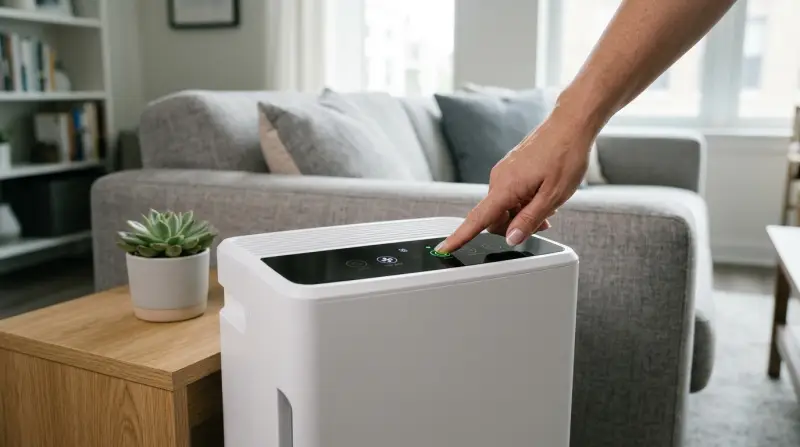
Every Hathaspace air purifier uses a filter indicator to tell you when it’s time to replace the filter. After swapping out the old filter for a new one, the indicator often stays on. This light doesn’t reset on its own. If you ignore it, the device may not track the filter’s life correctly. Over time, you might breathe in dirty air or replace filters more often than needed.
Resetting the filter indicator does two things:
- Updates the machine’s memory—It starts counting the hours for the new filter.
- Clears false warnings—It stops unnecessary beeping or blinking, which can be distracting.
Some users worry that resetting is risky or hard. In reality, it’s a simple process, but skipping or doing it wrong can reduce your purifier’s performance. Many beginners forget to check if the filter door is closed tightly—a common cause of reset failures.
Different Hathaspace Models: Know Your Device
Hathaspace makes several air purifier models, like the HSP001 and HSP002. Each model has slightly different controls and reset steps. The following table shows the main differences:
| Model | Reset Button Location | Typical Filter Life (Hours) |
|---|---|---|
| HSP001 | Control Panel (front) | 2,000 hours |
| HSP002 | Under Filter Cover | 2,500 hours |
| Smart True HEPA | Touch Display | 2,200 hours |
Always check your user manual for your exact model. Many users forget this and end up pressing the wrong buttons.
Step-by-step: How To Reset Your Hathaspace Air Purifier
Resetting is easy if you follow the right steps. Here’s how to do it for the two most common models.
Hsp001 (classic Model)
- Turn off and unplug the air purifier for safety.
- Open the back cover. Remove the old filter and insert the new one.
- Close the cover tightly. The device will not reset if the cover isn’t closed all the way.
- Plug in and turn on the air purifier.
- Find the “Filter Reset” button on the front panel. It’s often a small, recessed button you press with a pen tip.
- Press and hold the button for 3–5 seconds. The indicator light should turn off.
Common mistake: Pressing the reset button before the unit is turned on. The reset only works when the device is powered.
Hsp002 (smart Model)
- Power off and unplug the purifier.
- Remove the front cover and swap the filter.
- Replace the cover securely.
- Plug in and turn on the device.
- Locate the reset button—on some HSP002s, it’s under the filter cover or a touch sensor on the display.
- Press and hold for 3–8 seconds until the filter light turns off.
Practical insight: For models with a touch display, you might need to press two buttons together, such as “Fan Speed” and “Reset.”
Other Models
If you have a different model, the process is similar, but the button location changes. If you’re unsure, look for a small button labeled “Reset” or an icon that looks like a filter.
What To Do If The Reset Doesn’t Work
Sometimes, the indicator light won’t turn off after you follow the steps. Here’s what you can do:
- Double-check the filter and cover. The device won’t reset if the filter is missing or the cover is loose.
- Try again—hold the button longer (up to 10 seconds).
- Unplug and wait. Disconnect the unit for 1–2 minutes, then plug it back and repeat.
- Clean the sensor. Dust in the sensor area can sometimes cause problems.
- Contact support if nothing works. Hathaspace offers customer service for these issues.
How Often Should You Reset?
Reset only after replacing the filter. For most users, this means every 6–12 months, depending on air quality and usage. Running the purifier 24/7 in a smoky or dusty area means you’ll change filters (and reset) more often. The following chart gives rough estimates:
| Environment | Expected Filter Life | Reset Needed? |
|---|---|---|
| Normal Home | 8–12 months | Yes, after each change |
| Urban/Smoky | 4–6 months | Yes, more often |
| Pet Owners | 5–8 months | Yes |
Signs The Reset Worked
After a successful reset, you should notice:
- Filter indicator light is off or no longer blinking.
- No warning beeps about filter change.
- Normal air flow resumes.
If the indicator comes back quickly, double-check the filter installation.

Extra Tips For Long-lasting Filters
- Vacuum the pre-filter (if your model allows) every month to catch large dust and hair.
- Keep the purifier away from direct sunlight and windows to prevent extra dust intake.
- Do not wash HEPA or carbon filters unless the manual says it’s okay.
- Use genuine filters—knockoff filters can cause the reset to fail or shorten filter life.
- Note the reset date on your calendar. Many users forget when they last changed the filter.
Troubleshooting: Common Problems And Fixes
Some users run into problems even after a reset. Here are frequent issues and what to do:
The Light Stays On
- Make sure you’re pressing the right button.
- Hold the button longer.
- Ensure the filter is seated correctly.
- Check for error codes in the user manual.
Purifier Won’t Start
- Unplug for 5 minutes and try again.
- Check the power outlet.
- Confirm all covers are locked in place.
Filter Life Seems Short
- If you reset often, your environment may be extra dusty or smoky.
- Try running the purifier on lower speed to extend filter life.
- Use air quality sensors to measure real pollution.
When To Call Customer Support
If you’ve tried all steps and still have issues, contact Hathaspace support. Have your model number, purchase date, and a summary of what you’ve done. Most units have a one-year warranty. Some filters may be covered if they’re defective.
Comparing Hathaspace To Other Brands
You might wonder if reset steps are unique to Hathaspace. Here’s how Hathaspace compares to top competitors:
| Brand | Reset Process Difficulty | Typical Filter Change Alert | Support Quality |
|---|---|---|---|
| Hathaspace | Easy | Filter Light | Good |
| Levoit | Easy | Filter Light | Average |
| Honeywell | Medium | Filter Light & Timer | Good |
| Dyson | Medium | Digital Display | Excellent |
Insight: While most brands use a similar reset process, Hathaspace’s physical reset button is easier for many users compared to touch screens.

The Value Of Regular Maintenance
Resetting the filter indicator is part of routine air purifier care. Regular resets mean you’re always breathing clean air. Skipping the reset can make you think your filter is still dirty, even if you changed it. Clean filters also reduce allergies, dust, and indoor smells.
Many users overlook another important step: cleaning the air intake grilles and the outside of the purifier every few months. Dust buildup here can reduce efficiency—even if the filter itself is new.
Frequently Asked Questions
How Do I Know When It’s Time To Reset My Hathaspace Air Purifier?
When the filter change indicator light comes on or the device beeps, it’s time to replace the filter and reset the indicator. Some models also show a warning on the display.
Can I Use Non-hathaspace Filters And Still Reset The Indicator?
It’s best to use genuine Hathaspace filters. Off-brand filters might not fit perfectly, which can cause the reset to fail or reduce air quality.
What If I Lost My User Manual?
You can download a digital copy from the official Hathaspace website or check trusted sources like Manualslib for your model’s guide.
Does Resetting Delete Any Settings Or Schedules?
No, resetting the filter indicator only clears the filter timer. Your fan speed, timer, or sleep mode settings stay the same.
How Can I Make My Filters Last Longer?
Vacuum the pre-filter regularly, keep windows closed during high pollen or smoke days, and run the purifier on lower speeds when possible. This reduces dust intake and extends filter life.
Resetting your Hathaspace air purifier is a simple but important step in keeping your air clean and your device running smoothly. Remember to always follow your model’s specific instructions and don’t skip regular maintenance. With the right care, your purifier will protect your home’s air for years to come.