
If your LG refrigerator is not working as it should, knowing how to use the diagnostic mode can save you time and money. This special feature helps both homeowners and technicians find problems quickly. But many people feel lost when they try to use it for the first time. Understanding what the diagnostic mode does, how to access it, and how to read the results makes caring for your fridge much easier. In this guide, you’ll learn everything you need to know to use LG refrigerator diagnostic mode like a pro—even if you have no technical background.
What Is Lg Refrigerator Diagnostic Mode?
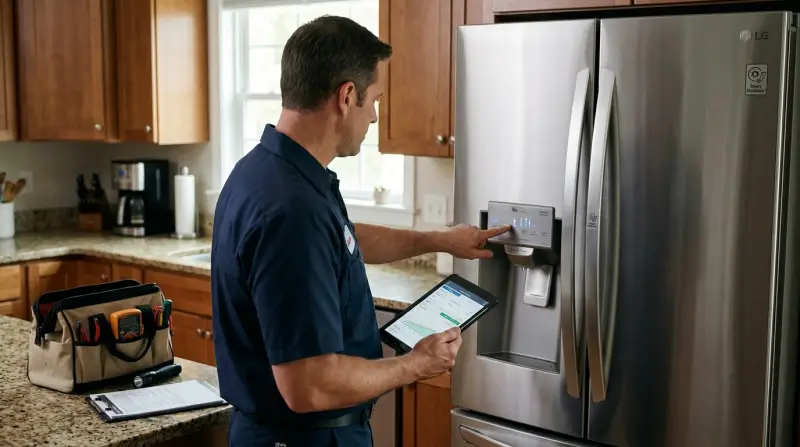
The diagnostic mode is a built-in tool for checking the health of your fridge. When you activate this mode, the refrigerator tests its own systems and shows error codes if something is wrong. These codes help you or a technician find the source of a problem faster. It’s like a medical check-up but for your refrigerator.
Most LG fridges made in the last decade include this feature. It’s especially useful when you notice issues such as the fridge not cooling, strange noises, or lights blinking. The diagnostic mode is not only for experts; many owners can use it to get information before calling for repair.
Why Use Diagnostic Mode?
Here’s why activating diagnostic mode can be a smart move:
- Save Time: You don’t have to guess what’s wrong.
- Save Money: You might fix simple problems yourself, avoiding a service call.
- Accurate Information: Technicians can arrive with the right parts if you tell them the error code.
- Prevent Bigger Problems: Early detection can stop small issues from becoming serious.
A surprising fact: in a 2022 LG service study, nearly 40% of repairs could have been avoided if the owner had used diagnostic mode and followed basic troubleshooting steps. Many people don’t know about this feature or how to use it.
How To Enter Lg Refrigerator Diagnostic Mode
Different LG models have slightly different steps. Below, you’ll find the most common methods for side-by-side, French door, and top-freezer models. Always check your owner’s manual for your exact model, but these steps cover most cases.
Method 1: Using The Control Panel
- Open the refrigerator door.
- Press and hold the “Refrigerator” and “Ice Plus” buttons together.
- While holding, plug the refrigerator back in (or press the main power button if your model has one).
- Hold the buttons for about 5-8 seconds.
- Release when you see numbers or codes on the display.
Method 2: For Models Without “ice Plus” Button
- Press and hold the “Express Freeze” and “Colder” buttons together.
- Wait for the display to change, usually after 5 seconds.
- Release the buttons and check the display for error codes.
Method 3: Smart Diagnosis Feature
Many new LG fridges support the Smart Diagnosis system using your smartphone:
- Download the LG ThinQ app.
- Open the app and select “Smart Diagnosis.”
- Follow the app’s instructions—usually, you place your phone near the Smart Diagnosis logo on the fridge.
- The fridge sends data to LG support via sound signals.
Quick Reference Table: Common Lg Diagnostic Entry Methods
| Model Type | Diagnostic Entry Buttons | Notes |
|---|---|---|
| Side-by-Side | Refrigerator + Ice Plus | Hold 5-8 sec, door open |
| Top Freezer | Express Freeze + Colder | Hold until display changes |
| French Door | Refrigerator + Ice Plus | Some use Smart Diagnosis only |
Practical tip: If your fridge has no display or buttons, the diagnostic mode may not be available. In that case, use the Smart Diagnosis app or check for blinking lights as error codes.
Understanding Lg Refrigerator Error Codes
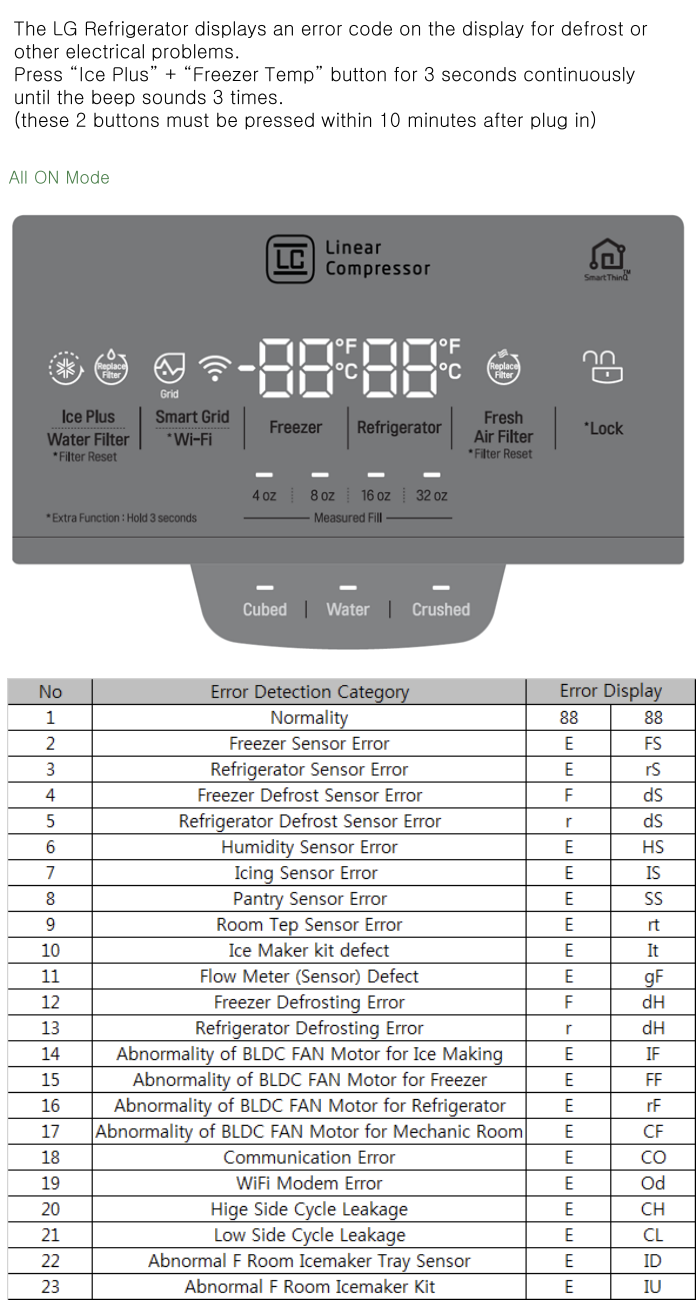
Once you enter diagnostic mode, your fridge will show error codes. Each code points to a specific issue. Some are easy to fix, while others need a professional.
Common Error Codes And Their Meanings
Here’s a handy list of the most frequent codes:
- Er IF: Ice maker fan problem
- Er FF: Freezer fan problem
- Er dH: Defrost heater issue
- Er FS: Freezer sensor error
- Er rS: Refrigerator sensor error
- Er HS: Humidity sensor issue
- Er CO: Communication error (main control board)
Error Code Comparison Table
Understanding the impact of each code helps you decide what to do next.
| Error Code | Possible Cause | DIY Fix? | Needs Technician? |
|---|---|---|---|
| Er IF | Ice fan blocked/faulty | Check for ice buildup | Yes, if fan broken |
| Er FF | Freezer fan issue | Clear vents, restart | Yes, if still error |
| Er dH | Defrost heater failed | No | Yes |
| Er CO | Main control board | No | Yes |
If you see an error code, write it down. Unplug the fridge for 1 minute, plug it back in, and check if the code comes back. If it does, the problem is real, and you need to address it.
How To Read Diagnostic Results
Once you see a code, you need to decide what to do. Here’s how to approach it:
- Identify the code: Use your manual or the tables above.
- Restart the fridge: Some errors clear after a reset if the issue was temporary (like a power blip).
- Check for simple fixes: For example, ice buildup or a blocked vent can be cleared by hand.
- Call for help if needed: If the code stays, or if the problem is electrical or involves the sealed system, call a certified technician.
Non-obvious insight: Many first-time users expect the fridge to “fix itself” after running diagnostic mode. This mode only shows the problem—it doesn’t repair it.
Common Problems That Diagnostic Mode Can Help Identify
Some of the most frequent refrigerator issues can be spotted with diagnostic mode:
- Fridge not cooling: May show codes for sensors or compressor.
- Ice maker not working: Codes for ice fan or ice sensor.
- Water leaks: Sometimes linked to defrost system errors.
- Strange noises: Fan-related error codes help pinpoint the source.
Extra tip: Not all noises mean failure—diagnostic mode helps separate normal sounds from actual problems.

Credit: www.youtube.com
Steps To Take After Getting An Error Code
So, you’ve run diagnostic mode and found a code. What next?
- Look up the code meaning in your manual or using a reliable online source.
- Try basic troubleshooting: Unplug and restart, check for visible blockages, reset ice maker if needed.
- Don’t ignore repeated codes: If the same code returns, the problem is not solved.
- Record details: Date, code, and what you tried. This helps technicians solve the issue faster.
- Contact LG support or a certified technician for repairs you cannot do yourself.
How Smart Diagnosis Makes Troubleshooting Easier
Smart Diagnosis is a newer LG feature that uses your smartphone to send sound-based information directly to LG support. Here’s how it stands out:
- Faster help: The LG support team receives a detailed report, so you don’t have to describe the problem.
- Less guesswork: The app guides you step by step.
- Reduces mistakes: No need to interpret codes yourself.
Pro insight: Most people don’t realize Smart Diagnosis can catch issues that manual error codes miss, especially with software or sensor faults.
Lg Diagnostic Mode Vs. Manual Troubleshooting
How does using diagnostic mode compare with old-fashioned “trial and error” troubleshooting?
| Feature | Diagnostic Mode | Manual Troubleshooting |
|---|---|---|
| Speed | Fast (minutes) | Slow (hours or days) |
| Accuracy | High (specific code) | Low (guesswork) |
| Needed Skills | Basic | Intermediate/Advanced |
| Risk of Error | Low | High |
Using diagnostic mode is almost always the smarter choice, especially for newer LG refrigerators.
Safety And Precautions
While diagnostic mode is safe, you should keep a few things in mind:
- Unplug the fridge before touching any internal parts.
- Do not force buttons or try to open sealed sections.
- If unsure, stop. Some repairs need special tools or knowledge.
- Avoid water contact with electrical parts.
Beginner mistake: Ignoring safety instructions can damage your fridge or cause injury. Always check the owner’s manual first.

Credit: www.youtube.com
When To Call A Technician
Not every problem can be fixed at home. Call a certified LG technician if you see:
- Repeated error codes after a reset
- Electrical smells, sparks, or smoke
- Compressor or sealed system errors
- Water leaks from inside panels
- Display not working at all
Attempting advanced repairs without training can void your warranty.
Keeping Your Lg Refrigerator In Good Shape
Regular care helps prevent most problems that show up in diagnostic mode. Here’s what to do:
- Clean condenser coils every 6 months.
- Check door seals for cracks or dirt.
- Don’t block air vents with food items.
- Defrost ice buildup if you see it.
- Update software using Smart Diagnosis if prompted.
Following these steps can reduce the chance of seeing error codes and extend the life of your fridge.
Where To Find More Help
For more details about your specific model, always check the official LG support website or your printed manual. Many guides are available in video format for step-by-step help. The official LG site also provides downloadable manuals and a support chat for extra questions. For broader information on how appliance diagnostics work, see this Wikipedia article on appliances.
Frequently Asked Questions
What Do I Do If My Lg Refrigerator Shows No Display In Diagnostic Mode?
First, make sure your model supports diagnostic mode—it may not if it’s older or very basic. If you have a display, but nothing appears, try unplugging the fridge for 1 minute. If the issue remains, the control board or display panel may be faulty and need professional repair.
Can I Clear Error Codes Myself?
You can clear some error codes by unplugging the fridge for 1 minute and plugging it back in. However, if the code returns, the underlying problem is still there. Only codes caused by temporary glitches will clear permanently.
Is Smart Diagnosis Available On All Lg Refrigerators?
No, Smart Diagnosis is a newer feature available on most LG models made after 2015. Check for a Smart Diagnosis logo or mention in your manual. Older models use button sequences instead.
Will Running Diagnostic Mode Void My Warranty?
No, simply running diagnostic mode will not void your warranty. However, opening the fridge or trying advanced repairs yourself can void the warranty. Always check your user manual and call LG support if unsure.
Why Does My Fridge Make Beeping Noises During Diagnostic Mode?
Beeping or clicking sounds are normal during diagnostic mode. The fridge is testing fans, relays, and other parts. If noises continue after the test, check for error codes or call a technician if you suspect a fault.
LG refrigerator diagnostic mode is a powerful tool for every owner. Learning to use it helps you solve problems faster, avoid unnecessary repair costs, and keep your fridge running smoothly for years. Even if you’re new to appliances, taking a few minutes to learn this feature pays off in the long run.