
Ceiling fans have become smarter and more convenient thanks to remote controls. Among popular brands, Lucci ceiling fans stand out for their stylish looks and reliable performance. However, sometimes the fan stops responding to the remote, or you need to pair a new remote. That’s where the Lucci fan remote reset button comes in. If you’ve ever wondered how to reset your Lucci fan remote, when to use the reset button, or what to do if it’s not working, this guide gives you clear answers. You’ll learn practical steps, common mistakes to avoid, and some insider tips to make sure your fan and remote work smoothly.
What Is The Lucci Fan Remote Reset Button?
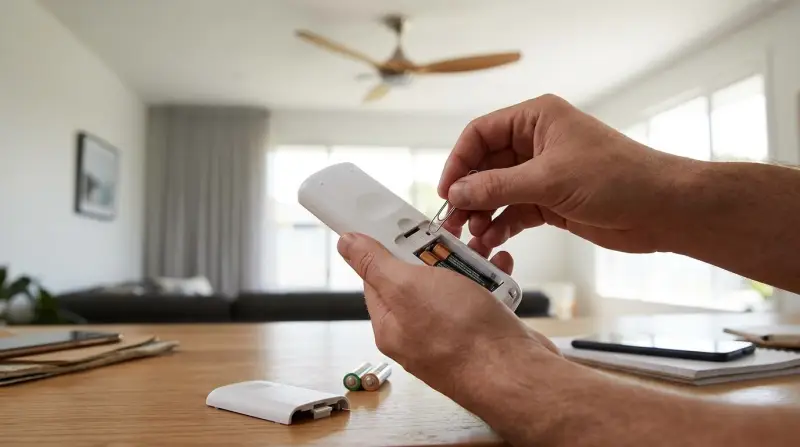
The reset button on a Lucci fan remote is a small, often hidden, button that helps re-sync the remote with your ceiling fan. It’s usually used when the remote stops working, after a battery change, or if you’re pairing a new remote to the fan. The reset process clears any stored codes or glitches, allowing the fan and remote to communicate again. In most cases, this button is inside the battery compartment or marked as “RESET” or “SYNC.”
How Does The Lucci Fan Remote Work?
A Lucci remote uses radio frequency (RF) or infrared (IR) signals to send commands to the fan’s receiver unit inside the motor housing. When you press a button (like “speed up” or “light”), the remote sends a coded signal. The receiver recognizes this code and performs the action. If the code changes (for example, after a power surge or battery replacement), the remote and receiver can lose sync.
When Should You Use The Reset Button?
Resetting is not something you need to do every day. Here are the most common situations where the Lucci fan remote reset button is helpful:
- Remote not working: If the fan ignores all remote commands, even after changing batteries.
- Remote controls wrong fan: In homes with multiple Lucci fans, remotes can sometimes control the wrong fan.
- After battery changes: Occasionally, replacing batteries can cause the remote to lose its connection.
- After power outages or surges: Electrical events can disrupt the code pairing.
- Pairing a new remote: If you buy a replacement or extra remote, you must sync it with your fan.
Where To Find The Lucci Fan Remote Reset Button
Not all remotes look the same, but the reset button’s location is usually consistent. Here are some places to check:
- Inside the battery compartment: Often, you’ll need to remove the battery cover. The reset button might be a tiny hole labeled “RESET.”
- On the front or back of the remote: Some remotes have a small button clearly marked.
- Under a sliding panel: On advanced models, there may be a hidden panel for programming.
If you’re unsure, check your Lucci fan manual or the manufacturer’s website for diagrams.
Step-by-step: How To Reset A Lucci Fan Remote
Resetting your Lucci fan remote is a simple process. Here’s a clear guide:
- Turn off the fan power: Use the wall switch or circuit breaker to cut power to the fan for at least 30 seconds.
- Open the remote battery compartment: Remove the batteries.
- Press and hold the reset button: Use a pen tip or paperclip if the button is recessed. Hold for about 5 seconds.
- Reinsert the batteries: After releasing the button, put the batteries back in.
- Restore power to the fan: Turn the switch or circuit breaker back on.
- Pair the remote: Within 60 seconds, press and hold the “ON” or “SYNC” button on the remote (check your model’s instructions).
- Test the remote: Try turning the fan and light on/off to confirm it’s working.
Example: Resetting A Lucci Air Remote
Suppose you have a Lucci Air fan. The process above works, but the reset button may be labeled as “LEARN.” In that case:
- Turn off the fan’s power for 1 minute.
- Hold the “LEARN” button after restoring power.
- The fan light will blink, showing successful pairing.
Common Problems And Solutions
Even with a reset button, things can go wrong. Here are some typical problems and how to fix them:
The Remote Still Doesn’t Work
- Check the batteries: Weak or old batteries cause most problems.
- Distance and obstacles: RF remotes work through walls, but thick walls or metal can block signals.
- Fan receiver issue: If resetting fails, the receiver in the fan may be faulty.
The Remote Controls The Wrong Fan
- Dip switch settings: Some older models have small switches (called dip switches) inside the remote and receiver. They must match to avoid cross-signals.
- Reset both units: Reset each remote and fan pair one at a time, turning off power to other fans in the home.
The Fan Is Stuck On One Speed
- Receiver memory issue: Resetting the remote often clears speed and direction glitches.
- Physical jam: Check that the fan blades and motor are not blocked.
Light Works, Fan Doesn’t (or Vice Versa)
- Receiver wiring: If only one function responds, there may be a loose wire or the receiver is partially damaged.
Lucci Fan Remote Models: Comparison
Lucci offers several remote models. Here’s a quick comparison of three popular options:
| Model | Reset Button Location | Signal Type | Special Features |
|---|---|---|---|
| Lucci Air DC Remote | Battery compartment | RF | 6-speed, timer, light dimming |
| Lucci AC Remote | Back panel | RF | 3-speed, light control |
| Lucci Smart Remote | Side button (hidden) | Wi-Fi/RF | App control, scene setting |
Tips For Reliable Fan And Remote Operation
A few small habits can prevent most remote problems:
- Change batteries yearly: Even if the remote works, weak batteries can cause glitches.
- Keep remotes clean: Dust in the battery compartment can block contacts.
- Label remotes: In homes with several fans, use stickers to avoid confusion.
- Check for firmware updates: Some smart Lucci fans can be updated for better performance.
- Avoid power surges: Use surge protectors or turn off fans during storms.
The Truth About Dip Switches And Pairing Codes
Many users overlook dip switches in older Lucci remotes. These are tiny switches inside the remote and fan receiver that set a unique code. If your fan is older than five years, you may need to match these switches. Newer models use digital pairing, making setup easier. If you have issues with multiple fans, adjusting dip switches is a reliable fix.
| Feature | Old Models (Dip Switches) | New Models (Digital Pairing) |
|---|---|---|
| Setup Complexity | Manual matching | Automatic sync |
| Chance of Interference | High in apartments | Low |
| Reset Process | Switch position + reset button | Reset button only |
What If The Reset Button Doesn’t Work?
Sometimes, the reset button fails. Here’s what to do:
- Double-check batteries: Try a brand new set.
- Reset the fan receiver: Turn off the fan at the breaker for 5 minutes, then try again.
- Inspect for damage: Look for signs of water, corrosion, or cracks.
- Try a universal remote: Some universal remotes work with Lucci fans.
- Contact support: The official Lucci support team can help diagnose deeper issues.
Pairing Multiple Lucci Fans In One Home
If you have several Lucci fans, it’s easy to get signals crossed. To avoid this:
- Reset and pair each fan one at a time: Turn off power to all other fans while pairing.
- Use different codes: For older models, set unique dip switch codes for each fan.
- Label remotes and fans: Use clear stickers or color codes.
This process prevents unwanted control overlap, especially in open-plan homes or apartments.
Advanced Troubleshooting: When To Call A Professional
Most remote problems can be fixed with the reset button, but if you notice:
- Burnt smell from the fan
- Lights flickering without remote input
- Fan turns on/off by itself
…there could be a wiring or receiver fault. In these cases, it’s safer to call a licensed electrician. Attempting repairs inside the fan can be dangerous if you’re not trained.
Energy Efficiency And Smart Controls
Lucci’s modern remotes often include smart features like timers, schedules, and app connectivity. Using these features can save energy:
- Set timers to turn the fan off after you fall asleep.
- Use speed controls to match the room temperature, instead of running at full speed all day.
- Integrate with smart home assistants for voice control and automation.
According to the U. S. Department of Energy, ceiling fans can reduce cooling costs by up to 30% when used with air conditioning. Smart remotes help you maximize these savings by preventing wasted energy.
How To Update A Lucci Smart Fan Remote
For users with a smart Lucci fan, firmware updates can solve bugs and add features. Check the Lucci website or app for update instructions. Usually, you’ll need:
- The latest app version on your phone
- Wi-Fi connection
- Remote and fan within range
Follow the prompts in the app to update. This can also fix remote pairing issues.
Essential Maintenance For Longevity
A well-maintained remote and fan last longer and work better:
- Wipe remotes monthly with a dry cloth
- Store remotes away from heat and humidity
- Check battery contacts for rust or residue
- Test the reset button twice a year, even if you don’t use it
If you notice the reset button is loose or stuck, contact support for repair options.
Example Scenarios: Real-world Use
- Scenario 1: You move into a new apartment with a Lucci fan, but the remote doesn’t work. After changing batteries, you use the reset button and follow the pairing steps. The fan responds again.
- Scenario 2: Two Lucci fans in the same house start turning on together. You open both remotes, adjust the dip switches, and use the reset buttons. Now, each remote controls only its fan.
These examples show that knowing how to use the reset button can save you time and money.
Safety Considerations
Never try to reset the remote or access the fan receiver while the power is on. Always:
- Turn off the wall switch or breaker
- Wait for moving blades to stop
- Avoid using metal tools on batteries or electronics
These small steps prevent shocks and damage.
Genuine Vs. Aftermarket Lucci Remotes
Buying a genuine Lucci remote ensures full compatibility and warranty support. Aftermarket or universal remotes may work, but can lack certain features like dimming or smart integration. Always check the model number before purchasing a replacement.
| Aspect | Genuine Lucci Remote | Aftermarket Remote |
|---|---|---|
| Compatibility | Guaranteed | Varies |
| Warranty | Yes | No |
| Advanced Features | Full support | Limited |
Key Takeaways
- The Lucci fan remote reset button is your main tool for fixing most control issues.
- Always check batteries, pairing, and dip switch codes before replacing hardware.
- Use genuine Lucci parts for best results.
- Don’t hesitate to get professional help if electrical problems continue.
If you want more detailed diagrams or firmware downloads, the official Lucci website is an excellent resource.
Frequently Asked Questions
What Do I Do If My Lucci Fan Remote Won’t Reset?
First, try new batteries and repeat the reset process. If the remote still fails, check for physical damage, ensure the receiver has power, and consider using a universal remote as a test.
Can I Use The Reset Button To Pair A New Remote With My Lucci Fan?
Yes. The reset button clears the old code and lets you pair a new remote. Follow your fan’s pairing instructions after pressing reset.
Where Can I Find The Reset Button On My Lucci Remote?
Usually, it’s inside the battery compartment or on the back. Look for a tiny button labeled “RESET,” “SYNC,” or “LEARN. ”
Do All Lucci Remotes Have A Reset Button?
Most modern Lucci remotes do, but some very old models only use dip switches. If you can’t find a button, check your user manual.
Is It Safe To Reset The Fan Remote Myself?
Yes, as long as you turn off power to the fan and use non-metal tools when pressing the button. If you’re unsure, ask an electrician for help.
Understanding how to use the Lucci fan remote reset button is a simple way to keep your ceiling fan working well. With these steps and tips, you can solve most problems without stress.